


Satisfying your customers is the key to the success of your online store, but it is not effective only by tracking single purchases. Today, successful WooCommerce store owners focus on important indicators gained from the customer lifetime value report in WooCommerce to recognize how much revenue a customer generates over their entire relationship with their store. The data gathered from the CLV report can also help them to make smart decisions about marketing spend, retention strategies, or customer segmentation.
In this post, we walk you through a step-by-step guide on how to create a customer lifetime value report in WooCommerce.
Introducing Customer Lifetime Value (CLV)
Customer Lifetime Value (CLV or LTV) is a metric that represents the total revenue a customer is expected to generate throughout their entire relationship with your store.
Instead of focusing on a single order, CLV looks at repeat purchases, long-term behavior, and overall customer loyalty.
For WooCommerce store owners, CLV answers critical questions such as:
- Which customers are worth investing more marketing budget in?
- Which segments bring the highest long-term revenue?
- How much can you afford to spend to acquire a new customer?
By tracking CLV report, you stop treating all customers the same. High-value repeat buyers, one-time shoppers, and at-risk customers each require different strategies. That’s why having access to a reliable customer lifetime value report in WooCommerce is a game-changer for data-driven growth.
How to Generate Customer Lifetime Value (CLV) Report
There are two main ways to generate a CLV or LTV Report in WooCommerce. The first method involves manually calculating CLV from order history, which can work for small stores but quickly becomes time-consuming and error-prone. The second method rely on using REPORTiT as an advanced reporting plugin that automatically calculates CLV across multiple reports and customer segments.
In the next sections, we’ll explore both approaches so you can clearly see the difference and choose the best solution for your business.
Method 1: Manual CLV Calculation From Order History
If you recently run an online store, calculating CLV manually is the most basic approach for beginning your customer behaviour analysis.
In this method, you can use exporting order data to calculate lifetime value using the following formula:
Customer Lifetime Value = Total Revenue / Number of Customers
Based on this formula, the basic data you need for a specific date range are:
- Total number of Customers,
- Total revenue generated.
While this approach might seem straightforward, it quickly becomes complicated in real-world scenarios.
Handling refunds, partial refunds, cancelled orders, guest checkouts, and customer churn requires constant manual adjustments.
As your store grows, maintaining accurate CLV calculations becomes increasingly difficult and inefficient.
Manual CLV calculation can be effective for very small stores with limited customer bases, but it lacks scalability, automation, and real-time insights. That’s why most growing WooCommerce businesses move toward plugin-based solutions.
Method 2: Advanced CLV With REPORTiT Plugin
For store owners seeking accurate, automated, and actionable insights, utilizing an advanced reporting plugin like REPORTiT is the smarter approach. REPORTiT – Advanced Reporting for WooCommerce – automatically calculates Customer Lifetime Value and displays it across multiple reports without manual formulas or spreadsheets.
One of the biggest advantages of REPORTiT is that CLV is not limited to a single report. Instead, the plugin calculates and displays LTV data across three different customer-focused reports, giving you a complete view of customer value from multiple angles.
Customer lifetime value Report based on all customers
To review the total CLV of all customers at a glance, you can generate the All Customer report by following the steps below:
Step 1: Navigate to the All Customers Report
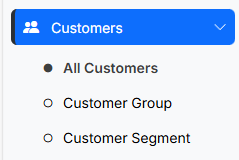
After installing and activating REPORTiT, go to your WordPress dashboard and navigate to Customer > All Customers. This report provides a complete overview of every customer in your store, enriched with advanced financial metrics.
Step 2: View the LTV Card
In this report, the LTV (Lifetime Value) card is displayed alongside other key customer metrics. This card shows the total customer lifetime value calculated automatically by the plugin based on real order data.
Step 3: Visualize LTV Trends
By clicking on the LTV card, you can view a detailed chart that displays customer lifetime value trends over time.
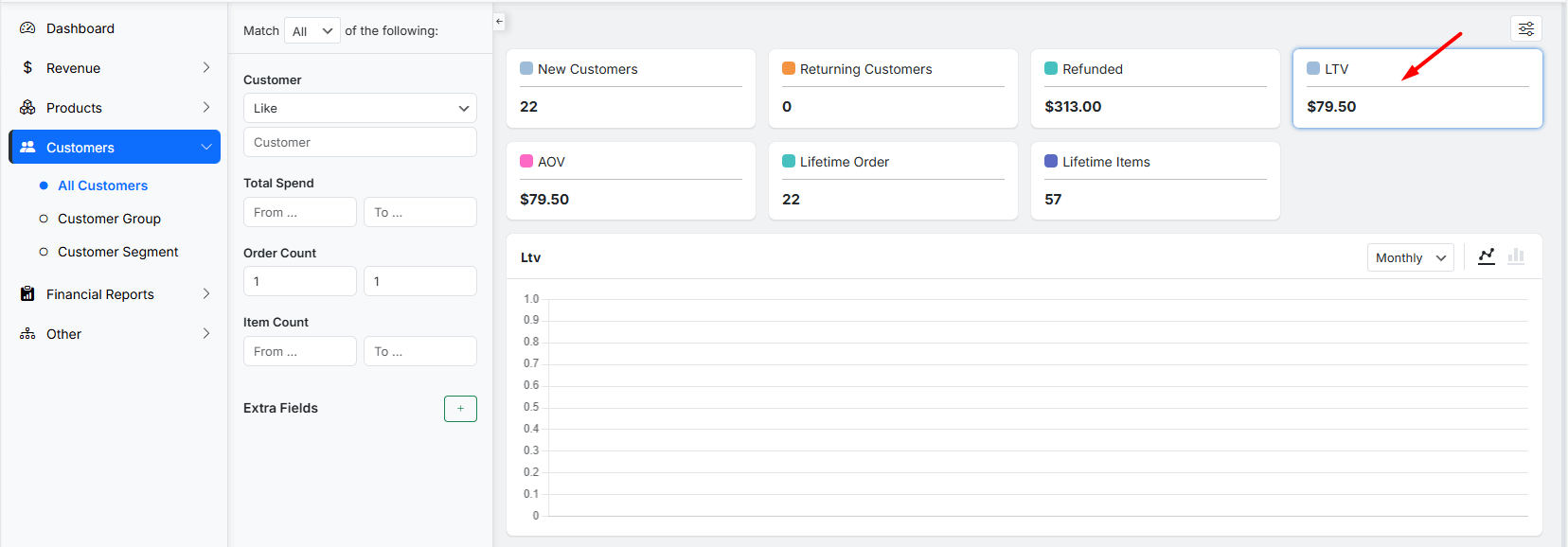
You can switch between bar charts and line charts, making it easy to analyze growth patterns and customer value changes. This visualization helps you understand whether customer value is increasing,
Customer lifetime value report based on customer group
To analyze CLV based on customer group, you need to generate a Customer Group report as follows:
Step 1: Open the Customer Group Report
Navigate to Customers > Customer Group. This report allows you to analyze CLV based on grouped customer attributes rather than individual users.
Step 2: Apply Group Filters
In this section, you can filter customers by:
- Role
- Location
- Join Date
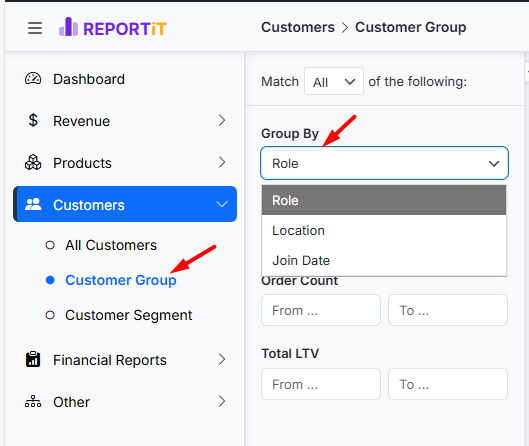
These filters help you compare customer lifetime value across different segments of your audience.
Step 3: Review CLV Summary Metrics
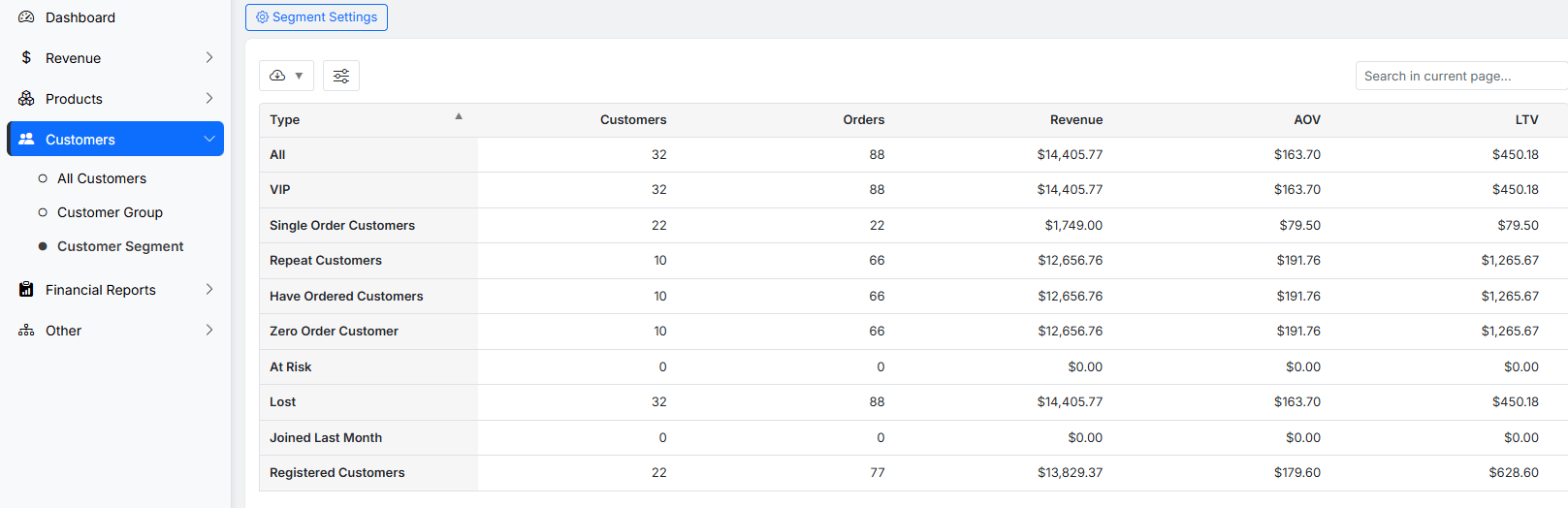
At the top of the report, The CLV is automatically calculated and reported as Total LTV and Average LTV.
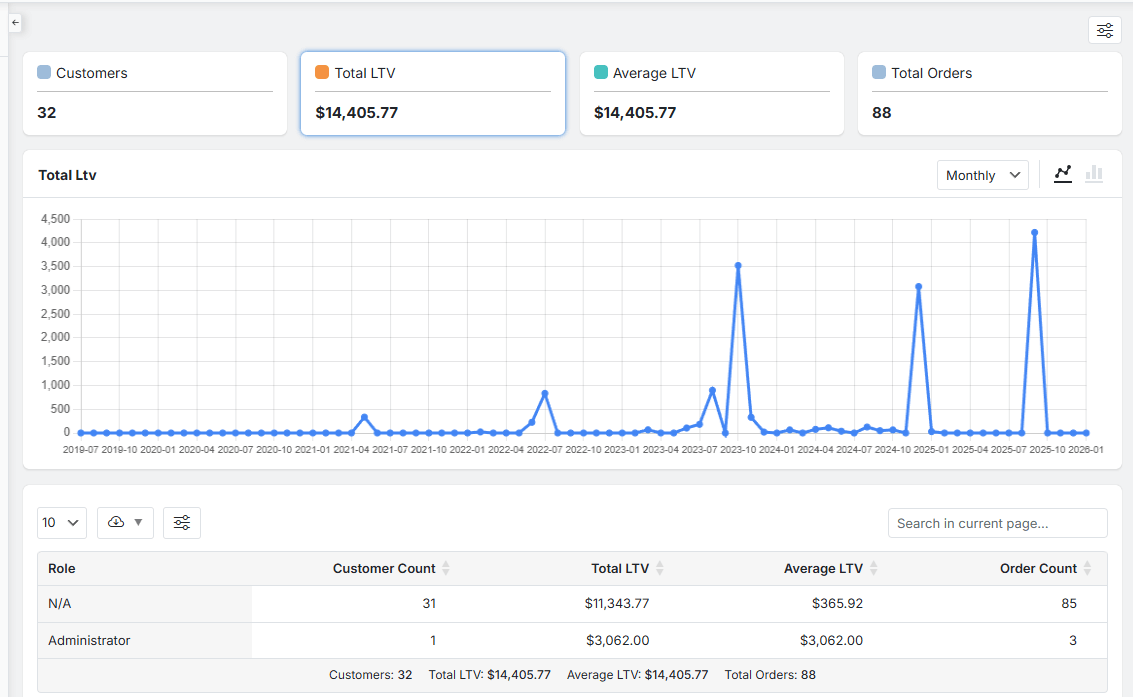
These values give you immediate insight into which customer groups generate the most long-term revenue.
Step 4: Analyze Table Reports
The table section of this report breaks down CLV in multiple ways.
- By Role: This view helps you understand how different user roles (such as subscribers, wholesale customers, or members) contribute to revenue.
- By Location: This table shows which geographic regions generate the highest lifetime value, making it easier to optimize location-based marketing campaigns.
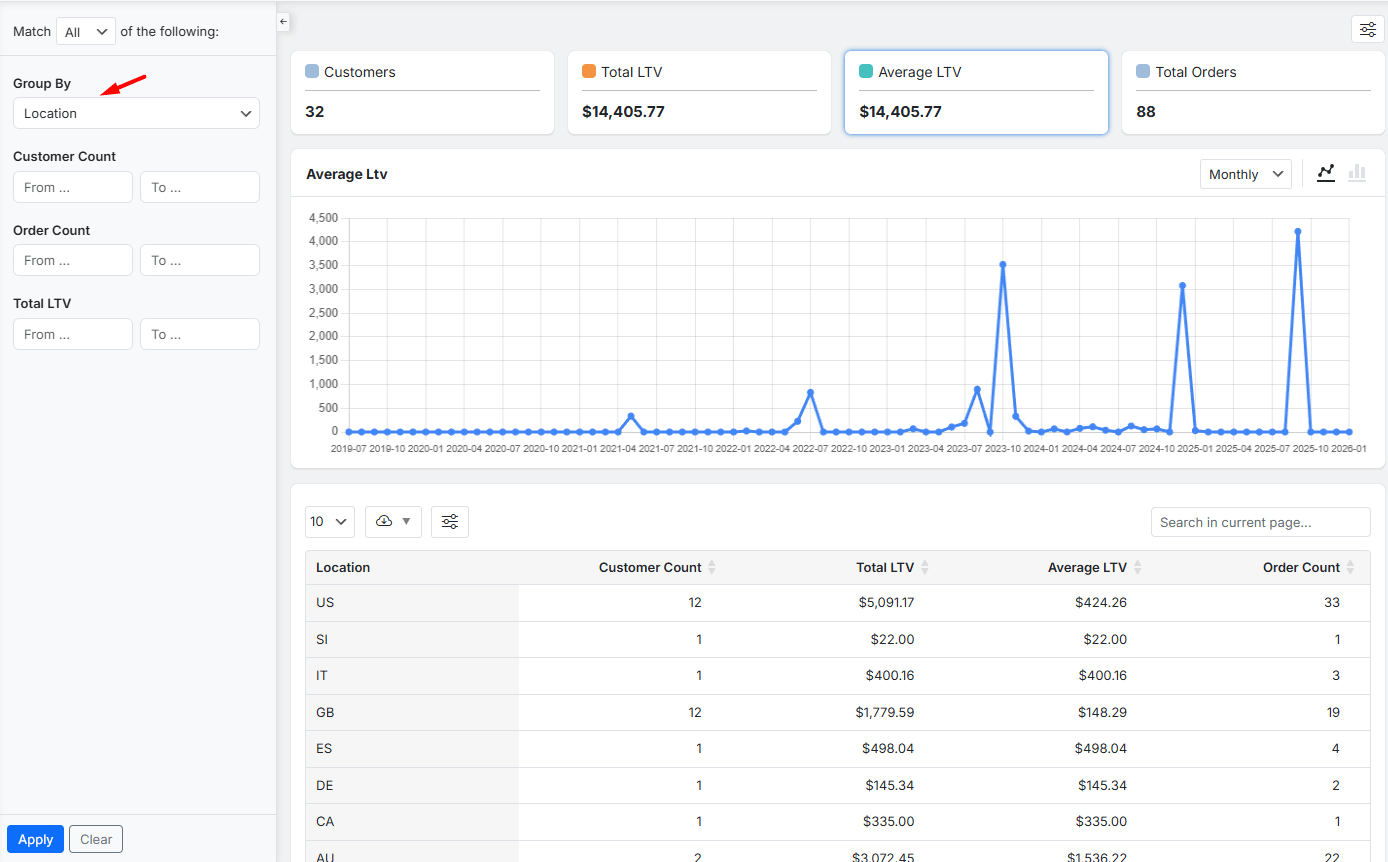
- By Join Date: This view is especially useful for cohort analysis, helping you see how customer value evolves based on when users joined your store.
REPORTiT – Advanced WooCommerce Reporting
The Smart Way to Unlock Growth with Customer Lifetime Value in WooCommerce
Customer lifetime value report based on customer segmentation
The third place where REPORTiT displays CLV is the Customer Segment report. This is one of the most powerful tools for understanding customer behavior and value.
Follow the below steps to generate a customer segmentation report:
Step 1: Open the Customer Segment Report
Navigate to Customers > Customer segments
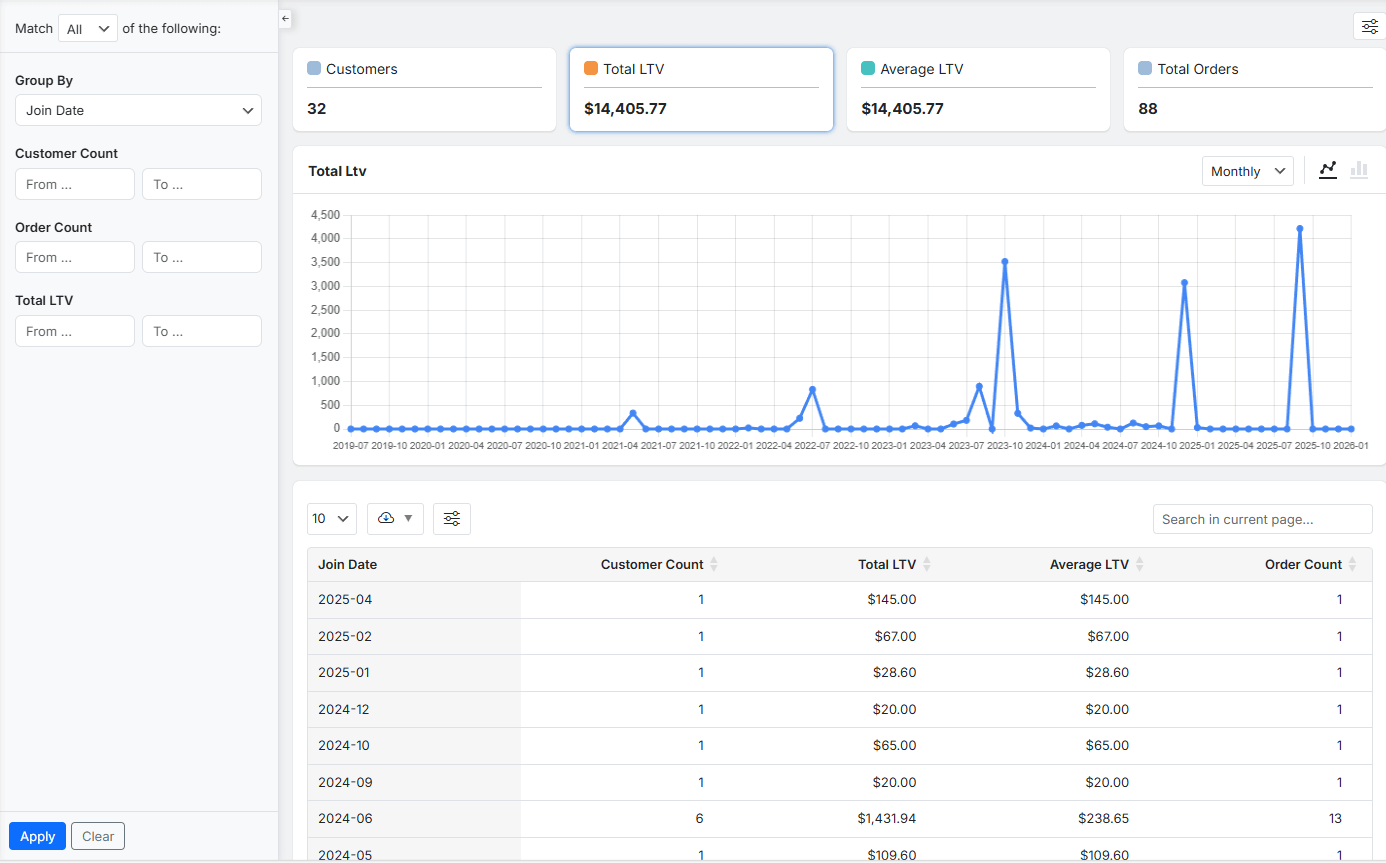
Step 2: Analyze CLV by Customer Type
In this report, customers are automatically categorized into meaningful segments, each with its own LTV value:
- All Customers
- VIP Customers
- Single Order Customers
- Repeat Customers
- Have Ordered Customers
- Zero Order Customers
- At Risk Customers
- Lost Customers
- Joined Last Month Customers
- Registered Customers
This segmentation allows you to instantly identify your most valuable customers, spot churn risks, and design targeted retention strategies.
Why a Plugin-Based Approach Is the Smarter Choice?
A plugin-based CLV solution eliminates manual work, reduces human error, and provides real-time insights. Instead of calculating lifetime value in spreadsheets, REPORTiT continuously updates CLV as new orders are placed. This means your LTV Report is always accurate and ready for decision-making.
More importantly, plugin-based reports connect CLV with segmentation, trends, and customer behavior—something manual calculations simply cannot achieve at scale.
Why CLV Is the Key Metric for Your Store’s Growth
Customer Lifetime Value (CLV) is an essential metric for measuring the total profit a customer generates throughout their entire relationship with your store. Analyzing CLV report helps you make smart decisions for marketing budgets, develop products that foster loyalty, and build a business designed for enduring profitability.
CLV Informs Smarter Marketing Investments
Analyzing CLV reveals which customer acquisition channels bring the most valuable, long-term buyers, not just the most initial sales. By calculating the CLV to Customer Acquisition Cost (CAC) ratio for each marketing source, you can stop wasting money on channels that attract one-time buyers and confidently invest more in channels that deliver loyal, high-value customers. This transforms your marketing from a cost center into a strategic growth engine.
CLV Identifies Your Most Valuable Customers
Not all customers contribute equally to your bottom line. CLV analysis allows you to segment your audience based on actual long-term profitability rather than just demographics. You can identify high-CLV customer segments—such as those who buy from specific categories or respond to certain campaigns—and develop targeted loyalty programs, exclusive offers, and personalized communication to retain and nurture these most valuable assets.
CLV Guides Product and Service Development
The products and experiences that drive repeat purchases are the foundation of a high CLV. By examining the purchase histories of your most loyal, high-value customers, you can identify which products act as entry points to loyalty and which bundles or categories keep customers coming back. This insight directly informs inventory planning, product bundling strategies, and the development of new offerings designed to maximize customer retention and lifetime value.
CLV Optimizes the Customer Experience for Retention
Increasing CLV is fundamentally about extending the customer lifespan. Every support interaction, post-purchase email, and website update should be evaluated through the lens of CLV. A streamlined return process, proactive customer service, and personalized engagement are not just costs—they are investments that reduce churn, increase satisfaction, and directly contribute to a higher, more profitable customer lifetime value.
| Strategic Goal | Key CLV Insight | Actionable Strategy |
|---|---|---|
| Improve Marketing ROI | Compare CLV by acquisition channel (e.g., Paid Search, Email, Social). | Reallocate budget towards channels with the highest CLV:CAC ratio. |
| Increase Customer Retention | Identify the common characteristics (first product, purchase frequency) of high-CLV customers. | Develop onboarding campaigns or loyalty perks that replicate this ideal journey for new buyers. |
| Drive Profitable Growth | Calculate the average CLV uplift from customers who respond to upsell/cross-sell emails. | Refine and expand personalized post-purchase recommendation engines. |
| Build a Loyal Brand | Track how CLV changes after major initiatives (new loyalty program, website redesign). | Double down on initiatives that show a measurable increase in customer lifespan and value. |
REPORTiT – Advanced WooCommerce Reporting
The Smart Way to Unlock Growth with Customer Lifetime Value in WooCommerce
Conclusion: Make Every Customer Count
Generating a customer lifetime value report in WooCommerce is no longer optional for serious store owners. While manual calculations can work in the early stages, REPORTiT as an advanced reporting plugin provides automated, accurate, and actionable CLV insights across multiple reports.
When you understand CLV, you don’t just track sales—you build long-term relationships, smarter marketing strategies, and a more profitable business.
FAQs About Customer Lifetime Value in WooCommerce
What is the difference between CLV and LTV?
They refer to the same concept. CLV (Customer Lifetime Value) and LTV (Lifetime Value) report the same data.
Does WooCommerce calculate CLV by default?
No. CLV or LTV Report is not generated in the WooCommerce native report or analytics. You need to calculate it manually or use REPORTiT plugin.
Can REPORTiT handle refunds in CLV calculations?
Yes. REPORTiT calculates CLV based on net revenue, ensuring refunds and cancelled orders are handled correctly.
Is CLV useful for small stores?
Absolutely. Even small stores benefit from understanding which customers bring the most long-term value.
How often should I review CLV reports?
Ideally, CLV should be reviewed monthly to track trends and adjust marketing and retention strategies.


