


Forecasting future sales trends is essential for store managers to effectively manage their inventory. Without sales forecasting, managers may face two major problems:
- locking up your capital in unsold stock.
- losing sales because you can’t meet customer demand.
The solution is analyzing WooCommerce historical reports enabling store managers to transform their past sales trends into a clear, actionable plan. Forecasting reports let them optimize stock levels, reduce costs, and seize every revenue opportunity.
Why Historical Data Matters for Accurate Sales Predictions
Historical sales data is essential for any reliable forecast. It provides the criteria and baseline against which all predictions must be evaluated. Without this foundation, forecasting is not effective.
The importance of analyzing WooCommerce historical reports is due to the ability to reveal trends and patterns invisible in day-to-day operations.
They are useful for store managers to distinguish between random fluctuations and meaningful trends, such as
- Consistent year-over-year growth,
- Predictable seasonal spikes,
- And the long-term impact of specific marketing campaigns.
Set sales goal predictions based on real data driving from WooCommerce historical reports can dramatically reduce risk and simplify proactive decision-making and strategic planning.
Overview of WooCommerce Reporting Capabilities
Although WooCommerce provides robust built-in analytics for generating essential reports like Revenue, Orders, Products, and Customers, there is no option for forecasting future sales trends.
The features include extracting data across custom date ranges, comparing periods (like “This Month vs. Last Month”), and applying basic filters.
For forecasting future sales trends, store managers can export the Revenue by Date report and compare the results with their predictions.
This is a fast and simple solution for small businesses to start identifying trends.
For big online stores, the manual workflow is frustrating and time consuming. They need more advanced, automated, and visual forecasting methods provided by the REPORTiT – Advanced Reporting for WooCommerce plugin. It empowers managers to add their prediction data and compare them with future sales trends in specific reports.
Popular Methods for Forecasting Future Sales (with Examples)
To accurately predict future performance, you have two main paths: the manual, hands-on analysis of data in a spreadsheet or the automated forecasting built into specialized WooCommerce reporting plugins.
Both methods start with using historical data, but they differ greatly in speed, complexity, and depth of insight.
We’ll explore both approaches below, giving you the knowledge to choose the right one for your business needs.
Using Excel/Google Sheets to Analyze WooCommerce Historical Data
Spreadsheets are the most accessible and powerful tools for hands-on forecasting. To use this method for forecasting future sales trends, follow the steps below:
Step 1: Evaluate the sales trends
To evaluate your WooCommerce historical reports, you need to create sales reports by month and compare it with the same time in the last year.
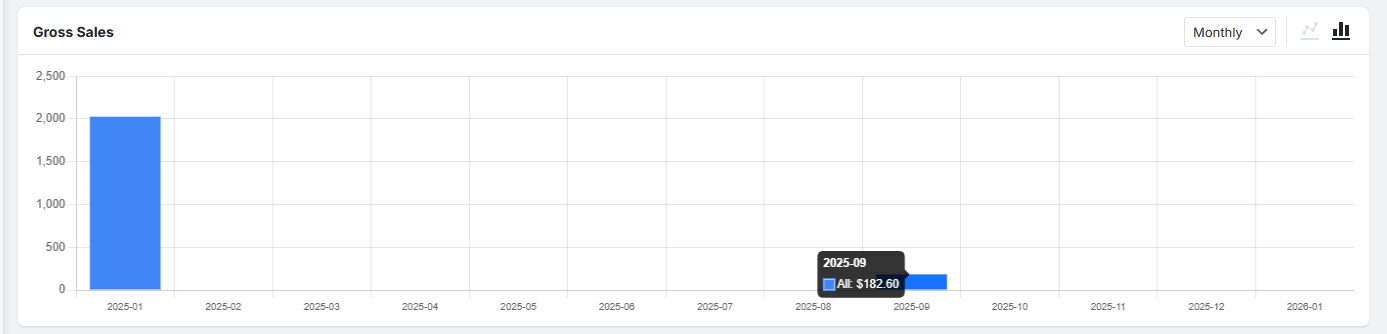
By taking the net sales of each month in the last year and the direction your business is heading, set your monthly sales goals for the next year.
Step 2: Create a Forecast report in Excel
You can import your predicted sales data into Excel or Sheets. Begin by making a monthly sales prediction in a clean table with a consistent date column.
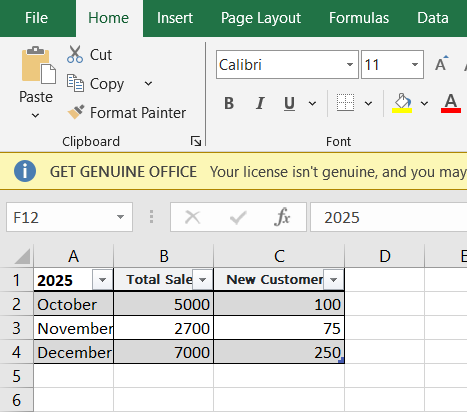
Step3: Extract WooCommerce historical reports
Every three months, go to your WooCommerce reports and export your actual sales data.
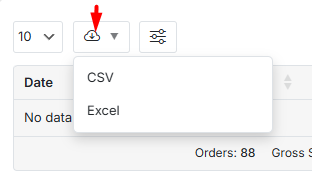
Download it as a simple CSV file. This file contains the truth of what you really sold.
Step 4: Compare the Actual sales data with the Predictions
Open your original forecast Excel sheet. Next to your predictions, add the real sales numbers from your new CSV file. Look at the difference between what you predicted and what actually happened. This shows you where your forecast was accurate and where it needs improvement for next time.
Integrating Third-Party Analytics Tools for Enhanced Forecasts
For stores seeking for a solution to gain deep insights, REPORTiT acts as a comprehensive sales forecasting WooCommerce assistant. Beyond the typical sales report to help you identify what is going on, it provides in-depth analysis across every aspect of your store.
REPORTiT allows you to generate incredibly detailed reports across all critical areas:
- Orders,
- Revenue
- Customers (with segmentation by ltv and purchase behavior),
- Products (including category and variation analysis),
The reports are not static; they feature powerful filtering options that let you drill down by date, customer group, location, payment method, and product attributes to answer very specific business questions.
Let’s see how this powerful plugin can help you to use WooCommerce historical reports for forecasting future sales trends.
REPORTiT – Advanced WooCommerce Reporting
The easy way to forecast sales trends and optimize inventory in WooCommerce
Step-by-Step Guide: Accessing and Exporting Historical Reports from WooCommerce
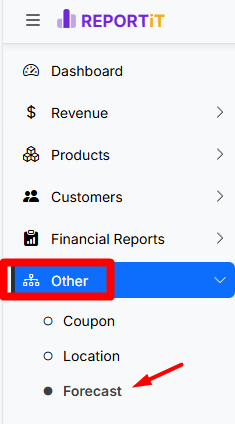
A standout feature of REPORTiT is its dedicated Forecast module.
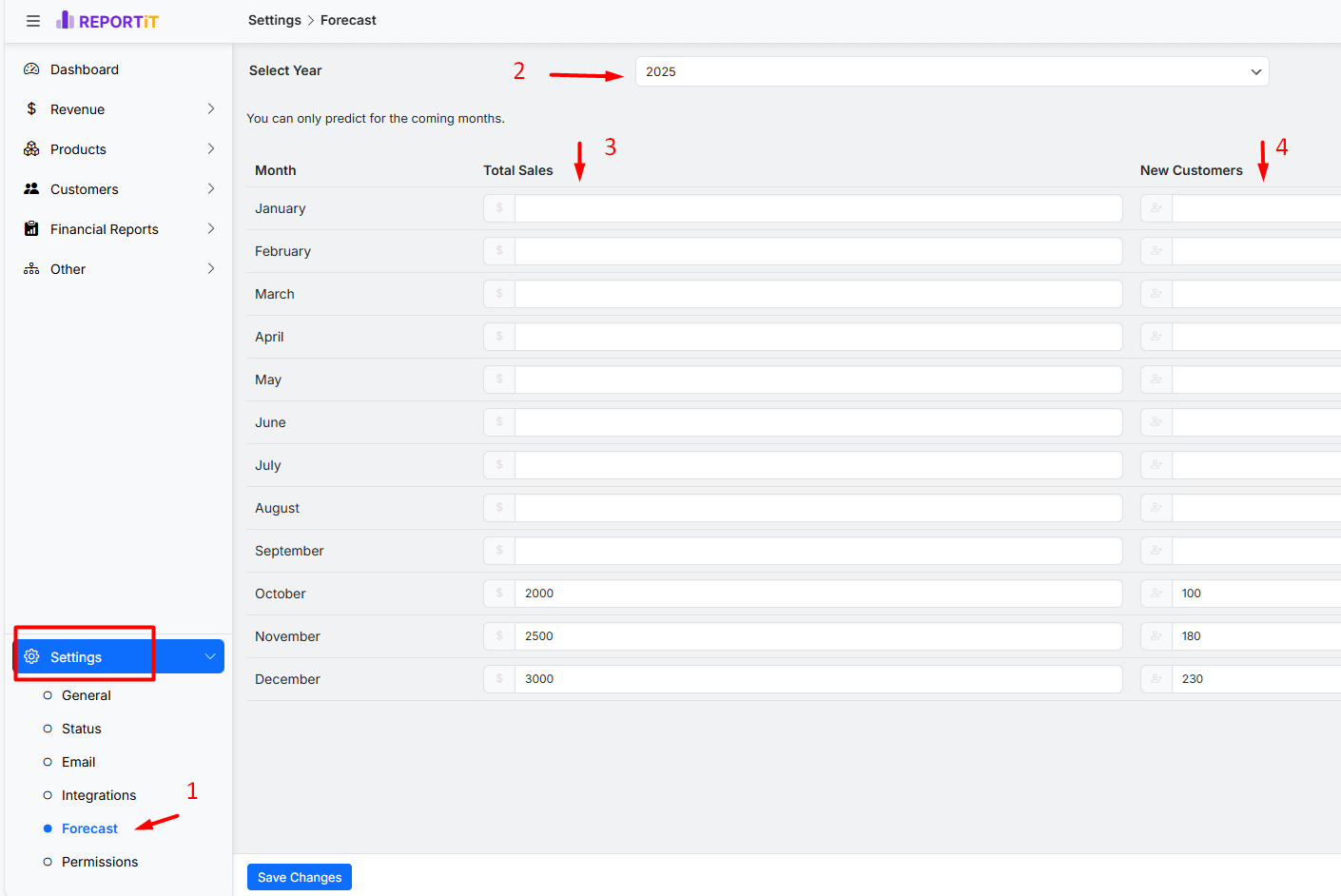
Step 1: Set forecasting future sales trends
By following the below simple steps, you can automate generating sales forecasting WooCommerce report:
- Navigate to Settings > Forecast
- Choose the year for inserting the predictions
- input your monthly predicted sales data into related field
- Add customer growth targets for each month of the upcoming year in the last column.
Step 2: Generate WooCommerce historical reports
From there, generating a detailed sales report is often a one-click operation; the plugin automatically pulls all necessary transactional data from WooCommerce and presents it in a structured, filterable format ready for analysis or export.
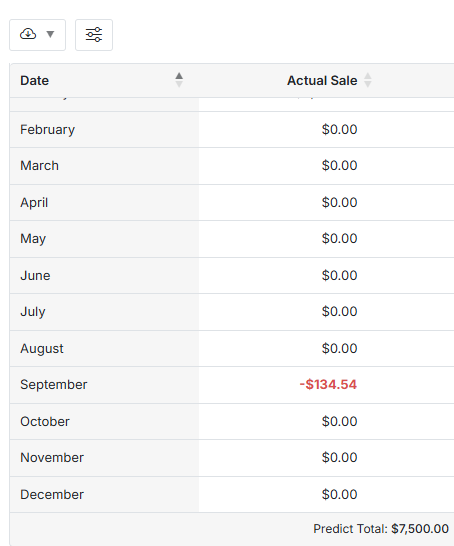
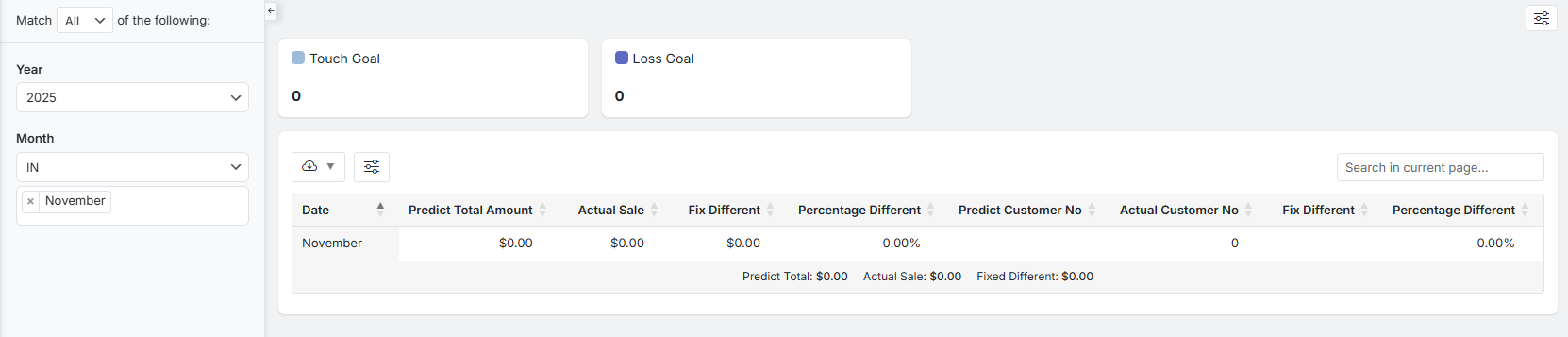
To analyze your store performance, go to the Forecast report, and get a month-by-month comparison that places your actual performance side-by-side with your predictions.
This creates an invaluable feedback loop for refining your sales strategies and inventory planning based on real data, not just guesswork.
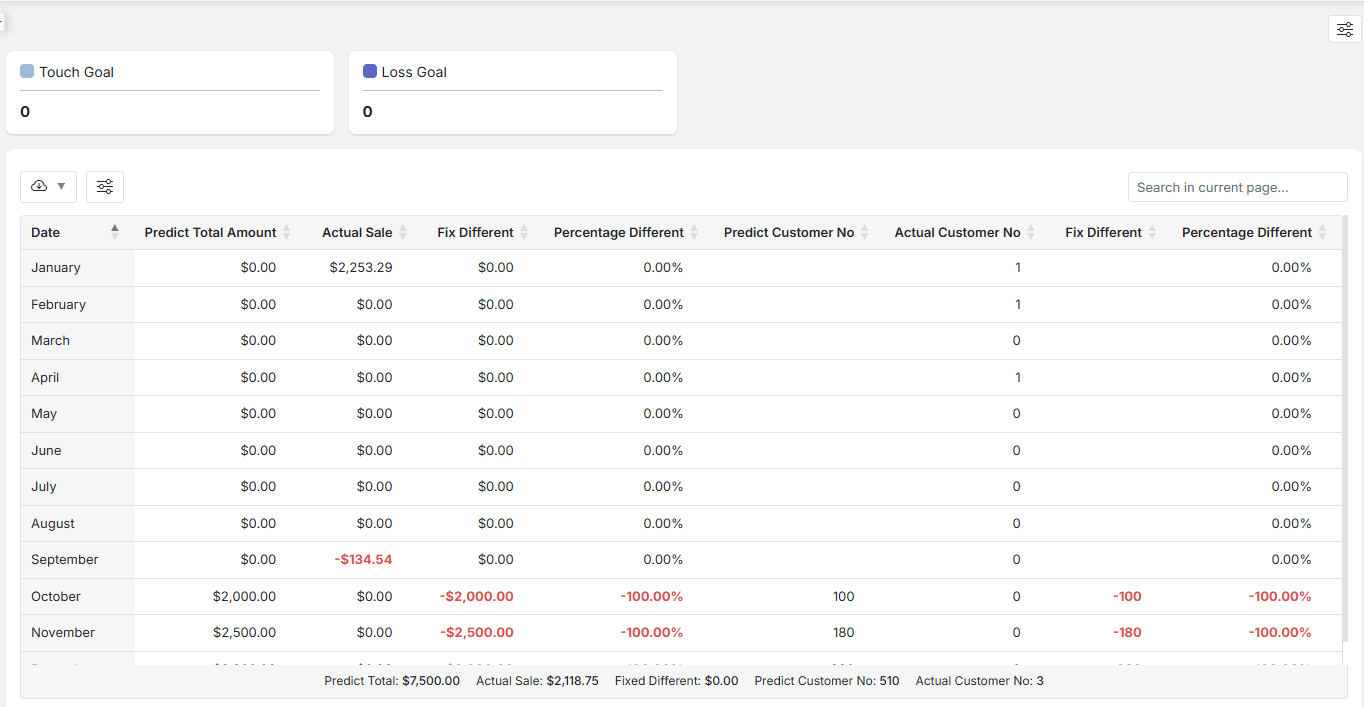
You can also use powerful filters, allowing you to measure the accuracy of your forecasting future sales trends over time.
Identifying Key Metrics in WooCommerce Reports for Forecasting
Effective sales forecasting WooCommerce is not effective without knowing which key metrics to watch. By identifying the following key metrics in your WooCommerce historical reports, you can build a reliable model for forecasting future sales trends:
- Predict Total Amount / Actual Sale: The most direct metric showing the forecast accuracy, and revealing if your revenue prediction match reality.
- Fix Different: The raw monetary variance, helping you to recognize exactly how much capital was over or under of your expectations.
- Percentage Different: The relative error rate, allowing you to undrestand the significance of a variance across different sales volumes.
- Predict Customer No / Actual Customer No: Essential index of whether your traffic and conversion predictions were correct, impacting both sales and marketing strategy.
- Customer Number Fix & Percentage Different: Reveals the accuracy of your customer growth forecasts, use as a basic for stock management and resource allocation.
Best Practices for Minimizing Forecasting Errors
- Use Ample Historical Data: forecasting future sales trends based on long term (12-24 months) data are more reliable than short term (3-6 months), as they encompass full seasonal cycles.
- Segment Your Forecasts: Creating separate forecasts for different WooCommerce historical reports like product categories, customer types, or sales channels result in more accurate evaluation.
- Incorporate Qualitative Factors: Adjust your quantitative model based on known future events: Are you launching a major marketing campaign? Is a key supplier increasing prices? Is a new competitor entering the market?
- Review and Revise Regularly: sales forecasting WooCommerce is not a “one time” process. Comparing actual results to your predictions monthly or quarterly, analyze the variances, and use those lessons to improve your next forecast is essential for identifying sales performance.
Common Challenges and How to Overcome Them
While sales forecasting WooCommerce is a powerful way for assessing future sales trends, it’s common to face discouraging challenges.
Finding a practical solution for them allows you to build a more accurate and useful model for forecasting future sales trends.
Let’s address the most frequent issues and how to move past them.
Challenge 1: Your store is new and has no sales history.
Solution: It’s normal to start with limited data. Begin by researching average sales or growth rates for stores in your niche (industry benchmarks). Set very conservative, realistic sales goals for your first few months. Track everything meticulously. The key is to start; your forecast will become significantly more reliable with each month of real sales data you add.
Challenge 2: An unexpected event completely changed my sales (like a sudden trend or global crisis)
Solution: Although you can’t predict major surprises, try to make your business more resilient. Use scenario planning by creating three simple forecasts: a Best-Case, a Worst-Case, and a Most-Likely-Case scenario. This approach helps you prepare for unpredictable events. Also, consider keeping a small “safety stock” of your best-selling items to handle sudden demand spikes.
Challenge 3: Your sales data is messy, inconsistent, and confusing to analyze
Solution: Instead of analyzing everything at once, Choose one core metric, like Monthly Net Sales, and focus only on that. First, “clean” your data by ensuring product names are consistent, and the data in your WooCommerce historical reports truly show thr net revenue. Once you have one clean, reliable sales forecasting WooCommerce data, you can build a confident forecast and gradually add more metrics.
Case studies
| Case Study / Example | Business Context | Key Use of WooCommerce Reports | Forecasting Outcome / Insight |
|---|---|---|---|
| Forecasting growth with predictive analytics | An e-commerce store applied predictive analytics to anticipate customer behavior and sales trends using WooCommerce data. | Used WooCommerce historical reports to spot recurring customer demand patterns and predicted future product interest and inventory needs. | Forecasting future sales trends allowed better inventory planning and marketing timing to reduce stockouts and improve revenue forecasts. |
| Metorik order & revenue forecasting | Online shop integrates Metorik with WooCommerce to forecast performance. | Metorik uses WooCommerce historical reports (revenue, orders, customer acquisition) to run sales forecasting WooCommerce projections. | Store can generate future revenue projections and order forecasts based on past data, aiding budgeting and planning. |
| Forecasting data with automated tools | Advanced forecasting tools leverage the past year of store data to project upcoming performance. | Historical monthly sales from WooCommerce were used to calculate trend lines and forecast expected monthly figures. | Example projection chart showing expected sales growth month over month using historical data trends. |
| Sales forecast from advanced reporting plugins | WooCommerce store used a plugin with forecasting features. | Historical order & product sales reports (from WooCommerce Advanced Reporting and Statistics) gave visibility into past performance. | Forecasting future revenue helped anticipate demand for specific products and informed promotional planning. |
Future Trends in E-commerce Forecasting and WooCommerce Roadmap
The future of sales forecasting WooCommerce is definitely integrating Machine Learning (ML) and Artificial Intelligence (AI) directly within reporting plugins to automatically detect complex, non-linear patterns in forecasting future sales trends.
The AI agents can act as a smart assistant to generate highly dynamic and accurate forecasts.
The WooCommerce ecosystem will likely see more plugins offering these predictive analytics as standard features, moving forecasting from a manual spreadsheet task to an automated, dashboard-driven insight.
REPORTiT – Advanced WooCommerce Reporting
The easy way to forecast sales trends and optimize inventory in WooCommerce
Conclusion and Action Steps to Start Forecasting Your Store’s Future
By consistently analyzing your WooCommerce historical reports to build, test, and refine your predictions, store managers can transform sales forecasting WooCommerce from a theoretical concept into the most practical business tool.
This disciplined cycle of extract, analyze, and act allows them to systematically identify forecasting future sales trends with greater confidence. Ultimately, this practice is what unlocks proactive management, optimized resources, and sustained, data-driven growth for the online stores.
FAQ
Q: What are the main benefits of forecasting future sales using WooCommerce reports?
A: Forecasting with WooCommerce reports helps store owners anticipate demand, optimize inventory, improve budgeting, and make informed decisions on marketing and promotions.
Q: Which metrics from WooCommerce reports are most useful for sales forecasting?
A: Key metrics include total sales, order volume, average order value, product-specific trends, customer segments, and seasonality patterns.
Q: Can I use WooCommerce’s built-in tools for accurate long-term forecasts?
A: While WooCommerce offers basic reporting, integrating with third-party analytics or exporting to advanced tools like Excel provides more sophisticated forecasting options.
Q: How frequently should I update my sales forecasts with new data?
A: Sales forecasts should be updated regularly, ideally monthly, to incorporate the latest data and refine predictions based on recent trends.
Q: Is it necessary to have advanced technical skills to start forecasting sales with WooCommerce data?
A: No. Basic spreadsheet skills are sufficient for simple forecasts, while plugins and external tools can automate and simplify advanced analysis for non-technical users.


