


Are you looking for a strategic approach to capture customer attention and encourage larger purchases? Many store managers believe that the most powerful and engaging strategy is to set up tiered price for free gifts in WooCommerce.
While simple discounts are effective, tiered price free gifts in WooCommerce can satisfy customers and increase the perceived value without directly impacting your profit margins.
In this post, you can find everything you need to set up tiered price free gifts in WooCommerce and launch sophisticated gifting campaigns that can dramatically increase your AOV and customer loyalty.
What Are Tiered Price Free Gifts?
Tiered price free gifts is a promotional strategy where the quantity of the free gift a customer receives increases based on the total amount they spend.
The main goal of this strategy is to create a staircase of rewards that incentivizes customers to reach the next level.
For example, a tiered free gift promotion might look like this:
- Spend $500: Get 1 free wine
- Spend $1500: Get 3 wines
- Spend $5500: Get 5 wines
This gamification approach is far more powerful than a single-threshold offer as it can:
- Improve the shopping experience,
- Give customers a clear goal to aim for
- and a tangible reward for exceeding it.
The powerful psychological incentive is convincing them to increase their order amount to receive a more valuable gift.
Managers usually set up tiered price free gifts in WooCommerce to clear inventory, introduce new products, and reward their loyal customers.
WooCommerce Default Limitations for Tiered Free Gifts
WooCommerce is a powerful and flexible eCommerce platform, but it has significant limitations when it comes to complex free gift campaigns.
The native WooCommerce plugin is designed to:
- Handle the fundamentals of selling products,
- Managing inventory,
- And processing payments.
Although WooCommerce has default options for offering free coupons or creating discount rules, it does not include built-in functions for running automated free gift rules.
The result of many surveys indicated that the conversion rate of discount campaigns is less than free gift campaigns at the same online store. Store owners concluded that customers are not satisfied with using a coupon discount as they need to remember and input a code, which creates friction in the checkout process.
That’s why they are looking for a solution to automatically add a free gift to a cart based on a customer’s total spend or item count.
Required Tools for Tiered Free Gift Setup
To unlock the power of tiered free gifts, you need a specialized, robust, and flexible solution capable of handling the complex logic of tiered pricing. We highly recommend using GIFTiT – Free Gifts for WooCommerce plugin.
This plugin offers all the methods and conditions you may need to run giveaway campaigns, including the tiered price method.
It comes with an intuitive interface allowing you to create rules where gifts accumulate as customers reach higher quantity or price thresholds, without needing to write a single line of code.
The plugin also provides excellent features like:
- Customizing notifications to inform customers about the rules at the product page, cart page, or checkout.
- Defining custom conditions to activate the rule based on Date, Cart value, Customer Role, etc.
- Tracking gift rule performance with built-in reports.
- And more.
Step-by-Step Guide to Setting Up Tiered Free Gifts Using the GIFTiT plugin
Follow these steps to set up tiered price free gifts in WooCommerce with GIFTiT plugin:
1. Install and Activate the Plugin
The first step is to install the GIFTiT plugin on your WordPress site.
- Download the plugin’s .zip file with the license.
- Log in to your WordPress admin dashboard and navigate to Plugins > Add New.
- Click the Upload Plugin button at the top of the page.
- Choose the .zip file you downloaded and click Install Now.
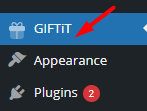
Once the installation is complete, return to the WordPress dashboard and click on the GIFTiT option just appeared.
Then insert the license key and activate it.
2. Create a New Rule
After activation, you have access to all features for creating free gift rules by pressing the Add Rule button.
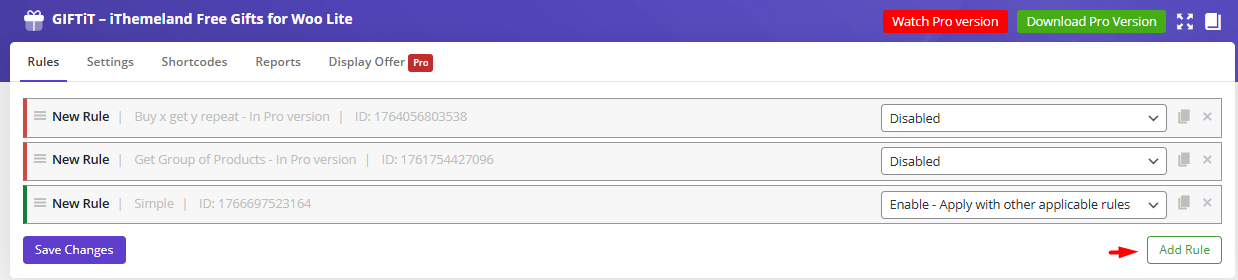
This will take you to the Rule Form.
3. Fill out the Rule Form to set up tiered price free gifts in WooCommerce
To define your tiered gift strategy, you need to fill in the Rule Form as follows:
- Select the Method: In the first section, open the Method dropdown menu and select Bulk Pricing. This tells the plugin to allow gifts to stack based on price tiers.
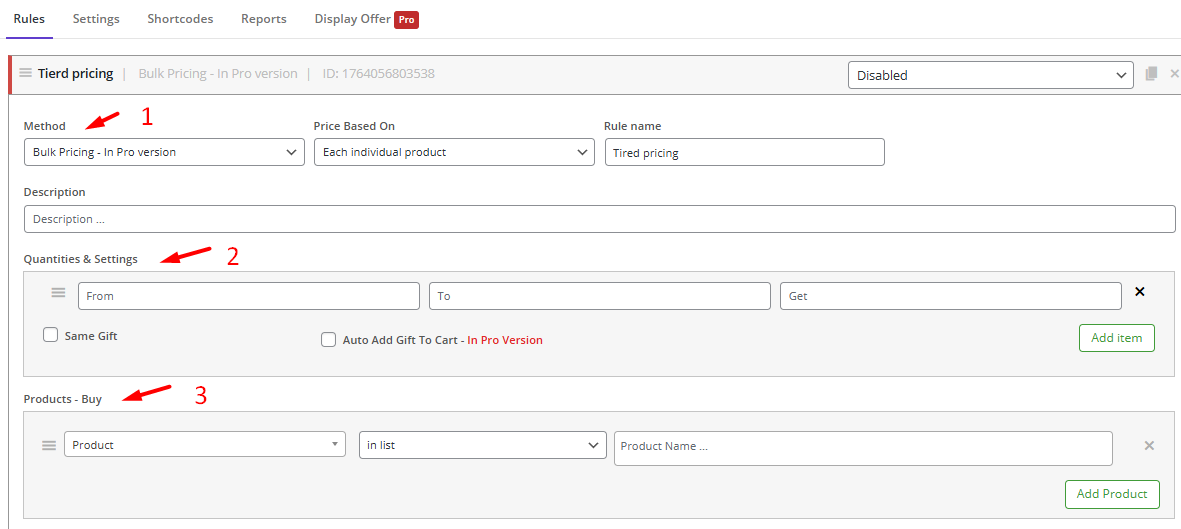
- Enter the Quantity Tiers: In the Quantities & Settings section, you will define the actual tiers of your promotion. Click the Add Item button to create your first tier. For each tier, you will need to specify a minimum and maximum range (e.g., 100 to 500) and the number of gifts the customer gets for that range.
You can also mark Auto add gifts to cart, and Same Gift to instruct the plugin to add the gift to the customer carts when conditions are met. Otherwise, they can select their preferred gifts from a list.
- Specify the Buy Products: In the Product Buy section, you will define the products that customers must add to the cart to trigger the gift. Ignore this section if you want to set up tiered price for all products in WooCommerce.
- Define the Gift: The Product Get section is designed to help you easily set the gifts
- Include Products/categories: Select the specific products/categories you want to offer as gifts.
- Exclude products/categories: Set products/categories to exclude from the list of gifts.
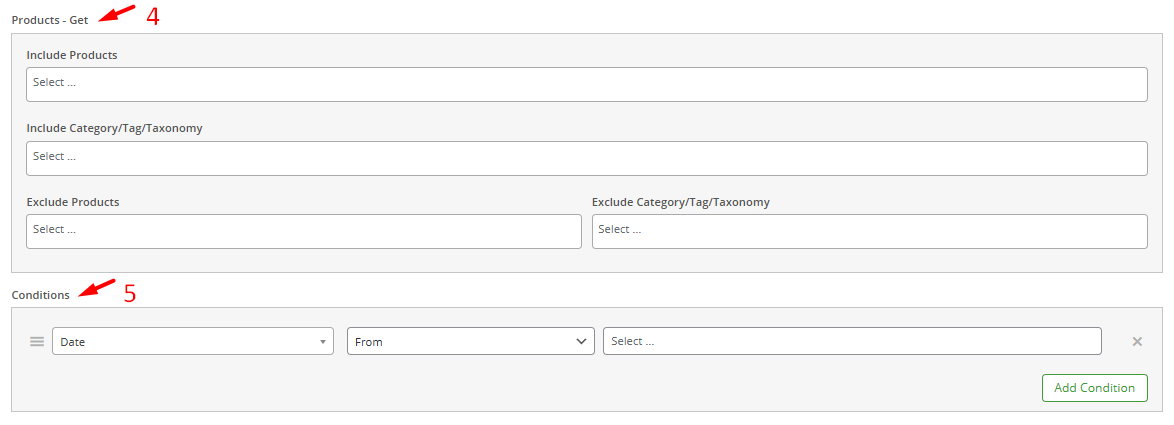
5. Specify the Conditions (Optional but Recommended): The Conditions section allows you to fine-tune who is eligible for this gift or when the rule activates on your site.
By pressing the Add Condition button, you can set conditions based on the customer’s user role, the date, or other cart parameters to ensure the rule applies exactly where you want it.
GIFTiT – Free Gifts For WooCommerce
The easy way to set up tiered price free gifts in WooCommerce
4. Save Your Changes
Once you have filled out all the necessary fields and reviewed your settings, the final step is simple. Scroll to the bottom of the rule form and click the prominent Save Changes button. Your new tiered free gift rule is now active on your store.
Practical Example: Set up tiered price free gifts on Valentine’s Day
Suppose that you want to set up a tiered price free gift based on the following strategy on Valentine’s Day:
- Buy $100-500 from the Clothing Category: Get 1 free sunglass.
- Buy $501-6000 from the Clothing Category: Get 3 free sunglasses.
- Buy +$6000 from the Clothing Category: Get 5 free sunglasses.
To apply this rule, fill in the form as follows:
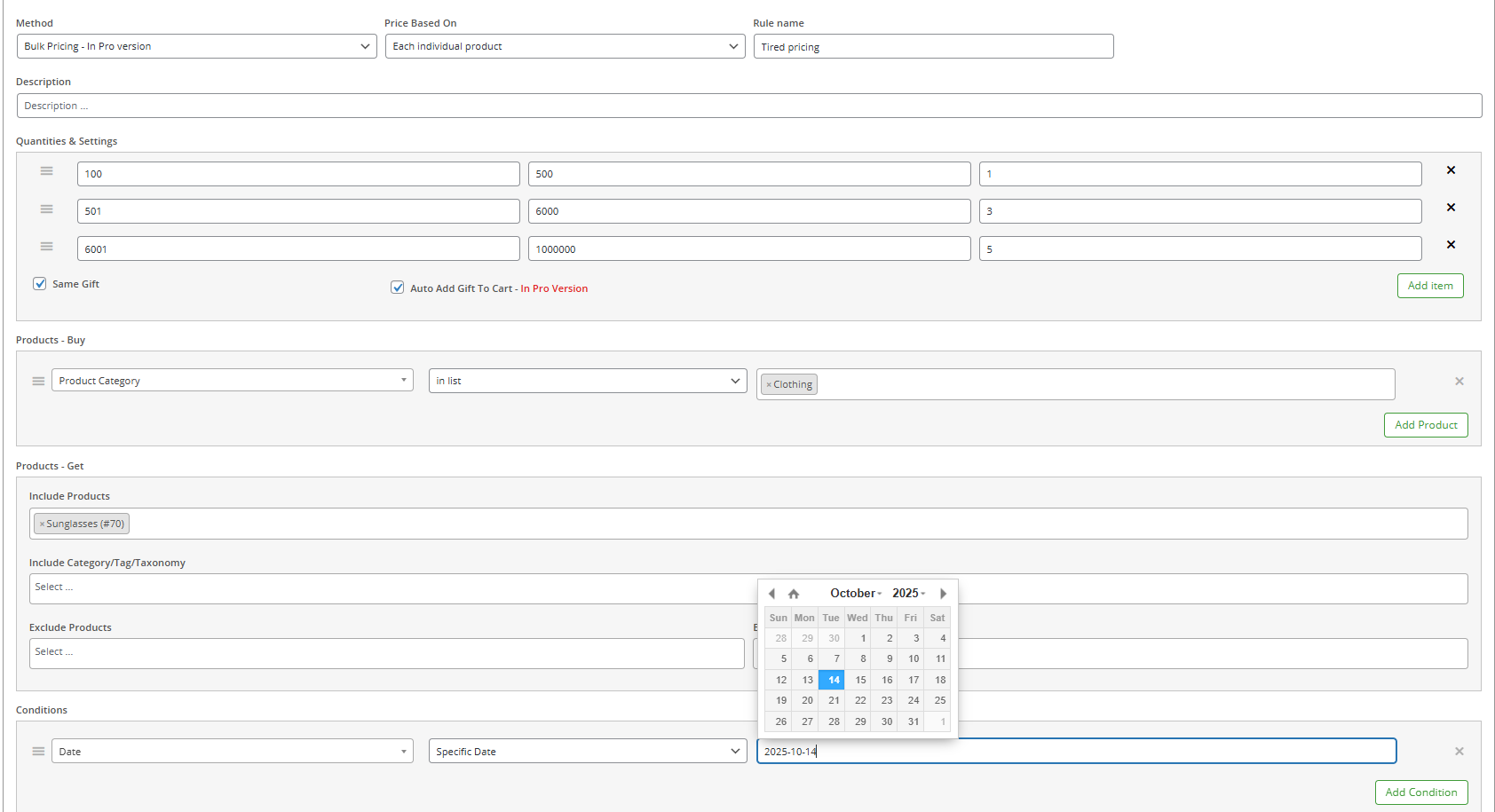
1. Select the Bulk pricing from the dropdown menu.
2. In the Quantities & Settings section, click the Add Item button three times, then set:
- Min:100, Max:500 → Get: 1,
- Min:501, Max:6000 → Get: 3,
- Min:6000, Max:100000 → Get: 5,
3. In the Product Get section, click Add Product, then set Product Category > in list > Clothing,
4. In the Product Buy section, add Sunglasses to the Include Products field.
5. Press Save Settings to apply the rule.
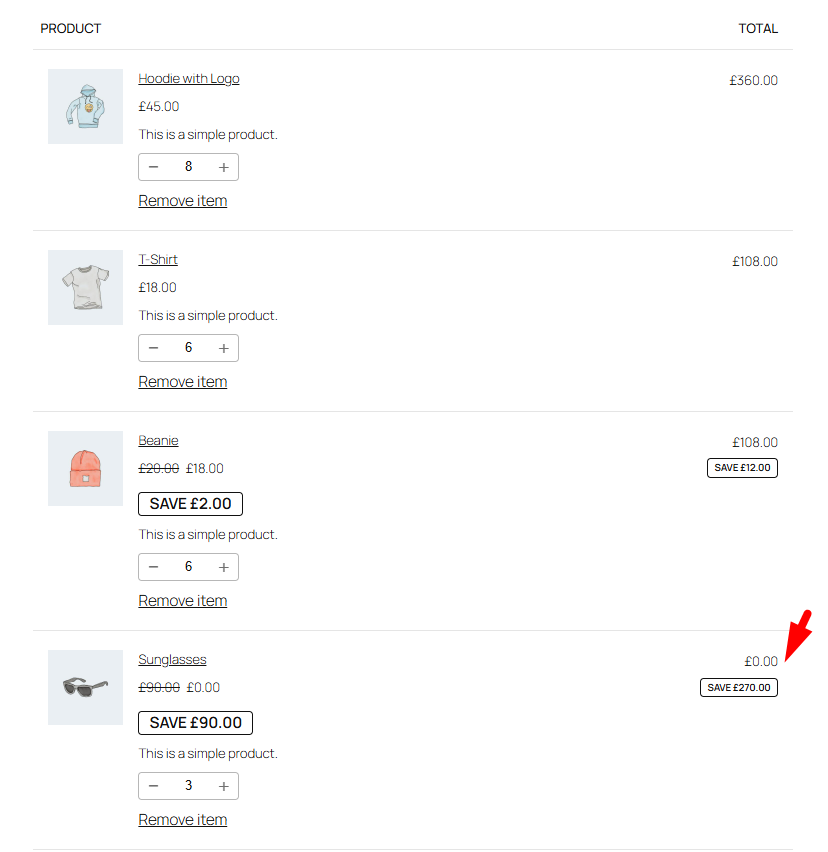
Common Tiered Free Gift Scenarios
The tiered gifting method is incredibly versatile. Here are a few common scenarios where you can apply this strategy to boost your sales.
| Scenario | Description | Example Rule | Business Goal |
|---|---|---|---|
| Spend-Based Tiers | Gifts are awarded based on the customer’s total cart value. | Spend $50: Get a small tote bag. Spend $100: Get the tote + a beauty sampler. | Increase Average Order Value (AOV) |
| Quantity-Based Tiers | Gifts are awarded based on the total number of items in the cart. | Buy 3 items: Get 1 pair of socks. Buy 6 items: Get 2 pairs of socks. | Move more inventory and bundles. |
| Category-Specific Tiers | The gift is triggered by purchasing items from a specific category. | Buy 2 movies from the “Horror” category: Get a horror-themed poster. Buy 4: Get the poster + a DVD. | Cross-sell and promote a specific category. |
| Customer Role Tiers | Different gift tiers for different user roles (e.g., Wholesale vs. Retail). | Wholesale: Spend $200: Get 1 gadget. Spend $400: Get 2 gadgets. | Reward B2B customers and encourage bulk orders. |
Why Use Tiered Free Gifts in WooCommerce?
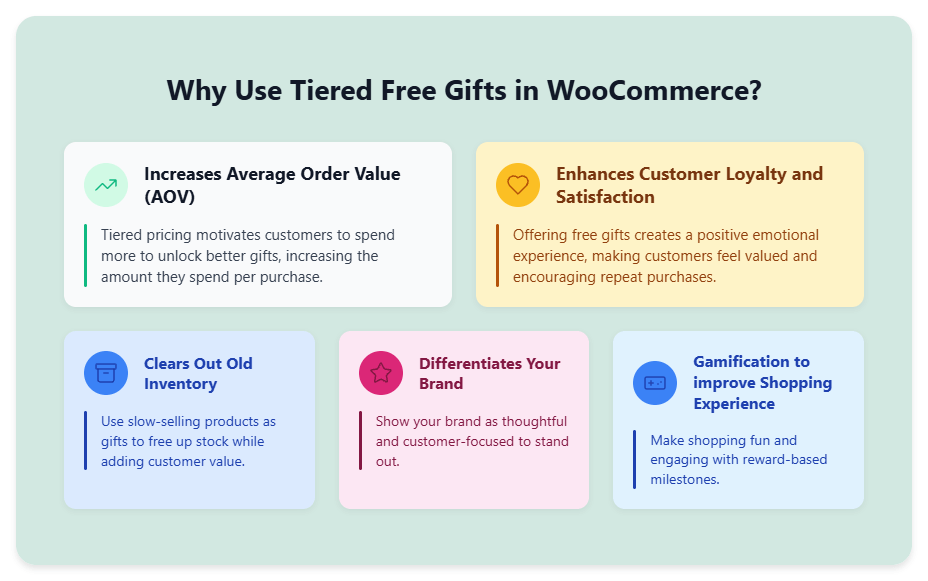
Implementing a tiered free gift strategy is not just about giving things away; it’s a sophisticated marketing tactic with tangible benefits for your store, including:
- Increases Average Order Value (AOV): By creating a “tiered pricing,” you convince the customers to increase their order amount to get a more valuable gift. This directly increases the amount they spend per transaction.
- Enhances Customer Loyalty and Satisfaction: Customers love receiving an unexpected free item with their purchase. By creating a positive emotional experience, Free gifts can make them feel valued and appreciated resulted in improving customer satisfaction and encouraging repeat purchases.
- Clears Out Old Inventory: Tiered gifts are a perfect way to move slow-selling stock. You can use products you need to clear out as the “gifts” in your promotion, adding value to the customer while freeing up warehouse space.
- Differentiates Your Brand: Tired gifting is a creative campaign that makes your brand stand out. It shows you are thoughtful and customer-centric, which builds a stronger brand identity.
- Gamification to improve Shopping Experience: The tiered campaigns turn shopping into a game where customers can “win” rewards. This increases engagement with your store and makes the purchasing process more fun and interactive.
Common Mistakes to Avoid when Setting up Tiered Price Free Gifts in WooCommerce
While setting up tiered free gifts has many benefits for your online store, there are a few common pitfalls you should avoid to ensure the success of your campaign:
- Making Tiers Too Far Apart: If there is a large gap between your spending tiers, customers will lose motivation. They will feel the next reward is unaffordable and will not be convinced to try for it. Keep the tiers realistic and achievable for your average customer.
- Choosing Unappealing Gifts: The perceived value of the gift plays an important role on encouraging your customers. A low-quality or irrelevant gift can actually harm your brand’s reputation. Choose gifts that are desirable, useful, and relevant to your target audience.
- Hiding the Promotion: To make the free gift campaigns work, you have to display attractive notifications about them to your customers. The GIFTiT plugin has customization options for showing promotion messages on different pages of WooCommerce stores.
- Complex Rules: Keep the rules simple and easy to understand. If a customer has to read a paragraph to figure out how to get a gift, they will likely give up. Use clear, simple language like “Spend $50, get a free gift! Spend $100, get two!”
- Forgetting to Test: Before launching your campaign to the public, thoroughly test it. Go through your checkout process as a test customer to ensure the correct gifts are being applied automatically and that the cumulative logic is working perfectly.
GIFTiT – Free Gifts For WooCommerce
The easy way to set up tiered price free gifts in WooCommerce
Conclusion
Setting up tiered price free gifts is one of the smartest marketing moves you can make for your WooCommerce store. It can work as a powerful, gamified engine for boosting average order value and satisfying your customers.
While WooCommerce’s native features don’t include this functionality, the gap is easily filled by the GIFTiT plugin.
Use this plugin to have everything you need to create sophisticated, cumulative gifting campaigns.
FAQs About Tiered Price Free Gifts
1. What is the difference between a simple free gift and a tiered free gift?
A simple free gift is given with every purchase. A tiered free gift offers more valuable rewards as the customer spends more.
2. Can I let my customers choose their own free gift from a selection?
Yes. If you add some products/categories in the Get Product section of the Rule Form, the plugin will automatically display a list of gifts to the customer when the conditions are met. So, customers can choose as many gifts as they are eligible for in their carts. You also have access to customization options for tweaking the appearance of the gift list.
3. Do I need to be a developer to set this up?
Not at all. GIFTiT has a user-friendly interface. You can easily create complex tiered rules by simply filling in the required fields without writing any code.
4. Will the free gift be automatically removed if the customer removes items from their cart?
Yes, when a customer removes items, and their cart total falls below the required threshold, the plugin will automatically remove the corresponding free gift to maintain the rule’s integrity.
5. Can I combine tiered free gifts with other conditions?
Yes, you can. In the Condition Section, you can add as many restrictions as you need to offer the gifts. The conditions support almost all scenarios, like offering rewards based on Cart Item, User Roles, specified date, Purchased product, and more.


