


Many online store owners are looking for a way to know exactly which product feature would excite their existing customers, or which product in their catalog is quietly losing its appeal. It is obvious that relying on gut feeling or limited sales totals is not enough for making crucial informed product decisions. The solution to this common business problem lies in leveraging advanced reports.
Advanced WooCommerce reports move beyond simple “what sold” data to answer the critical questions like “why” and “what’s next,”.
If you are wondering how advanced reports help you make informed product development decisions, the answer is turning raw data into actionable insights, allowing you to analyze customer behavior, sales patterns, and product performance.
Understanding Advanced Reports: Definition and Key Features
Advanced reports are specialized analytics tools to help you make informed product decisions.
Key features that define advanced reports product development include:
1. Multi-Dimensional Filtering
This feature is crucial for generating comprehensive reports based on accurate data. Using multi-dimensional filters like:
- Brand,
- Category,
- Product Type,
- Attribute,
- Variation,
- Or customer information
Can help you to review the product performance with more details and validate hypotheses about specific market segments or product attributes before committing resources to a full-scale development or production run.
2. Cross-Period Comparison
Making informed product decisions requires context, not just snapshots. Date range comparison (e.g., “This Week vs. Last Week,” “This Month vs. Same Month Last Year”) allows you to instantly benchmark the performance of your products.
You can immediately recognize if a new campaign launched this month is improving product sales compared to the previous period, or if one or more products are experiencing seasonal growth or decline.
Date comparison provides you with a clear narrative about trends, growth, and the impact of your actions, which is crucial for store managers to make informed product decisions.
3. Brand-Centric Performance Analysis
For stores managing multiple brands is absolutely important to use a dedicated Brand Report that aggregates total items, net sales, and orders per brand.
More critically, the Seamless Brand Integration and Filter reports by Brand functions are essential features for comparing the profitability of different brands and recognizing which brand has the highest average order value, or specific products’ performance.
This allows for informed product development decisions at the brand-portfolio level, such as deciding which brand line to expand or which partner relationship is most profitable.
4. Dynamic Sorting Across All Data Points
Another feature of advanced reports that helps make product development decisions is providing sorting options. It is an important feature for identifying leaders and laggards.
Using a dynamic, one-click sorting on any column in the advanced report helps you make informed product decisions by continuously answering key questions:
- What should we make more of?
- What needs a design review?
- Which category deserves our next development sprint?
Types of Advanced Reports Used in Product Development
For product development, not all reports are created have same value. There are specific types of advanced analysis yield the most actionable insights, including:
All products Report
All products report provides details of your entire catalog. You can find all information about a single product (based on its unique SKU) in the advanced report, allowing you to compare performance and profitability across all items at a glance.
The data provided in this report includes:
Name & SKU: The product identifier and its unique stock-keeping unit code for tracking.
Category & Brand: Classification data to help segment and filter your analysis.
Status: Indicates the product status, like Published (active and visible) or Draft/Out of stock.
Stock: The stock quantity for that item.
Quantity: The purchased quantity in the selected period.
Net Sales: The total revenue generated from this product.
Discounts: The total monetary value of discounts or coupons applied to this specific product.
Refund: The total monetary value refunded for this product.
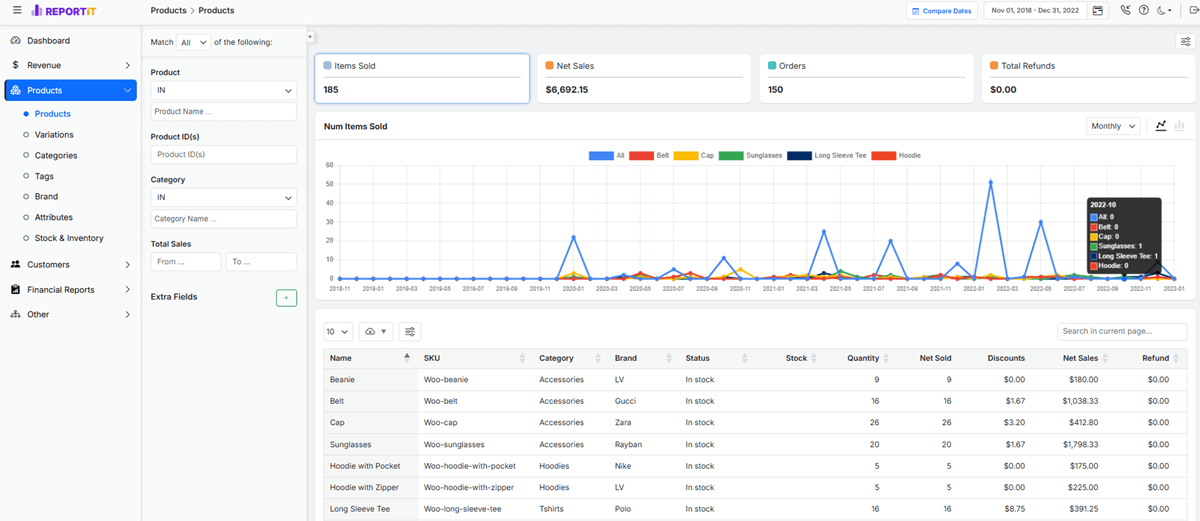
How All product advanced reports help you make informed product development decisions?
- Making informed product decisions about promotions, improvements, or discontinuations.
- Identifying top-performing and underperforming products.
- Recognizing low Net Sales or high Refunds for portfolio management.
Product Variations Report
The variation report breaks down the All Products data to the individual variation level. If you sell products in different variations like sizes, colors, or brands, this advanced report reveals which specific attributes are driving demand.
You can find all the necessary information for making informed product development decisions, like sold quantity, Net sales, Discounts, Refunds, and more in this report.
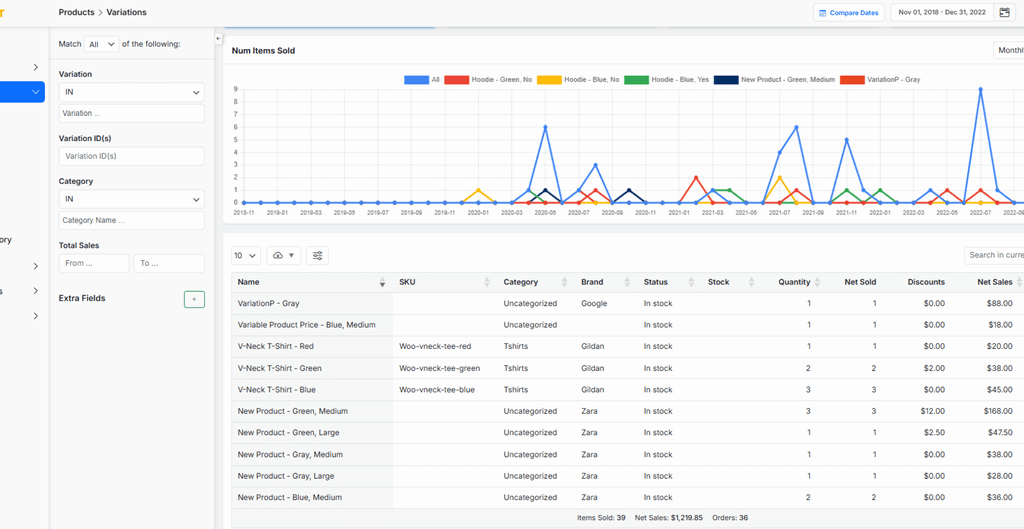
How do Product variations Advanced Reports provide Actionable Insights?
This report answers precise business questions like:
- Which specific variations have more demand?
- Which variations have disproportionately high refund rates?
- How to manage the inventory (Stock) and prevent stockouts of popular combinations?
Product Categories Report
In the category report, you can analyze data for all products within a category, giving you a strategic view of which categories are most successful for your business.
The data provided in this advanced report generally are:
Title: The name of the product category (e.g., “T-Shirts,” “Accessories”).
Quantity & Net Sold: The total sales volume for the entire category.
Net Sales: The total revenue generated by the category.
Refunds: The total refund amount of products in each category.
Orders: The total number of distinct transactions that included items from this category.
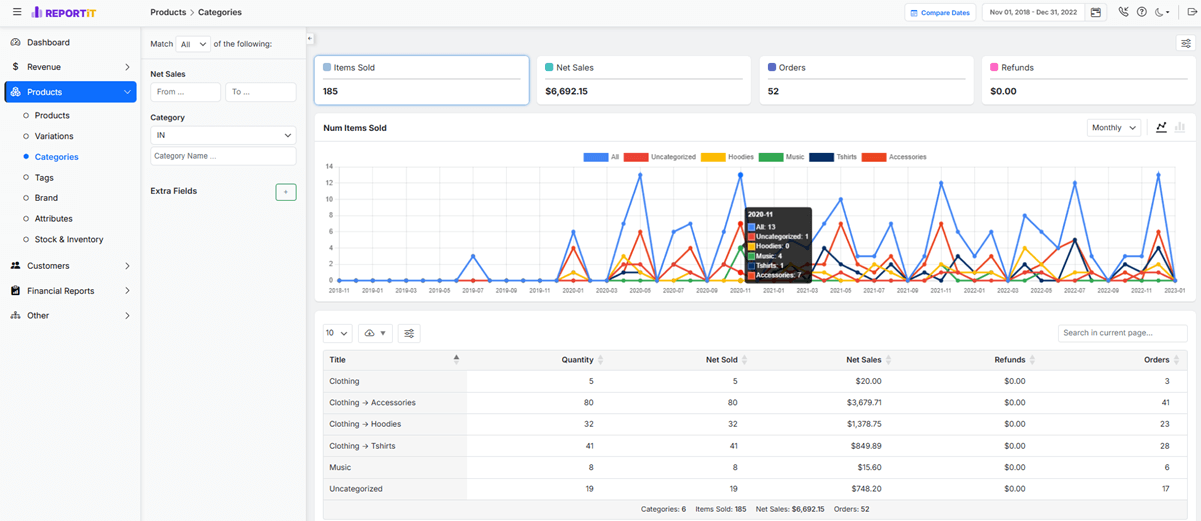
How do Category advanced reports help you make informed product development decisions?
This report helps you answer the fundamental questions for strategic planning:
- Which categories have the highest profit margins (Net Sales)?
- Which categories have the highest engagement (high Orders)?
- Are customers buying multiple items from this category per visit (high Quantity/Orders ratio)?
- How to spend marketing budget or develop new products?
Product Stock & Inventory Report
Product Stock & Inventory Report provides a snapshot of what you have in your warehouse, its status, and its total monetary value, which is crucial for cash flow management.
The most useful data in the stock report are:
- Product SKU: Identifies the specific item or variant.
- Status: Stock status like In stock, Out of stock, or On backorder.
- Stock: The stock quantity or number of units currently available for sale.
- Value: The regular Price of each item
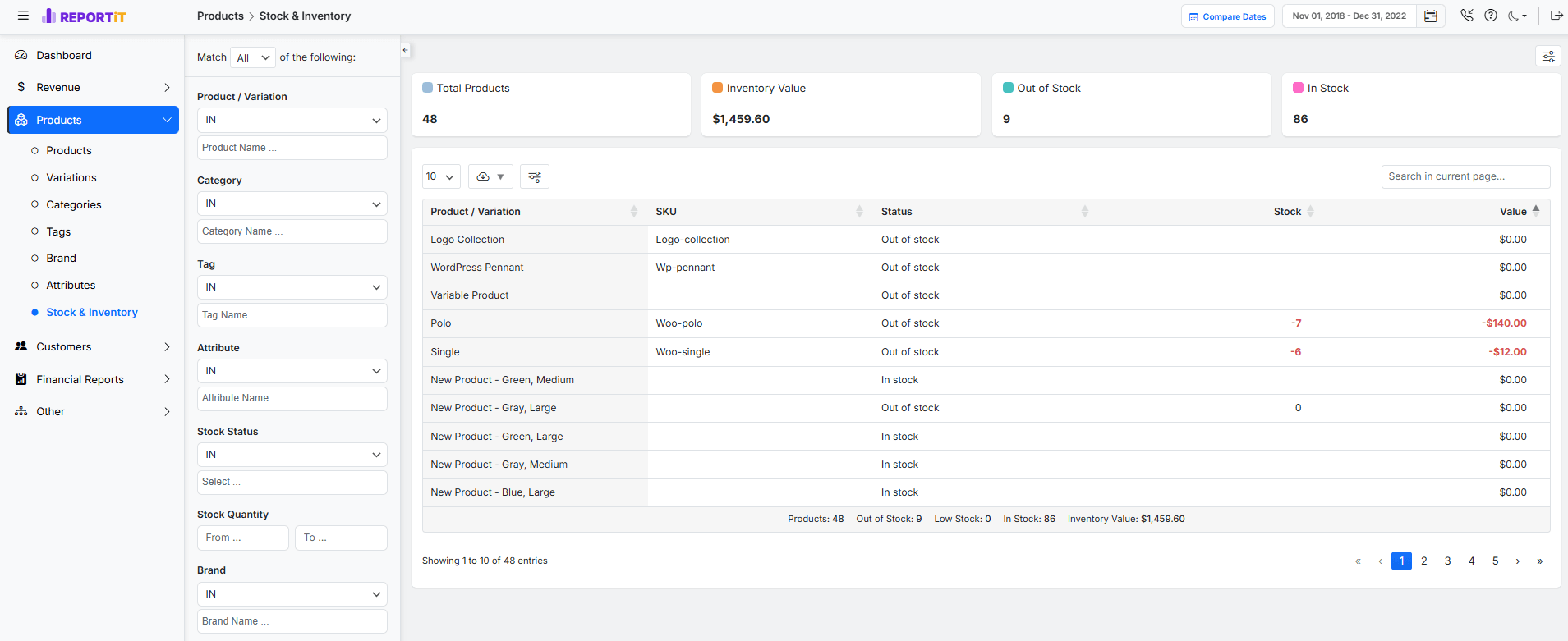
How Stock Advanced Reports Provide Actionable Insights?
This report is key to efficient inventory management. You can answer critical questions like:
- Which items are out of stock and need reordering?
- Which products have a high Stock Value and need sales promotion to turn into cash?
- How to prevent stockouts for best-selling items by monitoring their Stock quantity against sales?
REPORTiT – Advanced WooCommerce Reporting
The Strategic Way to Guide Product Development with Advanced WooCommerce Reports
Benefits of Using Advanced Reports for Product Development Decisions
You can benefit from integrating advanced reporting into your product strategy by:
- Risk Reduction: By analyzing historical data and identifying your best/worst-selling products, you can significantly lower the risk of launching products that fail to resonate with your market.
- Resource Optimization: Product Advanced reports can help you allocate your resources—budget, production capacity, marketing spend—to the most valuable products, resulting in improving return on investment (ROI).
- Enhanced Customer Experience: Recognizing the needs and preferences of customers, leading to providing products that better solve their real problems.
- Faster and effective Decision-Making: With a clear, data-backed insight, product development is more efficient
- Improved Forecasting Accuracy: Accurate demand planning is an easy task with Advanced reports helping you to reduce both overstock (and associated costs) and costly stockouts that disappoint customers.
Real-Time Data vs. Historical Data: Which Matters More?
For stores managers, analyzing both real-time and historical data are critical to help them make informed product development decisions.
Advanced reports with Historical Data are essential for
- Identifying enduring trends,
- Understanding seasonality,
- Measuring year-over-year growth,
- And building predictive models.
Generating an advanced product report allows you to answer strategic questions like:
- Which Products/Categories/Variations do your customers need?
- Which product category has been growing consistently?
- What features have historically driven upgrades?
The advanced reports product development with Real-Time Data gives you an immediate pulse to monitor the sales performance after:
- launching of a new product or feature,
- running a product promotion,
- and managing daily inventory
It answers tactical questions like:
- Is our new product launch generating buzz and sales in its first 48 hours?
- Is the landing page for our updated design converting visitors?
- Is the discount or free gift offer effective for boosting sales this week?
The most effective strategy uses historical data to set the strategic direction and long-term product development along with real-time data to make immediate tactical adjustments and managing a launch or a live experiment.
Steps to Implement Advanced Reporting in Product Development Processes
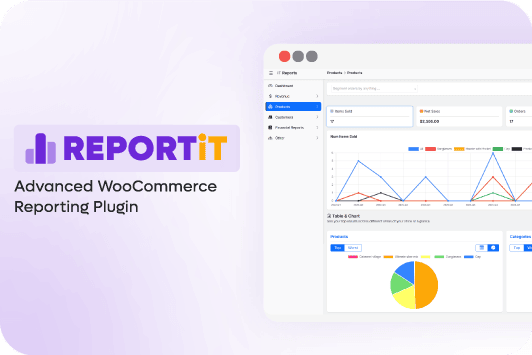
If you are looking for a comprehensive solution to Implement Advanced Reporting in Product Development Processes, the REPORTiT – Advanced WooCommerce Reporting plugin is the best choice.
It can provide the deep insights necessary for making truly informed product development decisions. In addition to data collection, the power of this tool is in how you systematically access and customize the advanced reports for product development to answer your most critical business questions.
After installing and activating the REPORTiT plugin, follow these steps to create detailed analyses for informed product development decisions.
Step 1: Set the Date Range
Navigate to WordPress> iThemeland > Woo Reports to open the main page of the plugin.
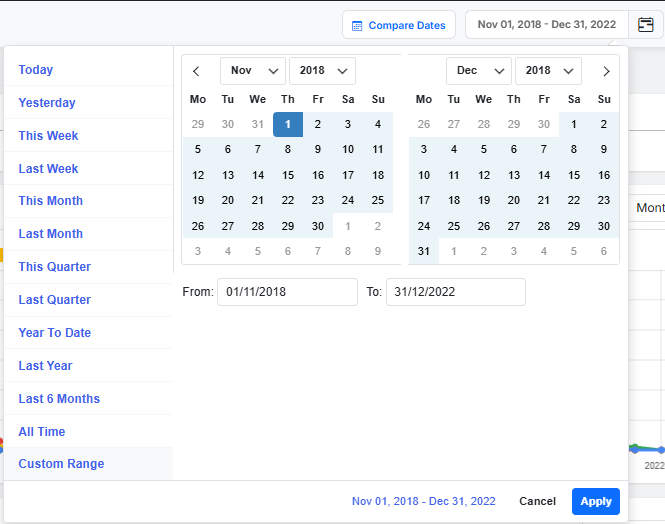
You can find the date selector at the top-right corner of the reporting dashboard. Use it to define the specific period for your analysis.
You can either choose preset ranges like “This Week”, “Last Month”, etc., or set a custom range (e.g., from the start of a product launch to the present) using a built-in calendar.
Step 2: Select the Report Type
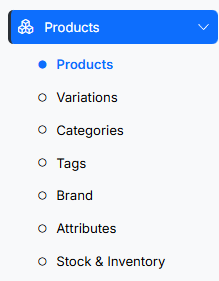
From the main reports menu designed on the left side, you can select the type of advanced reports product development you need. To generate advanced product reports, simply click on the Products in the menu and choose your preferred report, including:
- All Products
- Variations
- Categories
- Tags
- Brand (If you integrated the brand plugin)
- Attributes
- Stock and inventory
Step 3: Apply Specific Filters
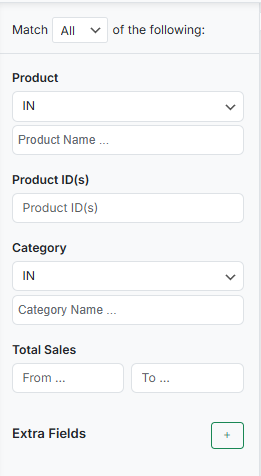
Once the report is generated, you can use the available filter options to narrow down the data to your exact scope.
It is an important step for creating an advanced product report providing targeted insight.
Common filters include:
- Product Category/Brand: To analyze a specific product line.
- Product Status: To view only in-stock/out-of-stock items.
- Total sales: To identify the most profitable items
Step 4: Customize, Interact & Export the Report
Advanced WooCommerce reporting plugin has many customizing and interaction features to help you make informed product decisions:
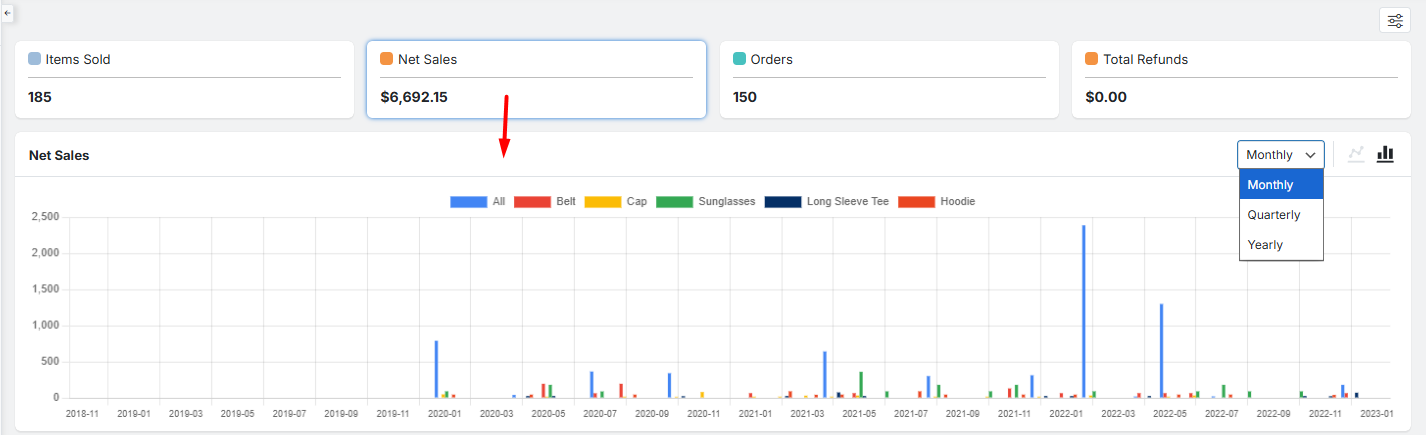
View Detailed charts: In each report, you can click on a specific metric like Items sold, Net sales, Orders, etc. To see a customizable chart related to that item. You can switch between bar chart or line chart or set the date to Monthly, Quarterly, Yearly.
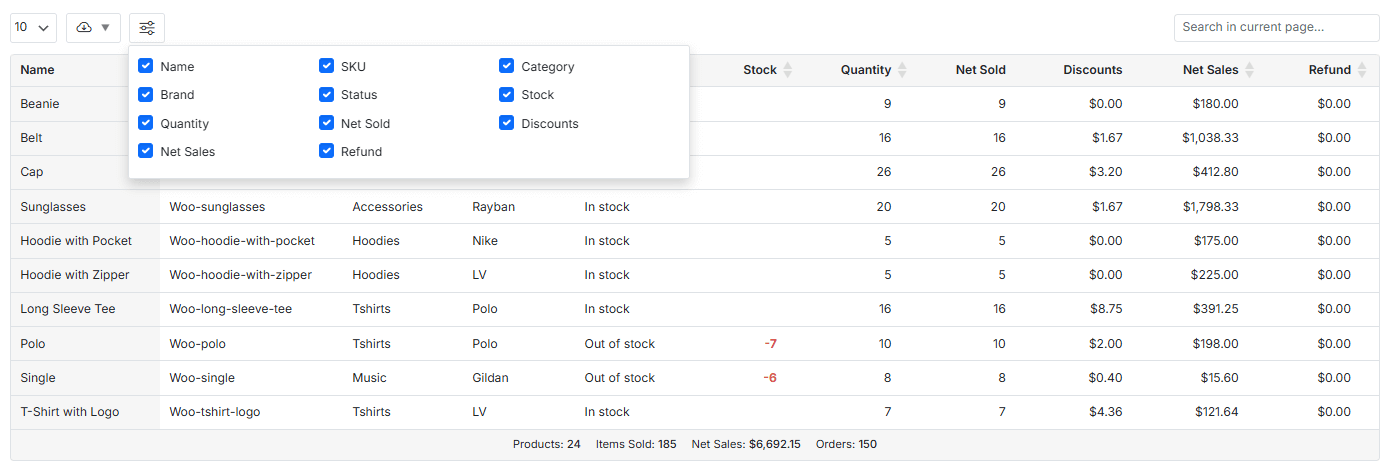
Customize Columns: There is also a table report with a column management icon. You can mark/unmark items in the lost to show or hide data in the table.
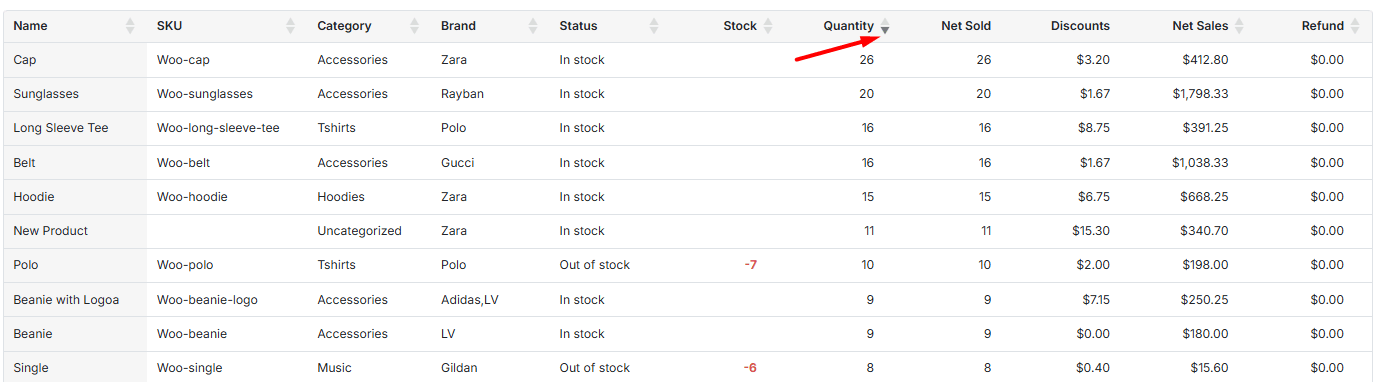
Sort Data: It is also possible to click on any column header (e.g., Quantity) to sort the entire table in ascending or descending order.
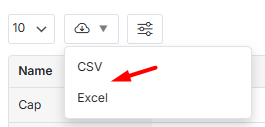
Export for Further Analysis: Finally, the “Export” button is designed to download the filtered and sorted report to CSV or Excel formats. You can use the download report for advanced manipulation, long-term archival, sharing with team members, or incorporating the data into presentations.
Case Studies: Companies Succeeding with Advanced Reporting
| Company / Example | Insight from Advanced Reports | Action Taken | Outcome | Source |
|---|---|---|---|---|
| Startup SaaS (Retention Cohorts) | Cohort analysis showed that users who completed onboarding tutorial retained much better | Improved onboarding & in-app messages | 15% boost in 30-day retention & higher revenue | UMA Technology case study (SaaS analytics) (UMA Technology) |
| HubSpot (Feature Adoption) | Analytics identified low adoption of complex features and confusion points | Simplified onboarding & added contextual tips | 25% increase in advanced feature adoption & better loyalty | UMA Technology product analytics case study (UMA Technology) |
| E-commerce Analytics (From UMA) | Segmentation and funnel analysis showed high-value behaviors and drop-offs | Personalized recommendations & churn-prevention campaigns | 25% increase in customer lifetime value | UMA Technology e-commerce growth case (UMA Technology) |
| DocuSign (Open Platform Use) | Funnel tracking spotted drop-offs early in user journey | A/B tested onboarding experiences | +10–15% conversion improvements on key activation steps | Userpilot product analytics examples (Userpilot) |
| Streaming Service Personalization (Spotify) | Listener data analytics drove better personalization | Improved recommendation algorithm | ~20% increase in user satisfaction & lower churn | MEFMobile analytics case (MEFMobile) |
Common Metrics and KPIs to Track in Product Development Reports
To make informed product decisions, you must track the right signals. Focus on a mix of commercial, engagement, and operational metrics.
- Commercial Metrics: Net sales by product category, Average Order Value (AOV) for products or variations, profit margin per SKU, and rate of sold items.
- Engagement & Perception Metrics: Customer interactions to specific products, product page bounce rate, “time spent on page” for product information, Discount or Coupon amount, feature usage data (for digital products), return/refund rates.
- Operational & Fulfillment Metrics: Inventory turnover ratio, cost of goods sold (COGS), sell-through rate (percentage of inventory sold in a period), and stockout frequency.
Best Practices for Interpreting Advanced Reports
Look for Trends, Not Just Snapshots: A single data point is an outlier; a trend over time is a signal. Always analyze data in the context of a timeframe.
Filter and Segment: Never analyze “all products” as one homogenous group. Break down data by date, categories, or net sales to find the true story.
Correlate Metrics: Don’t look at metrics in isolation. If a product’s sales are up but its return rate is also spiking, that’s a critical red flag that quality or description accuracy may be an issue.
Establish Baselines and Goals: Know what “normal” looks like for your business so you can identify meaningful deviations. Set clear, measurable goals for what success looks like for a product launch or feature update.
Context is King: Always combine quantitative data with qualitative feedback from customer support, surveys, and user interviews. The “why” behind the numbers often comes from direct customer voices.
Review report regularly: Schedule sending reports daily or weekly to automatically receive them in your email.
Challenges and Limitations of Advanced Reporting
While powerful, advanced reporting is not a silver bullet. Key challenges include:
Analysis Paralysis: The sheer volume of available data can overwhelm teams, leading to indecision. Focus on the metrics that align with your core objectives.
Cost of Tools and Expertise: Powerful BI platforms and the skilled analysts to run them represent a significant investment for smaller businesses.
Data Quality & Hygiene: Reports are only as good as the data fed into them. Inconsistent product categorization, duplicate customer records, and untracked promotions can corrupt insights.
Inability to Capture “The Why”: Data can show what customers did, but often not the underlying motivation. This gap must be filled with qualitative research.
Integrating Advanced Reports with Other Product Management Tools
For maximum impact, your reporting should not live in isolation. Integration creates a seamless workflow:
Project Management (e.g., Jira, Asana): Insights from reports (e.g., “Product X is highly requested in the Summer”) can automatically send a notification to the supplier team to order more near the pick season.
Customer Relationship Management (CRM): Segment data from reports that can sync to your CRM to tailor email campaigns. For instance, customers who viewed a product but didn’t buy can be added to a specific remarketing list.
Customer Feedback & Survey Tools (e.g., Delighted, Typeform): Correlate NPS scores from these tools with purchasing behavior in your WooCommerce advanced reports to understand how sentiment translates to revenue.
Financial & ERP Software: Connect product performance and forecasting data directly into your financial planning systems for more accurate budgeting and P&L management.
Future Trends: The Evolution of Reporting in Product Development
The future of advanced reports product development lies in greater automation, intelligence, and accessibility.
AI-Powered Predictive Insights: Tools will not just report on the past but will proactively surface recommendations based on trending customer searches and competitor activities.
Automated Anomaly Detection: Systems will automatically alert product managers to significant, unexpected changes in key metrics (e.g., “Sales for Product Z dropped 30% today versus the weekly average”), allowing for immediate investigation.
Natural Language Querying: Product managers will be able to ask questions of their data in (e.g., “Show me the top 3 products by revenue for customers in Europe last quarter”) and receive instant chart-based answers, democratizing data access.
Unified, Real-Time Data Platforms: The trend will move away from stitching together disparate tools toward single platforms that natively unify e-commerce, marketing, and customer data in a single, real-time view.
REPORTiT – Advanced WooCommerce Reporting
The Strategic Way to Guide Product Development with Advanced WooCommerce Reports
Conclusion: Leveraging Advanced Reports for Better Decisions
In the competitive landscape of e-commerce, informed product development decisions are the cornerstone of sustainable growth and innovation.
Advanced reports provide the critical lens through which intuition is validated, risks are quantified, and customer desires are clarified.
Using a powerful tool like the WooCommerce Advanced reports plugin, you can move beyond basic sales data to embrace segmentation, trend analysis, and predictive insights.
You can also empower your team to build and refine products that the market genuinely wants and needs.
FAQs
Q: What makes a report ‘advanced’ in the context of product development?
A: An ‘advanced’ report utilizes comprehensive data sources, incorporates automation, provides customizable visualizations, and highlights actionable insights, enabling teams to make strategic product decisions efficiently.
Q: How do advanced reports reduce risks in product development?
A: Advanced reports help identify trends, detect anomalies, and forecast potential issues early, allowing teams to mitigate risks before they impact the product lifecycle.
Q: Can small businesses benefit from implementing advanced reports?
A: Yes, even small businesses can gain valuable insights from advanced reporting, improving resource allocation, prioritizing features, and optimizing time to market.
Q: Which KPIs should I focus on in advanced product development reports?
A: Key KPIs include time-to-market, development costs, user engagement metrics, product performance, defect rates, feature adoption, and customer satisfaction.
Q: What challenges might teams face when adopting advanced reports?
A: Challenges include data integration from multiple sources, selecting appropriate KPIs, ensuring data accuracy, and training team members to interpret the reports effectively.


