

Ever wish you could read your customers’ minds? What if you knew exactly what they want to buy, even before they do? You’re not alone. Every online store owner grapples with these questions. The good news is, you don’t need psychic powers—you already have the WooCommerce data analysis in your own store.
By WooCommerce analytics, you can uncover the hidden stories your sales data is telling. This process is all about identifying customer buying patterns—those crucial trends that show you which products are a perfect pair, when your customers are most likely to shop, and what motivates them to click “buy.”
Tools like the WooCommerce Report plugin translate raw numbers into a clear picture of customer behavior in WooCommerce data. It helps you answer critical questions: Who are your most loyal customers? What campaigns are actually driving sales?
By understanding these patterns, you can stop guessing and start making smart decisions that boost your sales and build a store your customers love.
What is WooCommerce Data Analysis?
Imagine you own a physical store. You’d naturally notice things like: “The customer who buys the fancy coffee machine often picks up coffee beans too,” or “We’re always busy on Saturday mornings.”
WooCommerce data analysis is exactly that—but for your online store. It’s the process of using the information your WooCommerce store collects to understand what’s really happening.
In practice, it means using WooCommerce analytics (like the reports in your dashboard or other tools) to look at all your sales and customer information. The main goal? Identifying customer buying patterns.
You’re basically looking for answers to questions like:
- Which products do people often buy together?
- When do my biggest spenders usually shop?
- Where are my most loyal customers coming from?
By digging into this customer behavior WooCommerce data, you learn what your customers want, so you can sell more effectively and grow your business.
Why Identifying Buying Patterns Matters for Online Stores
For your online store, identifying customer buying patterns is about understanding the story behind the sales. Here’s why it’s a total game-changer:
1. You Can Sell More in Smarter Way
When you see that customers who buy “A” also frequently buy “B,” you can create combo deals, show smart “frequently bought together” suggestions, or bundle products. This simple move increases the value of every single order.
2. Stop Guessing and Start Knowing.
Instead of wondering what your customers want, your WooCommerce analytics will tell you. This deep dive into customer behavior WooCommerce data helps you decide which products to re-stock, which to discontinue, and what new items your audience might love.
3. Your Marketing Becomes a Magnet.
Knowing your customers’ habits means you can send them offers they’ll actually care about. Remind them to re-stock their favorite items, or offer a discount on the product they’ve been eyeing. This makes your marketing feel helpful, not spammy.
4. Build a Store People Love.
When your store feels intuitive—when it suggests the right products and makes shopping easy—customers feel understood. They come back, not just because of your products, but because of the great experience.
Types of Customer Buying Patterns
Think of buying patterns as the habits of your shoppers. Once you start looking for them through WooCommerce analytics, you’ll see they generally fall into a few key categories. Understanding these is the heart of identifying customer buying patterns.
1. The Shopping Frequency: How Often Do They Buy?
This is all about understanding your customers’ pace. Are they weekly regulars, or do they only pop in during the big sales? Identifying customer buying patterns related to frequency helps you spot your most loyal fans. Once you know who they are, you can reward them with a loyalty program or simply send a heartfelt thank you. It turns casual shoppers into a devoted community.
2. The Seasonal Clock: When Do They Shop?
Your sales charts probably have a natural heartbeat. Maybe sales surge every holiday season, or you get a rush every Friday afternoon. This seasonality is a crucial part of customer behavior WooCommerce data. Spotting these trends means you’re never caught off guard—you’ll have the right stock ready and your marketing campaigns lined up to perfectly match your customers’ shopping clock.
3. The Product Affinity: What Products Love Each Other?
This is where it gets really exciting. Have you noticed that people who buy a new phone case often add a screen protector to their cart? That’s product affinity in action. Using your WooCommerce analytics, you can uncover these hidden relationships. This lets you create irresistible bundles and show “frequently bought together” suggestions that feel incredibly helpful, not pushy.
4. The Spending Style: How Much Do They Spend?
Finally, look at the monetary value. Some customers are big spenders who love your premium products, while others are savvy shoppers who watch for deals. Understanding this spending style is a powerful part of WooCommerce data analysis. It allows you to tailor your offers, like creating a VIP tier for your top customers or setting a smart free shipping threshold to gently encourage larger orders.
Essential WooCommerce Data Sources for Pattern Identification
Let’s explore the key sources of information that will help you in identifying customer buying patterns and unlock the full potential of WooCommerce analytics.
Key Metrics and KPIs to Track
Think of these as the vital signs for your store’s health. Tracking these Key Performance Indicators (KPIs) is the first step in any effective WooCommerce data analysis. They provide a high-level overview of what’s happening and where to focus your deeper investigation.
| Metric Category | What It Measures | Why It Matters for Customer Behavior | Source |
|---|---|---|---|
| Sales Performance | Total Revenue, Average Order Value (AOV), Number of Orders | Shows purchasing trends and overall store health. A rising AOV indicates customers are buying more per trip. | Sales Report |
| Customer Behavior | Customer Lifetime Value (CLV), Repeat Purchase Rate | Identifies your most valuable customers and how loyal your shopper base is. | Customer Report |
| Product Performance | Top-Selling Products, Products Frequently Bought Together | Reveals product affinity and helps you plan inventory and bundling strategies. | Product Report |
| Cart & Checkout | Conversion Rate, Abandoned Cart Rate | Pinpoints where you are losing customers, allowing you to optimize the buying process. | Order Report |
Tools and Plugins for WooCommerce Data Analysis
While your WooCommerce dashboard provides basic sales data, unlocking deep insights into customer behavior, WooCommerce style often requires more powerful tools. These plugins transform raw data into actionable, easy-to-understand reports.
A highly effective and user-friendly solution is the WooCommerce Report Plugin. This powerful plugin is specifically designed to make WooCommerce data analysis accessible for store owners without needing to be a data scientist.
Here’s what makes it such a valuable tool for identifying customer buying patterns:
- Comprehensive Reporting: It goes beyond basic sales reports to give you deep insights into your products, customers, coupons, and taxes.
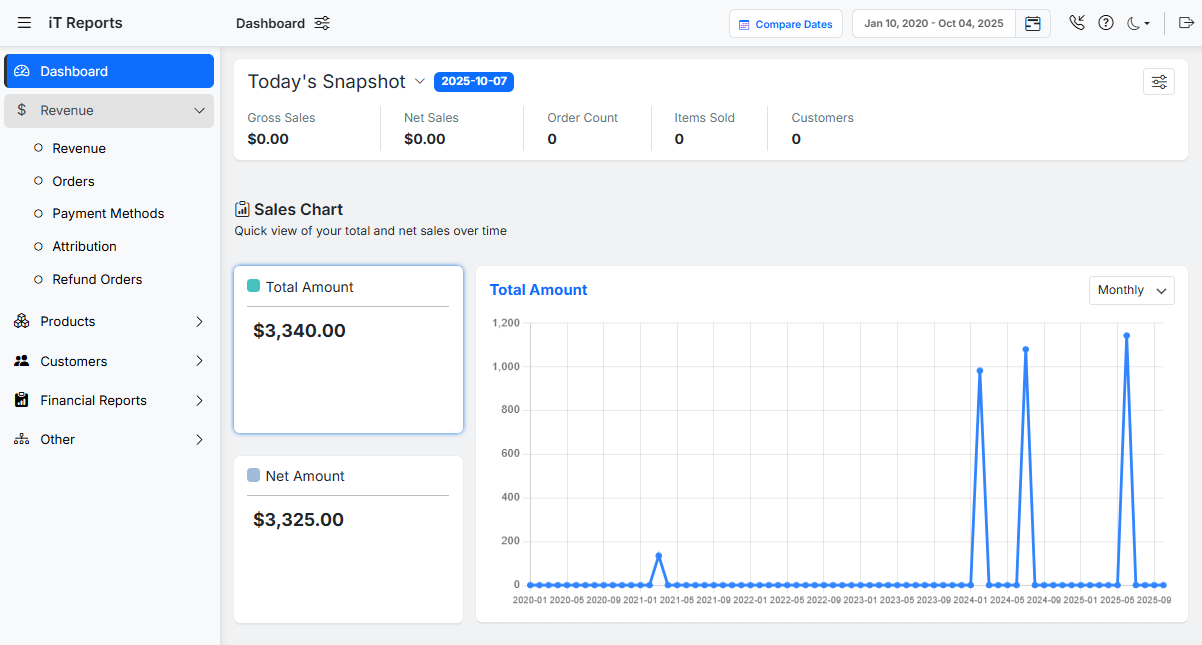
- Advanced Product Analysis: Easily identify your best-sellers and, most importantly, see which products are frequently purchased together. This is essential for uncovering those valuable product affinity patterns we discussed.

- Detailed Customer Tracking: See the complete purchase history of each customer, track their lifetime value, and identify your most loyal repeat buyers.
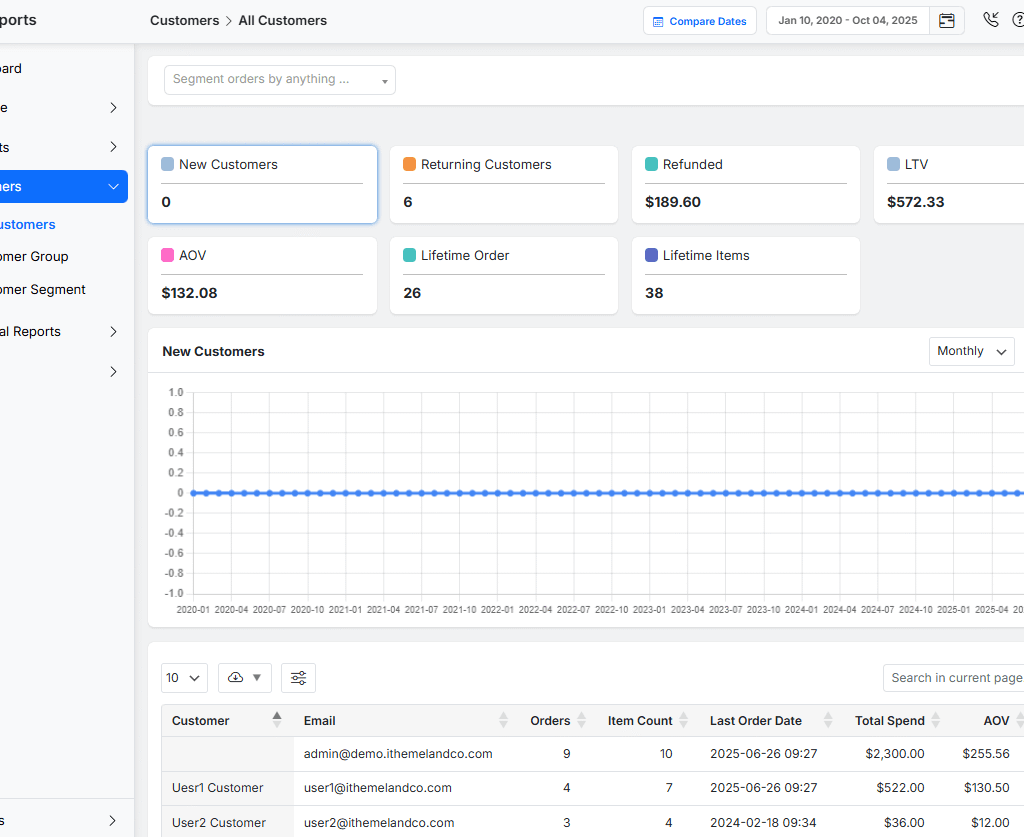
- Customizable Dashboards: Create the reports that matter most to you, so you can track your key metrics at a glance without sifting through irrelevant data.
Step-by-Step Guide to Extract and Analyze Customer Data in WooCommerce
Let’s walk through the process of transforming raw numbers into a clear growth strategy.
Step 1: Install and Access the WooCommerce Report Plugin
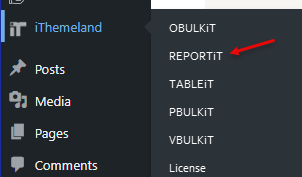
First, you need to get the tool. After purchasing and installing the WooCommerce Report Plugin on your WordPress site, you’ll find a new “iThemeland > REPORTiT” menu item in your dashboard. Click on it to enter your central command center for all data analysis.
Step 2: Define Your Date Range
The first thing you need to set for identifying customer buying patterns is a date range. This is your most important filter.
- For a quick overview: Select “Last 30 Days” or “This Month.”
- For seasonal analysis: Compare “This Year” to “Last Year” during the holiday season.
- For a specific campaign: Select the exact dates your sale or promotion ran.

Setting the correct timeframe ensures you’re analyzing the right data from the start.
Step 3: Extract and Analyze Sales Performance Data
Navigate to the “Revenue” report or “Orders” report section. Here, you’ll extract your high-level store health metrics.
What to Look At:
- Total Sales & Net Sales: See your overall revenue.
- Number of Orders: Track your sales volume.
- Average Order Value (AOV): See how much customers spend on average.

How to Analyze It:
First, look at the AOV; if it is going up, this could mean your bundling strategies are working.
Compare the order quantity with total sales. If you have a flat sale with an increase in order quantity, you might be attracting more bargain hunters.
Step 4: Dive into Customer Behavior Reports
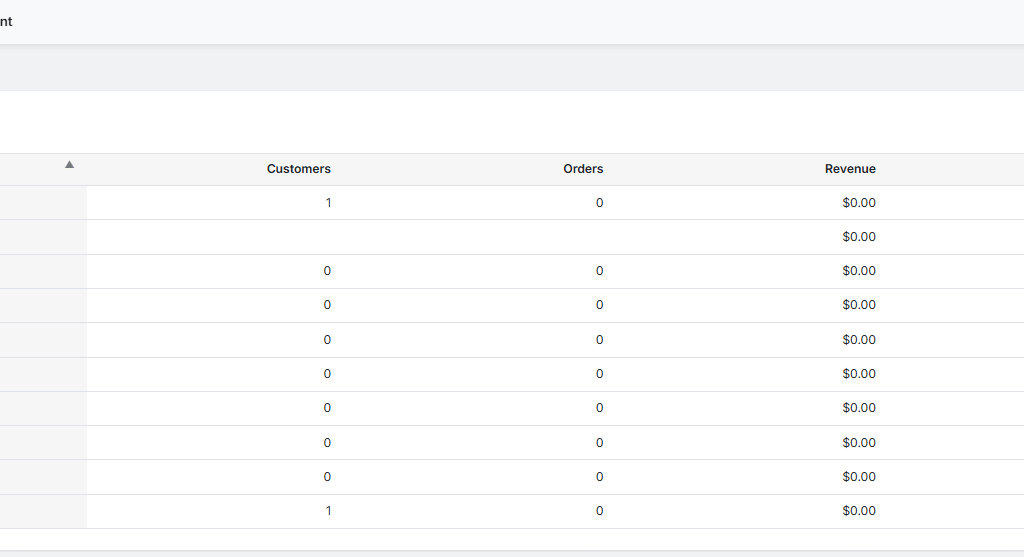
This is where true pattern identification happens. Go to the “Customers” reports section.
What to Look At:
- Customer List: A complete list of customers and their order counts.

- Repeat Customers: Identify customers who have purchased more than once.
- Customer Order History: View the complete purchase timeline for any single customer.
How to Analyze It:
First, you need to sort customers by “Total Spend” to see who your most valuable customers are.
Then calculate your Repeat Customer Rate:
(Number of repeat customers / Total customers) x 100.
Track this percentage over time to measure loyalty.
REPORTiT – Advanced WooCommerce Reporting
The Smart Way to Identify Customer Buying Patterns with WooCommerce Data Analysis
Step 5: Uncover Product Affinity and Performance
Now, let’s see what your customers are buying. Head to the “Products” report section.
What to Look At:
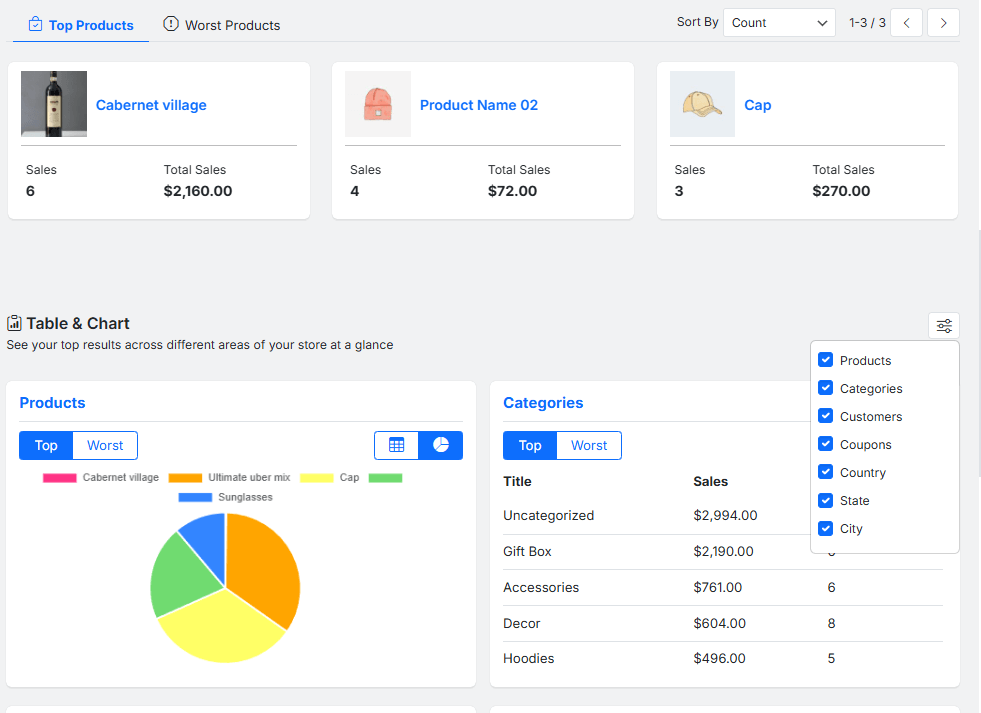
- Top Selling Products: Your best-sellers by quantity and revenue.

- Products Purchased Together: This specific report is gold—it shows you which items are frequently bought in the same order.

How to Analyze It:
First, use the “Top Selling” list to manage your inventory and focus marketing.
Then, review the “Products Purchased Together” in the All Order report to create pre-made bundles or set up cross-sell promotions on your product pages.
Read More: What is Woocommerce Cross-sell, Setting Up WooCommerce Product Cross-Sells (With & Without Plugins)
Step 6: Export and Take Action
The WooCommerce report plugin allows you to export any report to CSV or Excel.
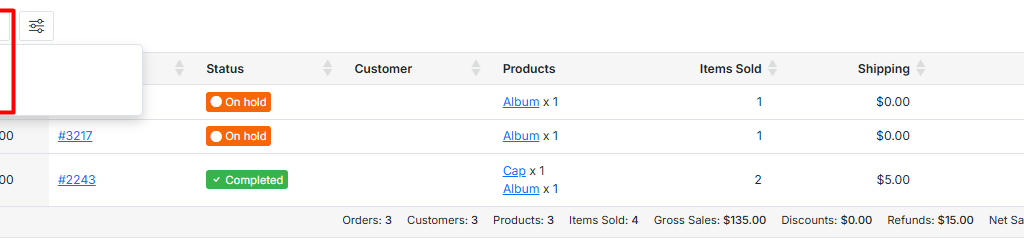
Exporting WooCommerce sales data is important as it can help you to:
- Create Custom Segments: Export your customer list and segment them in a spreadsheet by total spent or order frequency.
- Build Targeted Email Lists: Upload your list of repeat customers to your email marketing tool to send them exclusive “thank you” offers.
- Share with Your Team: Create clear reports for your team to align on goals and strategies.
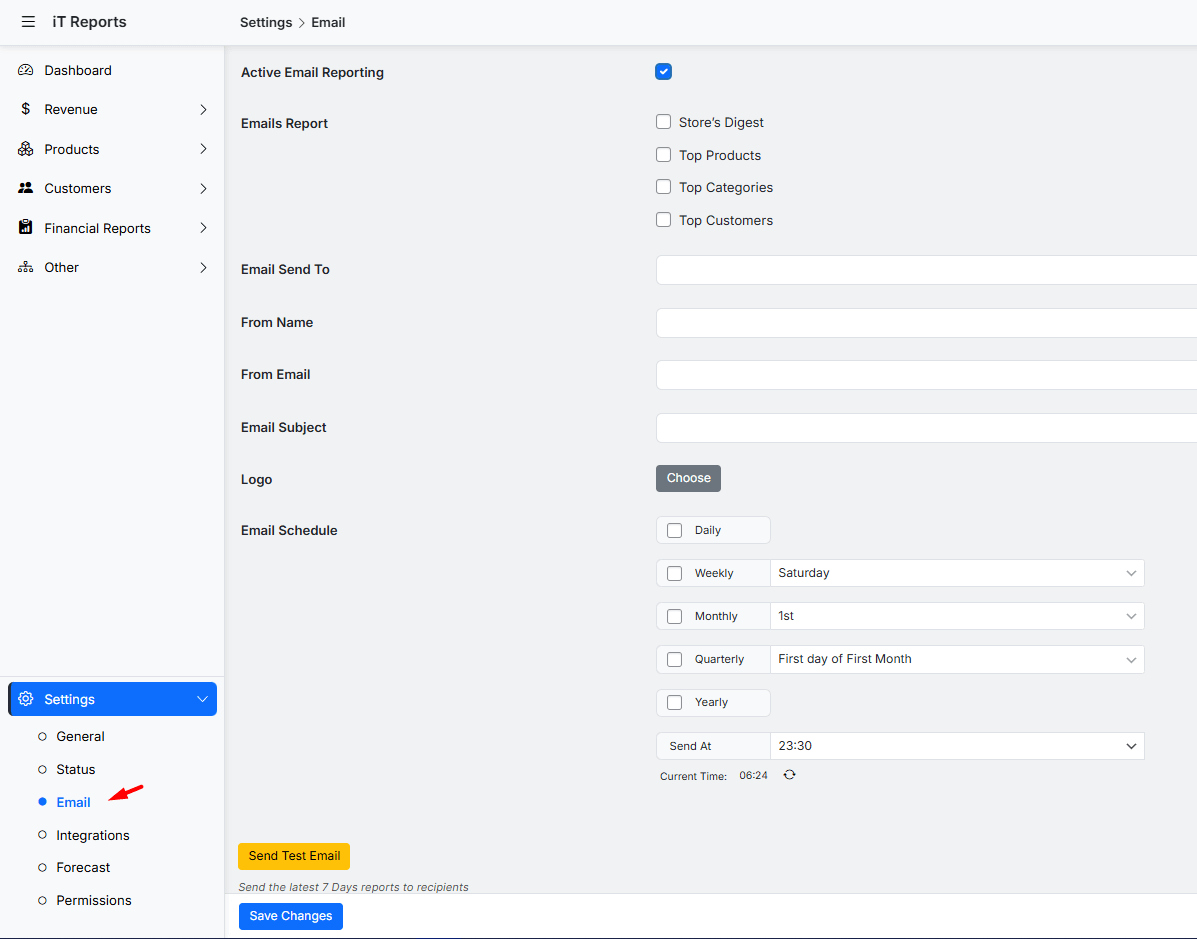
To streamline your workflow, you can schedule any report to be automatically sent to your email—or your team’s inbox—at regular intervals. This powerful automation eliminates the need for manual exports, ensuring you always have the latest key metrics and customer insights delivered directly to you.
Real-World Examples: How Businesses Used WooCommerce Data to Discover Patterns
The following real-world examples show how different businesses used their WooCommerce data to reveal patterns and optimize performance.
| Business / Brand | What they Analyzed & Found (Customer Behavior WooCommerce / Identifying Buying Patterns) | Key Insights / Actions Taken |
|---|---|---|
| Barrington Coffee | Used WooCommerce analytics to track which acquisition channels convert vs. just bring traffic; studied seasonality and loyalty. (Metrilo Ltd.) | Dropped low-ROI channels; invested more where conversions were higher; used analytics to target retention campaigns. |
| Segafredo Zanetti (Australia & NZ branch) | Plotted customer segments, looked at different product lines (coffee roasts vs. espresso machines), bounce rates by page, and measured conversion per channel using WooCommerce data and analytics tools. (Metrilo Ltd.) | Improved funnel by fixing drop-off pages; targeted “reactivation” offers; tailored messaging per segment. |
| The Fish Club (Malaysia) | Even early in their store life, they looked at average order value, what products customers repeatedly order, and focused on loyal customers vs new ones. (Metrilo Ltd.) | Started retention-focused marketing even with limited data; used behavior to decide which products to feature more; reactivated customers via onsite messages / remarketing. |
| Yumi (France, fresh juice brand) | Examined acquisition channel performance, coupon usage, cohort analysis (customers grouped by when they were acquired) to see how long they stay, how much they spend, and whether promotions or incentives are effective. (Metrilo Ltd.) | Used coupons and incentives more wisely; balanced short-term ROI vs long-term customer LTV; refined marketing spend based on behavior. |
How to Interpret Customer Purchase Behavior for Marketing Strategies
Here’s a practical guide on how to use WooCommerce data analysis to improve your product recommendations and boost sales.
Using Data Insights to Improve Product Recommendations and Upsells
When you truly understand what your customers are buying, you can stop guessing and start suggesting products they’ll genuinely love. This is where WooCommerce data analysis becomes your secret weapon.
By reviewing customer behavior WooCommerce patterns—like which items are often purchased together or which customers frequently buy from a specific category—you can move beyond generic recommendations.
Instead, you can showcase personalized “Frequently bought together” prompts or highlight complementary items right on the product page.
This thoughtful approach doesn’t feel pushy; it feels helpful, increasing both customer satisfaction and your average order value.
Segmenting Customers for Targeted Campaigns
Through careful WooCommerce analytics, you can group your customers based on their unique behaviors—like how often they buy, how much they spend, or what types of products they browse.
Identifying customer buying patterns at this level lets you speak directly to each segment. Your loyal, high-value customers might appreciate early access to new arrivals, while occasional shoppers might need a gentle nudge with a personalized discount.
This tailored communication makes people feel seen and valued, which builds lasting relationships.
Optimizing Marketing Timing with Behavioral Data
Sending a promotional email at the right moment can make all the difference. By analyzing your WooCommerce analytics, you can identify not just what your customers buy, but when they’re most likely to make a purchase.
Maybe your audience shops more on weekends, or perhaps they often make a second purchase exactly two weeks after their first order.
Identifying customer buying patterns related to timing allows you to schedule your marketing campaigns—like restock reminders or special offers—to arrive precisely when your customers are most receptive.
This leads to higher open rates, more clicks, and better conversion.
Troubleshooting Common Issues in WooCommerce Data Analysis
Even with powerful tools, diving into data can sometimes be confusing.
A common issue is facing inconsistent or incomplete data. For example, you might be trying to understand a customer’s full journey, but find that their guest checkout isn’t linked to their account purchases. This makes identifying customer buying patterns much harder.
The key is to start by auditing your data sources—ensure that your tracking is set up correctly and that you’re encouraging users to create accounts.
Another frequent problem is “analysis paralysis,” where you have so much data from your WooCommerce analytics that you don’t know where to start.
The solution is to focus on one specific business question at a time, like “How can I increase the average order value?” rather than trying to analyze everything at once.
Best Practices for Data Management and Privacy Compliance
Your customers’ data is a precious asset, and with that comes great responsibility. Proper WooCommerce data analysis isn’t just about extracting insights; it’s about managing information securely and ethically.
First, be transparent. Clearly state in your privacy policy what data you collect (like purchase history for customer behavior, WooCommerce analysis) and why.
Second, minimize data collection—only gather what you truly need for your business goals.
Finally, implement security measures and regularly audit your plugins and databases.
Using a trusted tool like the WooCommerce Report plugin helps, as it keeps your analysis within your own secure WordPress environment.
Respecting privacy isn’t just a legal requirement; it’s how you build the trust that turns one-time buyers into lifelong customers.
REPORTiT – Advanced WooCommerce Reporting
The Smart Way to Identify Customer Buying Patterns with WooCommerce Data Analysis
Conclusion: Turning Insights into Sales Growth
Identifying customer buying patterns isn’t just an academic exercise—it’s the roadmap to higher sales and a stronger brand.
When you know that customers who buy A also love B, you create a bundle they can’t resist. When you see a segment of lapsed customers, you send a personalized “we miss you” offer that brings them back.
Every insight from your WooCommerce data analysis is a direct opportunity to improve your marketing, refine your product offerings, and create a more personalized shopping experience.
By consistently listening to the story your data tells, you stop guessing and start building a store that is strategically designed for success.
FAQ
Q: What are customer buying patterns in WooCommerce?
A: Customer buying patterns in WooCommerce refer to recurring behaviors and trends in the way customers shop, such as purchase frequency, preferred products, times of purchase, and typical order values.
Q: How can I access and analyze WooCommerce customer data?
A: You can access WooCommerce customer data through built-in reports, analytics dashboards, third-party plugins, or by exporting data for analysis in spreadsheet or BI tools.
Q: Which tools can help identify buying patterns in WooCommerce?
A: Popular tools include WooCommerce Analytics, Metorik, Google Analytics integration, and custom reporting plugins tailored for e-commerce data analysis.
Q: How do I use buying pattern insights to increase sales?
A: By identifying buying patterns, you can optimize marketing campaigns, personalize product recommendations, design effective upsell and cross-sell offers, and improve customer retention strategies.
Q: Is WooCommerce data analysis GDPR compliant?
A: WooCommerce offers features and recommended practices for data privacy, but it’s essential to configure settings and processes to ensure full GDPR compliance when analyzing customer data.


