

To genuinely grow your WooCommerce business, you need to move beyond basic sales data and understand the complete customer lifecycle. This means tracking a customer’s entire journey from their first visit to becoming a loyal advocate. While standard WooCommerce reports might show you what was sold, they often miss the ‘who’ and ‘why’ behind the purchase. This is where deep customer analytics for WooCommerce becomes critical, allowing you to see not just transactions, but relationships and patterns over time.
The WooCommerce Reports plugin is built for this exact purpose. It empowers you to dissect the customer lifecycle with precision. You can identify your most valuable customer segments, see which products attract new buyers versus what keeps loyal ones coming back, and analyze the effectiveness of your coupons and promotions at different lifecycle stages.
By providing these advanced customer analytics to WooCommerce, the plugin turns your store’s data into a strategic asset, helping you make informed decisions to improve customer retention and drive sustainable growth.
What is the Customer Lifecycle?
Think of the customer lifecycle in WooCommerce as the complete story of a customer’s relationship with your store. It’s not just about the single moment they make a purchase; it’s the entire journey from the second they discover you, through their first buy, and hopefully, into a long-term relationship where they become a loyal fan.
Understanding this journey is what separates a stagnant store from a growing brand, and it’s the primary goal of effective customer analytics for WooCommerce.
Stages of the Customer Lifecycle in WooCommerce
Here, you can find stages of the Customer Lifecycle in WooCommerce and how advanced WooCommerce reports give you the insights to successfully measure them.
| Stage | What It Is | How WooCommerce Advanced Reports Helps You |
|---|---|---|
| 1. Reach & Awareness | This is when a potential customer first discovers your store, perhaps through a Google search, social media ad, or blog post. They are aware you exist but haven’t bought anything yet. | This stage is primarily tracks on-site behavior, Attribution report can be correlated with marketing efforts to see which channels eventually drive paying customers. |
| 2. Acquisition & Purchase | The critical moment when a visitor becomes a paying customer. This stage is all about that first transaction and the initial experience. | This is where core reports shine. You can see first-time orders, analyze the payment methods they use, and identify any friction points that cause abandoned carts. |
| 3. Conversion & Onboarding | The post-purchase phase where you deliver the product and confirm the customer made a great choice. A smooth experience here is crucial for building trust. | Use customer-specific reports to track their first order journey and ensure timely fulfillment. A positive experience here sets the stage for everything that follows. |
| 4. Retention & Loyalty | This is where you turn a one-time buyer into a repeat customer. It’s about encouraging them to come back and shop again, making your store their go-to choice. | This is the plugin’s power zone. You can segment customers to see who has purchased multiple times, track coupon usage for loyalty discounts, and identify your most valuable, repeat buyers. |
| 5. Advocacy & Referral | The ultimate goal. A loyal customer becomes a brand advocate who voluntarily promotes your store through reviews, testimonials, and word-of-mouth referrals. | While it tracks direct referrals if you have a system in place, the plugin helps identify advocates by showing you customers with high lifetime value and repeat order rates—the ones most likely to recommend you. |
Mapping WooCommerce Reports to Customer Lifecycle Stages
Understanding the customer lifecycle in WooCommerce is one thing, but the real power comes from using your WooCommerce reports to track and influence each stage. Think of your reports not just as data sheets, but as a map of your customer’s entire journey. With the right customer analytics for WooCommerce, you can move from guessing to knowing exactly where to focus your efforts.
Here’s a straightforward breakdown of which reports to use at each stage:
Reach & Acquisition: Start with Attribution and Coupon reports. Which channels are actually bringing new people in? What coupons are these first-time buyers using? This data tells you what’s working to acquire them.
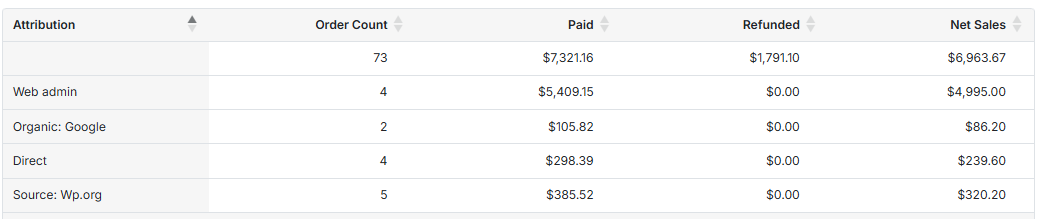
Conversion & Retention: This is where your Customer and Product reports become essential. Identify your repeat customers and see which products they’re buying again and again. This isn’t just about what’s popular; it’s about what builds loyalty.
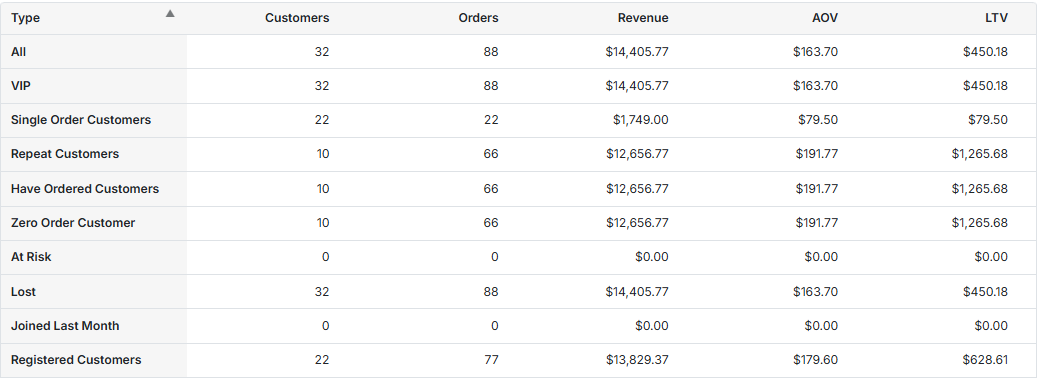
Advocacy: Look at your customers with the highest lifetime value and longest order history. These are your potential advocates. By using customer analytics for WooCommerce to segment and understand this group, you can create targeted referral programs or simply know who to ask for a valuable testimonial.
Key WooCommerce Reports for Tracking the Customer Lifecycle
Leveraging detailed WooCommerce reports and customer analytics is the most powerful strategy for growing your online store. By analyzing the right data at each stage of the customer lifecycle in WooCommerce, you can make informed decisions that not only acquire new shoppers but also turn them into loyal, repeat customers and active brand advocates.
The following reports are essential for tracking this entire journey, giving you the insights needed to nurture relationships and drive sustainable growth.
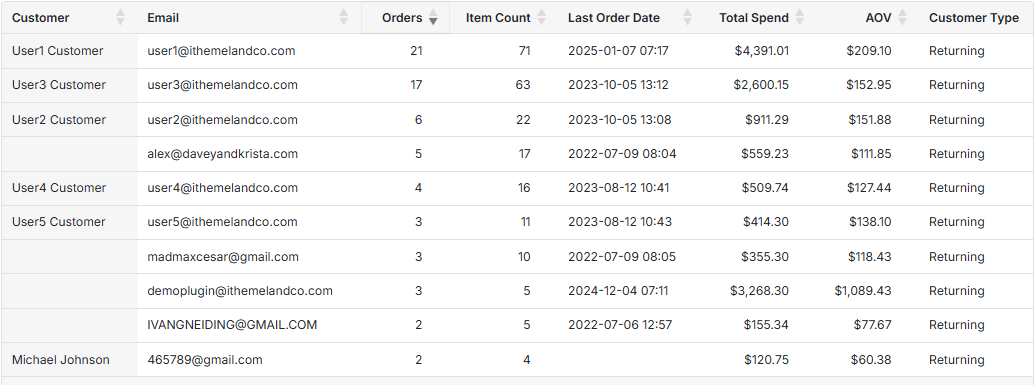
Customer Report
The Customer report is arguably the most critical tool for understanding customer loyalty and value. It goes beyond a simple list of buyers, allowing you to review total spending, the number of orders that customers placed, and the date of their last purchase.
To generate the Customer report, you need to simply go to Customers > All Customers in WooCommerce report plugin, and set the date. The plugin will generate the report with all important data as shown below:
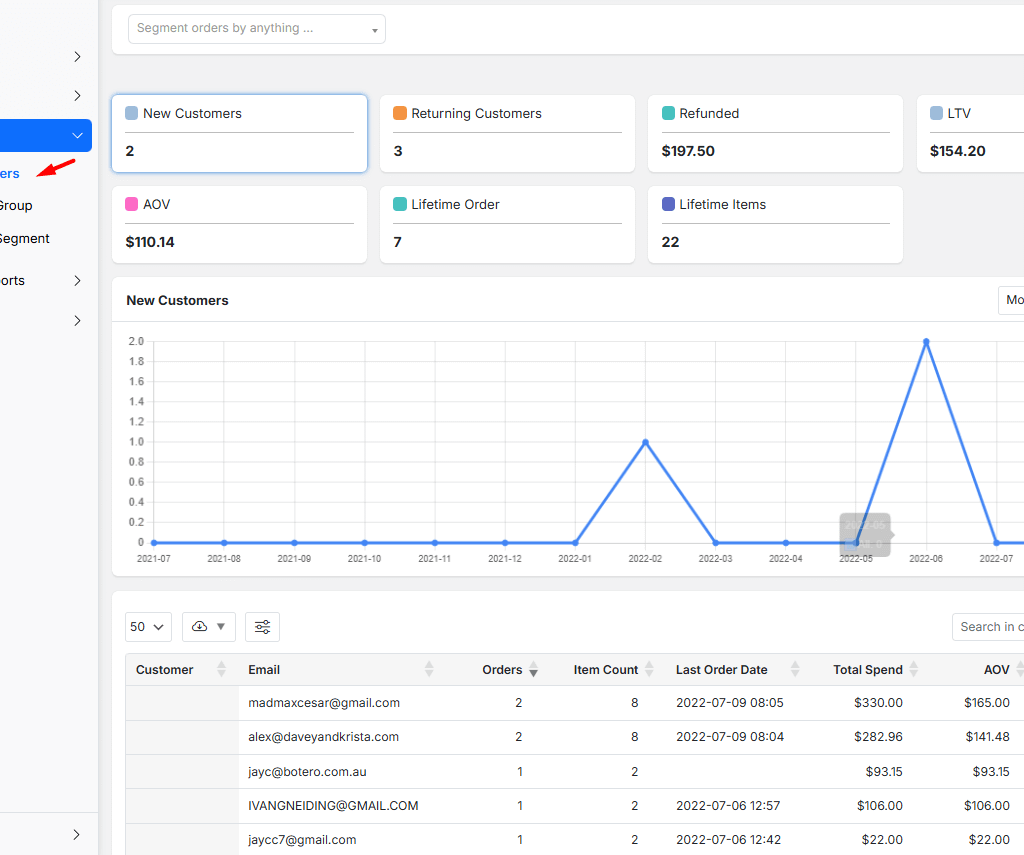
Within this report, you should pay close attention to customers who have made multiple purchases, as these are your loyal advocates.
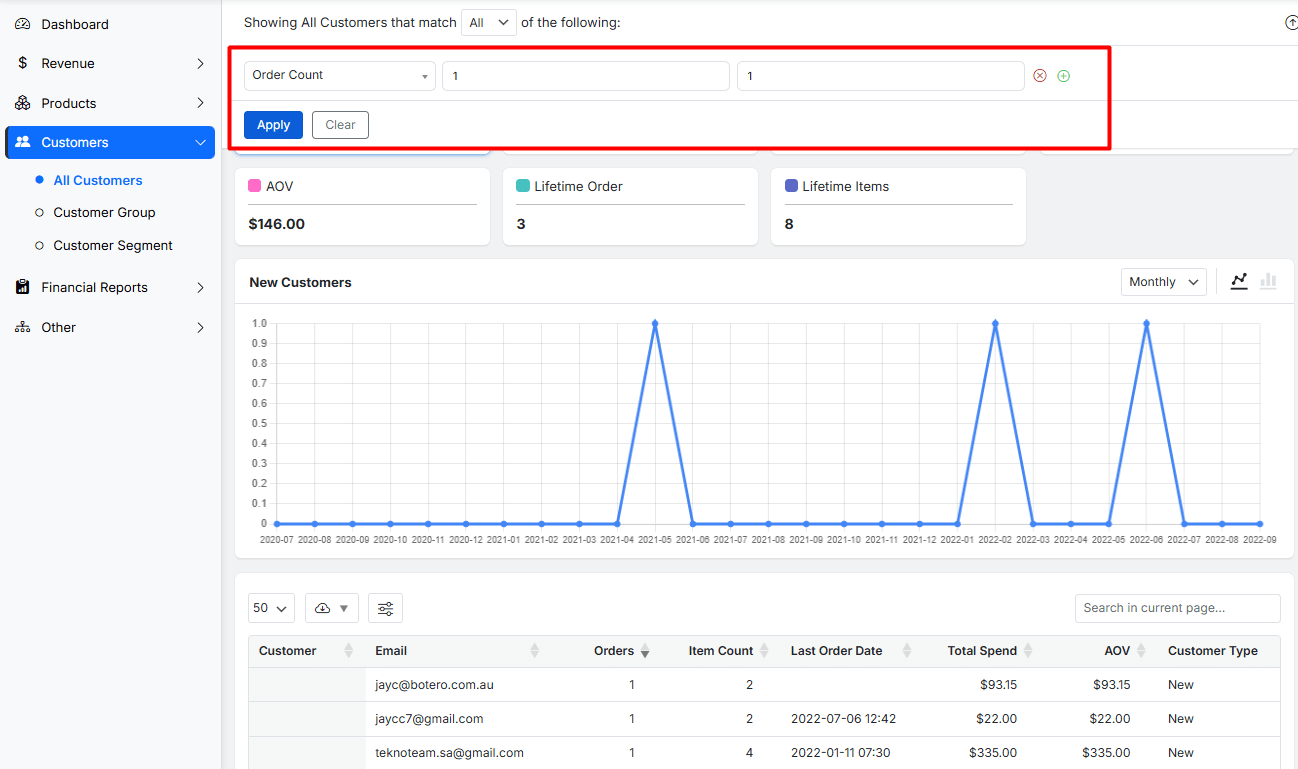
You can also identify customers who have only bought once but spent a significant amount by filtering Order Count and reviewing Total Spend, as they are prime candidates for a re-engagement campaign.
Orders and Revenue WooCommerce Reports
The Orders and Revenue report provide the fundamental pulse of your business. It shows you the total number of orders, the revenue generated (both gross and net), and the average order value over a specific period. This is your go-to report for understanding overall sales performance.
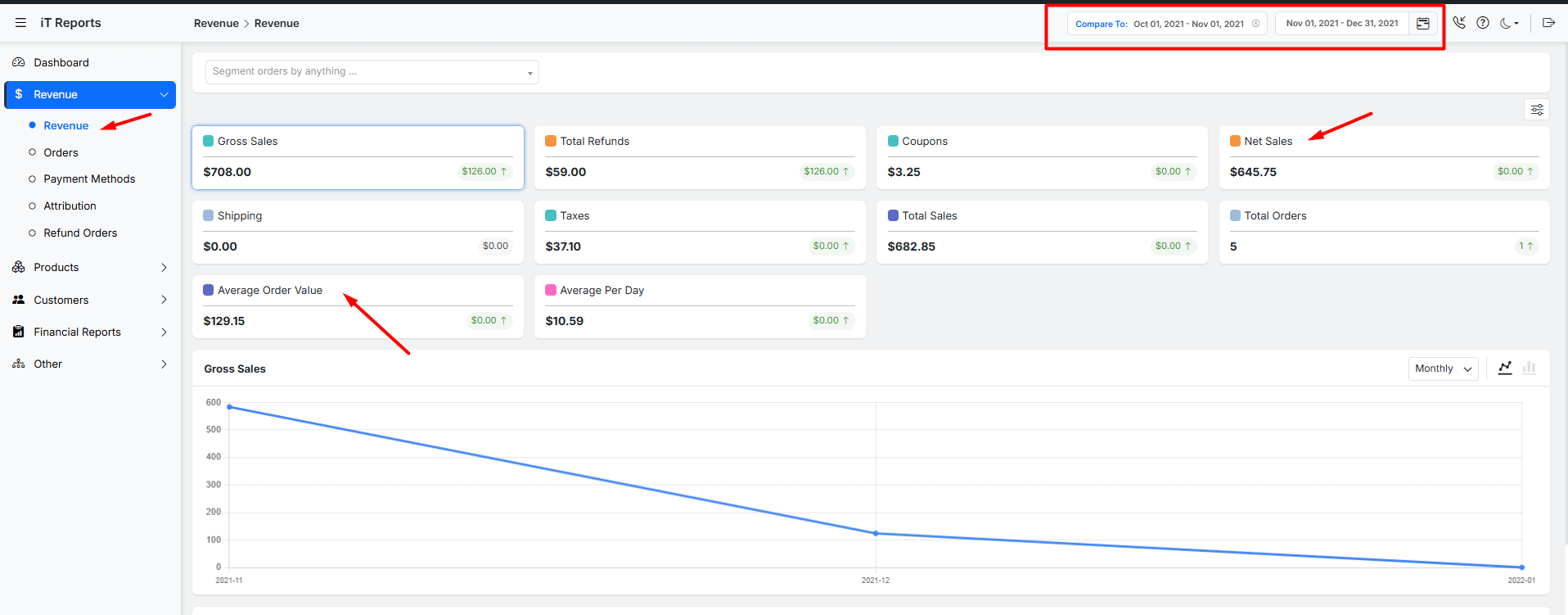
To generate the revenue report, choose Revenue from the menu and set the date.
We recommend that you generate a comparison report by using the Compare option provided on the top right of the screen.
Comparing the revenue of two months allows you to track trends in your Net Revenue and Average Order Value. A rising Average Order Value indicates that strategies like upselling or bundle deals are working.
Conversely, a dip in the number of orders might signal a problem with your checkout process or that your marketing efforts aren’t reaching new customers effectively.
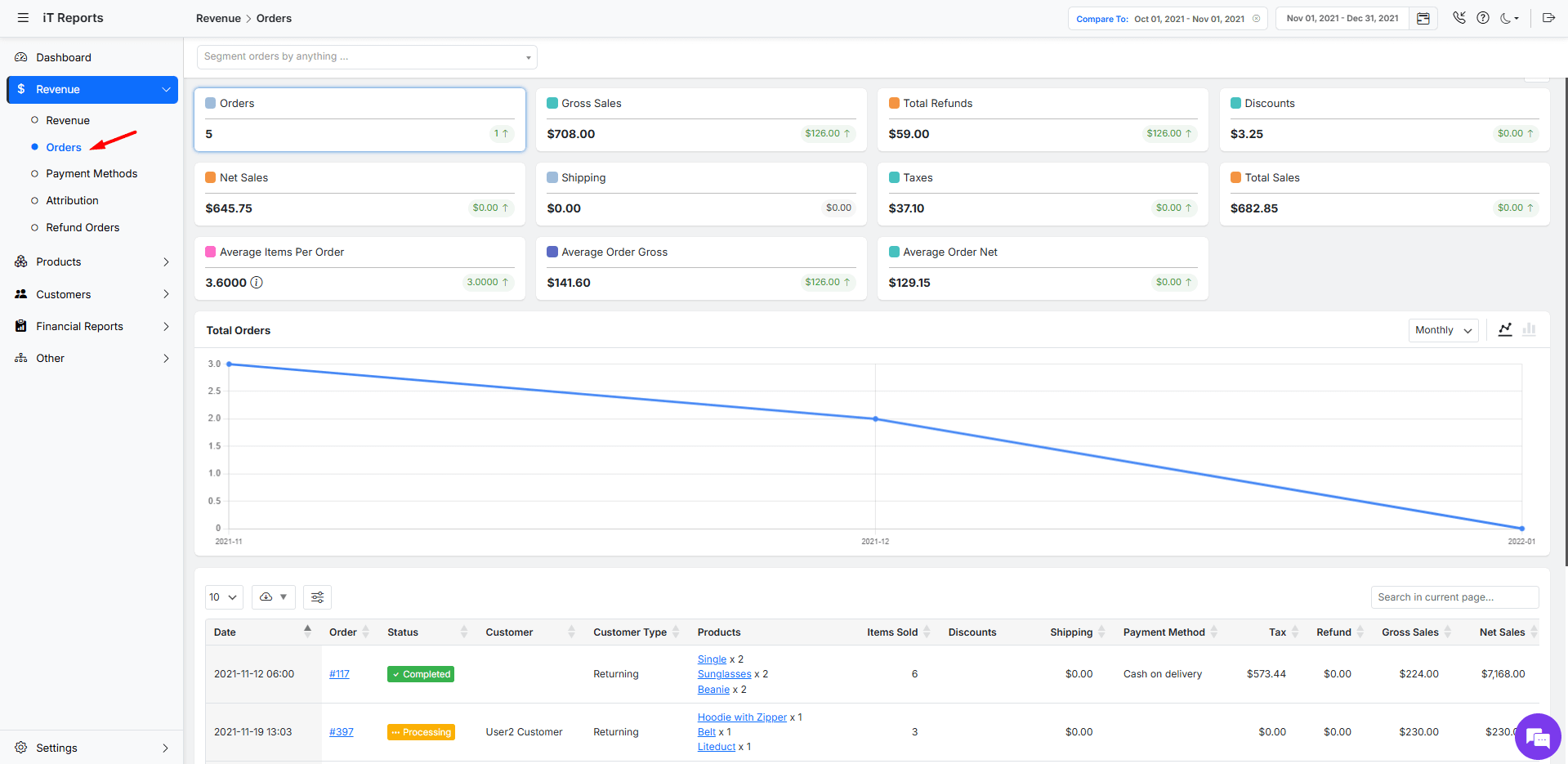
This report gives you the top-level view that tells you if your strategies to acquire and convert customers are successful.
Coupon Usage Report
The coupon usage report is essential for measuring the effectiveness of your discount and promotion strategies. It tells you exactly which coupons are being used, how much sales they are generating, and how many orders they are driving.
The coupon report is available under the Other tab of the WooCommerce report plugin. To see the details, you just need to apply a date range using the built-in calendar on top of the screen:
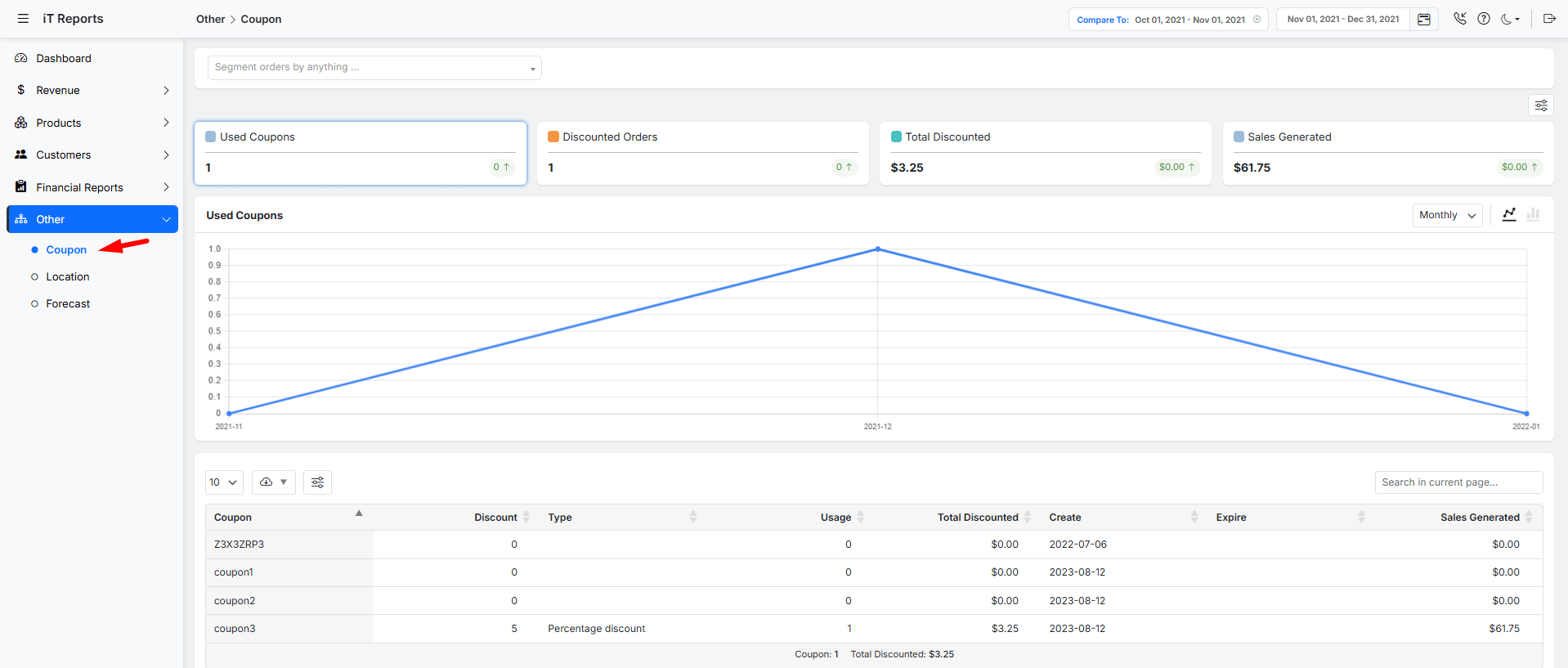
It’s crucial to look beyond just the number of times a coupon was used. You need to see if the coupons you’re using for acquisition are actually bringing in new customers, or if your loyalty coupons are successfully encouraging repeat purchases.
This report helps you understand if your discounts are eroding your profit margins without providing a worthwhile return in customer growth or retention.
Customer Lifetime Value (LTV) Report
The Customer Lifetime Value Report shifts your focus from single transactions to the long-term health of your business. It calculates the total revenue you can expect to earn from a customer throughout their entire relationship with your store.
By generating a customer group report under the Customer tab, you can easily set a date and review the Total LTV and Average LTV in the table:
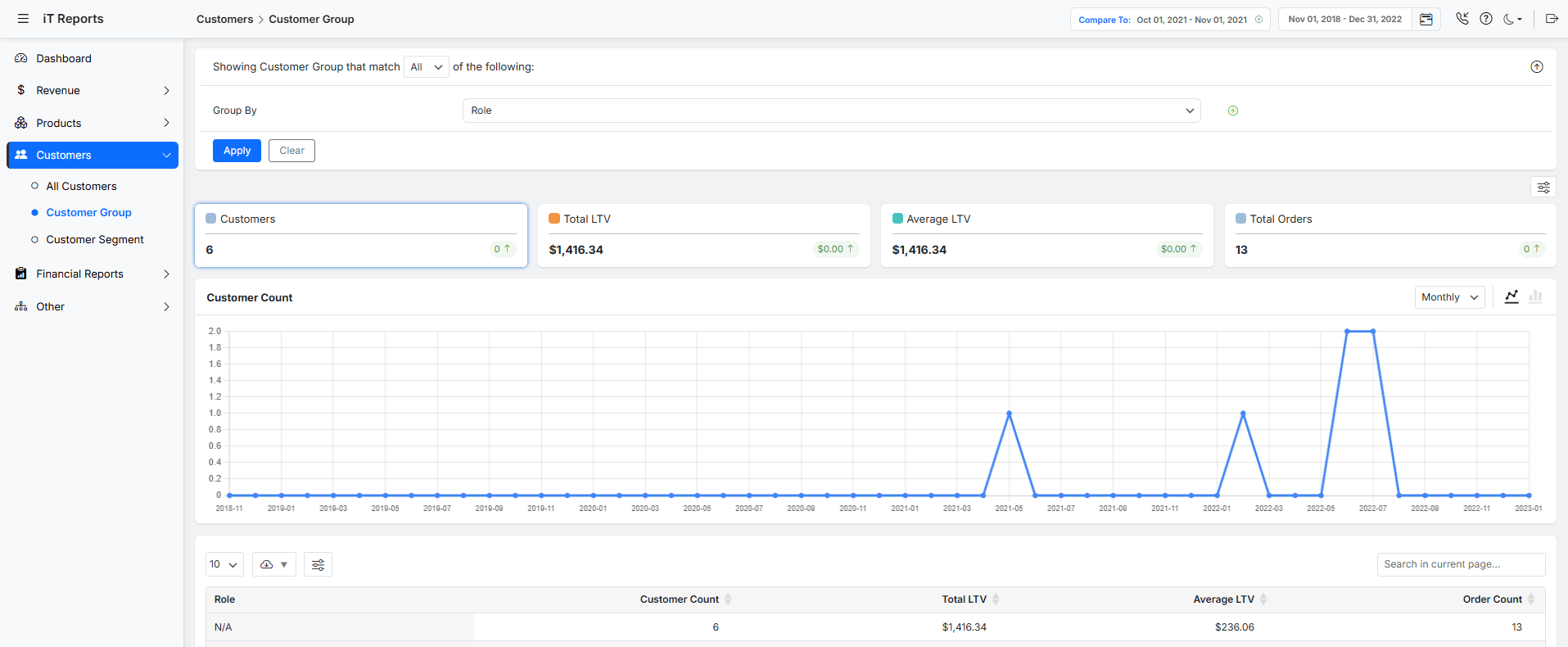
You should use this report to identify your most valuable customer segments. By understanding which customers have the highest LTV, you can tailor your marketing, support, and product development to attract and retain more people like them.
This insight is invaluable for deciding how much you can afford to spend on acquiring a new customer and for building strategies that maximize the value of your existing customer base.
REPORTiT – Advanced WooCommerce Reporting
The Proven Way to Master the Customer Lifecycle with WooCommerce Reports
Cart abandonment rate report
You must pay close attention to where, in the checkout process, potential customers are dropping off. A high abandonment rate often points to friction points, such as unexpected shipping costs, a complicated form, or a lack of trusted payment gateways.
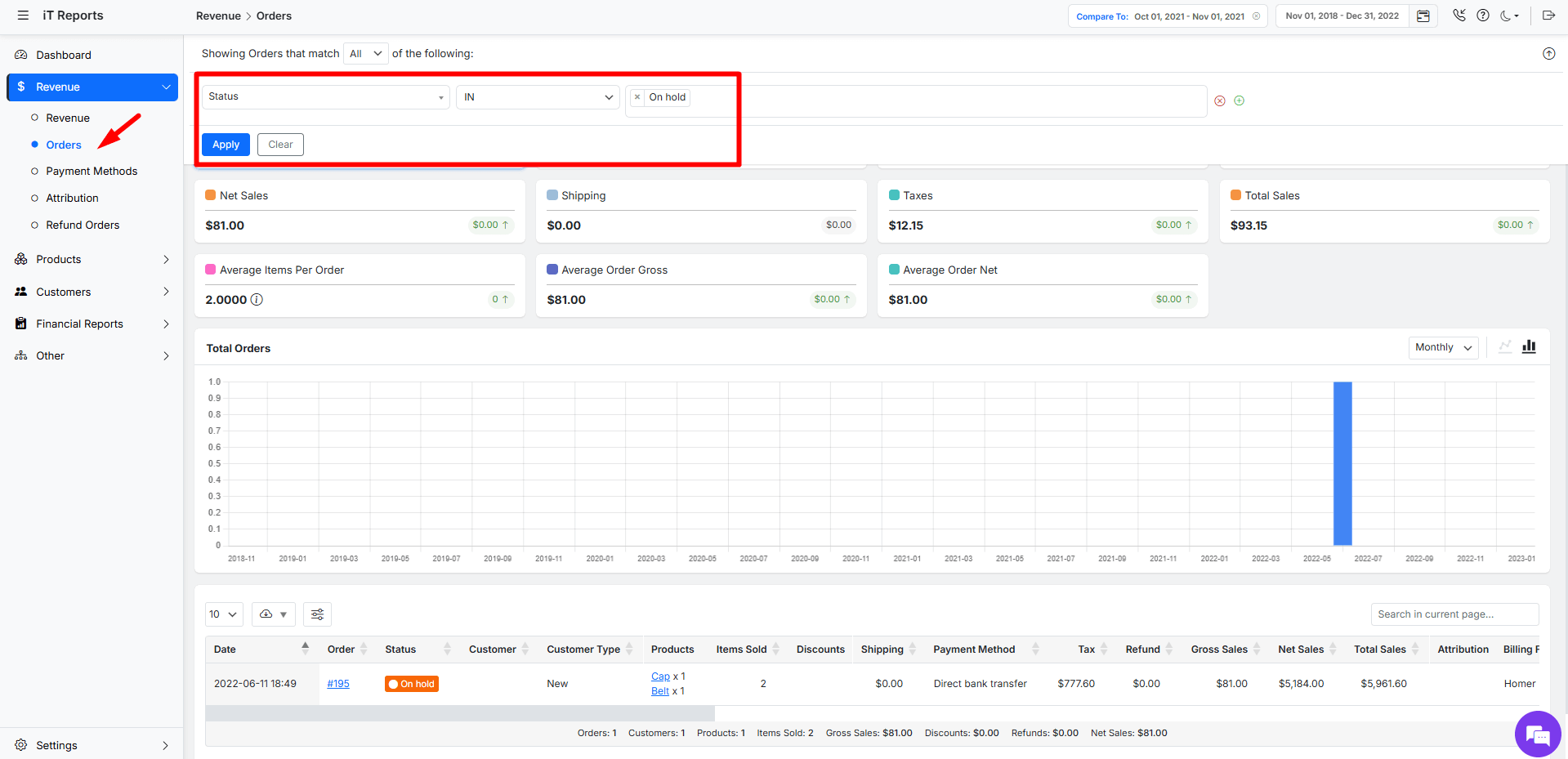
In the WooCommerce report plugin, you can easily find the On Hold orders to estimate the Cart Abandonment rate by following the below steps:
- Go to Revenue > Orders
- Set a date range
- Filter Status > In > On Hold
- Press the Apply button.
To effectively reduce cart abandonment, you need to move from just seeing that it’s happening to understanding why it’s happening. The goal of your analysis should be to find clear patterns in the abandoned carts.
For example, if you discover that a significant majority of abandoned carts all selected the same payment method, this is a strong signal that there is a technical issue or a lack of trust with that specific gateway. This insight allows you to take quick, targeted action, such as fixing a broken plugin or adding more trusted payment logos, rather than just guessing.
A similar diagnostic approach should be applied to other common friction points. Check if abandoned carts are clustered around specific products with unexpectedly high shipping costs, or if they all belong to a particular shipping zone where delivery times are long. By systematically checking these elements—payment methods, shipping rules, and product types—you can pinpoint the exact reason for abandonment and implement a precise solution to recover those lost sales.
Improving this process directly impacts your conversion rate, turning more browsing visitors into paying customers and effectively growing your customer base.
Analyzing Customer Acquisition Using WooCommerce Reports
Analyzing customer acquisition is about moving beyond vanity metrics to understand which strategies actually bring paying customers to your store.
By leveraging your WooCommerce reports, you can identify not just how many new customers you’re gaining, but where they are coming from and what finally convinces them to make a purchase. This data-driven approach allows you to optimize your marketing spend and focus on the channels and tactics that deliver real, measurable growth.
Measuring Customer Engagement and Retention with WooCommerce Data
Acquiring a customer is an event; keeping them is a process. Measuring retention is about understanding who comes back for a second, third, or fourth purchase. This is where the real profit lies, and your WooCommerce data provides a clear window into this critical area. The goal is to identify patterns that lead to long-term loyalty.
The most direct way to measure this is through your Customer Report. Filter for customers who have made more than one purchase. These are your engaged segment.
Look for common traits:
- Did they all buy from a specific location?
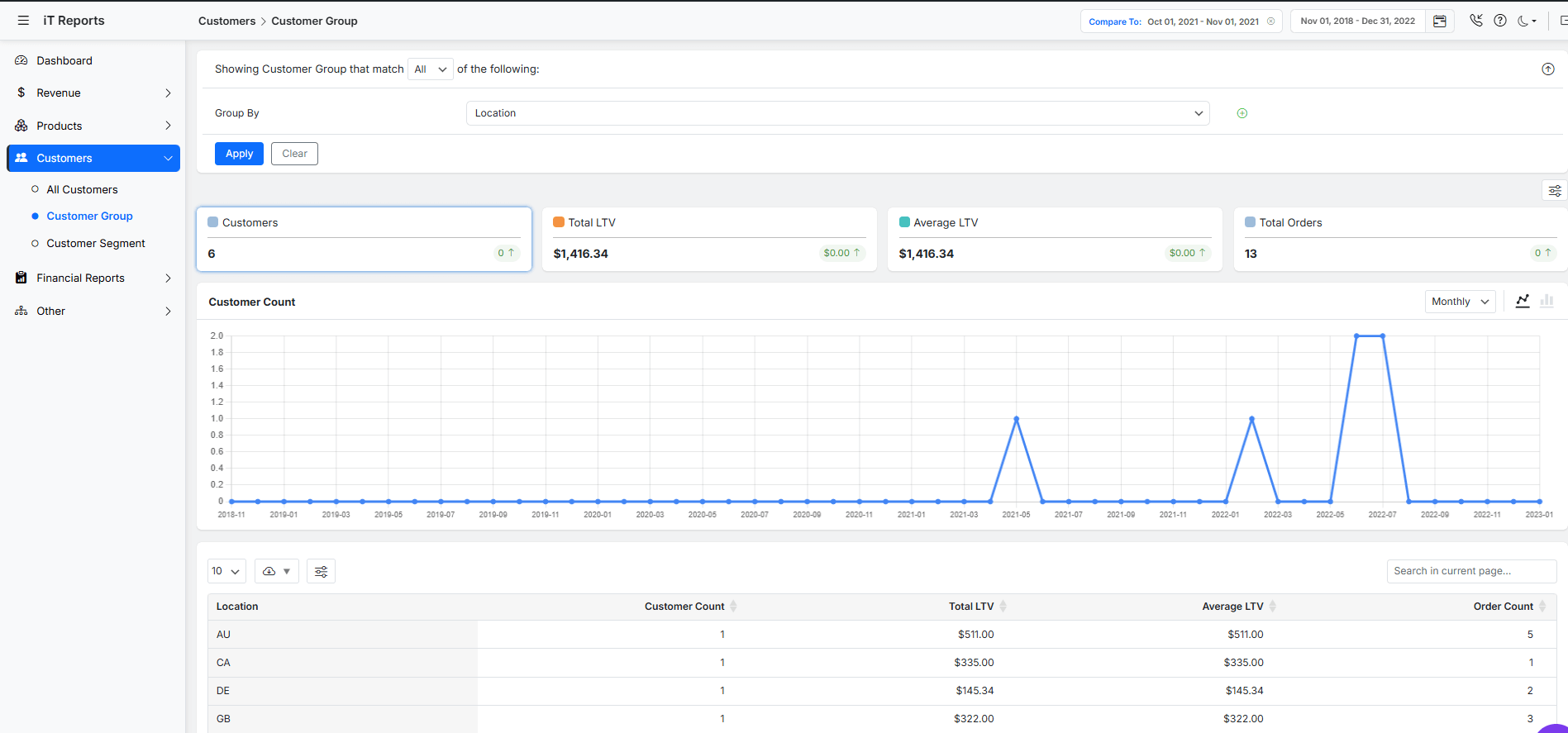
- Did they use a loyalty discount and order on a specific date after offering promotions?
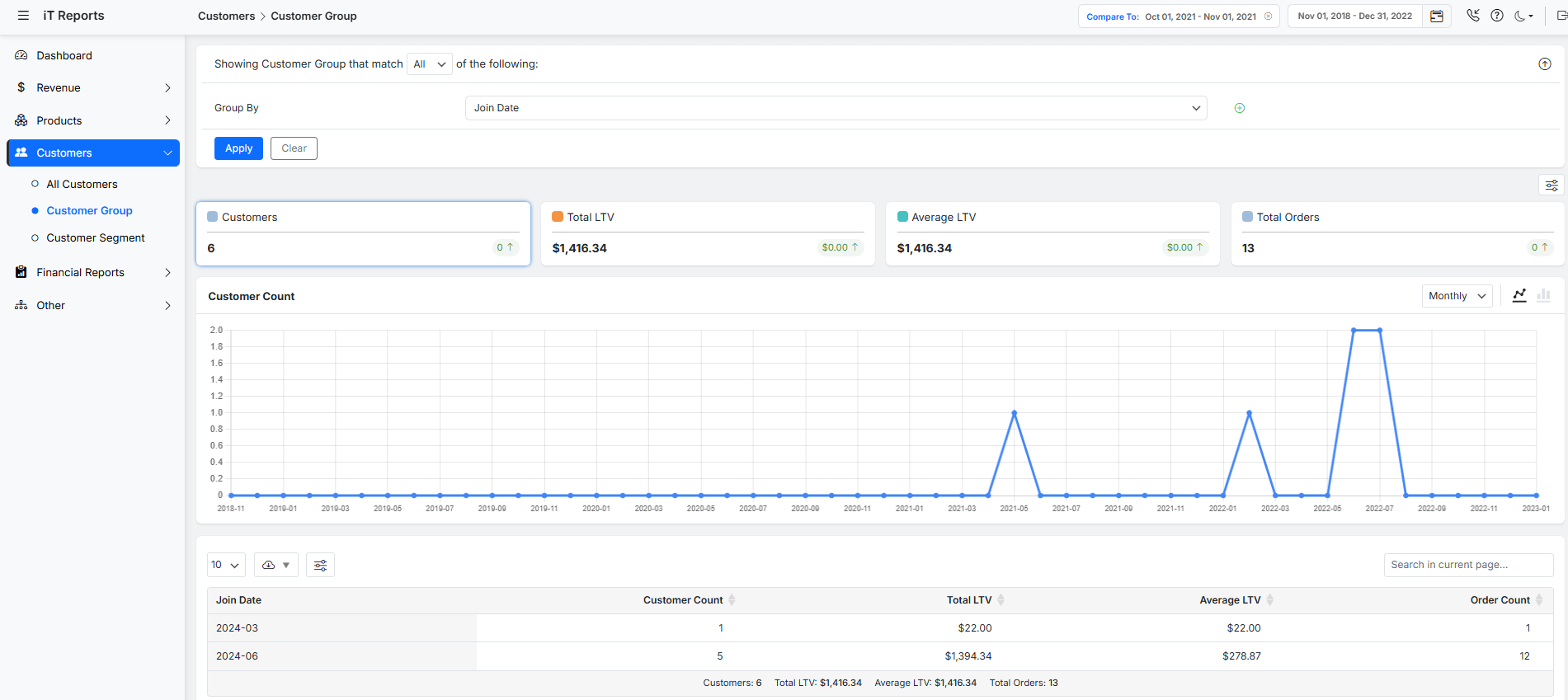
Filtering the Customer Lifetime Value (LTV) report by Location and join date takes this further by showing you the total revenue generated by these repeat customers. A rising average LTV is a strong signal that your retention strategies—like email newsletters, post-purchase follow-ups, or loyalty programs—are working effectively to keep customers engaged.
Segmenting Customers Based on Lifecycle Analytics
Treating all your customers the same is a missed opportunity. Segmentation allows you to group your customers based on their behavior and value, enabling you to send highly targeted and relevant messaging. Lifecycle analytics transform your broad customer list into actionable groups.
Using your reports, you can create powerful segments. For example, you can set the Segment Settings as follows:
- New Customers: Anyone with only one order. Target them with a “thank you” series and an offer for a second purchase.
- Loyal Customer: Customers with $543+ spend. Reward them with exclusive access or early sales.
- At-Risk Customers: Those whose last order was 16 days ago. Win them back with a compelling “we miss you” discount.
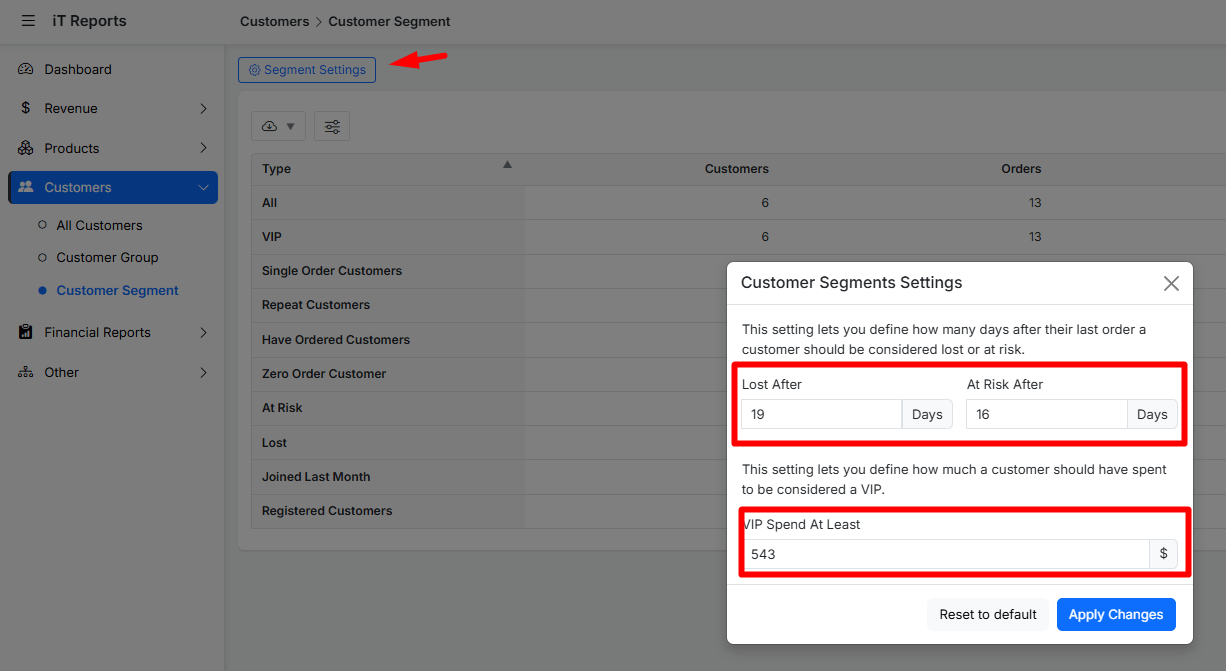
By applying these segments, you move from blasting generic messages to having personalized conversations that guide each customer to the next stage of their lifecycle.
Leveraging WooCommerce Reports for Improving Customer Experience
Ultimately, all this data analysis should lead to one thing: a better experience for the people who support your business. Every report contains clues about what your customers enjoy and where they encounter friction. By listening to this data, you can make informed changes that make shopping with you easier and more enjoyable.
For instance, a high number of refunds or returns on a specific product, visible in Refund Orders Report, is a direct signal of a potential product description or quality issue that needs fixing.
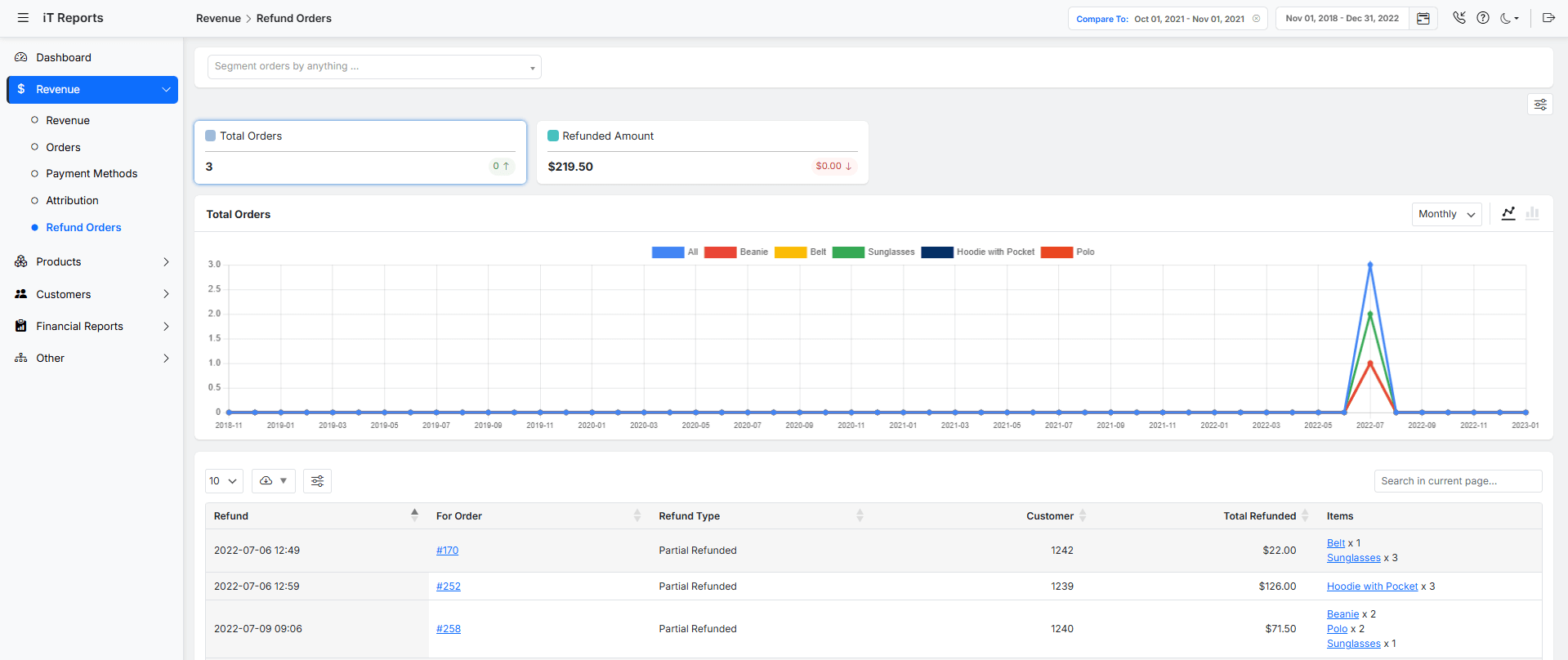
Similarly, if you see in your sales data that customers frequently purchase two specific items together, you can create a formal product bundle to simplify their journey.
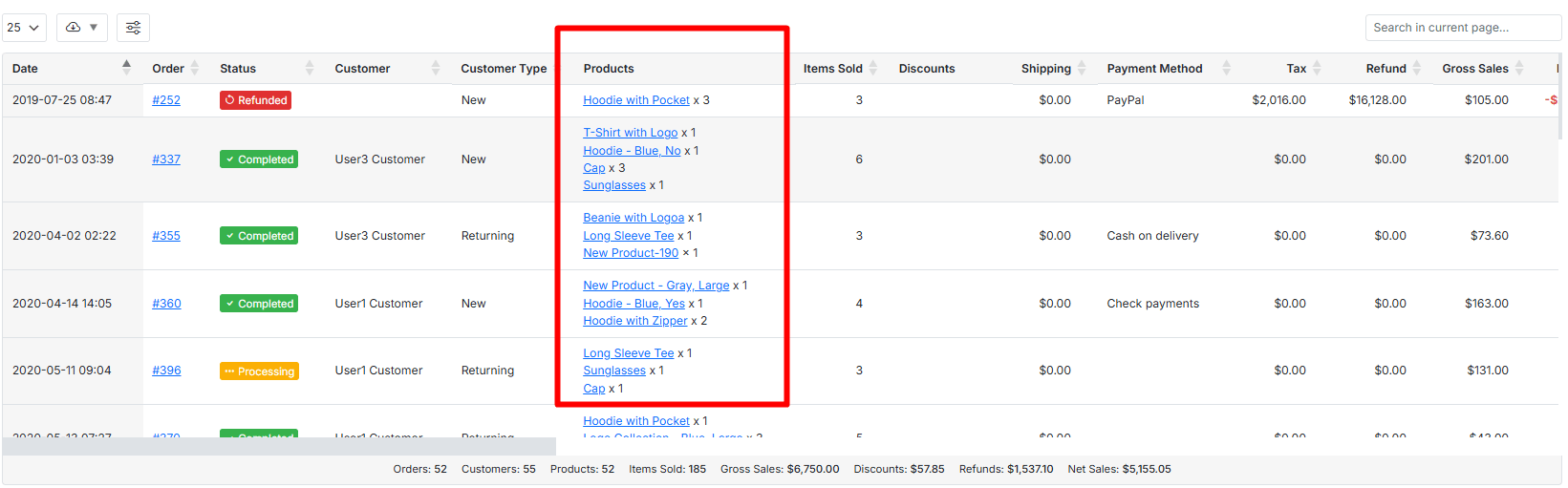
This proactive use of data turns your WooCommerce reports from a simple record-keeping tool into an active engine for improving satisfaction, building trust, and fostering lasting customer relationships.
Case Study: Applying Lifecycle Insights to Drive Sales
Here are some real-world case studies showing how businesses used customer lifecycle WooCommerce insights via WooCommerce reports and customer analytics WooCommerce to drive sales.
| Business / Brand | What Lifecycle Insights They Used (via WooCommerce Reports / Customer Analytics WooCommerce) | Actions Taken & Results |
|---|---|---|
| Segafredo Zanetti (Australia & NZ) | They segmented customers into lifecycle stages—new buyers vs returning buyers—using detailed WooCommerce analytics and reports. They examined behavior by channel, product line, and reactivation potential. | Ran reactivation campaigns targeting customers who hadn’t purchased in 90 days. Used coupons to bring them back. Result: over $700 revenue in a short campaign from a small group. |
| The Fish Club (Malaysia) | Even with limited history, they looked at Average Order Value, repeat order frequency, product interest, and customer loyalty trends via WooCommerce data analysis. | Focused on retention strategies: on-site messages, remarketing, loyalty “ambassadors.” This helped improve repeat business early on in their lifecycle. |
Best Practices for Customer Lifecycle Analysis in WooCommerce
Simply having access to reports isn’t enough; you need a strategy to use them effectively. The goal of customer lifecycle WooCommerce analysis is to move from reactive reporting to proactive business management.
Define KPI for each lifestyle stage
A fundamental best practice is to define clear Key Performance Indicators (KPIs) for each lifecycle stage. Don’t just look at “all the data.” For the acquisition stage, focus on your Cost per Acquisition and First-Time Order Value. For retention, track your Repeat Purchase Rate and Customer Lifetime Value (LTV). By knowing which numbers matter most at each stage, you avoid data overload and can quickly assess what’s working.
Segment your customers
Another critical practice is consistent segmentation. Your “New Customers” segment should be the foundation for analyzing acquisition campaigns, while your “VIP Customers” segment (e.g., those in the top 10% of LTV) should be the focus of your loyalty efforts.
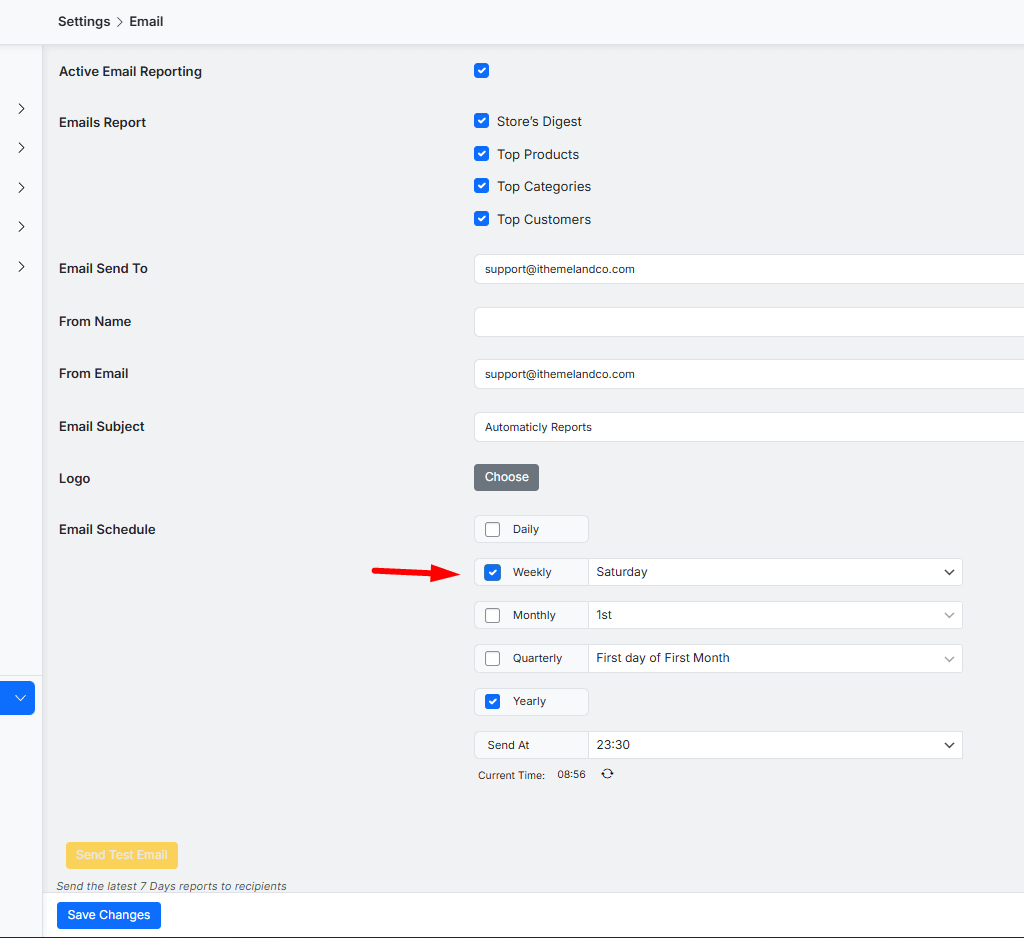
Schedule weekly review of sales report
Furthermore, make your analysis a regular rhythm, not a one-time event. Schedule a weekly review of your acquisition and sales reports and a monthly deep-dive into retention and LTV trends. This consistency allows you to spot emerging trends early, like a gradual dip in repeat purchases, so you can take action before it becomes a major problem.
REPORTiT – Advanced WooCommerce Reporting
The Proven Way to Master the Customer Lifecycle with WooCommerce Reports
Conclusion: Turning Insights into Action
The entire purpose of diving into WooCommerce reports and customer analytics is not just to gain insights, but to use those insights to make smarter business decisions. Data on a screen is just information; the action you take based on it is what creates growth. By systematically using WooCommerce reports to analyze, segment, and engage with customers at every stage of their journey, you stop guessing and start building a truly customer-centric business that is built for long-term success.
FAQ
Q: What is the customer lifecycle in WooCommerce?
A: The customer lifecycle in WooCommerce refers to the journey a customer takes from the first interaction with your store, through various stages such as acquisition, engagement, retention, and eventually, loyalty or churn.
Q: Which WooCommerce reports are most useful for understanding the customer lifecycle?
A: The most useful WooCommerce reports for understanding the customer lifecycle include sales by customer, new vs returning customers, customer retention rates, average order value, and customer lifetime value.
Q: How can I segment WooCommerce customers by lifecycle stage?
A: You can segment WooCommerce customers by exporting relevant reports and analyzing purchase recency, frequency, and monetary values, or by using plugins/extensions that offer advanced segmentation based on lifecycle criteria.
Q: Why is customer lifecycle analysis important for my WooCommerce store?
A: Lifecycle analysis helps identify where you lose potential customers, how to boost retention, and what drives repeat purchases, enabling smarter marketing and higher ROI.
Q: Are there plugins to enhance customer lifecycle reporting in WooCommerce?
A: Yes, there are several WooCommerce plugins and third-party analytics tools that provide enhanced customer reporting, segmentation, and lifecycle mapping capabilities.


