


Managing a large number of posts in WordPress often requires updating publish dates to keep content fresh and properly organized. However, changing the date of each post individually can be extremely time-consuming, especially for websites that publish a lot of articles.
Many website owners look for ways to perform a WordPress bulk edit publish date so they can update multiple posts at once. For example, bloggers may want to bulk update post dates after refreshing old articles, adjusting the order of posts on the blog page, or improving search visibility by updating outdated content.
Search engines often consider content freshness when ranking pages. Updating a post’s content and publish date can signal that the article is still relevant, which may improve its chances of appearing in search results. Because of this, many SEO experts recommend periodically updating older blog posts and adjusting their publish dates when significant updates are made.
Fortunately, WordPress allows you to bulk update posts using specialized tools and plugins. With the right solution, you can bulk change post dates, update modified dates, and manage hundreds of posts in just a few clicks instead of editing them one by one.
In this guide, we will show you how to bulk edit publish dates in WordPress using a powerful bulk editing plugin. You will learn how to filter posts, select multiple items, and quickly apply a bulk post update date to your WordPress content.
Why do you need to bulk post update date?
Updating dates can be very important so that we don’t let our posts get forgotten by search engines and ignored by our potential readers. You could lose thousands of readers if they see that your posts are out of date. They may think that if your posts were made, say, three years ago, they have nothing good to say on a current topic.
On the other hand, based on this Search Engin Land article, in the official Blogspot announcement of Google, it is stated that updating the content and its publication date affects 35% of the search terms, and it has a serious impact on approximately 6-10% of them, so updating the date of WordPress posts can partially save your posts from de-ranking.
If you never change the date of posts published in the past, Google recognizes that they are no longer relevant so it won’t display them in the search results. That’s why SEO experts recommend you update the content and post dates, regularly.
Bulk post update date is also important when you make some major changes to your blog posts and want to make them fresh. So, you can edit their publish date by bulk editing.
WordPress bulk edit publish date is also helpful when you want to change the order of posts on the blog page, you can manage it by changing the post published date. In this way, the recent blog post will appear at the top and the others are below, respectively.
How to change the publish date on WordPress with the WordPress posts/page bulk editing plugin?
The WordPress posts/page bulk edit plugin is an awesome tool that lets you update all WordPress fields of posts. It could help you quickly bulk update publish dates as well as featured images, authors, descriptions, excerpts, etc.
The plugin also has a comprehensive filter form allowing you to easily find the preferred WordPress posts and apply bulk post update date on them.
Let’s review how this plugin could benefit WordPress’s bulk edit publish date.
Step 1: Install the WordPress posts bulk editing plugin
The plugin is simple and easy to install. Once you have installed the plugin (here is the step-by-step guide), head over to WordPress Dashboard > iT Bulk Editing > WP posts, and you will see the main page of the plugin.
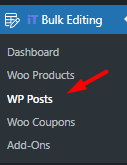
On the main page, the following items are designed to make bulk editing the WordPress fields as simple as possible:
- A toolbar on top of the posts list.
- A table including a list of all posts, pages, or custom posts.
WPBULKiT – Bulk Edit WordPress Posts / Pages plugin by ithemeland
The easy way to bulk edit WordPress posts publish date

If you want to bulk post update date, we recommend you to click on the second icon of the toolbar and choose Post from the list of WordPress post types as shown below:
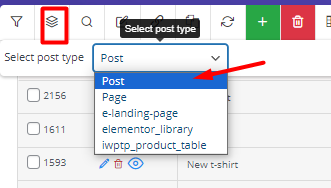
So, the plugin will just display a list of all WordPress posts in the table.
Now, you can use the following tools to change post date WordPress:
- Filter desired WordPress posts.
- Bulk edit posts publish date.
- Bind edit posts publish date.
- Column manager.

In the next steps, we are going to describe how to change the post publish date on WordPress with these tools seamlessly.
Step 2: Filter WordPress posts
Filter form is a helpful tool when you need to first, find desired WordPress posts and then change their publish date. It has a simple design including all WordPress fields that are divided into four tabs to help you find what you are looking for, faster.
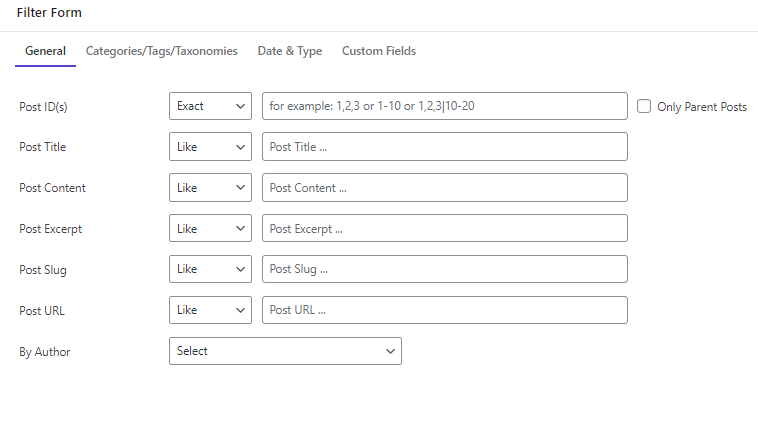
When you set the conditions related to the WordPress fields, easily press the Get Posts buttons to see the filtered posts in the table.
Now you are ready to change publish date WordPress in bulk. Let’s see how.
Step 3: Select desired WordPress posts and then apply WordPress bulk edit publish date
In the WordPress bulk posts/pages bulk edit plugin, there are different methods for making changes to post fields, including:
- Bulk Edit method: Use options in the bulk edit form to change the date on WordPress post.
- Bind Edit method: Change the publish date WordPress of multiple posts, directly in table.
- Inline Edit method: Revise the WordPress publish date of a single post in the table.
To use the first two methods, you need to mark some posts in the table, and then use the right tool to edit the publish date.
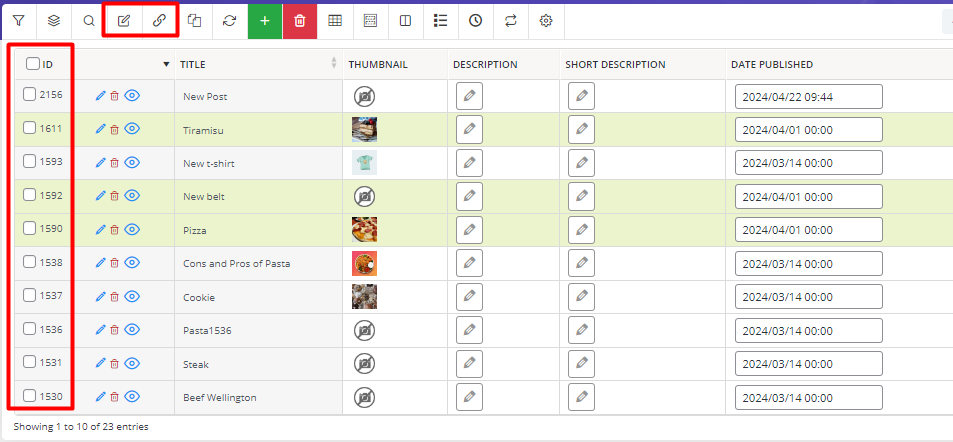
Now, let’s review the step-by-step guide about using different methods for WordPress bulk edit publish date.
Method 1: Use bulk edit form for WordPress change post date
The bulk edit form has a lot of amazing features for making more complicated changes to WordPress fields.
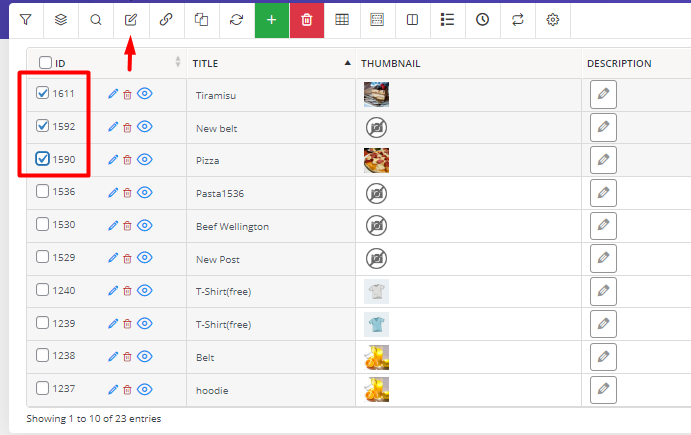
To set a new date for the published posts, you can:
- Mark the desired WordPress posts in the table.
- Open the Bulk Edit form.
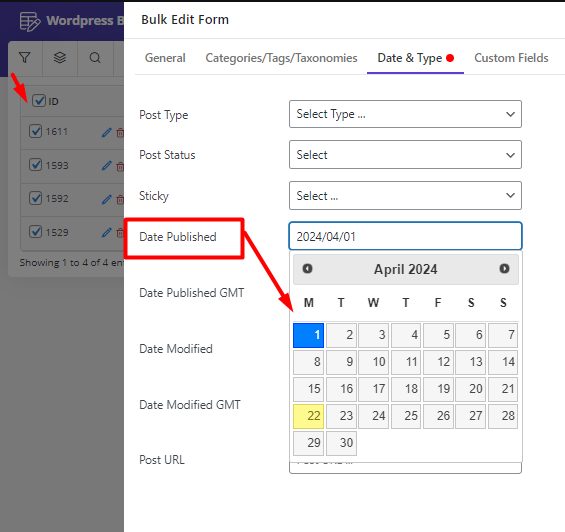
- Go to the Date&Type tab.
- Use the built-in calendar in front of the Date Published field.
- Choose your preferred date- 1. April.2024 in this example.
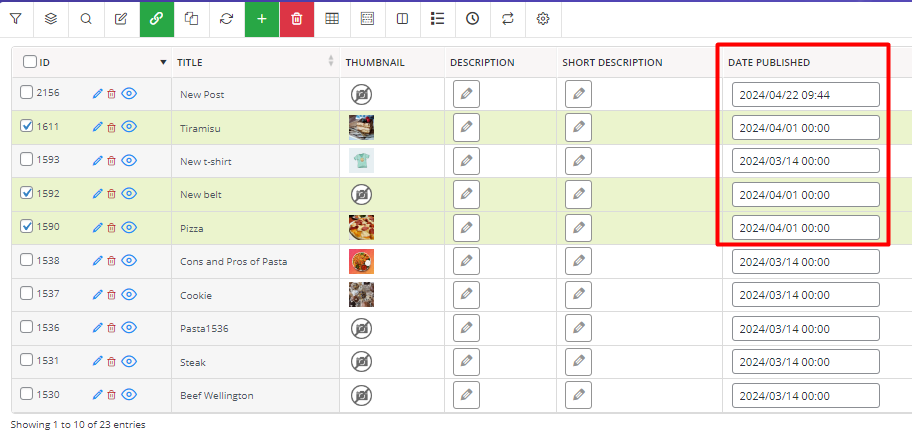
- Press the Do Bulk Edit button to see the result.
Method 2: Use the bind edit tool to change the WordPress post date
Another useful method allowing to change of multiple posts data directly in the table is bind editing. This method is beneficial when you want to quickly bulk edit posts with minor changes.
Let’s try to bind edit WordPress posts date:

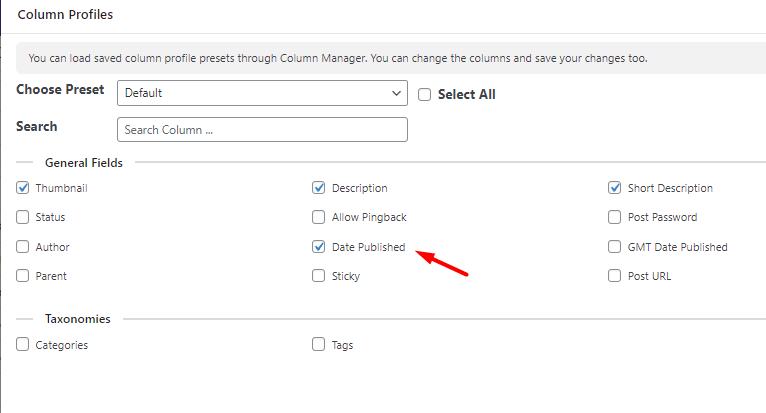
- Open the Column Profile tools and mark the Date Published.
- Press Appy to Table to add this column to the table.
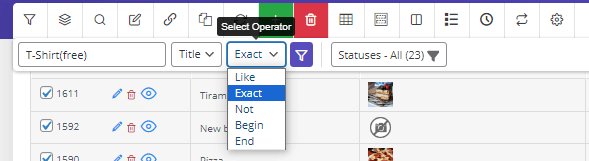
- Use the Quick Search tool to filter the WordPress posts by title or ID.

For example, we tried to find the posts that their titles are exactly T-Shirt(free)
- Mark all filtered posts in the table.
- Press the Bind Edit tool.
- Click on the Date Published column of one post.
- Use built-in calendar and choose your preferred date.
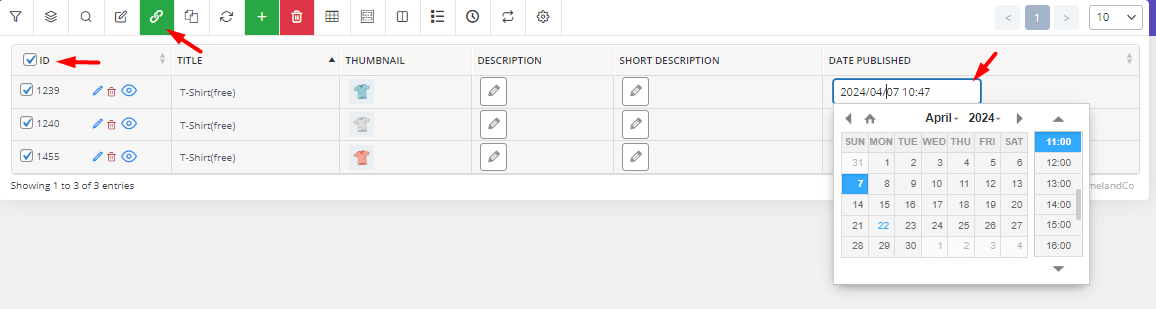
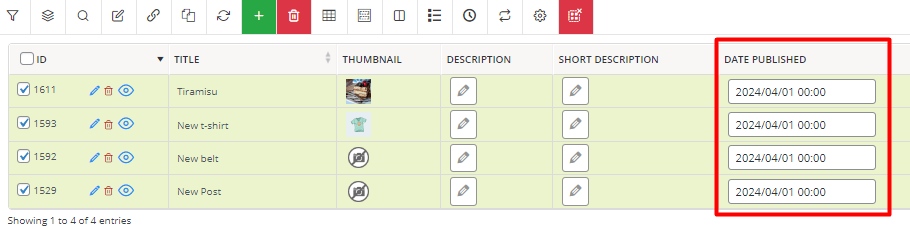
- Press Apply Changes and you can see that post published date has been edited as shown below:

Example 1: WordPress change publish date for all posts from a specific category
If your goal is to bulk post update date of a specific category, follow the below simple steps:
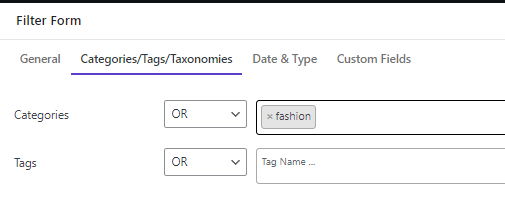
- Open the Filter form and go to the Categories/Tags/Taxonomies tab.
- Choose your desired category from the dropdown list of Categories field – Fashion in this example.
- Press the Get Posts button.
- Mark all posts in the table and open the Bulk Edit form.
- Go to the Date & Type tab.
- Use the built-in calendar and set the date.
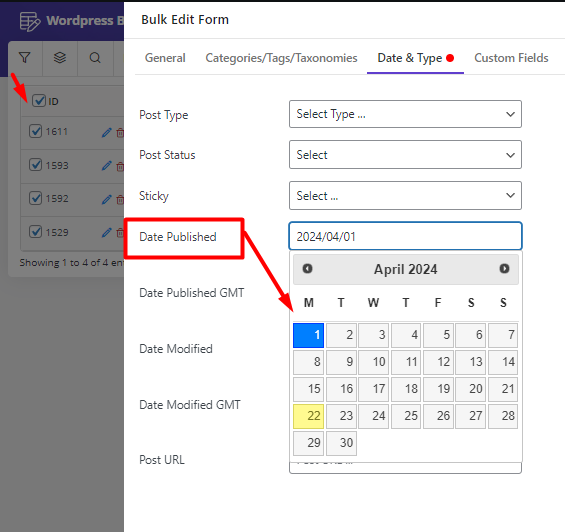
- Press the Do Bulk edit button to see the changes in the table.
Example 2: Change post date WordPress for a specific author
Suppose that you want to quickly apply WordPress bulk edit publish date on some posts published by specific user.
To make this happen, try to:
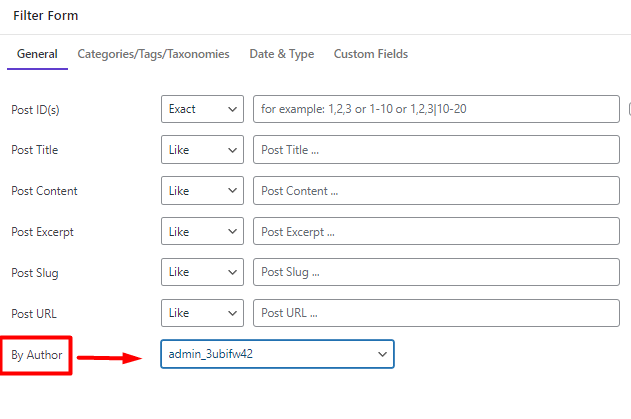
- Go to Filter Form > General Tab > Author field.
- Select your preferred author from the list.
- Press the Get Posts button.
- Mark desired posts in the result table.
- Activate the Bind Edit tool.
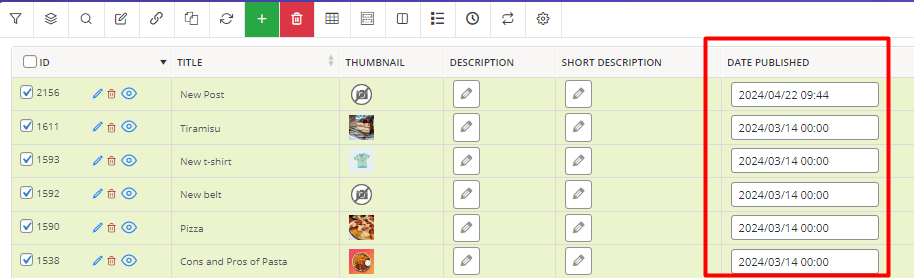
- Use the built-in calendar of the Date Published field related to one of the selected posts in the table.
- Pick your date and press the Enter Key on the Keyboard.
That’s it. You have successfully change post date WordPress by bind edit tool.
WPBULKiT – Bulk Edit WordPress Posts / Pages plugin by ithemeland
The easy way to bulk edit WordPress posts publish date
Other plugins for WordPress bulk edit publish date
Update WordPress post date manually requires a lot of time and effort and it is not a useful option when you publish a lot of posts in your blog. In this case, it makes sense to use one of the WordPress plugins to update the date of multiple posts at once.
Here, you can find the best ones:
Bulk post update date plugin

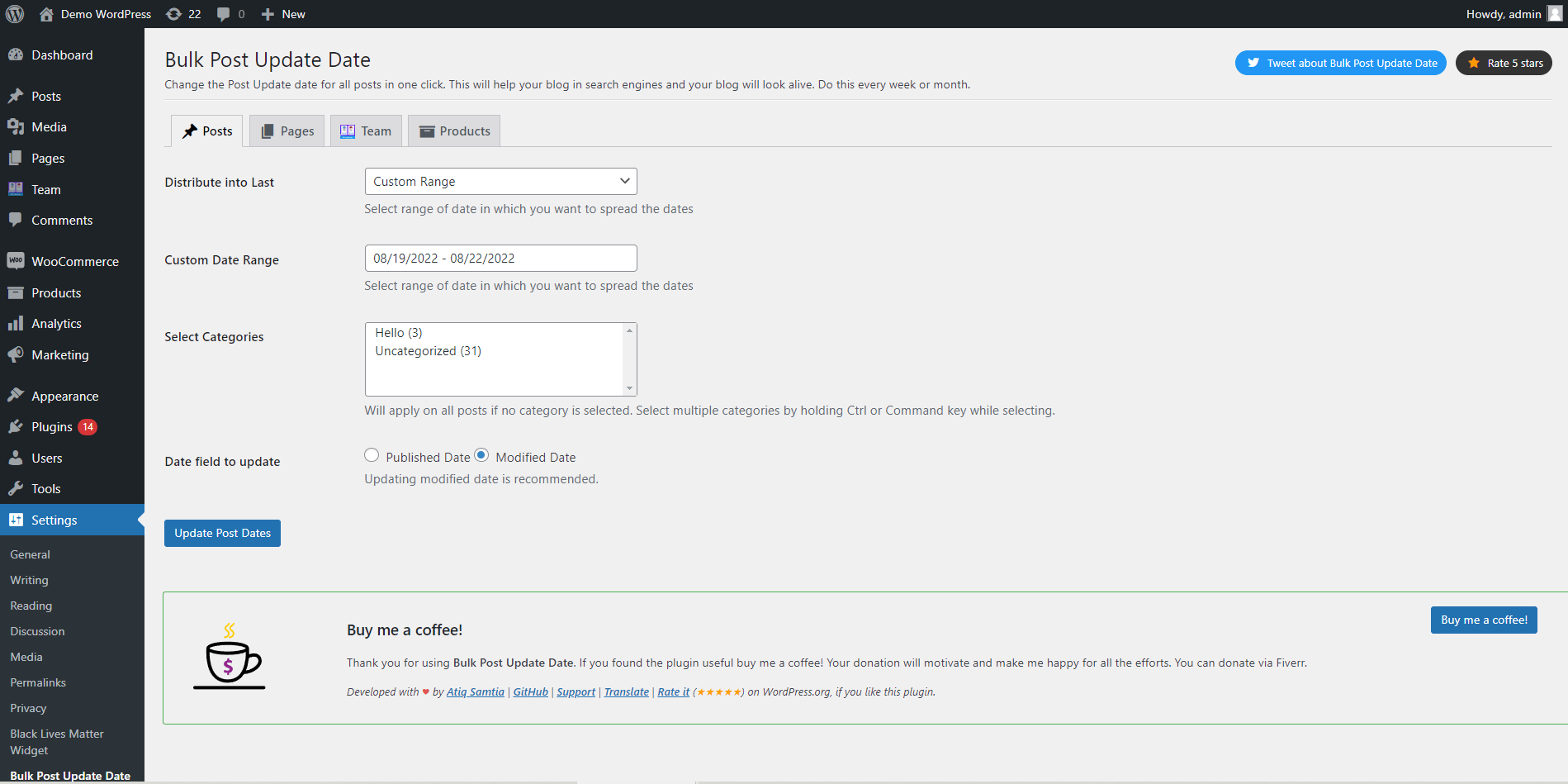
The bulk post update date plugin is designed as a simple and light solution for updating the published date of all posts and pages with one click. If you have massive blogs and content, easily get help from this plugin to bring your older posts on top and make search engines like Google rank the newly added or modified posts higher than the older ones.
Key Features:
- WordPress bulk edit publish or modified date.
- Bulk page update published or modified date.
- Bulk edit WordPress custom post date.
- Update comments post date WordPress.
- Generate random dates in a specified custom interval or date range and assign them to multiple posts.
- WordPress update post modified date of specific categories.
Price: You can install and use this plugin for free
Bulk datetime change plugin
The bulk datetime change plugin allows you to change the publication date of blog posts. Changing the release date of WordPress media is another interesting feature of this plugin. This lightweight and functional plugin is the simplest tool that you can use to change the publish date for bulk edit posts, pages, and WordPress media. In this plugin, a date/time picker has been designed, with the help of which you can specify the exact publish date and time of posts.
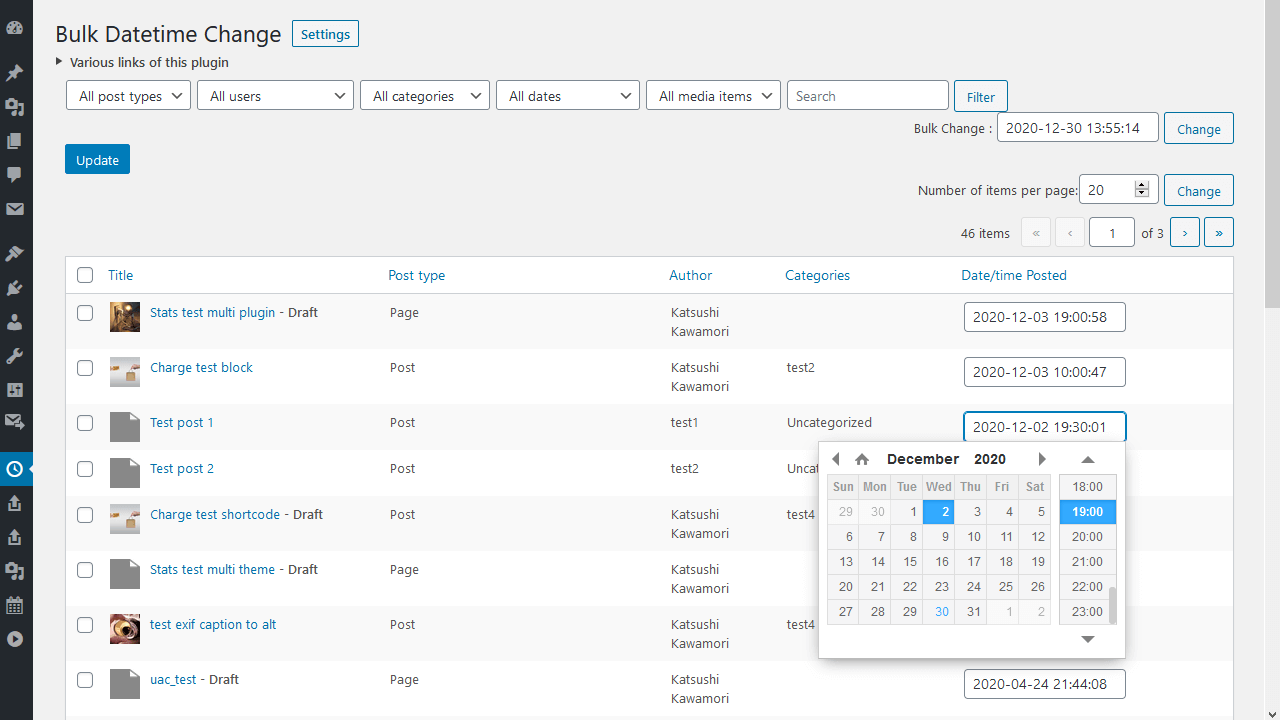
Key features:
- WordPress change publish date in bulk.
- Change post date WordPress with a built-in calendar.
- WordPress change date of pages.
- Change the publish date or modified date of WordPress posts.
- Bulk edit WordPress publish date of media.
Price: You can use all tools and options of this plugin for free.
Conclusion
Updating the publish date of your content can play an important role in keeping your WordPress website organized and relevant. When blog posts are refreshed with new information, updating the publish date helps signal that the content has been improved and remains valuable for readers.
However, manually editing the date of each post is inefficient when you manage dozens or hundreds of articles. This is where WordPress bulk edit publish date tools become extremely useful. With a bulk editing plugin, you can filter posts, select multiple items, and apply a bulk post update date within seconds.
Using bulk editing features not only saves time but also allows you to maintain a better publishing schedule, reorganize blog posts, and keep your content fresh for both readers and search engines. Whether you need to bulk change post dates after updating old articles or simply want to reorder your blog posts, a WordPress bulk editing solution provides the fastest and most efficient way to manage post dates.
FAQ
What is WordPress bulk edit publish date?
WordPress bulk edit publish date refers to the process of changing the publication date of multiple posts at the same time. Instead of editing posts individually, bulk editing tools allow you to update the publish date for many posts or pages simultaneously, which is much faster for large websites.
How can I bulk update post dates in WordPress?
You can bulk update post dates in WordPress by using a bulk editing plugin that allows you to filter posts and apply changes to multiple items at once. These tools enable you to modify publish dates, last modified dates, authors, and other fields directly from a single interface.
Why should I change the publish date of WordPress posts?
Changing the publish date of posts can help keep your blog content fresh and organized. Website owners often update publish dates after refreshing old articles, improving content for SEO, or reorganizing the order of posts on their blog page.
Can I bulk change the last modified date in WordPress?
Yes, many WordPress bulk editing plugins allow you to bulk edit the last modified date of posts. This feature is useful when you update older content and want the modification date to reflect the latest changes.
Is there a way to bulk update WooCommerce product dates?
Yes, WooCommerce product publish dates can also be updated in bulk using WordPress bulk editing plugins that support custom post types. This allows store owners to quickly change the publish or modified date of multiple products at once.


