
If you are comparing GWP vs BOGO, the first step is understanding what each promotion actually means. GWP means Gift With Purchase, a marketing strategy where customers receive a free gift after meeting a purchase condition, such as buying a specific product or reaching a minimum order value. BOGO means Buy One Get One, a promotion where customers buy one product and receive another item for free or at a discount.
Both strategies can increase sales, but they work in different ways. A gift with purchase promotion is often used to increase perceived value, introduce new products, improve customer loyalty, and encourage shoppers to spend more. BOGO promotions are usually better for driving quick sales, moving inventory, and attracting price-sensitive customers.
In this guide, you’ll learn the meaning of GWP, what BOGO means, the key differences between gift with purchase and BOGO, practical gift with purchase ideas, and when each strategy works best for ecommerce stores. You’ll also see how WooCommerce store owners can create both GWP and BOGO promotions using GIFTiT – Free Gifts For WooCommerce.
The right setup depends on your products, customers, and campaign goal. For additional context before choosing between gift-with-purchase and BOGO, see WooCommerce free gift plugin guide.
What is a gift with purchase (GWP)?
A Gift with Purchase (GWP) is a promotional strategy where customers receive a free gift when their orders meet specified conditions, like purchasing a qualifying product or spending a minimum amount. Unlike discounts, GWP encourages shoppers to buy by offering added value rather than a price reduction.
Common examples of gift with purchase (GWP)
- A free product (sample, accessory, or exclusive item) is bundled with a purchase.
- Often used in beauty, fashion, and luxury industries (e.g., “Free tote bag with $50+ purchase”).
- Can be tiered (e.g., higher-value gifts for bigger purchases).
Benefits of gift with purchase strategy:
- Increases average order value (AOV) by incentivizing higher spending.
- Introduces customers to new products (great for samples or new launches).
- Enhances brand loyalty with exclusive freebies.
Understanding BOGO promotions
Buy One Get One (BOGO) is a sales promotion where customers get a second item for free when they purchase one at full price.
Types of BOGO:
- BOGO Free (Same product as gift)– Buy one, get the same for free (e.g., “Buy 1 Shirt, Get 1 Free”).
- BOGO Free (Different product as gift)– Buy one, get another free (e.g., “Buy 1 Shirt, Get 1 cap for Free”).
- BOGO Repeat (Buy 1 Get 1 Repeat) – The offer applies repeatedly based on the quantity purchased (e.g., buy 2, get 1 free; buy 4, get 2 free, and so on). Unlike standard BOGO, it’s not limited to a single free item per transaction.
Benefits of BOGO promotion strategy:
- Drives quick sales and clears excess inventory.
- Encourages bulk purchases (common in food, apparel, and electronics).
- Simple and attractive to bargain hunters.
Key Differences Between GWP and BOGO
| Feature | Gift with Purchase (GWP) | Buy One Get One (BOGO) |
|---|---|---|
| Free Item | Different product (e.g., sample, accessory) | Same or bundle product |
| Goal | Increase order value, introduce new products | Boost sales volume, move inventory |
| Best For | Luxury, beauty, subscription boxes | Retail, F&B, high-volume products |
| Perceived Value | “Exclusive bonus” feel | “More for less” deal |
Pros and cons of Gift with purchase vs BOGO
Both Gift with Purchase (GWP) and Buy One Get One (BOGO) are effective sales strategies, but each has its strengths and weaknesses. Understanding the pros and cons of Gift with purchase vs BOGO will help you choose the right promotion for your business.
Gift with Purchase (GWP) – Pros and Cons
| Pros: | Cons: |
| ✅ Boosts Perceived Value: Customers feel they’re getting an exclusive bonus, enhancing brand perception. ✅ Increases Average Order Value (AOV): Encourages shoppers to spend more to qualify for the free gift. ✅ Great for Product Sampling: Introduce new products without heavy discounts (common in beauty & cosmetics). ✅ Enhances Customer Loyalty: Free gifts create a positive experience, increasing repeat purchases. | ❌Higher Cost for Businesses: Requires sourcing, storing, and shipping free gifts, which cuts into margins. ❌ Risk of Low-Quality Gifts Hurting Brand Image: Cheap or irrelevant freebies can disappoint customers. ❌ May Attract “Gift Hunters”: Some buyers only purchase to get the free item, then return the main product. |
Buy One Get One (BOGO) – Pros and Cons
| Pros: | Cons: |
| ✅ Drives Immediate Sales: Effective for clearing excess inventory quickly. ✅ Encourages Bulk Purchases: Works well in fashion, food, and electronics (e.g., “Buy 1, Get 1 Free” on shirts). ✅ Simple & Easy to Market: Customers understand the deal instantly—no complex conditions. ✅ Attracts Price-Sensitive Shoppers: Bargain hunters love BOGO promotions. | ❌ Lower Profit Margins: Giving away free or discounted products reduces revenue per sale. ❌ May Train Customers to Wait for Deals: Shoppers might delay purchases until the next BOGO offer. ❌ Less Effective for Premium Brands: Luxury brands avoid BOGO to maintain exclusivity. |
When to use Gift with purchase vs BOGO in WooCommerce?
When choosing between Gift with Purchase (GWP) and Buy One Get One (BOGO), businesses should align their strategy with specific goals—whether it’s boosting order value, clearing inventory, or attracting new customers. Below is a breakdown of the best approach for different objectives, along with an advanced strategy to maximize impact.
| Goal | Best Strategy | Advanced Strategy |
|---|---|---|
| Increase order value & brand prestige | GWP | Combine GWP + BOGO for high-impact sales (e.g., Black Friday). |
| Clear out old stock fast | BOGO | Layer with limited-time urgency (e.g., “BOGO + Free gift while supplies last!”). |
| Introduce new products | GWP (samples) | Offer a free new product sample with BOGO on best sellers. |
| Attract bargain shoppers | BOGO | Pair BOGO with a small free gift to enhance perceived value. |
| Build long-term loyalty | GWP (exclusive gifts) | Combine VIP-tiered rewards (e.g., “Spend $X, get a gift + BOGO for members only”). |
Real-world examples
Let’s look at how major brands and e-commerce stores successfully implement these strategies:
- Sephora (Beauty Retail)
Gift with purchase: “Free 8-piece luxury sample bag with $75 purchase”
Why it works:
- Encourages customers to reach the spending threshold.
- Introduces new products through samples.
- Creates excitement around the “free gift” value.
- Lancôme (Luxury Cosmetics)
Gift with purchase: “Free deluxe gift set with any $39.50 purchase”
Why it works:
- Uses premium packaging to enhance perceived value.
- Includes full-size products to increase appeal.
- Limited-time offer creates urgency.
3. Apple (Tech)
Gift with purchase: “Free AirPods with MacBook purchase (back-to-school season)”
Why it works:
- High-value gift justifies premium pricing.
- Timed with seasonal buying periods.
- Gift is complementary to the main product.
4. Starbucks (Food & Beverage)
Gift with purchase: “Free reusable cup with holiday drink purchase”
Why it works:
- Eco-friendly gift aligns with brand values.
- Encourages the purchase of seasonal items.
- The gift has practical utility.
5. Old Navy (Apparel)
BOGO Deal: “Buy One, Get One 50% Off all jeans”
Why it works:
- Clear, simple offer structure.
- Encourages multiple purchases.
- Effective for moving inventory.
6. Ulta Beauty
BOGO Deal: “Buy 1, Get 1 50% Off all haircare”.
Why it works:
- Appeals to customers who use products regularly.
- Works well with consumable products.
- Easy to implement across product categories.
7. Pizza Hut (Food)
BOGO Deal: “Buy One Large Pizza, Get One Free”.
Why it works:
- Perfect for shared meals.
- Simple value proposition.
- Drives immediate sales.
8. Best Buy (Electronics)
BOGO Deal: “Buy One Video Game, Get One 40% Off”.
Why it works:
- Targets gamers who want multiple titles.
- Partial discount protects margins.
- Timed with new releases.
How to set Gift with purchase vs BOGO in WooCommerce using plugin?
Running effective promotions like Gift with Purchase (GWP) and Buy One Get One (BOGO) can significantly boost sales, attract customers, and clear inventory. However, manually managing these offers can be complex, especially for high-traffic stores.
The right eCommerce plugins automate these promotions, ensuring smooth implementation while avoiding pricing errors or fulfillment issues. Below, we compare how to set up GWP vs. BOGO using popular WooCommerce plugins, along with a step-by-step guide for applying them on your store.
Free gift for WooCommerce
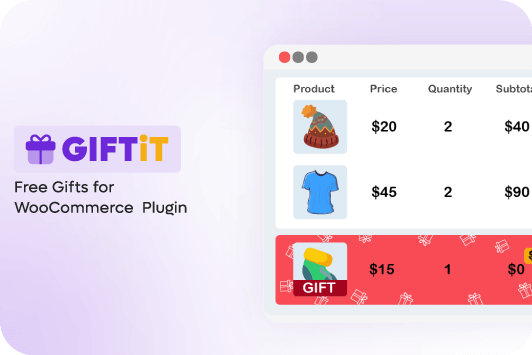
Free Gift for WooCommerce stands out as the most comprehensive solution for running both Gift with purchase vs BOGO promotions seamlessly.
What makes this plugin truly powerful is its dual functionality – it eliminates the need for multiple plugins by handling all types of promotional campaigns within a single, user-friendly interface.
Merchants can effortlessly set up conditional free gifts based on cart value, specific products, or categories while simultaneously running sophisticated BOGO deals with flexible “Buy X Get Y” configurations.
The plugin’s intelligent rules engine allows for precise targeting, including the ability to exclude sale items or restrict offers to certain customer roles.
For stores looking to run complex campaigns, the plugin supports hybrid promotions where you can combine GWP and BOGO offers, like offering a free gift at a $100 threshold while also providing BOGO deals on selected clearance items.
Advanced tracking features provide valuable insights into redemption rates, helping merchants measure campaign effectiveness and ROI.
What truly sets this plugin apart is its perfect balance of power and simplicity. While offering enterprise-level promotion capabilities, it maintains an intuitive interface that doesn’t require coding knowledge.
The ability to test different promotion strategies (Gift with purchase vs BOGO or combinations) within the same ecosystem makes it invaluable for stores looking to optimize their marketing efforts.
Whether you’re a small boutique testing promotional strategies or a large retailer running coordinated campaigns, this plugin scales to meet your needs while providing the flexibility to experiment with different approaches to maximize sales and customer engagement.
Core Features
- Handles both GWP (Gift with Purchase) and BOGO (Buy One Get One) in one plugin.
- No need for multiple plugins—run all promotions from a single dashboard.
- Offer flexible GWP rules based on:
- Cart total thresholds.
- Specific products/categories in the cart.
- Customer roles (e.g., VIP-only gifts).
- And more.
- Let customers choose their gift from multiple options.
- Set advanced BOGO deals.
- Works with product variations (e.g., “Buy 1 T-shirt, Get 1 Free in any color”).
- Exclude sale items from promotions.
- Smart display options like pop-up notifications.
- Customizable messages for better engagement.
- Run Hybrid Promotions like GWP + BOGO in one campaign (e.g., “Spend $100, get a free gift + BOGO on select items”).
- Stack promotions for Black Friday, holiday sales, or clearance events.
- Block promotions for specific user roles (e.g., wholesalers).
- Exclude already-discounted items from deals.
- Set time-limited promotions.
- Advanced Analytics & Tracking
Ideal For:
- Stores that want both GWP & BOGO in one tool.
- Running complex promotions (e.g., tiered gifts + BOGO).
- Optimizing campaigns without technical hassle.
Why Free Gifts for WooCommerce is the best choice?
The WooCommerce free gifts plugin is uniquely capable of handling both gift-with-purchase vs BOGO promotions within a single interface. It allows you to:
- Set conditional free gifts (GWP) based on cart total, products, or categories.
- Configure “Buy X Get Y” rules (BOGO) with flexible combinations.
- Offer gifts as popups or cart/checkout notifications.
- Exclude sale items or specific user roles.
For hybrid campaigns, you can combine both approaches, like offering a free gift at a spending threshold plus BOGO deals on select items. The plugin tracks redemption rates and helps optimize promotions without coding.
Step-by-Step Setup Guide to run Gift with purchase vs BOGO
Below, we’ll walk you through the exact steps to configure both gift with purchase vs BOGO strategies using the Free Gifts for WooCommerce plugin, ensuring smooth, error-free campaigns.
Step 1: Install & activate the “Free Gift for WooCommerce” plugin
To install the “Free Gift for WooCommerce” plugin, first download the plugin ZIP file from the official source or a trusted provider. Then, log in to your WordPress admin dashboard, navigate to Plugins > Add New, and click the Upload Plugin button.
Choose the downloaded ZIP file and click Install Now.
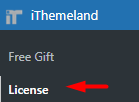
Once installed, go to iThemeland > Free gifts > license, then insert the Activation Key to enable its features.
Step 2: Add a new Rule
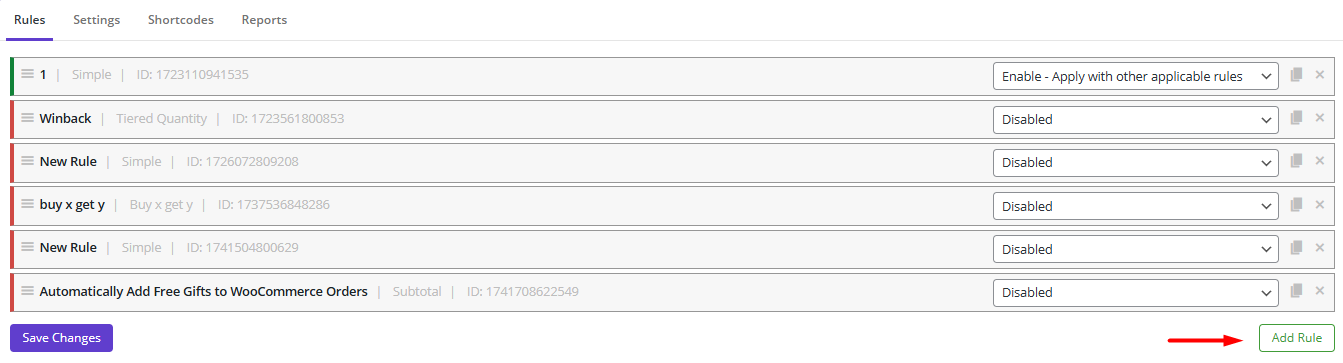
Go to WordPress Dashboard > iThemeland > Free Gifts
In the Rules page, you need to click on the Add Rule button to create a new rule.
Step 3: Choose promotion method and configure options
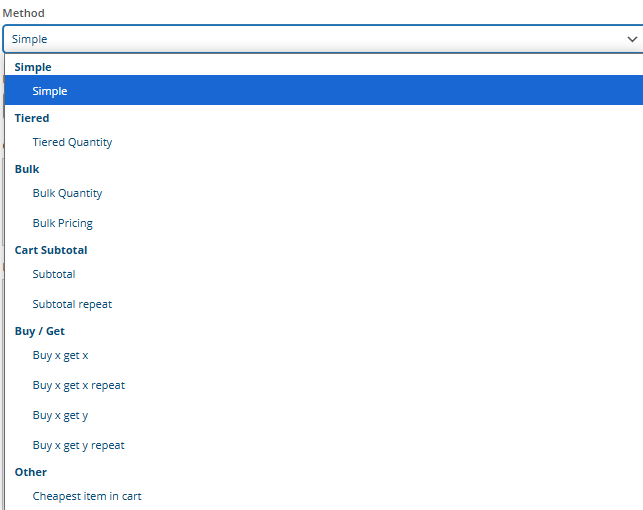
To set up custom gift promotions, you’ll need to define your rules in the “Rule” form. This step is divided into different key sections depending on the Method you have chosen to help you tailor the perfect offer for your customers.
1. Choose a gift offer method
Select the best gift with purchase strategy for your campaign from the following options:
- Simple Giveaway – Customers receive a free gift with every order, no minimum purchase required.
- Buy X, Get Y (Repeatable) – Purchase a specific product (X) and receive a different product (Y) as a free gift.
- Buy X, Get X (Repeatable) – Buy a product and get the same item for free (ideal for BOGO deals).
- Subtotal-Based (Repeatable) – Offer gifts when the order total reaches a set amount (e.g., “Spend $100, Get a Free Gift”).
- Tiered Quantity – Reward customers with gifts based on quantity purchased (e.g., buy 3 items = 1 gift, buy 5 = 2 gifts).
- Bulk Quantity Range – Provide gifts when product quantities fall within defined ranges (e.g., 1-3 items = 1 gift, 4-6 = 2 gifts).
- Bulk Pricing Tiers – Set gift rules based on order value ranges (e.g., 50−150 = 1 gift, $150+ = 2 gifts).
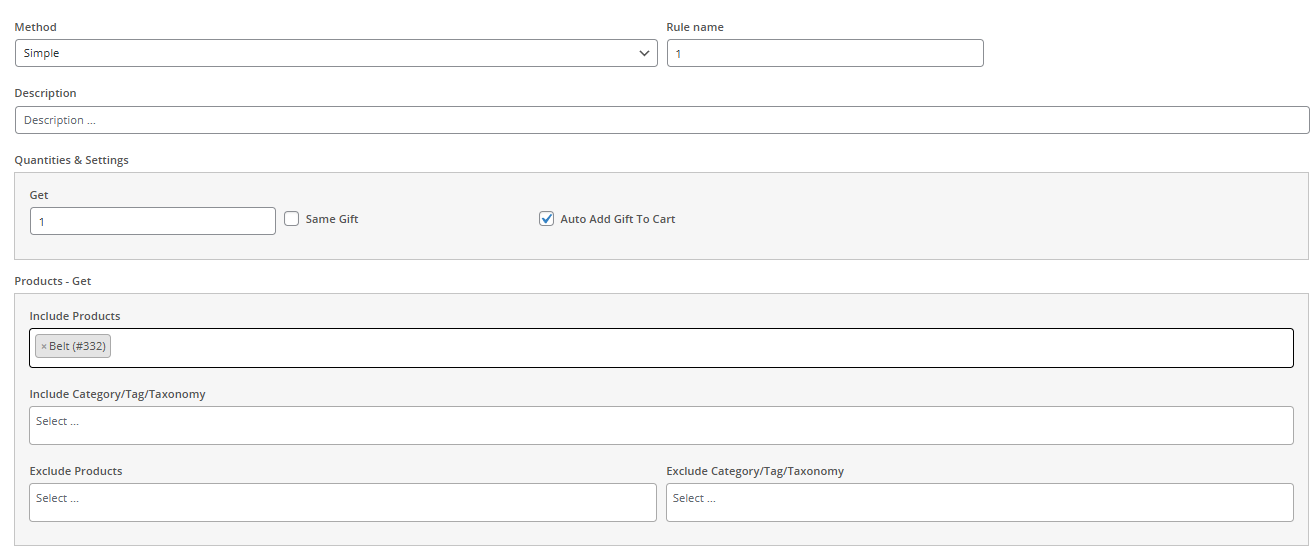
2. Adjust Quantities & Rule Settings for Gift with purchase vs BOGO
Once you’ve selected a method, customize the details:
Purchase Requirements
- In the Get field:
- For product-based rules: Define how many items must be bought (e.g., “Buy 2, Get 1 Free”).
- For subtotal rules: Set the minimum order value (e.g., “Spend $75, Get a Gift”).
- In the Buy field, set free gift quantity – Enter how many gifts the customer receives.
- Auto-Add to Cart – Enable to automatically include the gift in the cart.
- Same Gift (For Repeat Methods) – If using “Repeat” Gift With Purchase methods, check this to give the same product as the gift.
- Product Buy- Select Qualifying Products
Specify which products or categories trigger the promotion:
- Included Products – Choose specific items that activate the gift offer.
- Excluded Products – Prevent certain products from qualifying.
- Included Categories – Apply the rule only to items from selected categories.
- Excluded Categories – Block entire categories from the promotion.
4. Product Get – Choose Free Gift Products
Pick which items will be given away for free:
- Included Gift Products/Categories – Select the exact products or categories to offer as gifts.
- Excluded Gift Products/Categories – Restrict certain items from being given away.
By carefully configuring these settings, you can create targeted, high-converting promotions that enhance customer satisfaction and boost sales.
Step 3: Set Conditions for Gift with purchase vs BOGO Rule
To fine-tune your promotions, you can apply advanced conditions to ensure the right customers receive the right offers. These rules help you control eligibility, timing, and restrictions for both ” Gift with purchase vs BOGO”.
Key Conditions to Customize Your Promotion:
- Customer Roles – Limit the offer to specific user groups (e.g., VIP members, first-time buyers, or logged-in users only).
- Promotion Schedule – Set exact start and end dates to run time-sensitive deals (e.g., holiday specials or flash sales).
- Usage Limits – Control how often a customer can redeem the offer (e.g., “Once per customer” or “Max 3 uses per account”).
- Cart Requirements – Trigger gifts only when certain cart conditions are met, such as:
- Minimum number of products from a specific category
- Inclusion/exclusion of certain items
- Cart subtotal thresholds
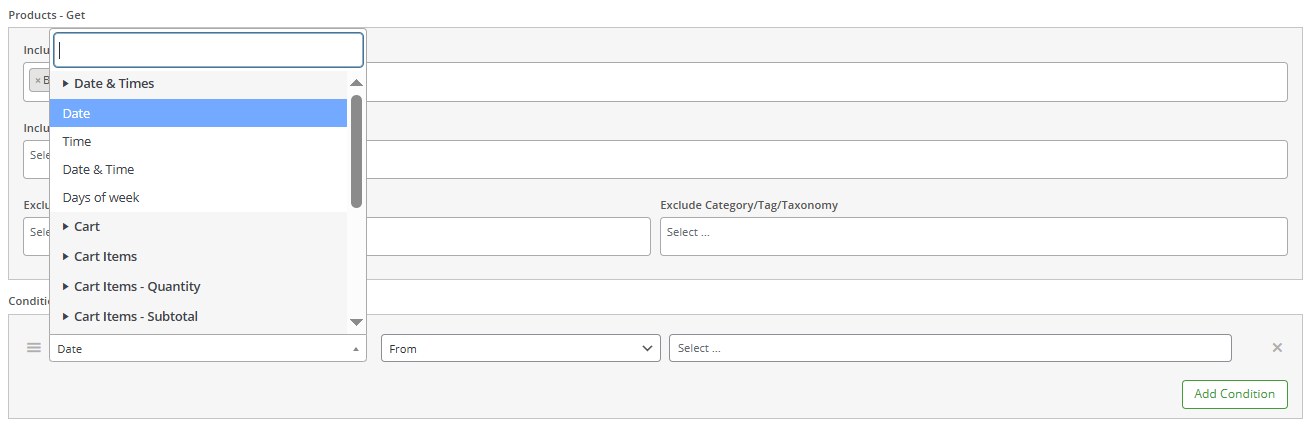
To adjust these settings, press Save Changes, so you can create targeted, high-impact promotions that prevent abuse, maximize conversions, and enhance customer loyalty.
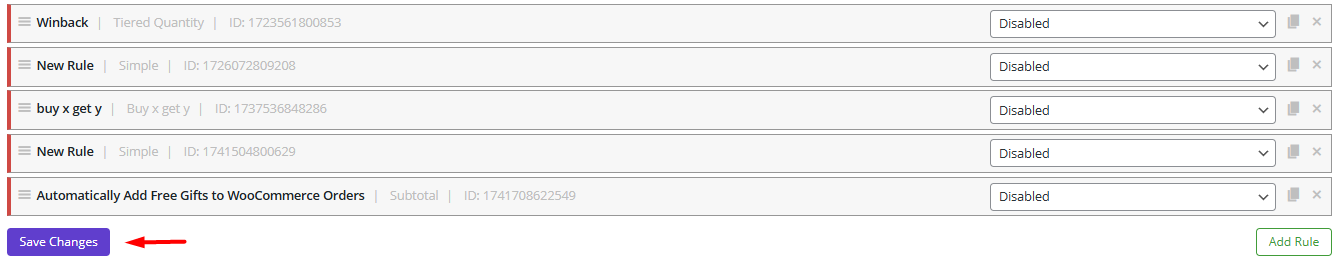
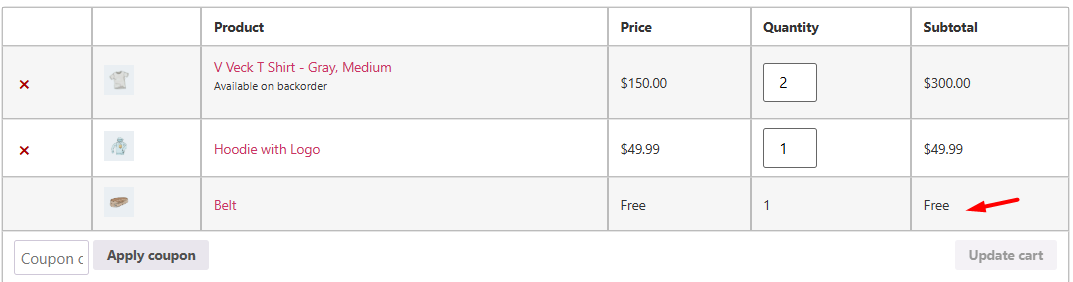
Step 4: Check the result
If all conditions are met (e.g., the customer add the required product or spends the minimum amount to the cart), the free gift will automatically appear in their cart (if auto-add is enabled).
GIFTiT – Free Gifts For WooCommerce
The easy way to leverage Gift with Purchase vs BOGO strategies in WooCommerce
Example: How to Offer BOGO (Buy One Get One) with the Free Gift for WooCommerce plugin
With this plugin, you can easily create BOGO deals with bonus gifts in just a few steps:
1. Choose “Buy X Get X “ Method
2. Adjust Quantities & Settings as follows:
- Buy: 1,
- Get: 1
- Enable Auto-Add to Cart to automatically apply the free item
3. Buy Products: Select which products trigger the BOGO deal.
4. Set Conditions (Optional) like:
- Limit by user role (e.g., logged-in users-only).
- Set start/end dates for time-sensitive promotions.
- Restrict usage limits (e.g., once per customer).
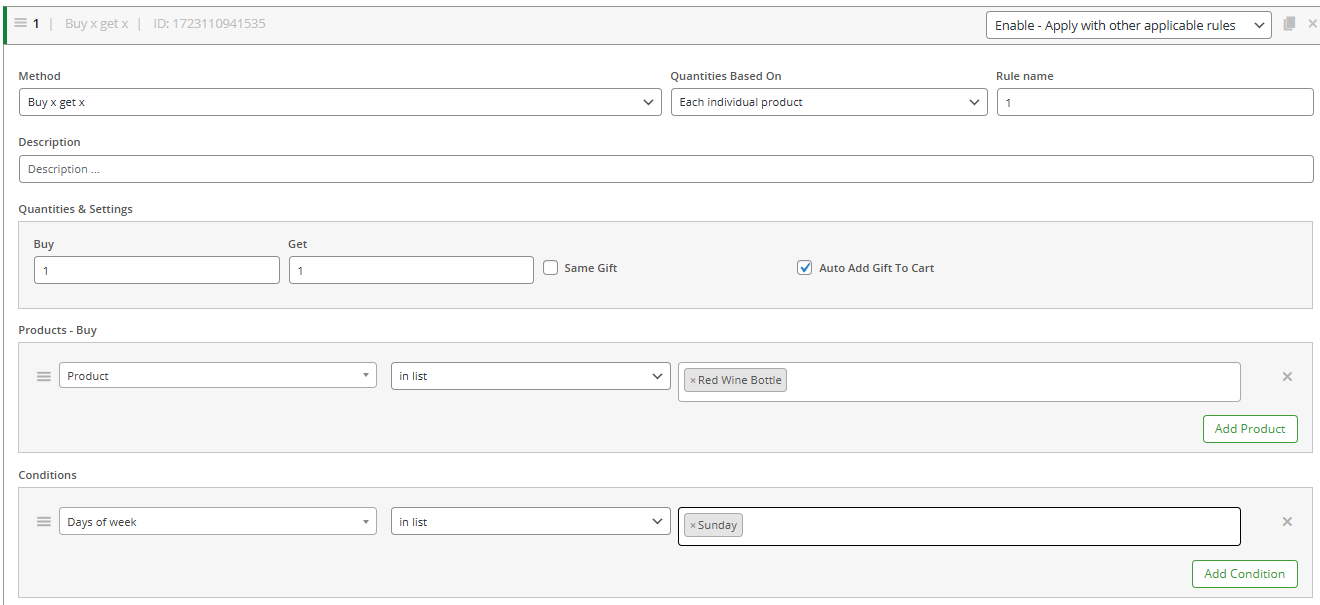
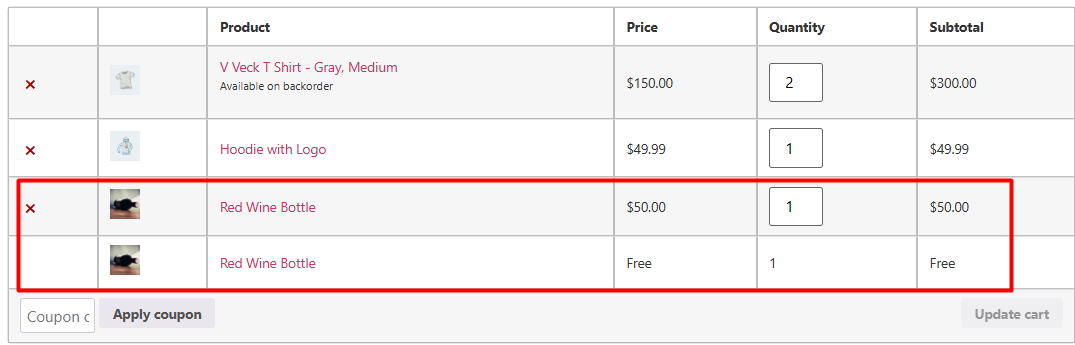
Finally, when a customer buys the required product, they’ll automatically get the BOGO item in their cart—no manual steps needed!
In this example: Buy 1 Red Wine > Get 1 Free.
Conclusion
GWP and BOGO are both effective ecommerce promotion strategies, but they are not the same. A gift with purchase strategy works best when you want to increase average order value, create a premium shopping experience, promote new products, or reward customers with added value. BOGO is usually more suitable when you want to increase order volume, sell more units, or clear inventory faster.
For many WooCommerce stores, the best approach is not choosing only one strategy. You can use GWP promotions for loyalty, product discovery, and higher-value orders, while using BOGO deals for seasonal campaigns, clearance sales, and simple high-conversion offers.
With GIFTiT – Free Gifts For WooCommerce, you can create gift with purchase promotions, Buy X Get Y offers, Buy X Get X deals, subtotal-based gifts, tiered gift rules, and hybrid campaigns from one plugin. This makes it easier to test different promotion strategies and find the offer that works best for your customers.
Choosing the right incentive is easier when you can see the full range of possibilities. Continue with this broader guide.
FAQ
What does GWP mean?
GWP means Gift With Purchase. It is a sales promotion where a customer receives a free gift after buying a qualifying product, spending a certain amount, or meeting another purchase condition. In ecommerce marketing, GWP is commonly used to increase perceived value and encourage customers to complete larger orders.
What is gift with purchase?
Gift with purchase is a promotion strategy that gives customers a free item when they make a purchase. The gift can be a sample, accessory, bonus product, limited-edition item, or complementary product. It is often used by ecommerce stores to increase average order value, improve customer experience, and promote new products.
What does BOGO mean?
BOGO means Buy One Get One. In a BOGO promotion, customers buy one product and receive another product for free or at a discount. The free or discounted item can be the same product or a different product depending on the campaign rules.
What is the difference between GWP and BOGO?
The main difference is the purpose of the free item. In a GWP promotion, the free gift is usually used as a bonus to increase perceived value or encourage a higher order value. In a BOGO promotion, the free or discounted item is usually tied directly to the purchased product and is designed to increase sales volume.
Is gift with purchase better than BOGO?
Gift with purchase is better when your goal is to increase average order value, create a premium offer, promote samples, or reward customers without discounting your main product. BOGO is better when your goal is to sell more units quickly, move inventory, or create a simple promotion that customers understand instantly.
What are good gift with purchase ideas?
Good gift with purchase ideas include free samples, accessories, travel-size products, limited-edition items, branded merchandise, complementary products, seasonal gifts, or bonus items that match the customer’s purchase. The best gift should feel useful, relevant, and valuable enough to encourage the customer to buy.
How can I run a gift with purchase promotion in WooCommerce?
You can run a gift with purchase promotion in WooCommerce by using a free gifts plugin that lets you create rules based on cart subtotal, selected products, categories, quantities, or customer conditions. With GIFTiT, you can create GWP rules, BOGO offers, Buy X Get Y promotions, and automatic free gift campaigns without coding.