

Accurate financial reports are essential for every WooCommerce store, especially when you need to prepare data for accounting, tax filing, profit analysis, or business planning. Store owners must track sales, refunds, discounts, taxes, shipping fees, product revenue, and customer orders in a clear format that accountants can review without confusion.
WooCommerce stores generate a lot of financial data, but turning that data into useful accounting and tax reports is not always simple. Basic WooCommerce analytics can show sales performance, but accountants often need more detailed reports with date ranges, order status, tax amounts, payment methods, refunds, and exportable files.
In this tutorial, you’ll learn how to generate WooCommerce financial reports for accounting and tax purposes using REPORTiT – Advanced Reporting for WooCommerce. We’ll explain which reports matter most, how to prepare tax reports for your accountant, and how to organize WooCommerce financial data in a cleaner, more reliable way.
Financial reporting becomes more useful when revenue, refunds, taxes, and orders are reviewed together. Complete WooCommerce reporting guide offers helpful context before choosing the next metric to review.
Quick Answer:
WooCommerce financial reports help store owners review revenue, taxes, refunds, discounts, order totals, shipping costs, and other accounting-related data. The default WooCommerce analytics can cover basic needs, but for deeper tax and accounting analysis, REPORTiT – Advanced Reporting for WooCommerce provides more structured and exportable reports.
After installing the plugin, go to WordPress Dashboard > iThemeland > REPORTiT. Open the relevant report section such as Orders, Tax, Revenue, Refunds, or Products, then choose the date range and filters you need. Generate the report, review the financial columns, and export the data when you need it for accounting, bookkeeping, or tax preparation.
This workflow is useful for monthly accounting, VAT or sales tax checks, refund analysis, campaign profitability, and year-end financial review. REPORTiT plugin is more practical than manual spreadsheets because it centralizes WooCommerce financial data and lets managers filter, compare, and export reports from one dashboard.
Introduction to Financial Reports for Accounting and Tax Purposes
Financial reports for accounting and tax purposes are formal records that summarize a business’s financial activities, performance, and position. These reports are essential for compliance, strategic planning, and legal obligations. They include key statements such as:
- Income Statements (Profit & Loss) – Show revenue, expenses, and profitability over a period.
- Balance Sheets – Detail assets, liabilities, and equity at a specific point in time.
- Cash Flow Statements – Track the movement of cash in and out of the business.
- Tax Reports – Summarize taxable income, deductions, and liabilities for regulatory filings.
Importance of Financial Reports in Business Operations
Financial reports serve as the backbone of sound business management, providing critical insights that drive strategic decisions and ensure regulatory compliance. These documents are far more than just accounting formalities—they offer a comprehensive view of a company’s financial health and operational efficiency.
Key benefits include:
- Performance Tracking – Financial reports reveal revenue trends, expense patterns, and profitability metrics, helping businesses identify strengths and weaknesses.
- Cash Flow Management – By monitoring income and expenditures, companies can optimize working capital and avoid liquidity crises.
- Investor & Stakeholder Confidence – Transparent reporting builds trust with shareholders, lenders, and partners.
- Tax & Legal Compliance – Accurate financial statements ensure adherence to tax laws and prevent penalties or audits.
- Data-Driven Decision Making – From inventory purchases to pricing strategies, reports provide the factual basis for operational choices.
Key Types of Financial Reports
Let’s explore the most important financial reporting for accounting that help managers to track profitability, liquidity, and overall financial health:
1. Balance Sheet
The Balance Sheet is a snapshot of a company’s financial standing at a specific point in time, detailing what the business owns (assets), owes (liabilities), and the owner’s equity (net worth).
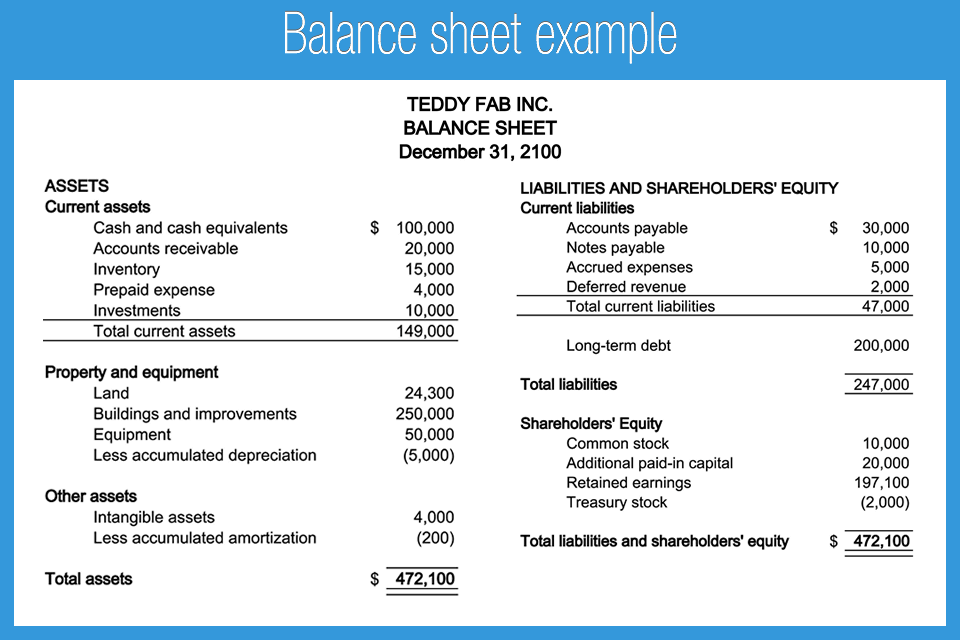
Key Components:
- Assets (Current & Non-Current) – Cash, inventory, property, equipment.
- Liabilities (Short-term & Long-term) – Loans, accounts payable, accrued expenses.
- Equity – Retained earnings, shareholder capital.
Why It Matters for Accounting & Tax?
- Helps assess liquidity and solvency (ability to meet short-term and long-term obligations).
- Required for loan applications, investor reporting, and tax compliance.
- Provides insights into financial stability and leverage.
2. Income Statement (Profit & Loss Statement)
The Income Statement summarizes a company’s revenues, expenses, and profits over a specific period (monthly, quarterly, or annually).
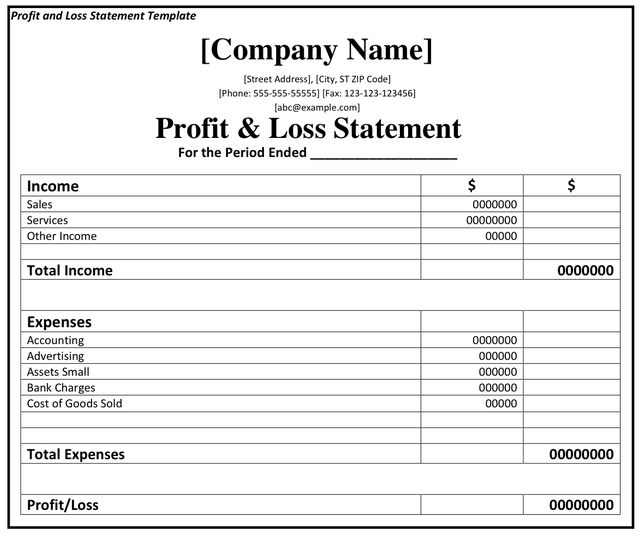
Key Components:
- Revenue – Sales, service income.
- Cost of Goods Sold (COGS) – Direct costs of production.
- Operating Expenses – Rent, salaries, marketing.
- Net Profit/Loss – Final earnings after all deductions.
Why It Matters for Accounting & Tax?
- Determines profitability and operational efficiency.
- Helps in tax calculations (income tax is based on net profit).
- Identifies cost-saving opportunities by analyzing expense trends.
3. Cash Flow Statement
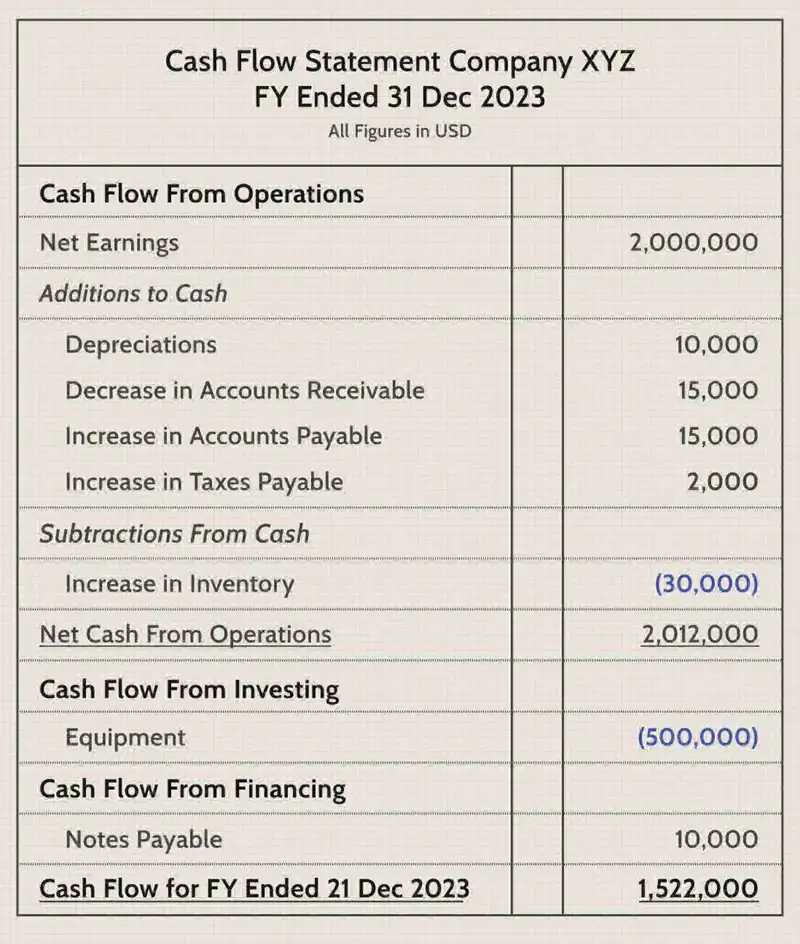
The Cash Flow Statement tracks the movement of cash in and out of a business across three key activities:
- Operating Activities – Cash from sales, supplier payments.
- Investing Activities – Asset purchases, investments.
- Financing Activities – Loans, equity injections, dividends.
Why It Matters for Accounting & Tax?
- Reveals cash liquidity (even profitable businesses can face cash shortages).
- Helps in budgeting and financial planning.
- Essential for tax audits to verify reported income matches cash inflows.
4. Statement of Changes in Equity
This report explains how a company’s equity (ownership value) changes over time due to profits, losses, dividends, and capital injections.
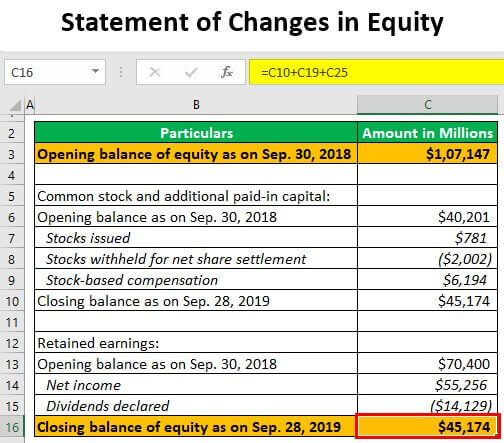
Key Components:
- Beginning Equity – Opening balance.
- Net Profit/Loss – Added or deducted.
- Dividends & Owner Withdrawals – Reductions in equity.
- New Capital Investments – Increases in equity.
Why It Matters for Accounting & Tax?
- Tracks ownership value changes for shareholders.
- Required for regulatory compliance and investor reporting.
- Helps in tax filings related to dividends and retained earnings.
Differences Between Financial Reports for Accounting vs. Tax Purposes
Financial reporting serves as the backbone of business transparency and compliance, but its application varies significantly between accounting purposes and tax purposes. While both require accurate financial data, their objectives, methodologies, and reporting standards differ in key ways.
Accounting reports focus on presenting a true and fair view of financial performance for stakeholders, whereas tax reports are structured to calculate taxable income in compliance with government regulations.
These differences impact how revenue, expenses, and profits are recognized and reported.
To better understand these distinctions, the following table summarizes the key differences between financial reports prepared for accounting purposes versus those prepared for tax purposes:
| Aspect | Financial Reports for Accounting | Financial Reports for Tax Purposes |
|---|---|---|
| Primary Objective | Show financial health for investors, creditors & management | Calculate taxable income & comply with tax laws |
| Reporting Standards | Follows GAAP or IFRS | Follows tax code regulations (e.g., IRS, HMRC) |
| Revenue Recognition | Accrual basis (recorded when earned) | Often cash basis (recorded when received) |
| Expense Deductions | All legitimate business expenses included | Some expenses restricted or disallowed (e.g., fines, penalties) |
| Depreciation Methods | Straight-line or reducing balance (matching economic use) | Accelerated methods (e.g., MACRS) for tax benefits |
| Financial Statements | Balance Sheet, Income Statement, Cash Flow Statement | Tax Return Forms (e.g., 1120, 1040, VAT returns) |
| Adjustments Required | None if following accounting standards | Requires reconciliation (e.g., book-to-tax adjustments) |
| Users of Reports | Investors, banks, management | Tax authorities (IRS, HMRC, etc.) |
Legal and Compliance Requirements for Financial Reporting
Financial reporting is not just a business best practice – it’s a legal obligation that carries significant consequences for non-compliance. Businesses must adhere to strict regulatory standards that vary by jurisdiction, industry, and business structure. These requirements ensure transparency, prevent fraud, and maintain investor confidence in financial markets.
Every online store, regardless of size or location, must comply with local and global financial regulations to avoid legal penalties and ensure smooth operations. Key universal requirements include:
- Income & expense tracking (visible in Profit & Loss Statements)
- VAT/GST compliance for international sales
- Transaction transparency (to prevent money laundering)
- Document retention (7+ years in most jurisdictions)
These elements should appear in your regular financial reports through:
- Clear P&L statements showing revenue streams and deductible costs
- Tax reports detailing collected/paid VAT/GST amounts
- Audit-ready transaction logs with complete sales/refund records
Step-by-Step Guide to Generating Financial Reports
Here, we walk you through the complete process of generating professional financial reports using the powerful WooCommerce Report Plugin, your all-in-one solution for e-commerce financial management.
1. Collecting and Organizing Financial Data
The foundation of accurate financial reporting begins with the proper collection and organization of data. The good news is that the WooCommerce Report Plugin automatically gathers all crucial financial data from your store, including:
- Sales transactions (completed, pending, and refunded orders)
- Revenue streams (product sales, subscriptions, shipping fees)
- Expense tracking (payment gateway fees, shipping costs, discounts)
- Tax calculations
- Customer purchase histories
2. Using Accounting Software and Tools
To generate financial reports for accounting and tax purposes in WooCommerce, the best tool is the WooCommerce report plugin. This tool helps in financial reporting for accounting and provides detailed financial reports for tax purposes.
Here’s how to generate financial statements using Woo Report:
1. Install & Activate
Download the ZIP file and install it via Plugins > Add New > Upload Plugin.
Activate the plugin after installation by navigating to WordPress Dashboard > iThemeland > license and inserting the license key into the form.
2. Access the Plugin
Go to iThemeland > Woo Report in your WordPress dashboard to open the main page of the plugin.
3. Select the Report
On the main page, you can find more than 50 reports, which are divided into some categories to help you easily find your required ones, including:
- Orders
- Products
- Customer
- Tax
- And more.
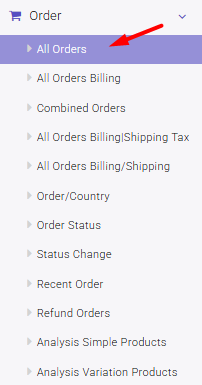
The best report for financial tracking is All Orders, which is located underthe Orders menu.
To generate this report, go to Orders > All Orders to view all transactions.
4. Set Date Range
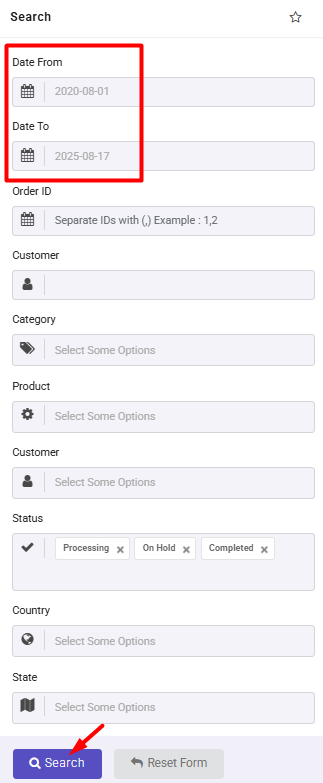
Open the search form and enter the Start Date and End Date for your report.
You can also set other filters to limit the data in the report.
5. Generate the Report
Click the Search button to let the plugin process and display the financial data in the report.
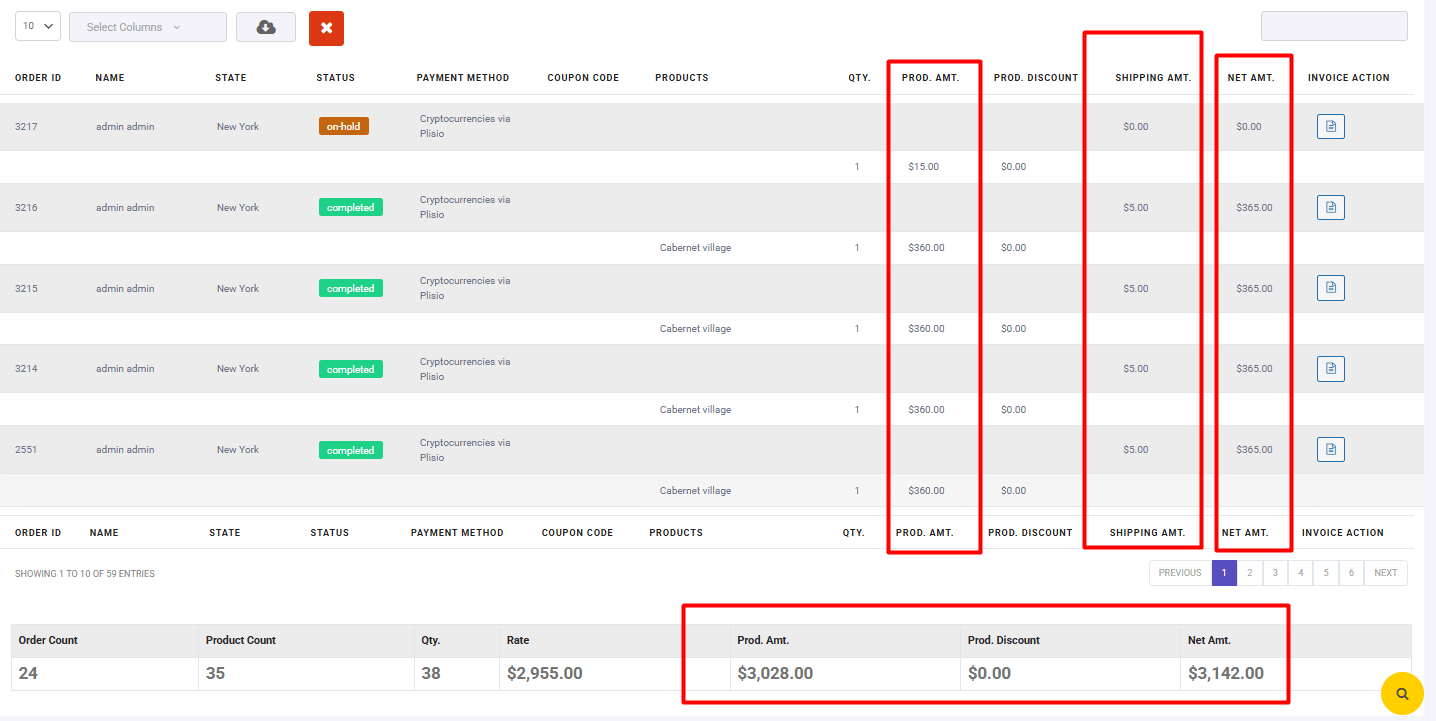
6. Customize the Report
– Select/deselect columns to focus on key financial details.
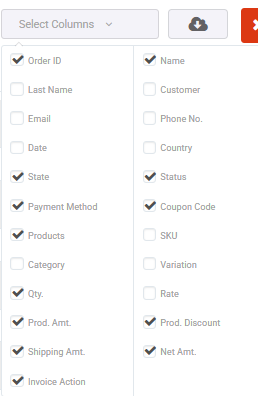
– Use the search box to filter specific data.
– Download the report in your preferred format

REPORTiT – Advanced WooCommerce Reporting
The easy way to generate financial reports for accounting and tax purposes in WooCommerce
3. Manual vs. Automated Reporting Processes
With the method explained earlier, you can manually generate financial reports for your WooCommerce store.
Here are the key benefits of manual reporting:
- Full Control – You can customize reports by selecting specific columns, date ranges, and filters.
- On-Demand Access – Generate reports whenever needed without waiting for scheduled updates.
- Detailed Analysis – Manually refine reports for deeper insights into sales, taxes, and accounting data.
While manual reporting is useful, automated financial reports save time and reduce errors. Automating reports ensures you always have updated financial statements for accounting and tax purposes without manual effort.
Benefits include:
- Time-Saving – No need to manually generate reports; they’re sent automatically.
- Consistency – Scheduled reports ensure you never miss important financial data.
- Convenience – Reports are delivered directly to your email or accounting software.
How to Enable Automated Reports in WooCommerce Report Plugin?
To set up automated financial reports, follow these steps:
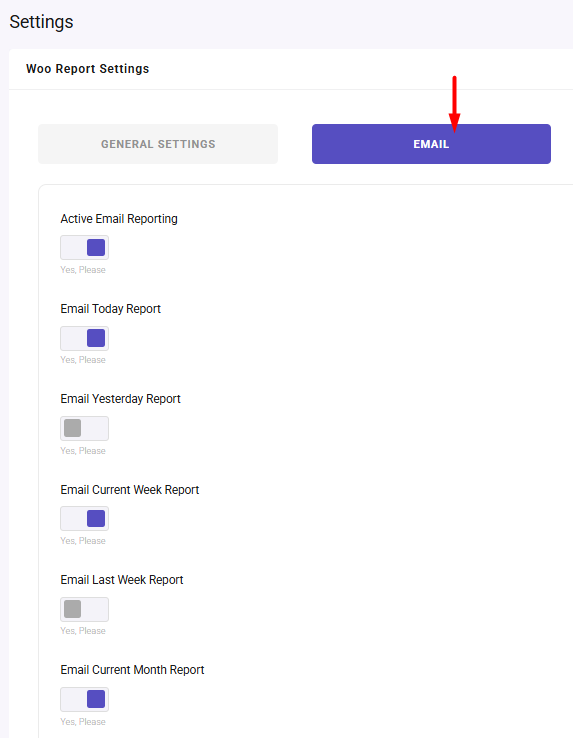
1. Go to Woo Report > Settings > Email.
2. Enable the “Activate Email Reporting” option.
3. Configure the settings:
– Set the report frequency (daily, weekly, monthly).
– Enter the recipient email(s).
4. Save changes, and periodic reports will be sent automatically.
Read more: Send automated sales report email in WooCommerce?(2 practical methods)
Best Practices for Accurate and Timely Financial Reporting
Whether you’re handling financial reporting for accounting or preparing financial reports for tax purposes, following best practices can streamline the process and minimize errors:
1. Maintain Consistent Data Entry & Organization
For generating financial reports for accounting and tax purposes, organized data is key. Use tools like WooCommerce Report Plugin to sync sales, expenses, and taxes in real time.
2. Schedule Regular Financial Reviews
Financial reporting for accounting requires weekly reconciliations and monthly closings to ensure accuracy and compliance.
3. Automate Wherever Possible
Automate financial reports for tax purposes to reduce errors and save time with tools like QuickBooks integrations.
4. Ensure Compliance with Standards
Follow GAAP/IFRS for how to generate financial statements and stay updated on tax laws to avoid penalties.
5. Verify & Cross-Check Data
Before submission, reconcile bank statements and review discrepancies for accurate financial reporting for accounting.
Common Mistakes to Avoid When Preparing Reports
Accurate financial reporting is critical for business decisions and compliance, yet many companies make avoidable errors. Here are key mistakes to watch for:
- Inconsistent Data Entry: When generating financial reports for accounting and tax purposes, inconsistent data leads to errors. Automate with tools like the WooCommerce Report Plugin for uniform categorization.
- Ignoring Reconciliation: Financial reporting for accounting fails without regular reconciliations. Match bank statements weekly to catch discrepancies early.
- Tax Calculation Errors: For accurate financial reports for tax purposes, automate tax rates and deadlines to avoid penalties.
- Poor Documentation: How to generate financial statements properly? Store invoices digitally for 7+ years for audit trails.
- Last-Minute Reporting: Rushed financial reporting for accounting causes mistakes. Schedule reviews ahead of deadlines.
Role of Financial Reports in Tax Filing and Audits
Financial reports serve as the foundation for accurate tax compliance and smooth audit processes. For tax filing, properly prepared income statements, balance sheets, and transaction records provide the necessary documentation to calculate taxable income, claim deductions, and determine tax liabilities.
During audits, these reports act as evidence of financial integrity, demonstrating compliance with tax laws and accounting standards. Well-organized financial statements reduce audit risks by showing clear transaction trails, proper revenue recognition, and correct expense categorization.
Businesses that maintain audit-ready reports can respond to tax authority inquiries efficiently, avoiding penalties and interest charges.
How Accountants Leverage Financial Reports for Strategic Decision-Making
Accountants transform financial reports into powerful strategic tools by analyzing key metrics and trends. They use profit and loss statements to identify profitable products or services, balance sheets to assess financial health, and cash flow reports to predict future liquidity.
By comparing period-over-period results, accountants spot growth opportunities, cost reduction areas, and potential risks. These insights guide critical business decisions like pricing strategies, inventory management, expansion plans, and investment opportunities.
Modern accountants combine financial data with operational metrics to provide comprehensive business intelligence that drives sustainable growth and competitive advantage.
Sample Templates and Examples of Financial Reports
The WooCommerce Report Plugin simplifies financial reporting by transforming raw sales data into professional, ready-to-use statements.
Below, we’ll explore key financial report templates that every online store should maintain—all easily customizable and exportable through the plugin.
Financial reporting for accounting
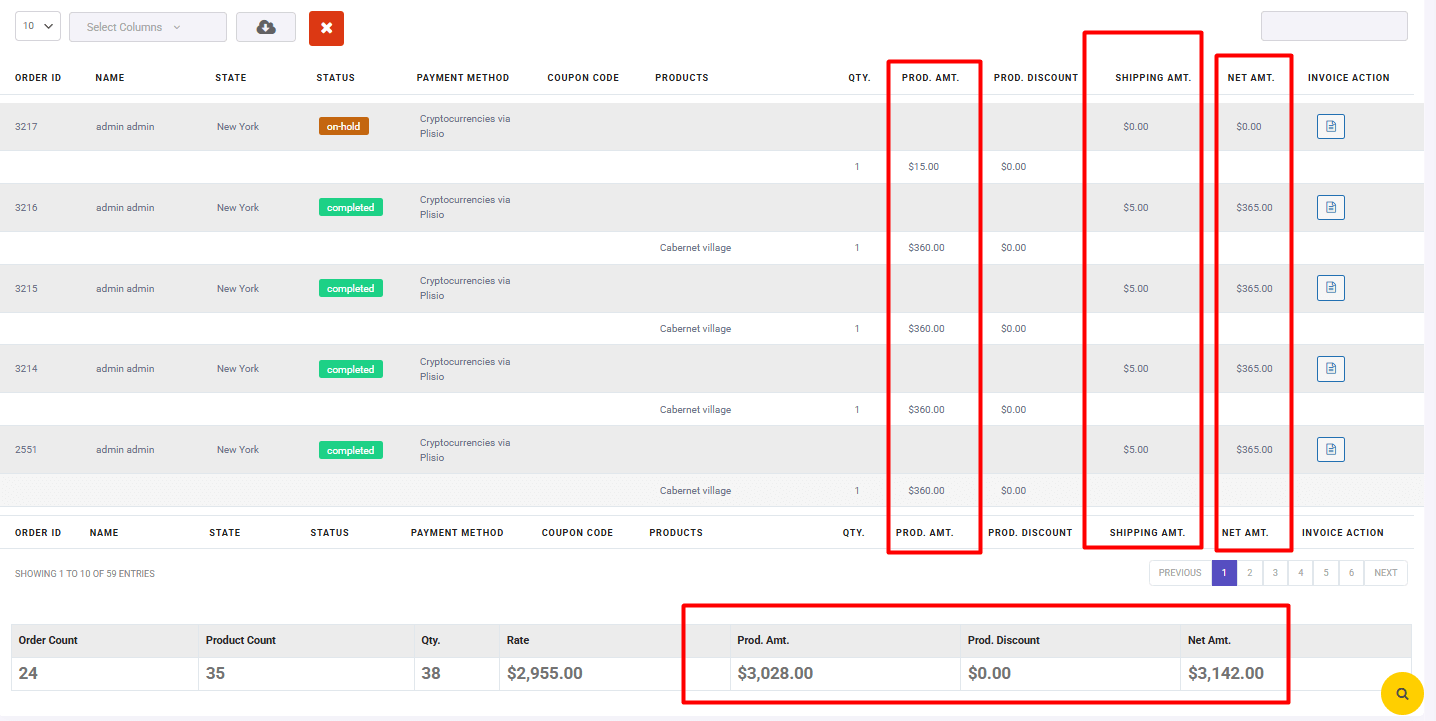
The All Orders Report in the WooCommerce Report Plugin provides a detailed breakdown of transactions, helping businesses track costs, analyze profitability, and prepare accurate financial statements.
Below is how this report supports financial reporting for accounting and how to generate financial statements from the available data.
Key Data Fields & Their Accounting Relevance
| Field | Accounting Purpose |
|---|---|
| Order ID | Unique transaction identifier for audit trails and reconciliation. |
| Name | Customer details for sales tracking and receivables management. |
| State | Location-based tax/VAT compliance (if applicable). |
| Status | Filters completed vs. pending/rejected transactions for revenue recognition. |
| Payment Method | Categorizes fees (e.g., PayPal/credit card charges) for expense allocation. |
| Coupon Code | Tracks discounts as contra-revenue in P&L statements. |
| Products | Itemized COGS (Cost of Goods Sold) calculation. |
| Qty. | Inventory management and unit-level profitability analysis. |
| Prod. Amt. | Gross sales revenue before discounts (accrual accounting). |
| Prod. Discount | Records promotional reductions (deducted from gross revenue). |
| Shipping Amt. | Logs shipping costs as operating expenses. |
| Net Amt. | Final transaction value (revenue after discounts + shipping). |
| Invoice Action | Generates invoices for accounts receivable tracking. |
How to generate financial statements?
In this report, you can find the total net amount of order,s which is useful for calculating profit.
To evaluate the profit, first you need to calculate the expenses:
- COGS: Multiply Products × their unit cost (from inventory data) × Qty.
- Shipping Amt.
- Payment Method fees (e.g., 3% of Net Amt. for PayPal)
- Prod. Discount
Finally, you can calculate the profit as follows:
Profit = Net Amount minus Expenses
Financial reports for tax purposes
Below is how to interpret and use the tax reports available in the WooCommerce report plugin for generating accurate financial statements.
Tax Summary Report for Financial Reporting & Accounting Compliance
The Tax Summary report in WooCommerce provides critical data for financial reporting for accounting and tax compliance, breaking down tax liabilities by jurisdiction.
Key Fields & Their Accounting/Tax Significance
| Field | Purpose in Financial Reporting |
|---|---|
| Tax Name | Identifies the tax type (e.g., VAT, GST, State Sales Tax) for compliance. |
| Tax Rate | Validates correct tax application per region (e.g., 20% UK VAT vs. 7% SG GST). |
| Order Count | Shows transaction volume subject to each tax rate (audit trail). |
| Shipping Amt. | Taxable shipping revenue (if applicable). |
| Net Amt. | Total order value (pre-tax) for revenue recognition. |
| Shipping Tax | Tax collected on shipping fees (must match shipping revenue in P&L). |
| Order Tax | Tax on product sales (core tax liability). |
| Total Tax | Sum of Order Tax + Shipping Tax → Payable to tax authorities. |
To generate the Tax report in the WooCommerce report plugin, navigate to Tax > Tax Reports.
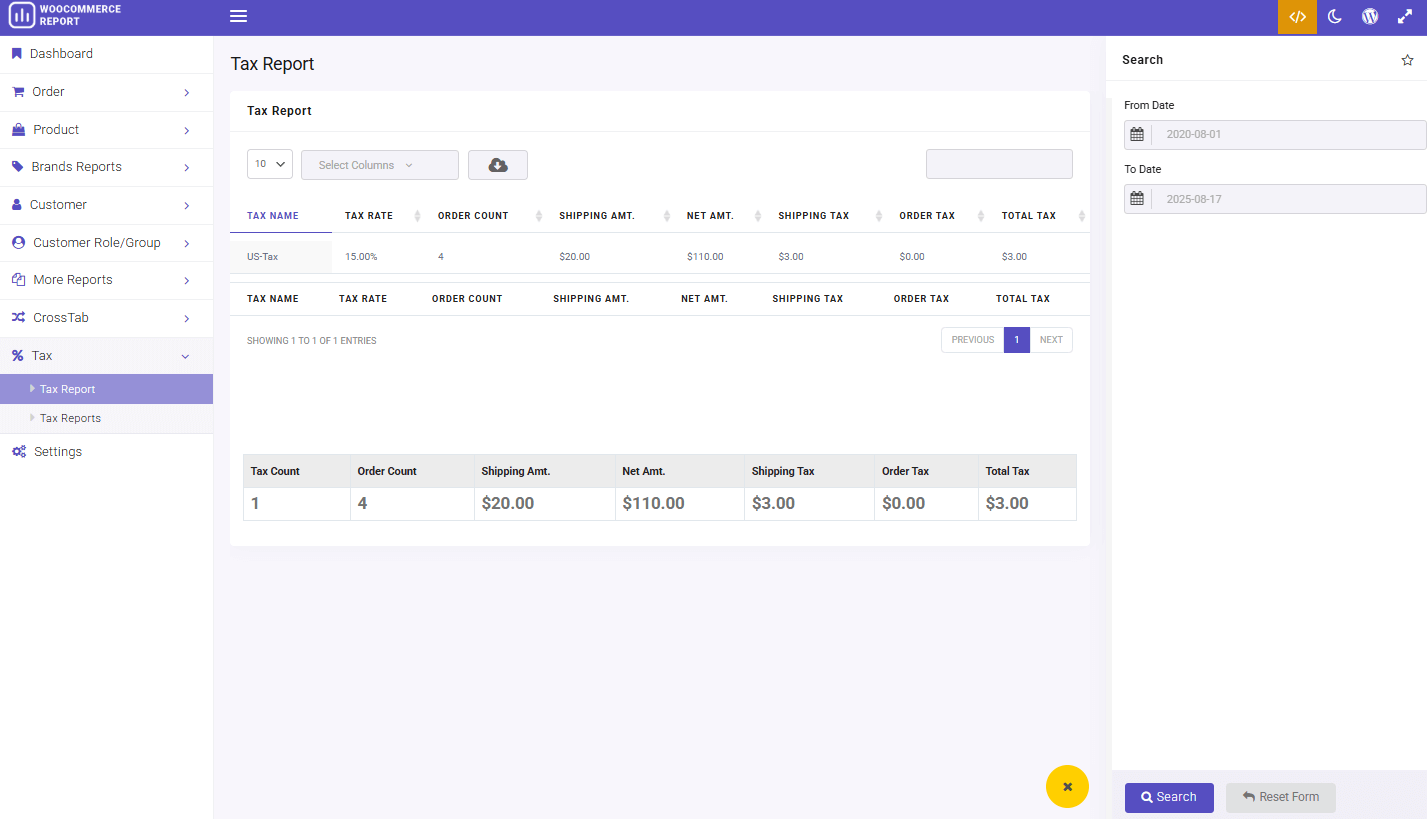
How to generate financial statements
To calculate the profit, you can minus the total tax amount and other expenses (like COG, Shipping Amount, Discounts, etc.) from the Total Net Amount.
Tax Compliance Reporting
This tax summary report provides all critical data needed for tax compliance and financial statement preparation.
To generate this report, navigate to Tax > Tax report:
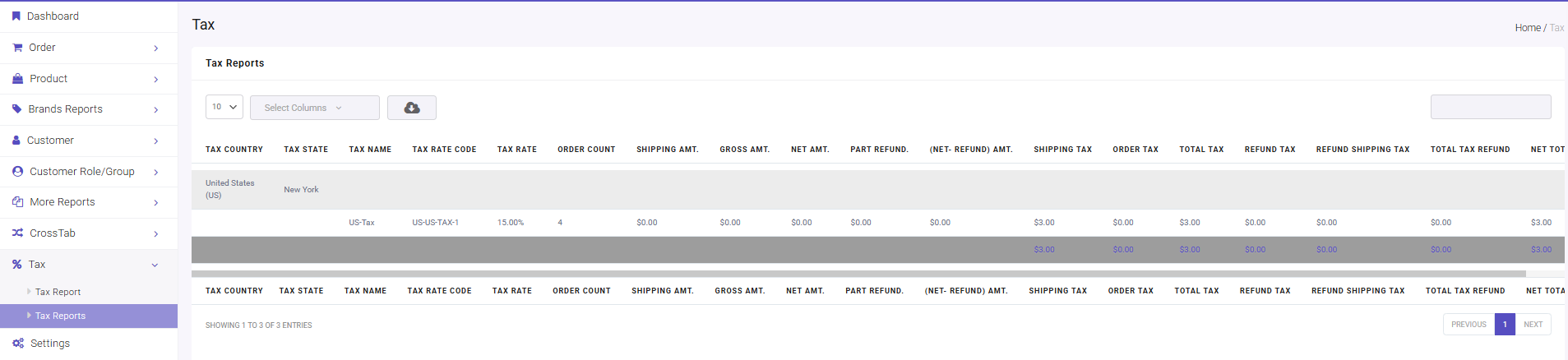
By systematically analyzing this data, businesses can avoid penalties while optimizing their tax positions.
Jurisdiction Tracking
The Tax Country and Tax State fields enable precise geographical tracking of tax obligations. This allows merchants to automatically apply the correct VAT, GST, or sales tax rates for each transaction based on the customer’s location.
Refund Management
The Part Refund data is crucial for correcting previously reported figures. When processing returns, these amounts should simultaneously reduce both the revenue reported on P&L statements and any associated tax liabilities. Proper refund tracking ensures businesses don’t overpay taxes on returned items while maintaining clean financial records. This becomes especially important during peak sales periods with higher return volumes.
REPORTiT – Advanced WooCommerce Reporting
The easy way to generate financial reports for accounting and tax purposes in WooCommerce
Conclusion
Financial reporting is not just a back-office task for WooCommerce stores. It helps you understand revenue, control taxes, review refunds, track order performance, and give your accountant the data they need for accurate reporting.
If your store has only a few orders, WooCommerce’s built-in analytics may be enough for basic sales checks. But as your order volume grows, you need more detailed accounting reports, tax summaries, customer reports, product revenue reports, and exportable data that can be reviewed, shared, and archived.
With REPORTiT – Advanced Reporting for WooCommerce, you can generate WooCommerce financial reports more efficiently, filter data by date and order details, export reports, and prepare cleaner information for accounting and tax purposes. This makes financial reporting easier for store owners, accountants, and WooCommerce managers who need reliable data without manually collecting numbers from different parts of the dashboard.
To build a more consistent accounting workflow, explore store reporting guide for WooCommerce.
FAQ
1. What is WooCommerce financial reporting?
WooCommerce financial reporting means collecting and organizing store data such as sales, refunds, taxes, discounts, shipping fees, orders, and product revenue. These reports help store owners understand business performance and prepare data for accounting or tax review.
2. How do I generate tax reports for my accountant in WooCommerce?
You can generate tax reports by filtering WooCommerce order data by date, tax amount, order status, and payment details. With REPORTiT , you can create more detailed reports and export them for your accountant.
3. What reports does an accountant need from WooCommerce?
An accountant may need sales reports, tax reports, refund reports, order reports, product revenue reports, payment method reports, and customer purchase data. The exact reports depend on your business structure and local tax requirements.
4. Is WooCommerce Analytics enough for accounting reports?
WooCommerce Analytics can be useful for basic sales and revenue tracking. However, it may not be enough when you need advanced filters, export options, tax-focused reports, or detailed financial reports for accountants.
5. What is the difference between accounting reports and tax reports?
Accounting reports help you understand business performance, revenue, costs, and profitability. Tax reports focus more on taxable sales, tax collected, refunds, deductions, and data needed for tax filing.
6. Can I export WooCommerce accounting reports?
Yes. Exporting reports is important when you need to share data with accountants, finance teams, or tax advisors. REPORTiT helps you generate and export WooCommerce reports in a more organized format.
7. Why are financial reports important for WooCommerce stores?
Financial reports help you track profit, review sales trends, prepare tax data, monitor refunds, and make better business decisions. They also reduce manual work when your accountant needs clear WooCommerce store data.