


Customer billing and shipping information is one of the most valuable data sources in any WooCommerce store. These details include customer addresses, phone numbers, emails, and order-related information that store managers often use for communication, marketing campaigns, or logistics management.
In WooCommerce, this information is collected during the checkout process and stored in the WordPress database. However, many store owners quickly realize that accessing this data through WooCommerce reports or the default WooCommerce reporting dashboard is not always straightforward.
Because WooCommerce does not provide a dedicated WooCommerce order billing report or WooCommerce shipping report by default, store managers often look for alternative solutions. These may include generating reports programmatically with PHP or using REPORTiT as a professional WooCommerce report plugin that can extract billing and shipping data instantly.In this guide, we will explain two practical methods to get WooCommerce billing and shipping reports, helping you easily access customer information, analyze order data, and export reports for marketing or operational purposes.
Get WooCommerce order billing and shipping reports programmatically
The first method for generating WooCommerce order billing report or WooCommerce order shipping report is using PHP codes. You can access wc_order by utilizing getter methods available in the wc_order and wc_abstract_order classes.
Before running the below code in order to get customer details from an order in WooCommerce, consider the below recommendations:
- Back up the WordPress database in case of any potential problems.
- Use this code only if you are a WordPress expert.
- Create a Child theme then run this code in the functions.php.
// Get an instance of the WC_Order Object from the Order ID (if required)
$order = wc_get_order( $order_id );
// Get the Customer ID (User ID)
$customer_id = $order->get_customer_id(); // Or $order->get_user_id();
// Get the WP_User Object instance
$user = $order->get_user();
// Get the WP_User roles and capabilities
$user_roles = $user->roles;
// Get the Customer billing email
$billing_email = $order->get_billing_email();
// Get the Customer billing phone
$billing_phone = $order->get_billing_phone();
// Customer billing information details
$billing_first_name = $order->get_billing_first_name();
$billing_last_name = $order->get_billing_last_name();
$billing_company = $order->get_billing_company();
$billing_address_1 = $order->get_billing_address_1();
$billing_address_2 = $order->get_billing_address_2();
$billing_city = $order->get_billing_city();
$billing_state = $order->get_billing_state();
$billing_postcode = $order->get_billing_postcode();
$billing_country = $order->get_billing_country();
// Customer shipping information details
$shipping_first_name = $order->get_shipping_first_name();
$shipping_last_name = $order->get_shipping_last_name();
$shipping_company = $order->get_shipping_company();
$shipping_address_1 = $order->get_shipping_address_1();
$shipping_address_2 = $order->get_shipping_address_2();
$shipping_city = $order->get_shipping_city();
$shipping_state = $order->get_shipping_state();
$shipping_postcode = $order->get_shipping_postcode();
$shipping_country = $order->get_shipping_country();
There is another method enabling you to get information from Order metadata by using the below hooks:
- wc_order
- get_data()
Here you can find the code:
// Get an instance of the WC_Order Object from the Order ID (if required)
$order = wc_get_order( $order_id );
// Get the Order meta data in an unprotected array
$data = $order->get_data(); // The Order data
$order_id = $data['id'];
$order_parent_id = $data['parent_id'];
// Get the Customer ID (User ID)
$customer_id = $data['customer_id'];
## BILLING INFORMATION:
$billing_email = $data['billing']['email'];
$billing_phone = $order_data['billing']['phone'];
$billing_first_name = $data['billing']['first_name'];
$billing_last_name = $data['billing']['last_name'];
$billing_company = $data['billing']['company'];
$billing_address_1 = $data['billing']['address_1'];
$billing_address_2 = $data['billing']['address_2'];
$billing_city = $data['billing']['city'];
$billing_state = $data['billing']['state'];
$billing_postcode = $data['billing']['postcode'];
$billing_country = $data['billing']['country'];
## SHIPPING INFORMATION:
$shipping_first_name = $data['shipping']['first_name'];
$shipping_last_name = $data['shipping']['last_name'];
$shipping_company = $data['shipping']['company'];
$shipping_address_1 = $data['shipping']['address_1'];
$shipping_address_2 = $data['shipping']['address_2'];
$shipping_city = $data['shipping']['city'];
$shipping_state = $data['shipping']['state'];
$shipping_postcode = $data['shipping']['postcode'];
$shipping_country = $data['shipping']['country'];
If you need to print the information or display them in a webpage, use the following code:
$order = new WC_Order($order_id);
$billing_address = $order->get_billing_address();
$billing_address_html = $order->get_formatted_billing_address();
// For printing or displaying on the web page
$shipping_address = $order->get_shipping_address();
$shipping_address_html = $order->get_formatted_shipping_address(); // For printing or displaying on web page
Generating WooCommerce shipping report programmatically is an ideal method for WordPress exports however, if you have no experience in coding it is recommended to use the WooCommerce report plugin.
Get order billing and shipping reports with the WooCommerce report plugin
The WooCommerce report plugin is an advanced tool for generating more than 50 reports in WooCommerce with one click. In this plugin, you can find various sales reports with useful options for filtering, searching, and exporting your required information.
Let’s review a step-by-step guide on generating WooCommerce order billing report and WooCommerce order shipping report to learn more about this useful plugin.
Step 1: Install WooCommerce report plugin
Download the WooCommerce report plugin and then install it on your WordPress website to see iT Woo Report option in the WordPress Dashboard.
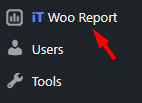
Click on this option to visit the main page of the plugin. Now, you can get a WooCommerce order billing/shipping report with one click.
REPORTiT – Advanced WooCommerce Reporting
The easy way to generate order billing/shipping reports in WooCommerce
Step 2: Open WooCommerce order billing and shipping report page
In our plugin, we designed a specific option for receiving WooCommerce billing and shipping report at the below address:
Order > All orders billing/shipping
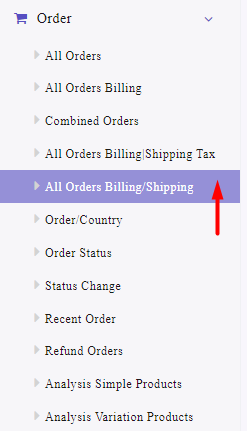
By opening this page, you can see a Search icon which is used to set some filtering options for generating reports based on your needs.
Step 3: Filter WooCommerce order billing and shipping report
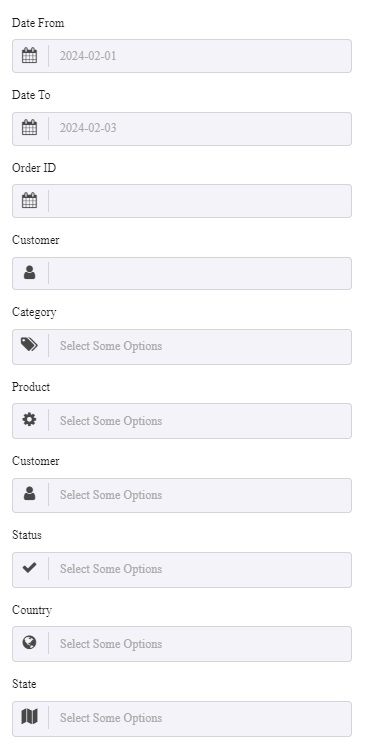
Let’s review some filtering options available in this form:
Filter WooCommerce billing and shipping report by date
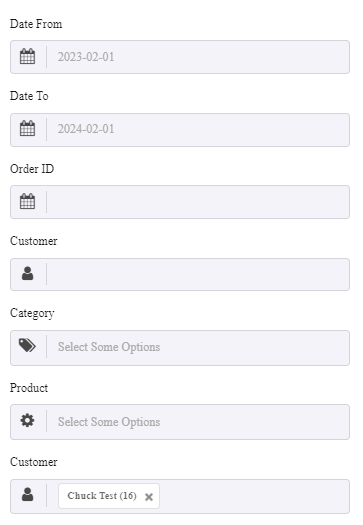
Date from and date to fields are available in the search form to help you filter the report in a customized period. There is also a built-in calendar allowing you to set the date easily in both fields.
Get WooCommerce billing and shipping reports by order ID
If you need to get WooCommerce billing and shipping report by specific order ID, you can simply insert the order ID in the field to receive all information related to it in the report.
Get WooCommerce billing and shipping reports by customer
You can get the WooCommerce billing and shipping report for a specific user by selecting the name of the user in the Customer field. This is a good option when you want to quickly find a specific customer’s address, Email, or phone number.
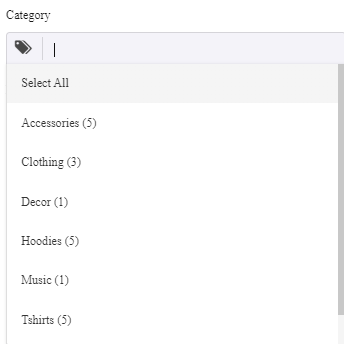
Filter WooCommerce billing and shipping reports by product category
Another option for filtering WooCommerce order billing and shipping reports is by product category. This is useful when you want to inform the customers who ordered some products from a specific category about new collections or a special offer.
By applying this filter, you can export the contact information of the target audiences and send them special offers or use other marketing strategies.
Filter WooCommerce billing and shipping report by Product
The purpose of generating this report is to get billing /shipping information of customers who ordered specific products and send them related advertisements or promotional offers. You can simply choose one of the products from the list to filter the report based on.
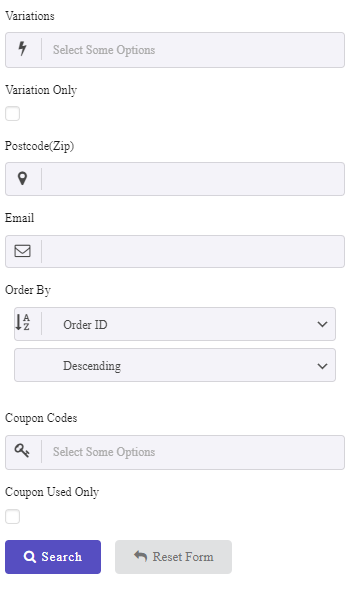
Other WooCommerce billing and shipping report filters
More filters are available in this form including:
- Variation
- Postcode
- Coupon code
Step 4: Get WooCommerce order billing and shipping reports
After setting your required filters, click on the Search button to instruct the plugin to generate the WooCommerce billing and shipping report instantly.
For example, we tried to get the report of one customer in the last year:
So, the result is as follows:
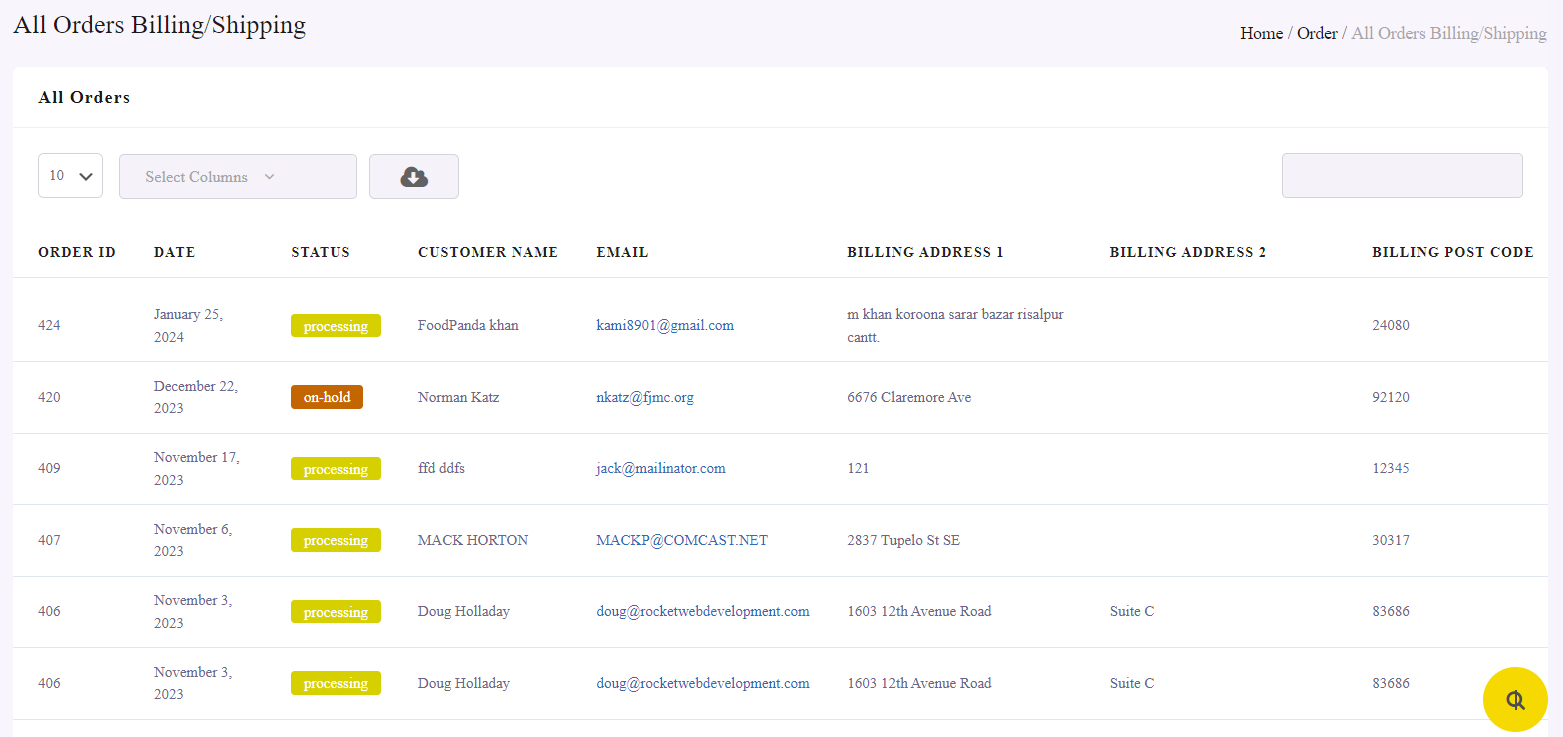
As you may notice, the WooCommerce order billing and shipping report is a table with all information listed in different columns including:
- Customer Name
- Order ID
- Status
- Billing Address
- Billing Address 2
- Billing Post Code
- Billing City
- Billing Country
- Billing Phone
- Billing State
- Shipping Address 1
- Shipping Address 2
- Shipping postcode
- Shipping State
- Shipping City
- Shipping Country
- Products
- Category
- Qty
- Prod.Amount
- Date
- Customer Name
- SKU
- Rate
- DeliveryCharge
- Variation.
All information that customers insert in the Billing and Shipping forms of WooCommerce will automatically be imported to this table and reported to you.
Get WooCommerce order billing and shipping report of specific customer
You can easily filter the billing/shipping information of specific customer in the report by searching the user name in the Search box.
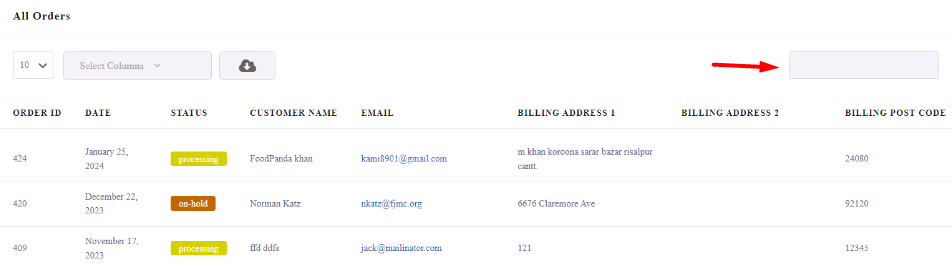
For example, getting the billing / shipping information of Norman is simply possible by writing Norman in the Search box. As you can see in the below image, the plugin will automatically filter the report and display your preferred information in the table:

Step 5: Export WooCommerce billing/shipping report to CSV, XLS, or PDF
To export the WooCommerce order billing and shipping report, follow the below instructions:
- Click on the Select Columns field on top of the table report.
- Mark the columns you want to export.
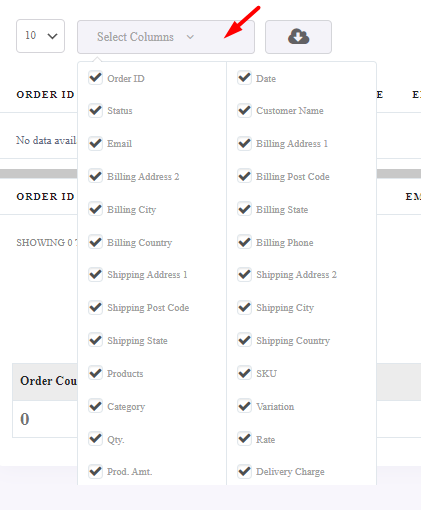
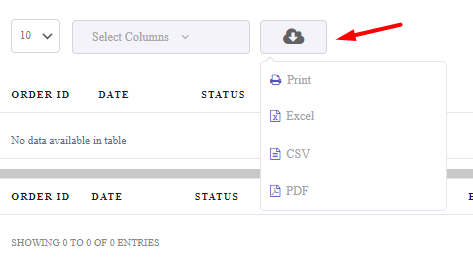
- Click on the Download icon.
- Choose one of the below formats:
- Excel
- CSV
The plugin will automatically download the report and save it on your system.
You can also press the Print option to directly print the report.
REPORTiT – Advanced WooCommerce Reporting
The easy way to generate order billing/shipping reports in WooCommerce
Conclusion
Billing and shipping information plays a key role in understanding your customers and improving communication with them. WooCommerce stores this data for every order, but extracting it in a structured report is not always easy using the default reporting tools.
In this article, we explained two practical methods to generate WooCommerce order billing and shipping reports. Developers can access the data programmatically using WooCommerce order objects and PHP code, while store managers who prefer a simpler approach can use a dedicated reporting plugin to generate reports with just a few clicks.
By using a proper WooCommerce reporting solution, you can quickly retrieve customer addresses, emails, and order information, export them to different formats, and use the data for marketing campaigns, customer support, or logistics management.
FAQ
How can I get billing and shipping reports in WooCommerce?
WooCommerce does not provide a dedicated billing or shipping report in its default reporting dashboard. To access this information, you can either retrieve it programmatically using WooCommerce order data or use the REPORTiT plugin that generates billing and shipping reports automatically.
Where is billing and shipping information stored in WooCommerce?
Billing and shipping information is stored in the WordPress database as part of WooCommerce order metadata. When a customer completes checkout, their address, email, phone number, and other details are saved with the order and can be retrieved through WooCommerce order objects or reporting tools.
Can I export WooCommerce billing and shipping reports?
Yes, billing and shipping reports can be exported using reporting tools or plugins. Many WooCommerce reporting plugins allow you to export customer information and order data to formats such as CSV, Excel, or PDF, making it easier to analyze or share the data.
Why are WooCommerce billing and shipping reports important?
Billing and shipping reports help store managers access customer contact information such as addresses, emails, and phone numbers. This data can be used for marketing campaigns, customer communication, shipping management, and analyzing customer distribution.
Is there a plugin to generate WooCommerce billing and shipping reports?
Yes, the REPORTiT plugin allows you to generate detailed reports that include billing and shipping information. This plugin usually provides advanced filtering options, customizable columns, and export capabilities to help store managers easily access customer order data.


