

Introduction
A one-time spending threshold can encourage a shopper to reach a target, but a repeatable reward gives them a reason to keep going. Instead of stopping the incentive after the first $100, you can structure the offer so the reward grows with the cart: spend $100 and get one free gift, spend $200 and get two, spend $300 and get three.
With GIFTiT – Free Gifts for WooCommerce, this campaign can be created with the Subtotal Repeat method. The rule uses the cart subtotal as a repeating interval, so each additional $100 can unlock another gift. This is different from a standard Subtotal rule, where reaching the threshold does not automatically mean another gift is earned at every additional interval.
If you are building a broader gifting strategy, see our Complete Guide to WooCommerce Free Gifts for an overview of gift methods, campaign ideas, targeting options, and practical WooCommerce use cases.
Quick Answer: How Do You Give a Free Gift for Every $100 Spent?
Create a new GIFTiT rule and choose Subtotal Repeat as the method. Set Subtotal Amount to 100 and Get to 1, then select the products customers can receive as gifts. With this setup, the reward repeats at each $100 cart-subtotal interval.
| Cart Subtotal | Free Gifts |
| $99 | 0 |
| $100 | 1 |
| $200 | 2 |
| $350 | 3 |
| $500 | 5 |
The key is using Subtotal Repeat rather than a regular Subtotal rule. The repeat method is designed to increase the number of available gifts as the cart moves through additional subtotal intervals.
What Is a Repeatable Subtotal Free Gift?
A repeatable subtotal gift connects the number of rewards to repeated cart-value intervals. The customer does not simply cross one minimum-spend threshold. Instead, the same reward logic is applied again as the subtotal reaches the next interval.
For a $100 interval with one gift per interval, the first gift is earned at $100, the second at $200, the third at $300, and so on. This makes the promotion easy to communicate because customers can immediately understand what the next spending milestone unlocks.
Subtotal vs. Subtotal Repeat
| Method | Example | Behavior |
| Subtotal | Spend $100 → Get 1 gift | The cart reaches a defined subtotal threshold. |
| Subtotal Repeat | Every $100 → Get 1 additional gift | The gift quantity repeats as the cart reaches additional price intervals. |
This distinction matters when your campaign promise says “for every $100 spent.” A normal threshold and a repeating threshold may look similar at $100, but they behave very differently at $200, $300, or $500.
Why Offer Another Gift for Every $100 Spent?
The main advantage of a repeatable gift is that the incentive does not disappear after the first threshold. A shopper who has already reached $100 can still see a reason to move toward $200. That can make the promotion more useful for stores where customers commonly add several products or where order values vary widely.
- It creates another reward target after the first gift is unlocked.
- It can make larger carts feel progressively more rewarding.
- The offer is simple to explain: each spending interval earns another gift.
- Customers can be given a choice of gifts instead of receiving the same product every time.
- The threshold can be adjusted to match the economics and typical order value of the store.
How to Offer One Free Gift for Every $100 Spent in WooCommerce
For the tutorial below, we will build one clear campaign: customers receive one additional free gift for every $100 in their cart subtotal.
Step 1 – Install GIFTiT and Add a New Gift Rule
After installing and activating GIFTiT, open the plugin’s Rules page from the WordPress dashboard and click Add Rule. Give the rule a descriptive name such as “1 Free Gift for Every $100 Spent.” A clear internal name makes the campaign easier to identify later when you have multiple gift rules running.

Step 2 – Choose the Subtotal Repeat Method
In the Method field, select Subtotal Repeat. This is the important setting for this campaign because the reward needs to repeat as the cart moves through each $100 interval.
Do not use the standard Subtotal method when the promise is one additional gift for every $100. The standard method is suitable for a threshold-style campaign, while Subtotal Repeat is designed for repeated cart-price intervals.
Step 3 – Set the $100 Spending Interval
In Quantities & Settings, set Subtotal Amount to 100 and Get to 1. In practical terms, this tells the rule to award one gift for each completed $100 subtotal interval.
| Setting | Value |
| Method | Subtotal Repeat |
| Subtotal Amount | 100 |
| Get | 1 |
That produces an easy pattern: $100 earns one gift, $200 earns two, $300 earns three, and $500 earns five. A cart between two thresholds keeps the number of gifts earned at the last completed interval.

Step 4 – Choose Which Products Customers Can Receive as Gifts
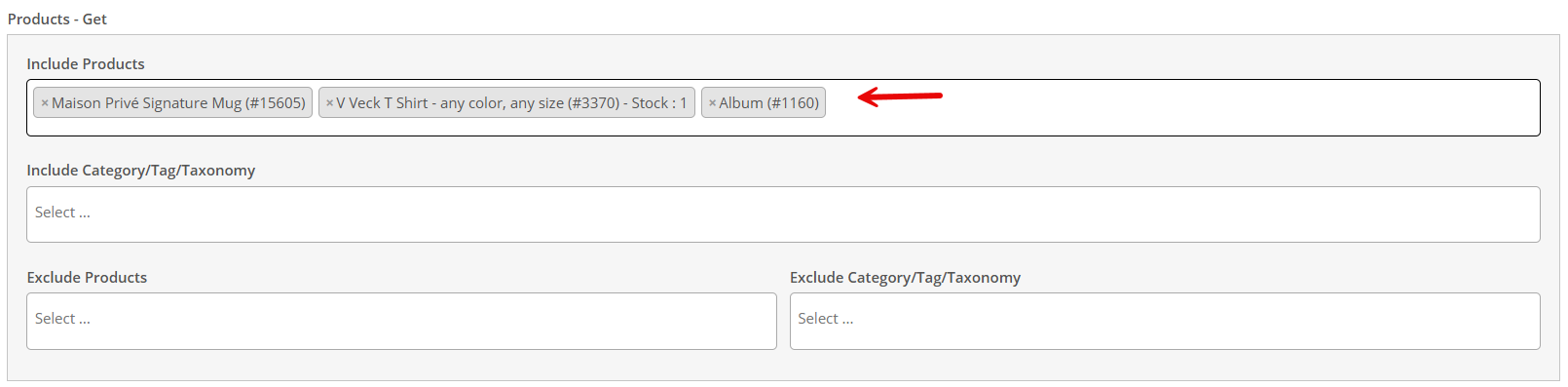
Next, use the Product Get section to define the products available as rewards. You can include specific products or use product categories, tags, or taxonomies where appropriate. You can also exclude products that should not appear in the gift selection.
For example, a store could offer a Branded Mug, Tote Bag, and T-Shirt. When a customer earns multiple gifts, the available selection gives the promotion more flexibility than a single fixed reward.
Step 5 – Auto-Add the Gifts or Let Customers Choose
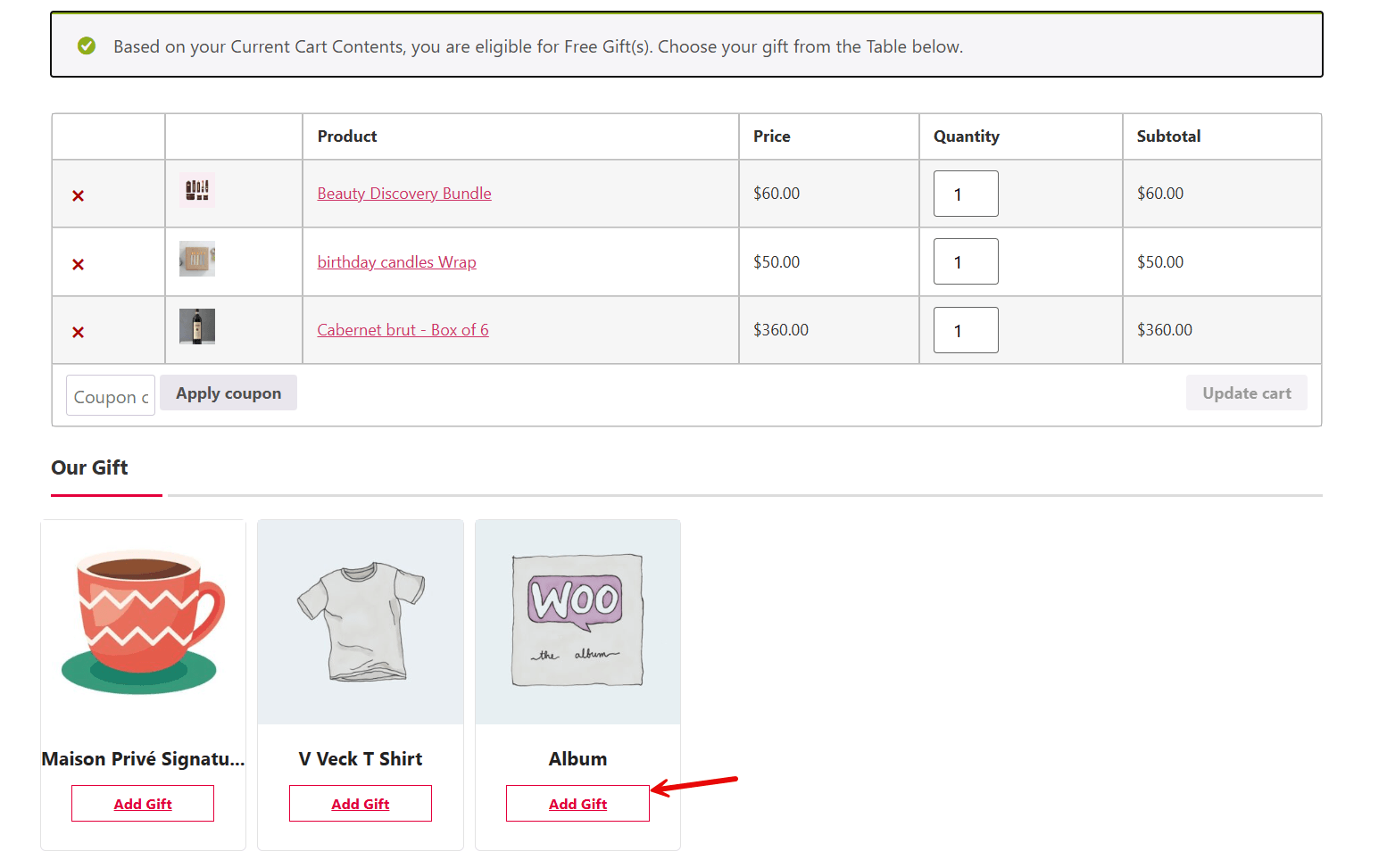
GIFTiT can automatically add eligible gifts to the cart, or you can leave Auto Add Gift to Cart disabled and allow the customer to choose from the available gift products. For a repeatable campaign, customer choice can be especially useful because a shopper who earns three gifts may prefer selecting among several rewards.
If you want the gift to appear automatically as soon as the rule is satisfied, enable Auto Add Gift to Cart. For a dedicated walkthrough of this experience, read How to Automatically Add Free Gifts to WooCommerce Cart.
Step 6 – Add Optional Conditions to Narrow the Rule
The repeat interval controls how many gifts are earned, but it does not have to be the only requirement. The Conditions section can be used to make the campaign more specific. For example, you may restrict eligibility by customer information, cart or cart-item criteria, date and time, purchase history, or other available conditions.
This means an “every $100” campaign can remain store-wide, or it can be narrowed to fit a more specific promotion. You might run the repeatable gift only for a selected customer group, during a seasonal campaign, or when qualifying products are in the cart.
Read More: Offer Free Gifts Based on Payment Method in WooCommerce
Read More: Offer a Free Gift on First Purchase in WooCommerce
These extra conditions are optional for the basic $100-repeat campaign; the core setup still comes from Subtotal Repeat, Subtotal Amount = 100, and Get = 1.
Step 7 – Save and Test the Rule
Save the rule and test it with several cart values rather than checking only one successful threshold. Testing just above and below each interval helps confirm that the reward count changes where you expect it to.
| Test Cart | Expected Result |
| $75 | No gift |
| $100 | 1 gift |
| $199 | 1 gift |
| $200 | 2 gifts |
| $350 | 3 gifts |
| $500 | 5 gifts |
GIFTiT – Free Gifts For WooCommerce
The easy way to offer a free gift for every $100 spent in WooCommerce
What Happens Between Gift Thresholds?
A repeatable rule works in completed intervals. If the interval is $100, a cart at $149 has crossed the first threshold but not the second. Likewise, a $299 cart has completed two $100 intervals but has not yet reached $300.
| Cart Value | Gift Quantity |
| $100 | 1 |
| $149 | 1 |
| $199 | 1 |
| $200 | 2 |
| $299 | 2 |
| $300 | 3 |
This is why the campaign message should make the next threshold obvious. Customers should not have to calculate whether another gift is available or how much more they need to spend.
Use a Progress Bar to Encourage the Next Gift
A progress bar can make the repeating incentive easier to understand by showing how close the cart is to the next reward. If a customer has a $165 cart, for example, the promotion can communicate that another $35 is needed to reach the next $100 interval.
Once the cart reaches $200, the next gift is unlocked and the customer has a new target. This creates a more visible progression than relying on a static promotion message alone.
That guide covers GIFTiT promotional notices and progress-bar presentation, including using the difference amount to show how far a customer is from gift eligibility.
Free Gift Every $100 vs. One Gift After Spending $100
| Comparison | Spend $100, Get 1 Gift | Every $100, Get 1 Gift |
| GIFTiT Method | Subtotal | Subtotal Repeat |
| $100 cart | 1 gift | 1 gift |
| $200 cart | 1 threshold reward | 2 gifts |
| $300 cart | 1 threshold reward | 3 gifts |
| Main idea | Reach one spending threshold | Continue rewarding additional intervals |
Both campaign types can be useful, but they serve different purposes. A standard subtotal offer focuses attention on reaching one target. A repeatable subtotal offer keeps another reward available after the first target has already been achieved.
When Does an “Every $100” Gift Campaign Work Best?
Fashion Stores
A fashion store can offer accessories or branded items at each interval, giving customers another reason to add a shirt, pair of trousers, or other item to move toward the next reward.
Beauty Stores
Beauty retailers can use samples, travel-size products, or selected accessories as gifts. Multiple eligible gifts can also make customer choice more appealing when more than one reward is earned.
Electronics Stores
Stores with higher product values can use compatible low-cost accessories as gifts. The interval does not have to remain $100; it can be adjusted to fit the store’s usual cart size.
Seasonal Campaigns
The repeating rule can be combined with campaign conditions for a limited promotional period, such as a holiday event, instead of running continuously.
High-AOV Stores
If $100 is too low relative to typical orders, use a larger repeat interval. The logic stays the same: define a subtotal interval and award the configured number of gifts each time another interval is completed.
How to Choose the Right Spending Threshold
The $100 figure is easy to understand, but it is only an example. The right threshold should reflect your normal cart values, product margins, and the cost of the reward. A threshold that customers routinely exceed without effort may add unnecessary gift cost, while a target that feels unreachable may do little to influence the cart.
Consider the gap between your usual order value and the next realistic basket size. Then choose a gift with enough perceived value to make that extra spend attractive without making the campaign uneconomical. The same principle applies if you choose $50, $150, $250, or another interval.
Best Practices for Repeatable Free Gift Campaigns
- State the interval clearly, such as “Get 1 free gift for every $100 spent.”
- Make the next reward threshold visible while the customer shops.
- Use gift products with attractive perceived value and manageable cost.
- Offer a useful selection when customers can earn multiple gifts.
- Test values immediately below, at, and above each threshold.
- Use additional conditions only when they support the campaign goal.
- Review the economics of higher-value carts, where several gifts may be earned.
Common Mistakes to Avoid
Using Subtotal Instead of Subtotal Repeat
This is the most important setup mistake. If the offer promises another gift for every $100, use the repeat method rather than a one-threshold subtotal rule.
Setting the Wrong Gift Quantity
For one gift per interval, Get should be 1. Increasing Get changes the reward rate. For example, Get = 2 would make each completed interval award two gifts.
Choosing Gifts That Make the Campaign Too Expensive
Remember that larger carts can earn several gifts. Evaluate the cost of the promotion at $100, $200, $500, and other realistic order values rather than looking only at the first threshold.
Hiding the Next Reward Threshold
If customers cannot see how close they are to another gift, the repeating structure loses much of its clarity. Use clear messaging or a progress-style experience where appropriate.
Not Testing Threshold Boundaries
Always test values such as $99, $100, $199, and $200. Boundary testing is more useful than testing only a large cart that already qualifies for several gifts.
Adding Conditions You Do Not Need
Conditions are useful for targeting, but a basic store-wide repeatable subtotal offer does not need extra restrictions. Add them only when the campaign strategy requires narrower eligibility.
GIFTiT – Free Gifts For WooCommerce
The easy way to offer a free gift for every $100 spent in WooCommerce
Conclusion
A repeatable subtotal gift turns a single spending target into a continuing incentive. Instead of giving one reward after the cart reaches $100, GIFTiT’s Subtotal Repeat method can increase the gift quantity as the cart moves through additional $100 intervals.
For the campaign covered in this guide, the core configuration is simple: choose Subtotal Repeat, set Subtotal Amount to $100, set Get to 1, and define the products customers can receive. From there, you can choose automatic or manual gift selection, add optional conditions, and use promotional messaging to make the next reward easier to see.
To build this campaign with flexible gift rules, explore GIFTiT – Free Gifts for WooCommerce.
For more ways to combine spending thresholds, customer targeting, product rules, and other gift strategies, continue with our Complete Guide to WooCommerce Free Gifts.
FAQ
1. How can I give a free gift for every $100 spent in WooCommerce?
Create a Subtotal Repeat rule in GIFTiT, set the Subtotal Amount to 100 and Get to 1, then choose the products available as gifts. The reward quantity repeats as the cart completes additional $100 intervals.
2. What is the difference between Subtotal and Subtotal Repeat?
Subtotal is designed around reaching a defined cart-value threshold. Subtotal Repeat applies the reward again as the cart reaches additional subtotal intervals, making it appropriate for an “every $100” promotion.
3. Can I give different gifts to different VIP customer levels?
With a $100 repeat interval and Get set to 1, a $350 cart has completed three $100 intervals, so the customer is eligible for three gifts.
4. Can customers choose a different gift for each $100 spent?
You can leave Auto Add Gift to Cart disabled and provide a selection of eligible gift products. The available choices depend on how you configure the Product Get section.
5. Can I automatically add the free gifts to the WooCommerce cart?
Yes. Enable Auto Add Gift to Cart when you want GIFTiT to add the configured gift automatically after the rule requirements are met.
6. Can I use an amount other than $100 for the repeatable gift threshold?
Yes. The $100 amount is an example. You can set the Subtotal Amount to a different interval that better matches your store’s average cart value, margins, and campaign strategy.