
Introduction
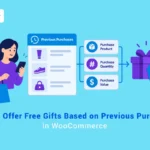
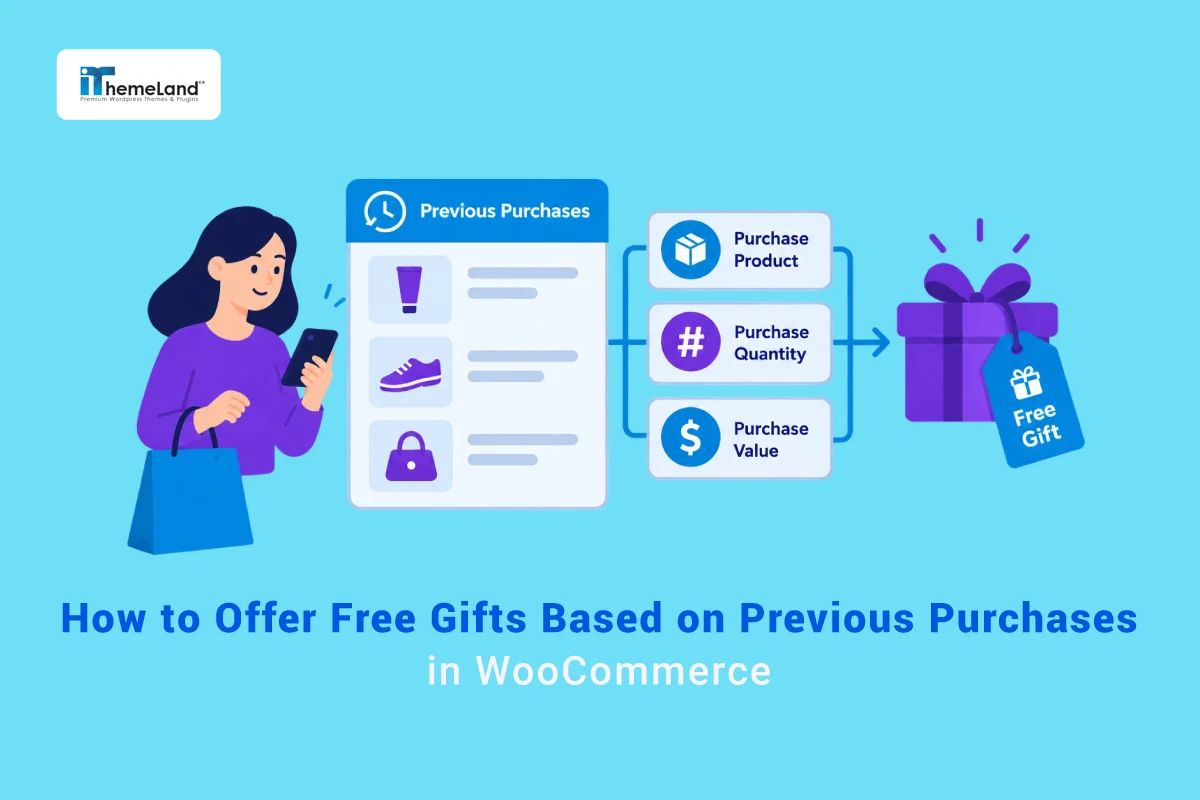
A customer’s previous orders can tell you much more than whether they have shopped with you before. They can show which products or categories the customer has already purchased, how many qualifying items they bought, and the value of those purchases. That information can be used to make the next free gift more relevant.
For example, a customer who previously bought from a skincare category could become eligible for a beauty sample on a later visit. A customer who previously purchased several qualifying accessories could receive a different reward, while a shopper whose qualifying purchase history reaches a chosen value could unlock a more premium gift.
GIFTiT – Free Gifts for WooCommerce includes Purchase History, Purchase History Quantity, and Purchase History Value conditions. These conditions let a gift rule use information from earlier paid orders instead of relying only on the products or subtotal in the current cart.
For a broader overview of WooCommerce gifting methods and targeting strategies, read our Complete Guide to WooCommerce Free Gifts.
Quick Answer: Can WooCommerce Offer Gifts Based on Previous Purchases?
Yes. With GIFTiT, you can create a free gift rule and use purchase-history conditions to decide which returning customers qualify. The appropriate condition depends on whether you care about what was purchased, how many qualifying items were purchased, or the value of those qualifying purchases.
| Condition | What It Checks | Example |
| Purchase History | What the customer previously purchased | Previously bought from Category A |
| Purchase History Quantity | Quantity of qualifying previous purchases | Previously bought 3+ qualifying items |
| Purchase History Value | Value of qualifying previous purchases | Qualifying previous purchases reached $300 |
GIFTiT’s documented purchase-history conditions can check products, variations, attributes, categories, and tags that were present in customer orders.
What Does “Previous Purchase” Mean in a WooCommerce Gift Rule?
In this type of campaign, the qualifying event happened before the customer’s current shopping session. The rule looks at relevant information in the customer’s order history and uses it as an eligibility condition for a new gift.
That is different from a cart-based promotion. A cart condition asks what is in the cart now. A purchase-history condition asks what the customer bought in earlier paid orders.
Consider a simple example. A customer previously purchased a coffee machine. On a later visit, you want that customer to qualify for a free coffee sample. The coffee machine does not need to be in the current cart for the previous-purchase condition to be useful; the earlier paid order is the signal used to identify the customer.
Purchase History vs. Customer Lifetime Spend
Purchase history and lifetime spend can both be used to reward returning customers, but they answer different questions. Keeping them separate helps you choose the right condition and prevents overlapping article intent.
| Purchase History | Lifetime Spend | |
| Main question | What qualifying items did the customer buy before? | How much has the customer spent overall? |
| Product/category targeting | Designed for specific previous purchase criteria | Not the main purpose |
| Quantity targeting | Available through Purchase History Quantity | Not the same measurement |
| Value targeting | Value of qualifying purchase-history criteria | Overall customer spend |
| Typical campaign | Follow-up or product-related gift | VIP/customer-value reward |
If your goal is to identify high-value customers from their overall spending rather than their specific purchase history, read How to Offer VIP Customer Gifts in WooCommerce Based on Lifetime Spend.
Three Ways to Target Customers Based on Previous Purchases
1. Purchase History
Use Purchase History when the important question is what the customer bought before. GIFTiT lets you check specific products, variations, attributes, categories, and tags in a customer’s previous paid orders.
Example: a customer previously purchased from the Coffee category, so they become eligible for a free sample pack on a later visit.
2. Purchase History Quantity
Use Purchase History Quantity when the number of qualifying items in previous purchases matters. This is useful when simply having one matching purchase is not enough for the campaign.
Example: a customer has previously purchased at least the quantity required by your campaign from a selected skincare range, so they become eligible for a cosmetic bag.
3. Purchase History Value
Use Purchase History Value when you want eligibility to depend on the monetary value associated with qualifying previous purchases. This is different from using the customer’s overall lifetime spend because the purchase-history condition can be tied to selected products, categories, tags, variations, or attributes.
Example: qualifying previous purchases from an Accessories category reach the value threshold defined by your campaign, so the customer can receive a premium gift.
How to Offer a Free Gift Based on Previous Purchases in WooCommerce
The basic gift rule can remain the same while the purchase-history condition changes. In this walkthrough, we will create one gift rule and then show three ways to define eligibility: previous purchase, previous purchase quantity, and previous purchase value.
Step 1 – Create a New Gift Rule in GIFTiT
Open the GIFTiT Rules page from your WordPress dashboard and create a new rule. Use a descriptive name such as “Previous Purchase Customer Gift” so the purpose of the rule remains clear when you manage several campaigns.
Step 2 – Choose the Gift Method
For this tutorial, use Simple Adjustment. The main purpose of the rule is to provide a gift when the customer matches a purchase-history condition, rather than to build a Buy X Get Y or repeating subtotal promotion.
Keeping the gift method simple also makes it easier to see the role of the condition: the method defines the reward, while Purchase History defines who qualifies.
Step 3 – Set the Number of Free Gifts
Set Get to 1 for the examples in this guide. You can then decide whether the gift should be added automatically or whether eligible customers should choose from the products you make available.
If you want the reward to appear in the cart automatically after the customer qualifies, see How to Automatically Add Free Gifts to WooCommerce Cart.
Step 4 – Choose the Gift Products
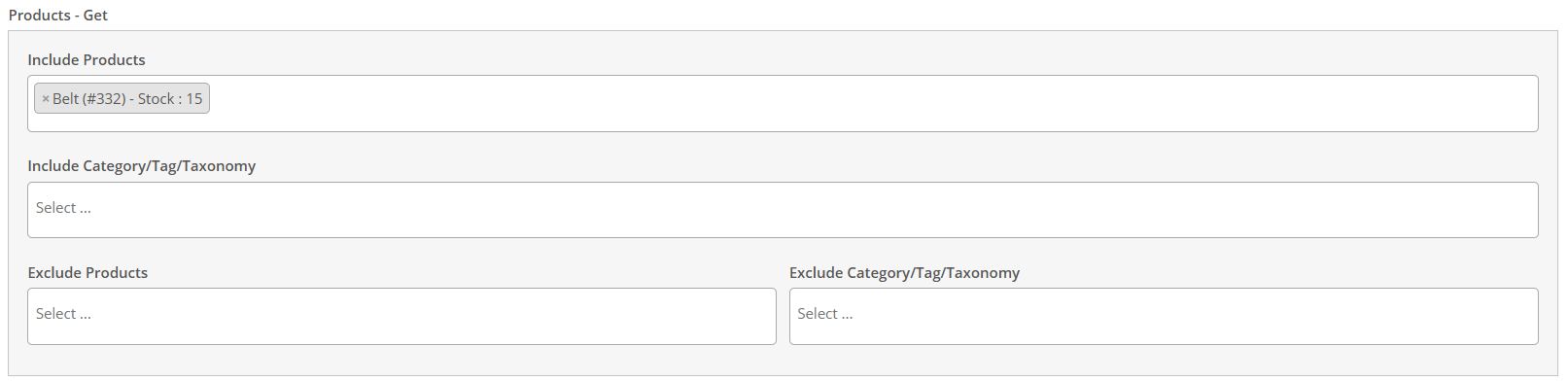
Use the Get section to define what eligible customers can receive. GIFTiT lets you include individual products or use categories, tags, and taxonomies, while also providing exclusion options for products or groups you do not want to offer.
For example, the gift list could contain a Travel Mug, Sample Pack, or Tote Bag. The gift itself does not have to be the same product that appeared in the customer’s previous order.
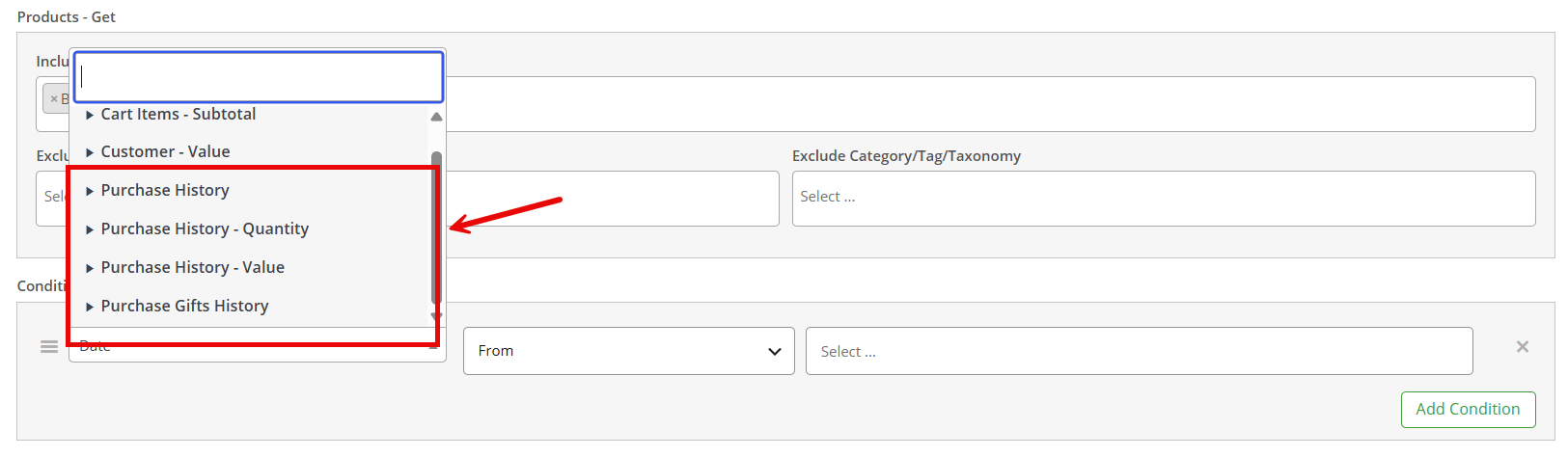
Step 5 – Add a Purchase History Condition
Open the Conditions section and add a condition. The purchase-history family gives you three useful directions for this campaign: Purchase History, Purchase History Quantity, and Purchase History Value.
Choose the condition that matches the question you are trying to answer. If the product or category matters, start with Purchase History. If the amount of qualifying items matters, use Purchase History Quantity. If the monetary value of qualifying purchases matters, use Purchase History Value.
GIFTiT – Free Gifts For WooCommerce
The easy way to offer free gifts based on previous purchases in WooCommerce
Option 1 – Offer a Gift Based on What the Customer Previously Purchased
Suppose you want customers who previously bought from the Coffee category to qualify for a free Travel Mug. In this case, the important information is the presence of a qualifying category in earlier paid orders, so Purchase History is the relevant condition family.
Select the previous-purchase criterion that matches the campaign, such as the qualifying product or category. GIFTiT also lets you target previous purchases by variations, attributes, and tags, giving you more precise control when targeting an entire product category would be too broad.
| Campaign Element | Example |
| Gift Method | Simple Adjustment |
| Get | 1 |
| Gift | Travel Mug |
| Eligibility | Previous paid purchase from Coffee category |
| Condition Family | Purchase History |
This kind of rule works well for complementary rewards. The earlier purchase identifies the customer’s product interest, while the gift can introduce a related item without requiring the original product to be purchased again.

Option 2 – Offer a Gift Based on Previous Purchase Quantity
Now consider a campaign where a single previous purchase is not enough. You want to reward customers only after their qualifying purchase history reaches a certain quantity.
Use Purchase History Quantity and define the qualifying product, category, tag, variation, or attribute together with the quantity requirement available in the condition. For example, a beauty store could reward customers whose paid order history contains the required quantity of qualifying skincare products.
| Campaign Element | Example |
| Gift Method | Simple Adjustment |
| Get | 1 |
| Gift | Cosmetic Bag |
| Qualifying Range | Skincare |
| Measurement | Quantity of qualifying previous purchases |
| Condition Family | Purchase History Quantity |
The important point is that the quantity belongs to the qualifying purchase history. It should not be confused with the number of orders the customer has placed.

Option 3 – Offer a Gift Based on Previous Purchase Value
Purchase History Value is useful when the campaign should reward the value of selected previous purchases rather than merely the presence or quantity of those items.
For example, imagine that you want to reward customers whose qualifying paid purchases from an Accessories category reach the value threshold you choose. The gift could then be a more premium product reserved for customers with stronger purchase history in that category.
| Campaign Element | Example |
| Gift Method | Simple Adjustment |
| Get | 1 |
| Gift | Premium Gift |
| Qualifying Range | Accessories |
| Measurement | Value of qualifying previous purchases |
| Condition Family | Purchase History Value |
This is not the same as overall lifetime spend. Purchase History Value is useful when the value needs to be associated with qualifying purchase-history criteria, whereas a lifetime-spend campaign is about the customer’s broader total spending.

Step 6 – Save the Rule and Test Different Customer Histories
After configuring the condition, save the rule and test it with customer accounts that have different order histories. Do not test only with the account that should qualify.
| Test Customer | Previous Purchase History | Expected Result |
| Customer A | No qualifying paid purchase | No gift |
| Customer B | Matches the configured previous-purchase condition | Gift available |
| Customer C | Has related purchases but does not meet the configured quantity or value requirement | No gift |
Also test a customer with an unpaid or non-qualifying order. GIFTiT checks Purchase History, Purchase History Quantity, and Purchase History Value conditions against paid orders, so make sure you use paid orders when testing the rule.
Practical Example 1: Reward a Customer Who Previously Bought a Specific Product
A product-specific follow-up gift can make the reward feel connected to something the customer already owns. For example, a customer who previously bought a coffee machine could become eligible for a free coffee sample.
| Setting | Example Configuration |
| Method | Simple Adjustment |
| Get | 1 |
| Gift | Coffee Sample |
| Condition | Purchase History |
| Previous Purchase Target | Coffee Machine |
| Purpose | Related follow-up gift |
The same idea can be broadened from one product to a category, variation, attribute, or tag when the campaign needs to cover a larger product group.
Practical Example 2: Reward Customers Based on Previous Purchase Quantity
A quantity-based campaign can distinguish a customer who has made only a small qualifying purchase from someone who has purchased several qualifying items.
For example, a skincare store could make a Cosmetic Bag available once the customer’s paid purchase history reaches the campaign’s required quantity of qualifying skincare products. The gift rule stays simple; Purchase History Quantity supplies the eligibility logic.
This can be useful for product families that customers purchase repeatedly or in multiples, because the reward reflects depth of engagement with that range rather than simply the existence of one previous order.
Practical Example 3: Reward Customers Based on Previous Purchase Value
A value-based history condition is useful when all qualifying purchases should not be treated equally. Instead of counting items, the campaign can look at the value associated with the selected previous-purchase criteria.
For example, customers whose qualifying Accessories purchase history reaches the chosen campaign value could unlock a Premium Gift. This allows the reward level to reflect the commercial value of the relevant historical purchases without turning the rule into a generic lifetime-spend campaign.
Previous Product vs. Category vs. Tag: What Can You Target?
GIFTiT’s purchase-history is not limited to individual products. It also lists variations, attributes, categories, and tags, giving you several ways to define the historical purchase that matters.
| Previous Purchase Target | Example Use |
| Product | Previously bought a Coffee Machine |
| Variation | Previously bought a qualifying product variation |
| Category | Previously bought from Skincare |
| Attribute | Previously bought a product with a qualifying attribute |
| Tag | Previously bought products tagged Premium |
Use the narrowest target that matches the campaign. A product condition is useful for a specific follow-up offer, while category or tag targeting can cover a wider product family.
Previous Purchase Gifts vs. Current Cart Gifts
Previous-purchase targeting and current-cart targeting solve different problems. A previous-purchase gift recognizes what the customer did before; a current-cart gift reacts to what the customer is buying now.
| Rule Type | Question | Example |
| Previous Purchase | What did this customer buy before? | Bought Coffee Machine before → qualify for Coffee Sample |
| Current Cart | What is the customer buying now? | Coffee Machine is in cart now → qualify for gift |
This difference is useful when planning the customer journey. Previous-purchase rules can support follow-up, loyalty, cross-sell, and re-engagement ideas, while current-cart rules are more directly tied to the active transaction.
Combine Purchase History with Other Conditions
Purchase history does not have to be the only requirement in a rule. GIFTiT includes condition groups for customer data, cart and cart items, date and time, customer value, and other criteria, so a purchase-history campaign can be narrowed when the promotion requires it.
For example, you might combine a qualifying previous purchase with a customer condition, a campaign date, or another current eligibility requirement. The purpose of the additional condition should be clear; adding restrictions simply because they are available can make the rule harder to understand and test.
For more examples of narrowing gift eligibility, see How to Set Up Custom Gift Rules in WooCommerce.
Best Use Cases for Previous-Purchase Free Gifts
Cross-Sell After a Previous Purchase
Use a known previous product as the signal for a complementary gift. A coffee machine buyer could receive a sample, or a customer who bought from a selected product family could be introduced to a related accessory.
Reward Repeat Buyers
Purchase History Quantity can recognize customers whose qualifying purchase behavior is deeper than a single transaction. The reward can acknowledge repeated or higher-quantity engagement with a product range.
Product Replenishment Campaigns
For products that are naturally repurchased, previous-purchase targeting can help create a follow-up promotion for customers who already know the product category.
Introduce Related Products
A gift can be used as a low-friction way to introduce an adjacent product. The previous purchase provides context for choosing a gift that is more likely to be relevant.
Reward High-Value Category Customers
Purchase History Value can help distinguish customers whose qualifying historical purchases in a selected product group have greater value, without using overall customer lifetime spend as the only signal.
Best Practices for Previous-Purchase Gift Campaigns
- Keep the gift relevant to the qualifying previous purchase whenever possible.
- Choose Purchase History, Quantity, or Value based on the actual business question rather than using them interchangeably.
- Remember that documented purchase-history checks use paid orders.
- Test several customer histories, including customers who nearly meet the condition.
- Use product, category, tag, variation, or attribute targeting at the level that best matches the campaign.
- Keep additional conditions purposeful so the rule remains easy to troubleshoot.
- Separate category-specific purchase value from overall lifetime spend when planning VIP campaigns.
Common Mistakes to Avoid
Using Cart Conditions Instead of Purchase History
If the campaign depends on what the customer bought before, a current-cart condition answers the wrong question. Use the purchase-history family for historical order criteria.
Using Spent Total When You Actually Need Purchase History Value
Spent Total is appropriate when overall customer spending is the key signal. Purchase History Value is more appropriate when the value needs to be associated with qualifying historical products, categories, tags, variations, or attributes.
Confusing Purchase History Quantity with Order Count
These are different measurements. Order Count measures the number of orders in the selected customer-value context. Purchase History Quantity is concerned with the quantity of qualifying historical purchase items.
For example, one order can contain several units or several qualifying products. That does not turn one order into several orders. Choose the condition based on whether you want to count orders or qualifying purchased quantity.
Forgetting That Purchase History Uses Paid Orders
A customer may have an order record that does not qualify for the documented purchase-history check. Include paid-order status in your test plan rather than assuming every order record will be treated the same.
Making the Gift Unrelated to the Previous Purchase
A technically valid rule can still feel arbitrary to the customer. Whenever the campaign strategy allows it, choose a reward that makes sense in the context of the qualifying purchase history.
Purchase History Quantity vs. Order Count
This distinction deserves special attention because the two conditions can produce very different audiences.
Imagine a customer placed one paid order containing eight qualifying items. Their Order Count for that transaction is one, while their qualifying purchased quantity can be much higher. Conversely, a customer could place several separate orders with only one qualifying item in each.
| Measurement | What It Represents | Example |
| Order Count | Number of customer orders in the configured context | 3 separate orders |
| Purchase History Quantity | Quantity of qualifying items in previous paid purchases | 8 qualifying items |
GIFTiT also provides a separate Customer Value → Order Count condition, which lets you target customers based on how many orders they have placed within a selected period. For example, you can offer a gift to customers who have placed more than three orders in the past month. That separation reinforces why Order Count should not be treated as a substitute for Purchase History Quantity.
Conclusion
Previous-purchase gifting gives you a way to make WooCommerce rewards respond to the customer’s actual order history instead of treating every shopper the same. The most important step is choosing the right historical measurement for the campaign.
Use Purchase History when the key question is what the customer bought. Use Purchase History Quantity when the number of qualifying purchased items matters. Use Purchase History Value when eligibility depends on the value associated with qualifying historical purchases. GIFTiT lets you apply these conditions to specific products, variations, attributes, categories, and tags found in the customer’s paid orders.
From there, the gift itself can remain simple: choose the reward, decide whether it should be automatically added or selected by the customer, save the rule, and test it against several real purchase-history patterns.
To create these targeted gift campaigns, explore GIFTiT – Free Gifts for WooCommerce.
For more campaign types, targeting ideas, and WooCommerce free-gift strategies, continue with our Complete Guide to WooCommerce Free Gifts.
GIFTiT – Free Gifts For WooCommerce
The easy way to offer free gifts based on previous purchases in WooCommerce
FAQ
1. Can I give a free gift based on a customer’s previous WooCommerce purchases?
Yes. GIFTiT includes Purchase History conditions that can use qualifying information from previous paid customer orders to control gift eligibility.
2. Can I offer a gift if a customer previously bought a specific product?
Yes. The documented Purchase History conditions can check specific products and also support variations, attributes, categories, and tags in customer orders.
3. Can I offer gifts based on the quantity a customer purchased before?
Yes. Purchase History Quantity is the relevant condition family when eligibility should depend on the quantity of qualifying items in previous paid purchases.
4. Can I offer a gift based on the value of previous purchases?
Yes. Purchase History Value can be used when the value associated with qualifying previous-purchase criteria should determine eligibility.
5. What is the difference between Purchase History Quantity and Order Count?
Purchase History Quantity measures qualifying purchased-item quantity, while Order Count measures the number of orders. One order can contain multiple qualifying items, so the two measurements should not be used interchangeably.
6. Does GIFTiT check unpaid orders when evaluating purchase history?
GIFTiT checks Purchase History, Purchase History Quantity, and Purchase History Value conditions using paid orders only.