

Customer reviews are one of the strongest trust signals for any WooCommerce store. Positive feedback not only helps potential buyers feel more confident about purchasing, but also improves search engine visibility, increases conversions, and strengthens your brand reputation. If you are wondering how to encourage customers to write reviews, the key is creating a rewarding and frictionless experience that motivates shoppers to share their opinions.
One of the most effective ways to increase WooCommerce customer reviews is by rewarding customers with incentives such as free gifts, discounts, loyalty points, or store credits. Using the GIFTiT – Free Gifts For WooCommerce plugin, store owners can easily create automated reward campaigns based on customer review activity and encourage more verified product feedback.
In this guide, you will discover proven methods to encourage customers to leave reviews in WooCommerce, improve customer engagement, and turn satisfied buyers into loyal advocates for your online store.
Quick Answer:
To encourage WooCommerce customers to write reviews, make the review process simple, timely, and valuable. Ask for reviews after the customer has received the product, use short and clear messages, highlight the benefit of feedback, and avoid making the review form too long or complicated.
You can also connect review campaigns with incentives such as free gifts or loyalty rewards using GIFTiT – Free Gifts For WooCommerce. After installing the plugin, go to WordPress Dashboard > iThemeland > GIFTiT, create a rule, and design a campaign that rewards selected customer behavior or repeat purchases with a relevant gift, while keeping the offer compliant with your review policy.
For best results, combine good timing with a frictionless review request. Send reminders after delivery, show review prompts on account pages or emails, and use incentives carefully. GIFTiT plugin can support broader loyalty and retention campaigns that make customers more likely to engage with your store after purchase.
Why encourage customer reviews is important?
Some studies have proved the importance of encouraging feedback from customers. The result of one study revealed that 93% of consumers claim to purchase from an online shop after reading strong reviews. So, to have a successful e-commerce business, you need to know how to encourage customers to write a review.
Another study showed that customers will spend up to 22% more in an online shop when they see other customer reviews or positive ratings. This means that online shops can boost their sales by encouraging customer feedback.
It is also proved that products are 270% more likely to sell when some positive reviews have been written for them.
The other study by eMarketer displayed that customer reviews can increase average order values and overall conversion rates by 42% and 56%, respectively.
Online reviews statistics, also revealed that 4 out of 5 Americans check customer reviews before purchasing, and 79% read reviews to ensure the quality of the product or service.
The result of another interesting study showed that customer reviews help 83% of consumers find new items.
All in all, the main goal of encouraging customer reviews is to improve the reputation of the online shop to make customers trust them. However, you can achieve other important goals by encouraging feedback from customers which are:
- Convert potential customers into real buyers by providing more transparency.
- Help customers ensure that the product is exactly what they are looking for.
- Help improve your rankings on Google and other search engines.
- Increase customer conversions and grow your business.
Encourage customer reviews by rewarding them with offering a free gift on WooCommerce
Gathering customer reviews is essential for your online shop, however, you can not just wait for them to send their feedback or leave a comment just because you are providing a high-quality product in your store.
On the other hand, directly asking for feedback is not effective. So, you should look for an innovative way to encourage customer reviews.
One of the best methods for encouraging feedback from customers is rewarding them with free gift products. It can help foster a positive online community around your brand and let customers feel you respect their activities and value them.
Offering free gift products can be a powerful tool to encourage customers to write reviews and make your brand more appealing to them.
You may wonder how you encourage customers to write a review by rewarding them with free gifts in WooCommerce.
Continue reading to learn about it.
How to reward customers for encouraging them to leave reviews on WooCommerce?
You can easily reward customers for product reviews using the free gift for the WooCommerce plugin.
It allows you to create and manage rules for offering giveaways with different methods under various conditions.
Here’s a step-by-step guide about how to encourage customers to leave a review by rewarding free gifts.
Step 1: Install and activate free gift for the WooCommerce plugin
The first step involves downloading the ZIP file of the plugin. After you’ve successfully downloaded and installed it on your WordPress site, the next step is to navigate to the WordPress dashboard > Woo free gift > Rules | Settings
Note: If you need help downloading and installing the plugin, read this guide:
Read more: How to install the GIFTiT – Free Gifts for WooCommerce plugin?
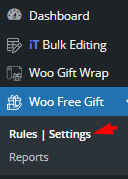
In the Rules page, you can click on the Add Rule button to create a new free gift offer.

Once you create a new gift offer rule, the New Rule form will appear on the screen.
In this form, you can find all items needed for running giveaway campaigns with different methods and conditions.
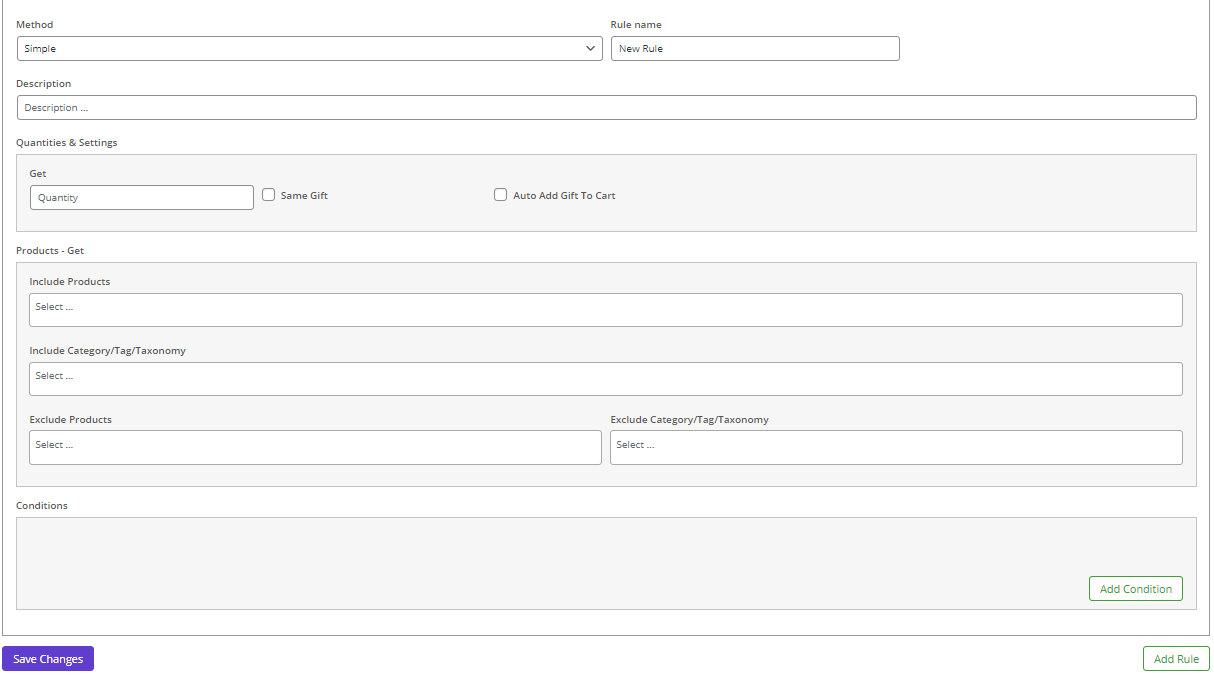
Follow the next steps to learn how to fill in the form for offering free gifts to customers who leave reviews on your products.
GIFTiT – Free Gifts For WooCommerce
The easy way to boost sales and encourage your customers
Step 2: Choose a method for offering free gifts
The first item you need to set in the form is Method which contains some default options for creating free gift offerings like Simple, Buy X Get X, Buy X Get y, Tired Quantity, etc.
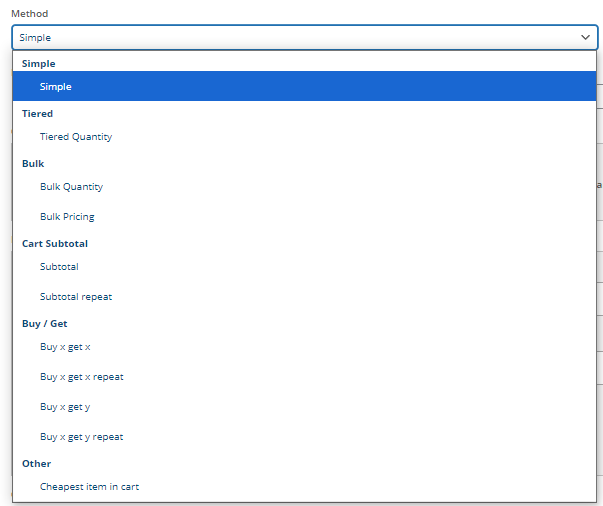
Choosing the right method is very important because the other items in the form will be changed when you choose one of the methods from the list.
If you have no idea about which method is best for your online business to encourage customer feedback, we recommend you to choose the Simple method and follow the next steps.
Setp3: Set gift quantity and settings
The next section in the rule form is Quantities & Settings designed to let store managers specify the below items:
- Get: The number of gift products you want to offer to the customers. For example, if you want your customer to receive 1 gift after leaving a comment, write 1 in the Get box.
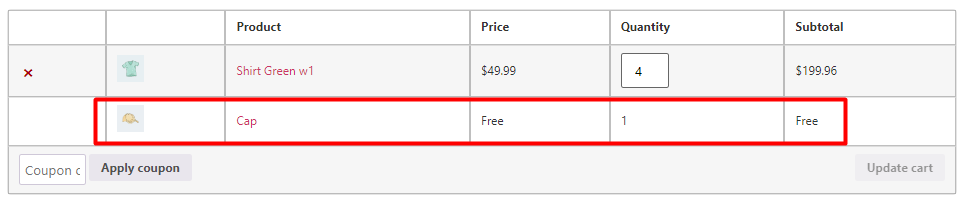
- Auto add gift to cart: If you want the plugin to add free gift automatically to the customer card, mark this option. Otherwise, customers will see a list of products on the cart page and they can choose their favorite gifts and add them to their cards.

Step 4: Choose products to offer as free gifts
In the next section which is Product – Get, you can choose one or more products from your shop to offer as free gifts to the customers.
The items available in this section are:
- Include products
- Exclude products
- Include categories
- Exclude categories
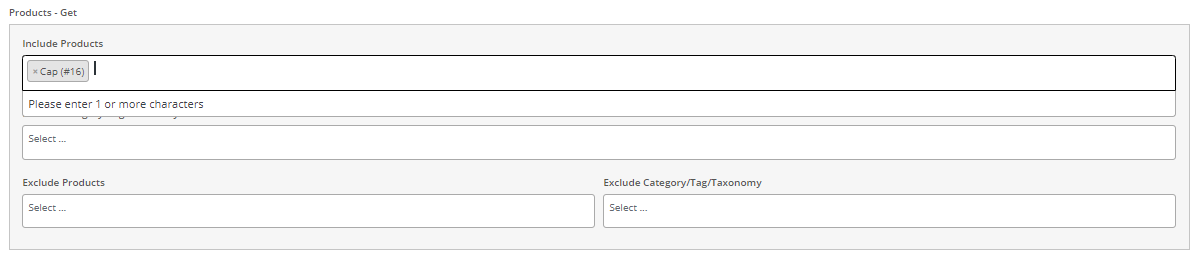
For example, if you choose Cap for the Include products, it means your customers will receive the Cap as free gift after writing a review.
Step 5: Add a condition to encourage customer reviews
The final step is to set conditions for encouraging feedback from customers. To do this, you need to:
- Click on the Add Condition button.
- Open the first dropdown list and choose Customer Value > Customer Review Count.
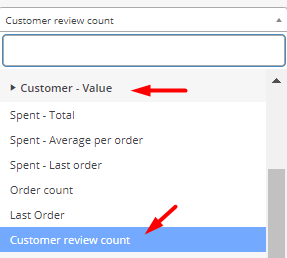
- Then choose one of the below items from the second combo box to set in which conditions customers can receive the gift:
- At least: If customers write the minimum number of comments that you have specified.
- More than: If customers write reviews more than a specific number.
- Not more than: If customers write the maximum number of comments that you have specified.
- Less than: If customers write reviews less than a specific number.
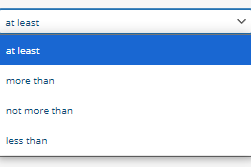
- In the last box, you should write the number of comments based on the condition you have set in the previous combo box.

For example, if you choose at least then write 1 in the second and third boxes, it means if customers have left 1 comment, they can receive the gift product.
How do you encourage customers to write a review in other innovative ways?
Since we introduced rewarding free gift products as the best method for encouraging feedback from customers, let’s look at some other innovative ways and explore how to encourage customers to leave a review by getting help from them.
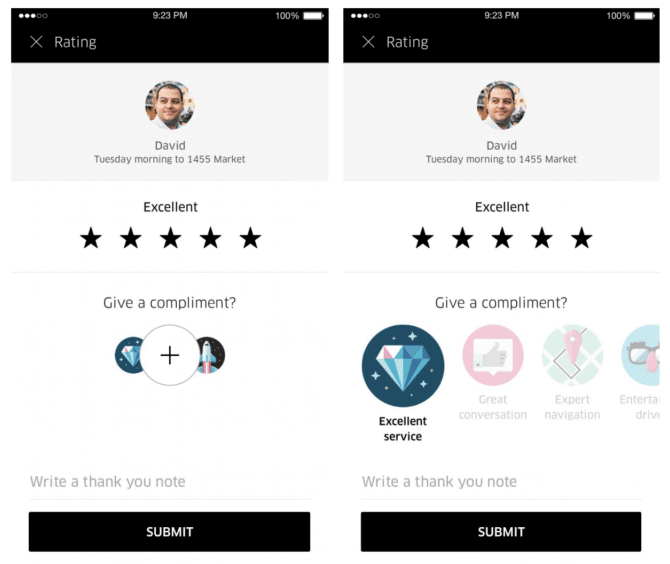
Encourage customers to write reviews by providing incentives
According to PowerReviews study, 73% of consumers claim that if given an incentive, they would be encouraged to leave a review.
So, much like rewarding a free gift, you can incentivize customers to leave comments and build up a healthy stock of reviews before making a purchase or sharing their thoughts about their purchases.
There are many ways to encourage customer reviews like offering loyalty points, discounts on future purchases, etc.
It is very important to highlight these rewards to entice customers to write comments on your website.
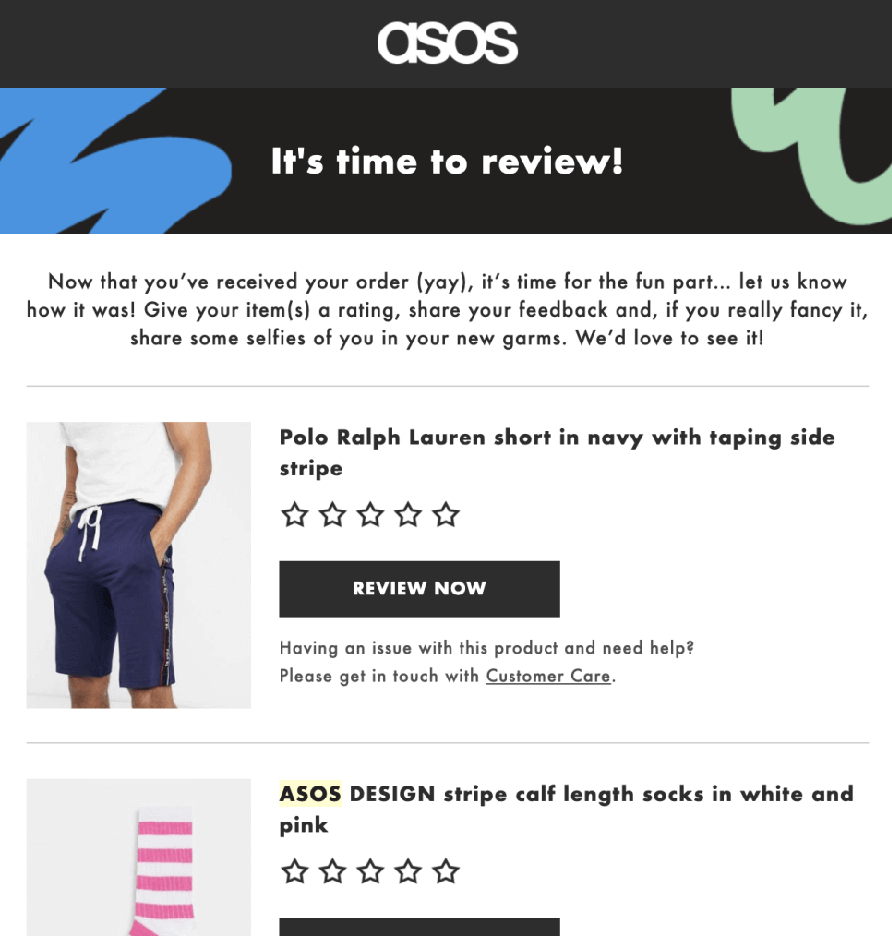
Sending personalized email requests to encourage customer reviews
Spiegel Research Center performed reliable research and found that 80% of reviews is the result of sending a personalized post-purchase email with a review link.
To sweeten the deal, mention how you reward customers for reviews.
To make this strategy work best for your online shop, it is important to mention the customer’s name, the product they purchased, and a reward that they may receive by writing reviews.
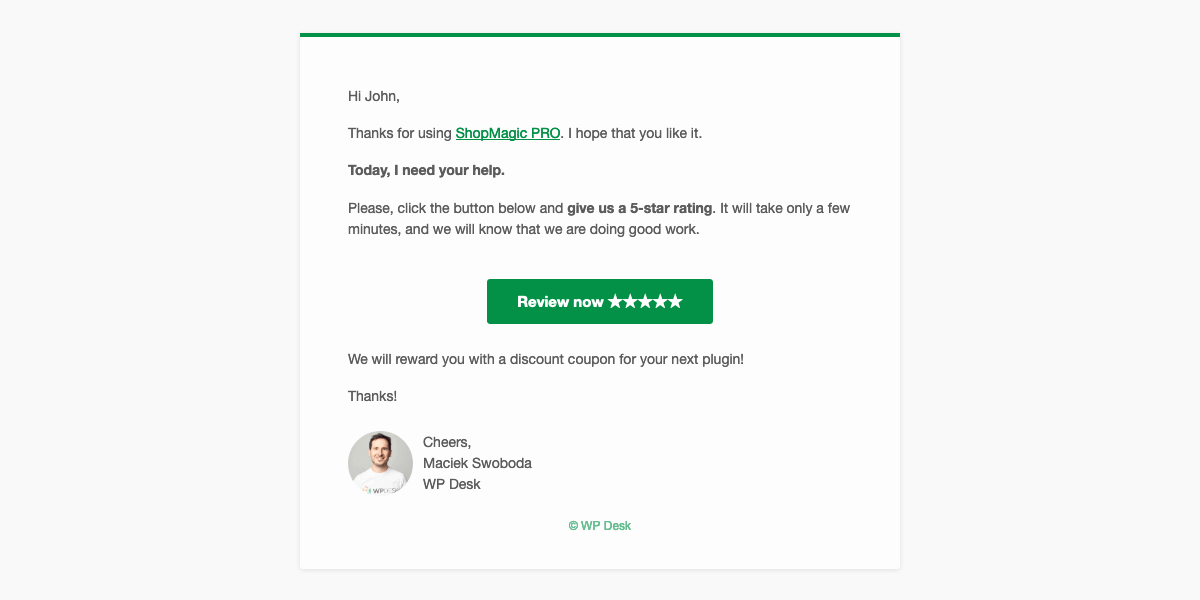
To get a better result, we recommend you send the email right after the customers receive their package. This is the exact time that they are so excited and ready to leave positive reviews of your products!
You can also send a follow-up survey in the Email to gather detailed feedback from your customers including the product reviews section.
Utilizing social media to encourage customer feedback
One of the creative ways to encourage customer reviews is publishing engaging posts on social media like Facebook, Instagram, etc. And asking customers to leave comments about your products.
You can even mention the rewarding free gifts and inform them about reward programs.
Displaying post-purchase pop-ups to encourage feedback from customers
When customers order their products and decide to leave your website, you can show them a pop-up window to ask for a review. This is a great way to encourage feedback from customers especially if you mention the possibility of receiving free gifts.
Attaching QR codes on packaging
If you are selling physical products, it is a great idea if you attach QR codes to your product packaging. In this way, you can directly lead customers to a review page on your website.
This innovative way can effectively encourage customers to leave a review right after package delivery.
Sending an SMS review request
Along with emails and social media posts, you can send SMS messages to encourage customer reviews. It is a proven method that you can always count on to make your customers feel their ideas are important for your business.
By informing customers about incentives and rewards, you can get a better result and improve customer engagement.
Asking for reviews in exchange for store credit
Offering store credit is known as an effective strategy for improving customer loyalty. However, you can benefit from this win-win method and encourage customers to write reviews effectively.
When customers know that leaving more comments means receiving more store credits, they will definitely be encouraged to send their feedback.
Making a follow-up phone call
The last way we want to introduce you to encourage customer reviews is to directly contact your customers by phone call. It can be used as a backup plan if other ways have not the expected results. If you think that your customers may ignore your emails or social media posts or if the target audience of your online business is old people who are not very well at working with technology like smart phone and the internet, making a phone call worth trying.
Although compared to other methods, making phone calls is absolutely time-consuming, you can use this method for advertising other products or new collections as well and convince customers to come back to your website and purchase again.
GIFTiT – Free Gifts For WooCommerce
The easy way to boost sales and encourage your customers
Conclusion
Encouraging customer feedback is one of the smartest long-term strategies for growing a successful WooCommerce store. Reviews build trust, improve SEO rankings, increase conversion rates, and help new customers make confident purchasing decisions. Whether you use personalized emails, social media campaigns, SMS reminders, or post-purchase incentives, the goal is to make leaving a review simple and rewarding.
Among all strategies, offering rewards remains one of the most effective ways to encourage customers to write reviews consistently. With GIFTiT – Free Gifts For WooCommerce, you can automate review reward campaigns, offer free gifts based on customer activity, and create a more engaging shopping experience that motivates buyers to leave valuable feedback. By combining smart incentives with a smooth review process, your WooCommerce store can generate more reviews, stronger social proof, and higher sales over time.
FAQ
Why are customer reviews important for WooCommerce stores?
Customer reviews help build trust with new buyers, improve conversion rates, increase SEO visibility, and provide valuable social proof that encourages more sales in WooCommerce stores.
How can I encourage customers to leave reviews in WooCommerce?
You can encourage customers to leave reviews by offering incentives such as free gifts, discounts, loyalty points, personalized emails, SMS reminders, and post-purchase follow-ups.
What is the best way to reward WooCommerce customer reviews?
One of the best methods is offering free gift products or store rewards after customers leave verified reviews. This creates a positive experience and increases customer engagement.
Can free gifts help increase WooCommerce product reviews?
Yes, rewarding customers with free gifts can significantly increase review submissions because customers feel appreciated and motivated to share their experience.
How do personalized review emails improve customer feedback?
Personalized review emails remind customers about their recent purchases and make the review process easier by including direct review links and reward information.
Does customer feedback help WooCommerce SEO?
Yes, customer reviews add fresh user-generated content to product pages, improve keyword relevance, and help search engines understand product quality and trustworthiness.
How can I automate review rewards in WooCommerce?
You can automate review rewards using plugins like the GIFTiT plugin, which allows you to create rules that reward customers after leaving reviews.
What incentives work best for encouraging better reviews?
Free products, discount coupons, loyalty points, store credits, and exclusive offers are among the most effective incentives for encouraging better reviews and increasing customer participation.