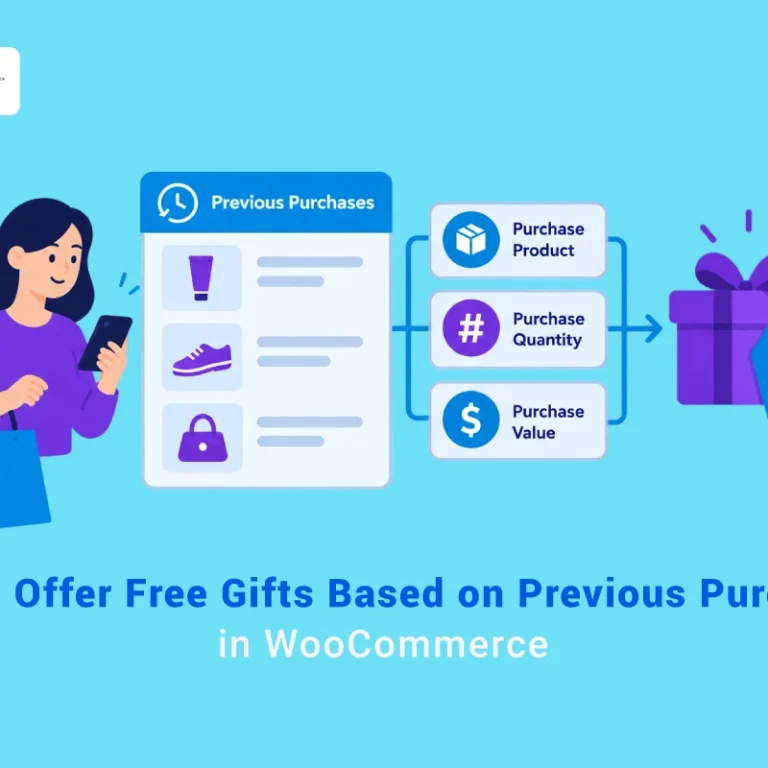

Automatic vs manual gift selection can directly influence how efficiently a WooCommerce store attracts customers, supports purchasing decisions, and turns everyday store activity into measurable growth. The topic is not only about applying a single tactic. It is about understanding the customer need, choosing a practical workflow, and using the right metrics to decide whether the strategy is actually working.
An automatically added gift removes friction and makes the reward instantly visible. Manual gift selection gives customers more control and can increase perceived value. The best choice depends on the campaign goal, the number of eligible gifts, and the complexity of the cart experience.
In this guide, readers will learn how to approach automatic vs manual gift selection step by step. The goal is to choose the gift-selection experience that creates the clearest and most appealing customer journey. The article should give readers enough context to choose a suitable approach, avoid common mistakes, and turn the recommendations into a realistic plan for their website or store.
A focused tactic is easier to apply when the wider structure is clear. this broader WooCommerce gift guide offers helpful context for choosing between automatic and manual gift selection.
Quick Answer:
Automatic gift selection means the free gift is added to the cart without customer action, while manual gift selection lets customers choose from available gift options. Both methods can work, but the best choice depends on the campaign goal. For WooCommerce stores, GIFTiT – Free Gifts for WooCommerce supports gift rules that can be configured around these gift selection experiences.
To create a gift selection campaign, After installing the plugin, go to WordPress Dashboard > iThemeland > GIFTiT, create a new rule, set the trigger condition, and choose the gift products. If the campaign should feel effortless, configure the rule so the gift is automatically applied when the condition is met. If personalization matters more, allow customers to choose from available gifts.
Automatic gifts are better for simple promotions and faster checkout, while manual selection is better when you want shoppers to feel more control. GIFTiT plugin makes both approaches easier to manage by keeping the gift rules, products, and display options in one place.
What is gift selection?
Gift selection refers to the process of choosing and offering free gifts to customers as part of a promotional strategy, loyalty program, or special offer in an online store. This can be done in two main ways: Automatic vs Manual Gift Selection
Let’s explore that, briefly:
Choosing Gifts Automatically – The system automatically assigns gifts based on predefined rules (e.g., order value, product category, or customer segment).
Manual Gift Picking – The store admin personally selects and assigns gifts to specific customers or orders for a more personalized touch.
Automatic Gift Selection: Definition & How It Works
Choosing gifts automatically is a feature that allows online stores to automatically offer free gifts to customers based on predefined rules—without manual intervention. This method uses conditions like order value, product category, cart quantity, or customer behavior to determine when and which gift to provide.
When comparing automatic vs manual gift selection, the key difference lies in efficiency: automatic systems apply rules instantly at scale, while manual selection requires personalized effort for each customer.
How Does Automatic Gift Selection Work?
Set Conditions – The store admin defines rules for when a gift should be offered (e.g., “Add a free gift for first order“).
Choose Gift Options – Specific products are marked as free gifts, and the system selects them based on the rules.
Automatic Application – When a customer meets the criteria (e.g., reaches the minimum spend), the gift is automatically added to their cart.
Example Use Cases
Spend more than $50, Get a Free Wine
To Auto-added the wine at checkout, you can create a new rule in the free gifts for WooCommerce plugin and fill the rule form as follow:
- Choose Subtotal method from the list.
- In the Quantities & Settings section, set the following fields:
- Comparison operator: Greater than >
- Subtotal amount: 50
- Get: 1
- Mark Auto add gift to cart
- In the Product Get section, add wine in the Include Product/Category field.
- Press the Save Changes button.
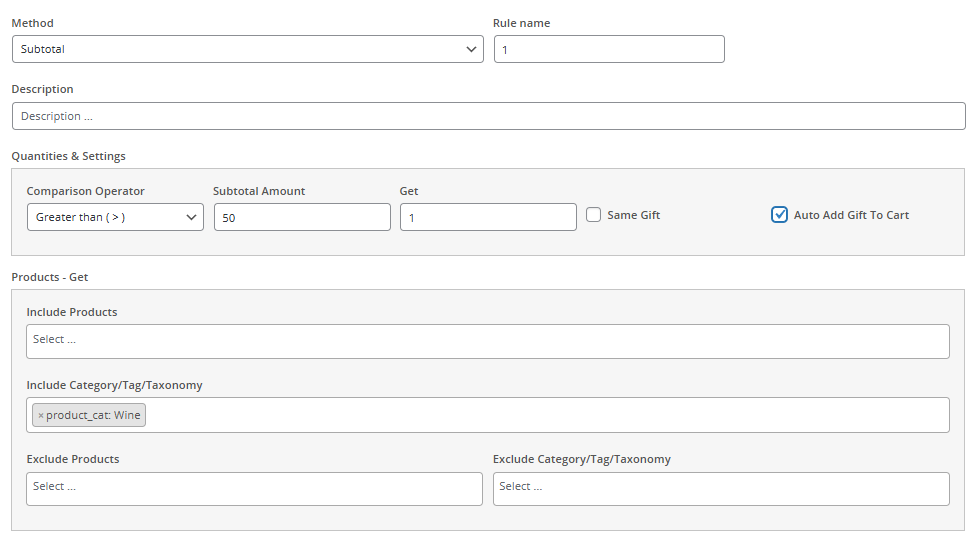
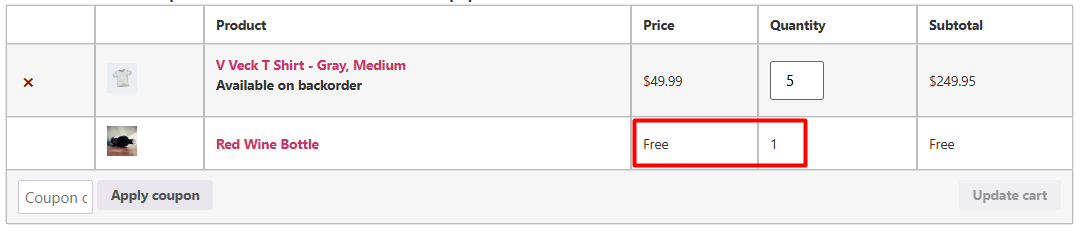
By applying this rule, when customers order above $50, the plugin will automatically add a wine to their cart.
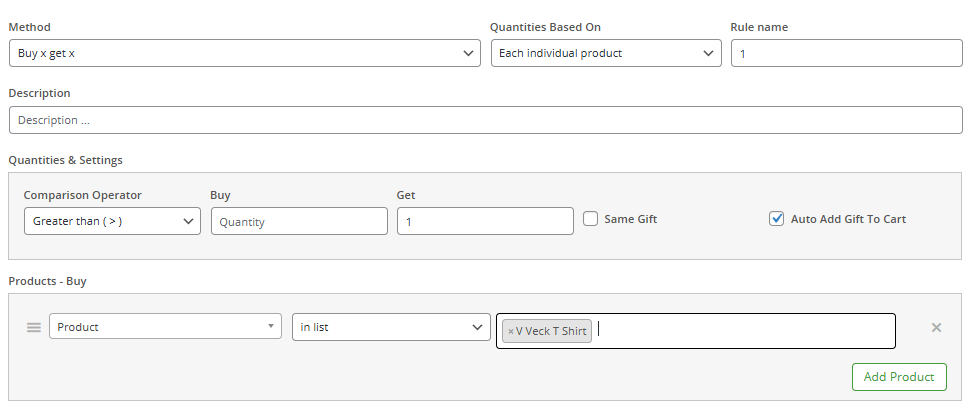
Buy 2 T-Shirts, Get one for free
You can easily create this rule in free gifts for WooCommerce plugin by following the below instructions:
- Select Buy X Get X from the list of methods.
- Set the fields in the Quantities & Settings section as below:
- Comparison operator: Greater than >
- Buy: 2
- Get: 1
- Mark Auto add gift to cart
- Under Product Buy section, press Add Product, then set the fields as below:
- First field: Product
- Second field: in list
- Last field: Tshirt
- Press the Save Changes button.
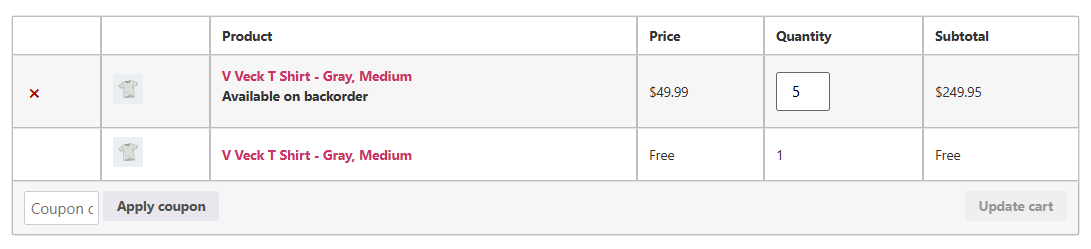
As illustrated below, gift applied when condition is met.
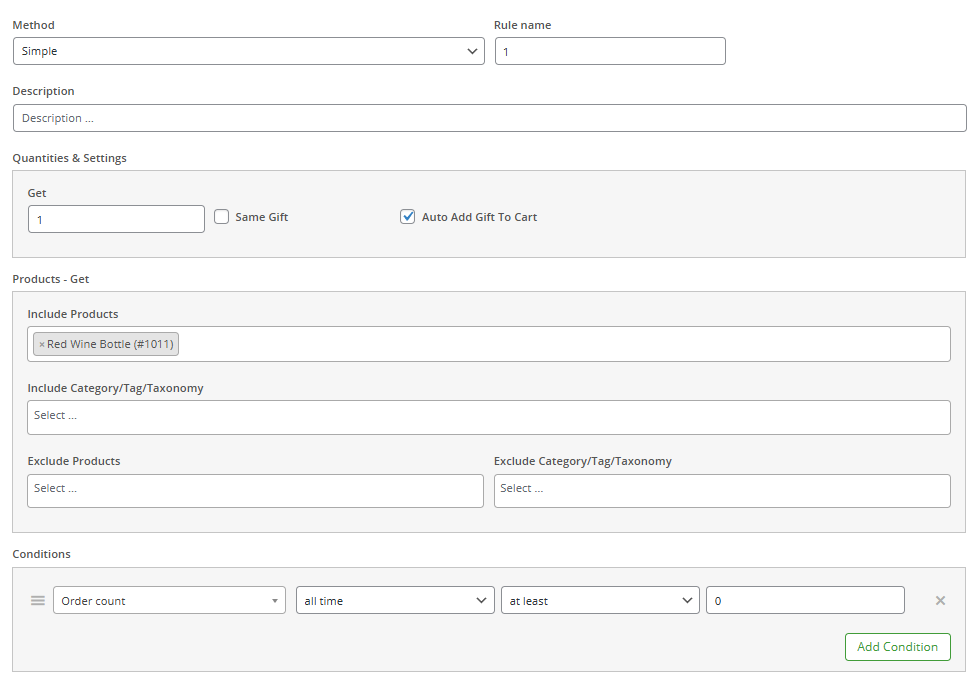
First-Time Customers Get a Free Sample
Here you can find an easy instruction to apply this rule on your store:
- Choose Simple method.
- Under Quantities & Settings set the Get field to 1, and Mark auto add gift to cart.
- Under Product Get section add free sample product to the Include Product/Category field.
- Under Condition section add a new condition, then set the following fields:
- First field: Customer Value > Order Counts.
- Second field: All time
- Third field: At least
- Last field: 0
- Click on the Save Changes button.
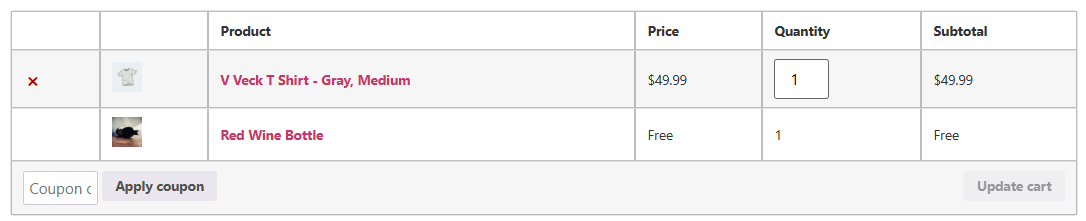
The gift is triggered when customers place their first order.
Best Plugin for Automatic Gifts: Free Gifts for WooCommerce
Free gifts for WooCommerce plugin simplifies automatic gift selection with features like applying rule-based free gifts (Buy X Get Y, Subtotal Repeat, Tired Quantity, Cheapest item, etc.), enable Auto-add gift to cart with one click, set flexible conditions to trigger choosing gifts automatically rule.
Automatic Gift Selection Pros and Cons
When evaluating automatic vs manual gift selection, it’s important to weigh the benefits and limitations. Automatic systems offer speed, scalability, and rule-based consistency, while manual methods provide personalized touches. However, automation may lack human intuition, whereas manual selection can be time-consuming and inconsistent. The right choice depends on your business needs and customer expectations.
Pros of Automatic Gift Selection
Saves Time & Effort – No manual selection needed; gifts are assigned instantly based on rules.
Boosts Conversions – Encourages customers to spend more to unlock free gifts.
Consistent & Fair – All qualifying customers receive the same offer, avoiding bias.
Reduces Human Error – Eliminates mistakes from manual gift selection.
Scalable for Large Stores – Works seamlessly even with high order volumes.
Encourages Upselling – Can be tied to minimum spend or specific product purchases.
Improves Customer Experience – Instant rewards create a positive shopping experience.
Cons of Automatic Gift Selection
Less Personalization – Gifts are rule-based, not tailored to individual preferences.
Risk of Irrelevant Gifts – Some customers may receive gifts they don’t want.
Limited Flexibility – Harder to make exceptions (e.g., special cases for loyal customers).
Dependent on Rule Setup – Poorly configured rules may lead to missed opportunities or abuse.
Inventory Challenges – If gifts run out, the system may still display unavailable offers.
Less Surprise Element – Predictable promotions may reduce excitement compared to manual surprises.
GIFTiT – Free Gifts For WooCommerce
The easy way to boost loyalty with automatic or manual gift selection
Manual Gift Selection: Definition & How It Works
Manual gift selection is a customized approach where store owners personally choose free gifts for customers, or alternatively, let customers select their preferred gift from a list or pop-up. This method allows for greater personalization and customer satisfaction compared to automatic systems. When considering automatic vs manual gift selection, it’s important to note that while manual methods create more meaningful customer experiences, they require additional time and resources that automated solutions don’t.* The choice between automatic vs manual gift selection ultimately depends on your business’s capacity for personalization versus operational efficiency.
How Does Manual Gift Selection Work?
Let’s explore how Manual Gift Picking works:
Admin-Selected Gifts: The store owner manually assigns gifts for specific orders or customers. This is ideal for VIP rewards, special occasions, or surprise upgrades.
Customer-Chosen Gifts: Customers pick their free gift from a predefined list during checkout.
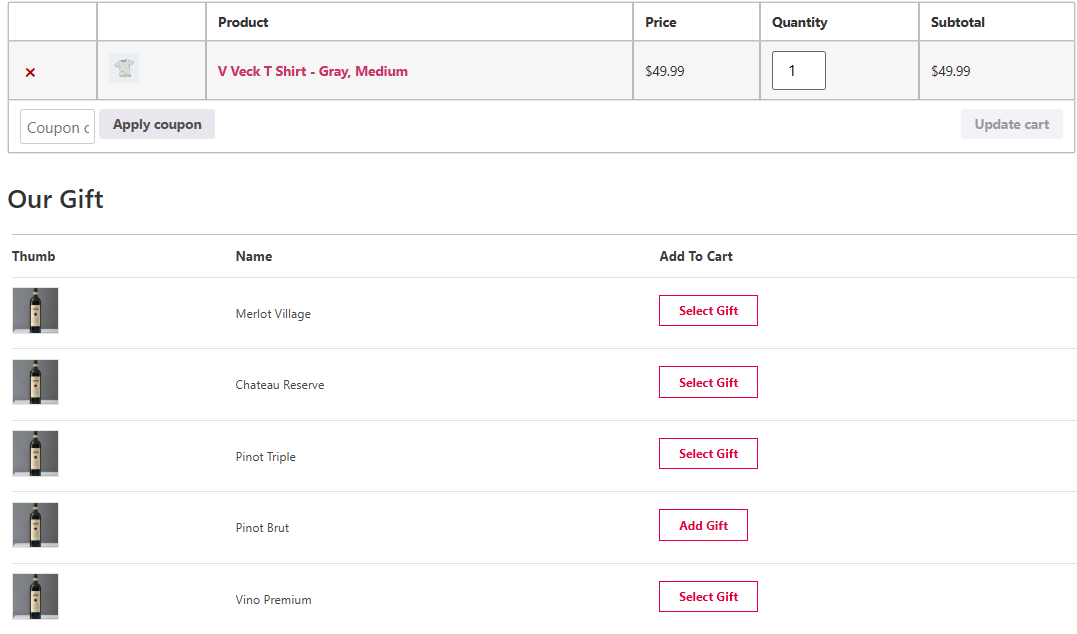
Free gifts for WooCommerce plugin allows users to display gifts to the customers with flexible views, including:
Gift layout in the Checkout page
To change the layout, you can go to Settings > Didplay and choose your preferred view from the Layout list.
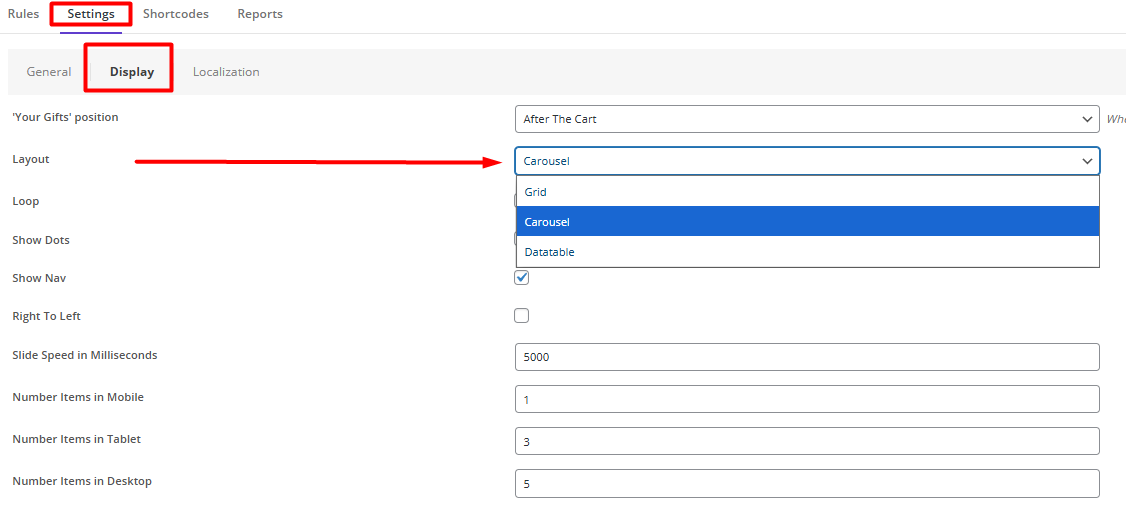
The gifts can be displayed as:
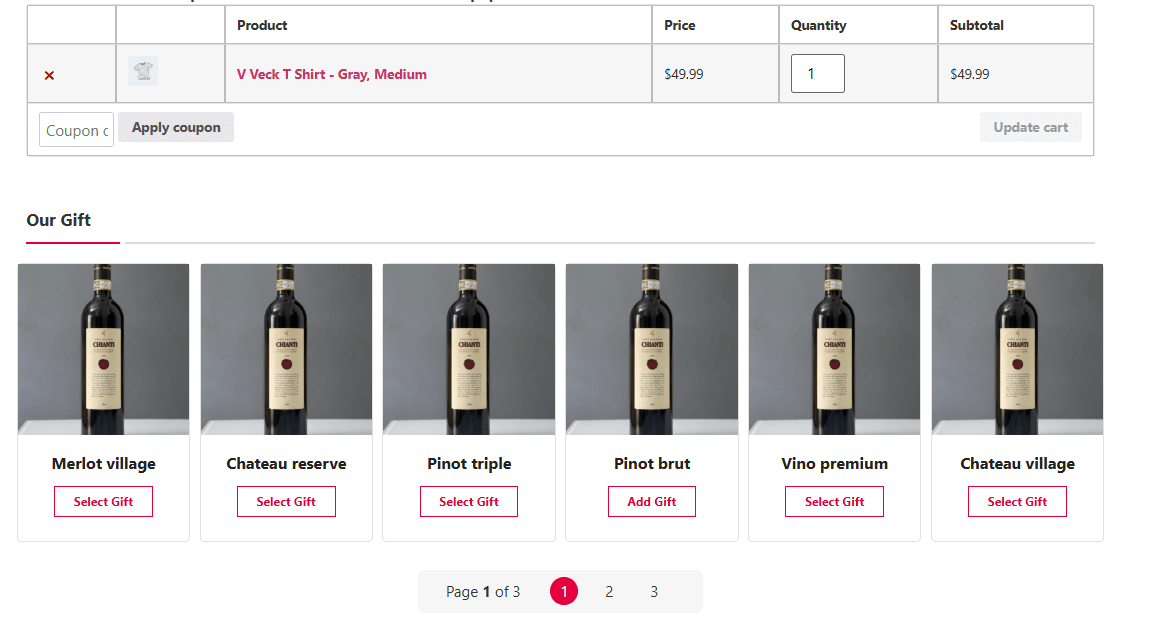
Grid view
Displays gifts in a clean, organized grid layout (typically 2-4 pages), allowing customers to easily go over pages to compare options and add them to their carts.
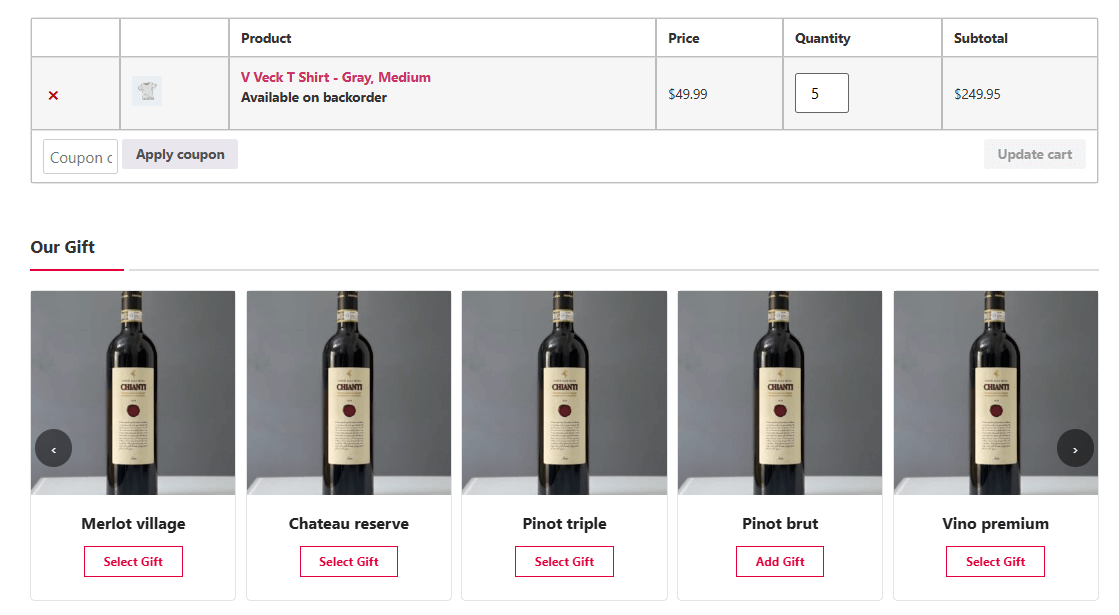
Carousel
Shows gifts in a horizontal sliding format, ideal for limited space and creating visual engagement through movement.
List
Presents gifts in a vertical single-column layout, best for detailed descriptions or when prioritizing simplicity over visual appeal.
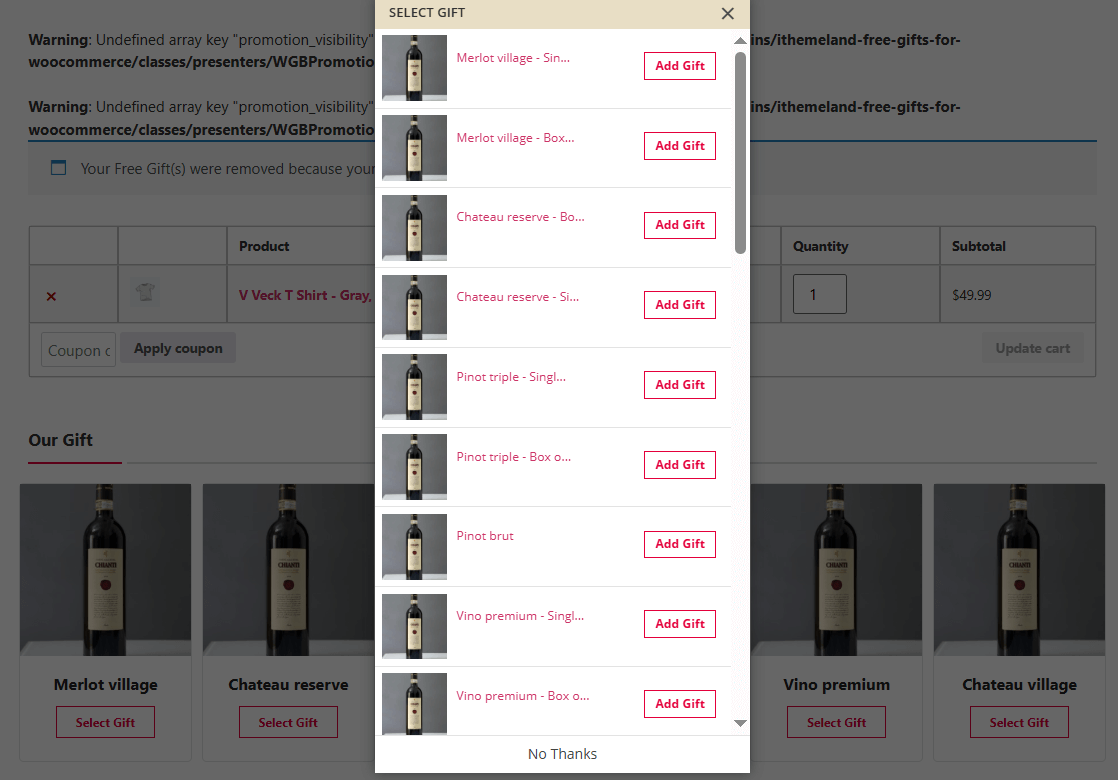
Interactive pop-up
You can also enable a pop up view and choose one of the following layout:
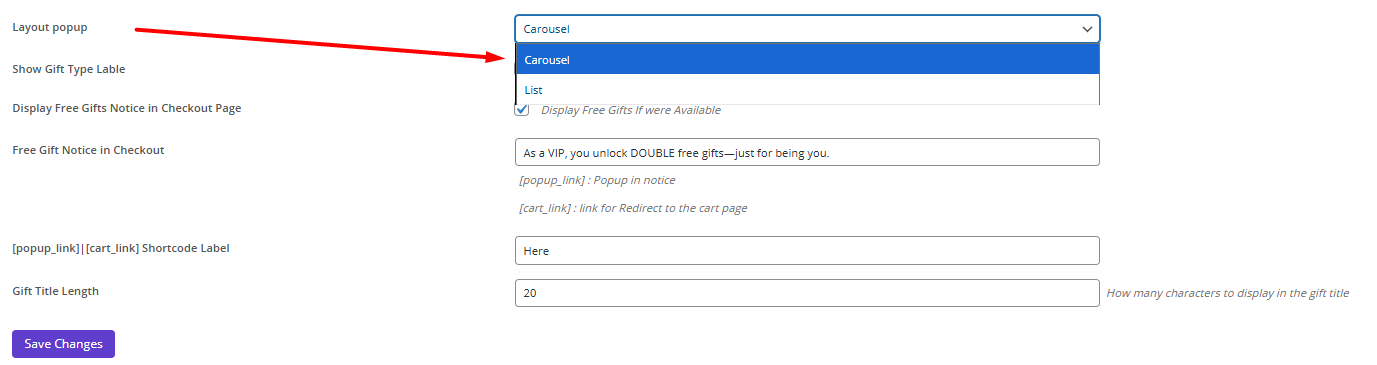
Carousel layout

List layout
Manual Gift Selection Pros and Cons
The Automatic vs Manual Gift Selection comparison reveals manual approaches excel in customization and brand warmth, but struggle with scalability – making them ideal for boutique stores rather than high-volume retailers. Unlike rule-based automatic systems, manual selection turns gifting into an art form, albeit a labor-intensive one.
To better compare these methods, let’s review Manual Gift selection pro and Cons in details:
Pros of Manual Gift Selection
Highly Personalized – Gifts can be tailored to individual customer preferences or purchase history.
Greater Customer Satisfaction – Buyers appreciate the thoughtfulness of handpicked gifts or the ability to choose their own.
Flexible Promotions – Allows for exceptions (e.g., special gifts for VIPs, holiday surprises).
Better Inventory Control – Admins can avoid giving out-of-stock or unpopular items.
Creates Emotional Connection – A personal touch increases brand loyalty and repeat purchases.
Ideal for Testing Products – Great for sending free samples of new items to targeted customers.
Works Well for Small Businesses – More manageable for stores with lower order volumes.
Cons of Manual Gift Selection
Time-Consuming – Requires manual effort to select and assign gifts for each order/customer.
Not Scalable – Difficult to manage for stores with high order volumes.
Risk of Human Error – Mistakes can happen (e.g., wrong gifts sent, missed opportunities).
Inconsistent Offers – Without strict rules, some customers may feel treated unfairly.
Slower Processing – Delays order fulfillment if gifts need manual approval.
Limited Automation – Cannot trigger gifts based on real-time behavior (e.g., cart value changes).
Key Differences: Automatic vs Manual Gift Selection
Automatic selection uses predefined rules to offer gifts, saving time and ensuring consistency, while manual selection allows for personalized, thoughtful gift choices that can strengthen customer relationships. The Free Gift for WooCommerce provides flexible solutions for both methods, helping stores implement effective gift campaigns.
To better understand which approach suits your business needs, refer to the Automatic vs Manual Gift Selection table below highlighting key differences. Whether you prioritize efficiency or personalization, choosing the right gift strategy can elevate your customer engagement and drive sales!
| Feature | Automatic Gift Selection | Manual Gift Selection |
|---|---|---|
| Selection Method | Rule-based (e.g., order value, product category) | Admin handpicks or lets customers choose |
| Personalization | Limited (generic gifts) | High (tailored to customer preferences) |
| Scalability | Excellent for high-volume stores | Best for small/medium businesses |
| Effort Required | Minimal (set once) | High (ongoing manual work) |
| Customer Choice | Usually auto-added | Often allows self-selection (popup/list) |
| Consistency | Uniform for all qualifying orders | Varies based on admin decisions |
| Best Use Cases | Flash sales, store-wide promos | VIP rewards, loyalty programs, curated gifts |
| Inventory Risk | May assign out-of-stock items | Better control over gift availability |
| Implementation | Plugins like Free Gift for WooCommerce | Requires manual setup or hybrid tools |
When to Choose Each Method: Automatic vs Manual Gift Selection
Automatic and manual gift selection each serve distinct business needs, and understanding when to use each approach – or combine them – can significantly impact your campaign’s success.
Automatic Gift Selection: The Efficient Scaling Solution
Automatic gift selection works best for businesses prioritizing operational efficiency and consistent customer experiences. This rule-based system eliminates manual work while ensuring every qualifying customer receives their promotional gift.
Key Advantages:
- Time-saving implementation – Set rules once and the system handles thousands of orders
- Behavior-triggered promotions – Gifts activate based on cart value, product combinations, or customer segments
- Perfect for volume promotions – Seamlessly handles flash sales and store-wide campaigns
Ideal Business Types:
- Mass Retailers (e.g., fashion, electronics)
Example: “Spend $100, automatically get free socks”
Example: “Black Friday: Free gift with every purchase over $50 (auto-added)”
Example: “New customers get a free sample (auto-applied)”
Best For:
- High-volume retailers (fashion, electronics, home goods)
- Seasonal campaigns (Black Friday, holiday sales)
- Entry-level loyalty programs
- Buy X Get X” offer
Manual Gift Selection: The Personalization Powerhouse
Manual gift selection delivers unmatched personalization, making it ideal for businesses where customer relationships are paramount. This approach allows for thoughtful, customized gifts that surprise and delight recipients.
Strategic Benefits:
- Tailored customer experiences – Match gifts to individual purchase histories
- VIP treatment capabilities – Offer exclusive gifts to top spenders
- Creative flexibility – Curate unique unboxing experiences
Ideal Business Types:
- Luxury/Niche Brands (e.g., jewelry, skincare)
Example: Handpicked free engraving for VIP customers
- Subscription Boxes
Example: Curated “mystery gift” based on user profile
Example: Custom corporate gifts for bulk buyers
Ideal Use Cases:
- Luxury goods and premium brands
- B2B corporate gifting
- Subscription box services
- Anniversary/celebration promotions
- “Buy X Get Y” offer
Hybrid Approach: Balancing Efficiency & Personalization
The most effective modern strategies often combine both methods, using automation for efficiency while reserving manual touches for high-value opportunities.
Optimal Hybrid Strategy:
- Automate foundation gifts (order value thresholds, product bundles)
- Enable customer choice (selection popups for certain promotions)
- Manual premium upgrades (for VIP customers or special occasions)
Best For:
- Growing mid-market brands
- Businesses with mixed product lines
- Retailers building loyalty programs
GIFTiT – Free Gifts For WooCommerce
The easy way to boost loyalty with automatic or manual gift selection
Conclusion
A successful approach to automatic vs manual gift selection begins with a clear objective. Store owners should decide what they want to improve, choose a manageable workflow, and review the result with the right metrics. This makes it easier to identify which changes create a real business benefit and which ones only add complexity.
The next step is to start with one practical use case, apply the strategy carefully, and compare the outcome with a reliable baseline. As the store grows, the process can become more detailed through better segmentation, clearer reporting, and more consistent execution. This gradual approach helps teams choose the gift-selection experience that creates the clearest and most appealing customer journey.
This method can work well when it aligns with the rest of your promotion. For a wider implementation view, use WooCommerce free gift plugin guide.
FAQ
1. What makes a WooCommerce free gift campaign effective?
An effective campaign uses a relevant reward, a clear eligibility rule, and a visible message throughout the shopping journey. The gift should support a specific goal such as increasing order value, encouraging product discovery, or improving customer loyalty.
2. Should customers choose the free gift or receive it automatically?
Automatic gifts reduce friction and make the reward immediate. Customer-choice gifts can feel more valuable when several relevant options are available. The right approach depends on campaign complexity and the customer experience you want to create.
3. How can I protect profit margins when offering free gifts?
Choose a gift with a controlled cost, set an appropriate order threshold, limit eligible products or customer groups, and measure campaign results against margin rather than revenue alone.
4. Can free gift rules be limited to specific products or categories?
Yes. Product- and category-based rules are useful when you want to promote selected items, clear stock, or create a more relevant reward for a specific purchase.
5. How should I measure a free gift campaign?
Track redemption rate, conversion rate, average order value, margin after gift cost, repeat purchases, and the performance of the products connected to the campaign.
6. Can GIFTiT – Free Gifts for WooCommerce automate gift campaigns?
Yes. GIFTiT – Free Gifts for WooCommerce can help store owners create flexible gift rules, define eligibility conditions, and manage different promotional scenarios without relying on custom code.