
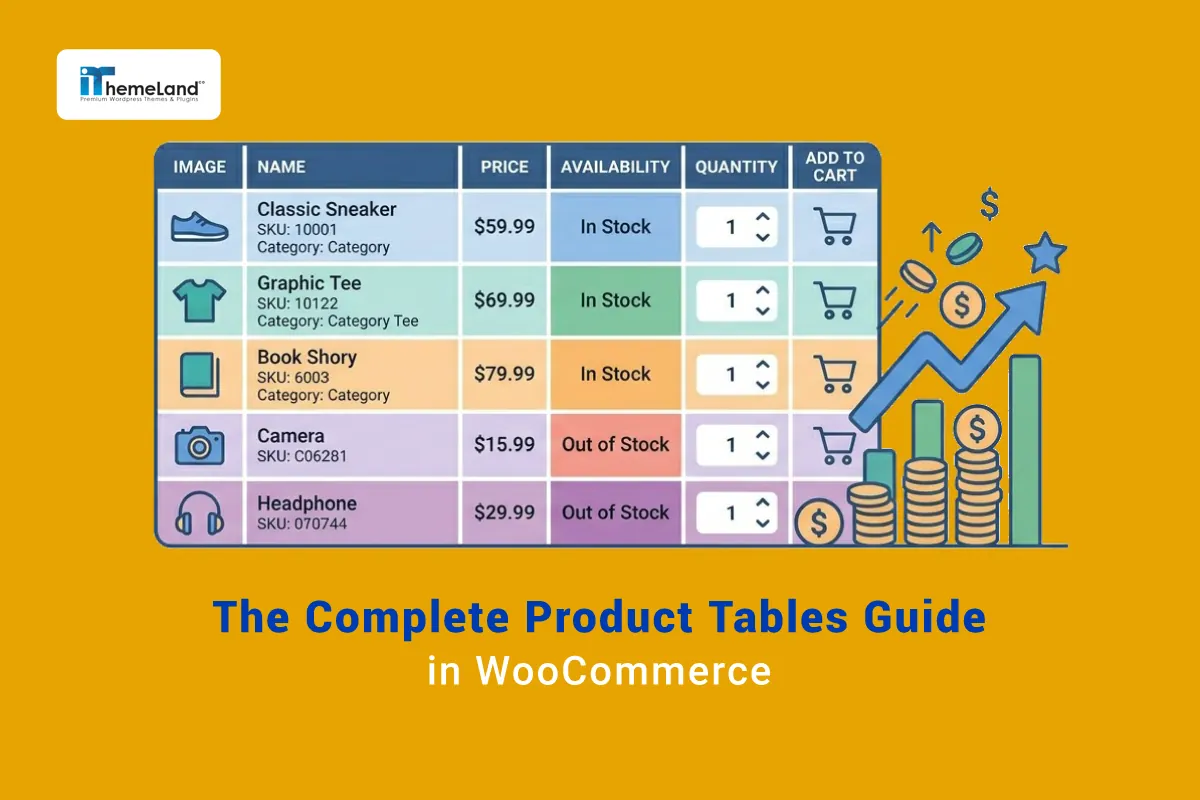

A large WooCommerce store can be technically sound and still feel slow to shop. The problem is often not server speed; it is the number of decisions and page changes required to find a suitable product. The default WooCommerce grid gives every product a card with an image, title, price and button. That format works well for a small visual catalog, but it becomes less efficient when customers need to compare dozens of SKUs, check stock, select quantities or evaluate several variations at once.
The limitation is most visible in wholesale stores, industrial catalogs and variation-heavy shops. A buyer may know the SKU they need, yet the interface forces them to open individual product pages. A restaurant customer may want six dishes, but must add them one by one. A clothing buyer may need different sizes and colors, while every variation is hidden behind a separate dropdown. In these cases, a product table can turn the shop page into a practical ordering workspace rather than a gallery.
A well-planned table places relevant product data in consistent columns, adds sorting and filters, and lets customers choose quantities or variations without losing context. It can be used as a complete custom WooCommerce shop page, as a focused category order form, or alongside a visual grid. Store owners can also use a WooCommerce product display plugin to control exactly which details appear. The most useful choice depends on whether shoppers browse visually or arrive with a clear buying goal; this comparison of product tables and traditional shop layouts explains the distinction in more detail.
What Is a WooCommerce Product Table?
A WooCommerce product table is a structured product listing in which each row represents a product or variation and each column presents a defined piece of information. Common columns include image, product name, SKU, short description, category, attributes, price, stock status, quantity and an add-to-cart control. Unlike a static spreadsheet, the table can be connected to live WooCommerce data, so prices, availability and product links remain synchronized with the catalog.
The table layout is designed for scanning. Customers can move down a single column to compare prices, stock levels or dimensions without repeatedly learning a new card layout. Search, filters, sorting and pagination can then narrow the catalog. A store might list all WooCommerce products in a table for a compact catalog, or create several tables for different departments. For stores that use WooCommerce primarily as a searchable reference library, a table also supports a more usable WooCommerce product catalog with or without purchasing controls.
Why Default WooCommerce Shop Layouts Become Limiting
Grid layouts emphasize imagery and individual product presentation. This makes sense for a boutique with twenty highly visual products. It is less suitable for a spare-parts store with 4,000 items, where the image may be secondary to model number, compatibility and dimensions. The user must scroll through large cards, open multiple tabs and remember details from one page while viewing another.
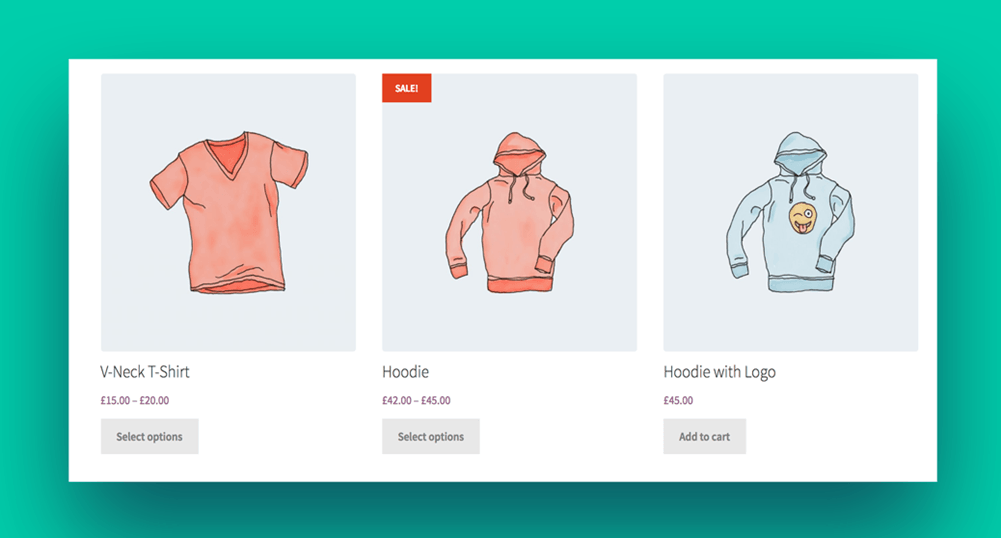
Variation-heavy stores create another layer of friction. The grid usually shows the parent product, while the actual purchasable choices remain hidden on the product page. When a customer needs several sizes, colors or pack quantities, the same selection process is repeated. A table can expose these options earlier and preserve the buyer’s place in the catalog. That is why the decision between a product table and the traditional shop layout should be based on the shopping task, not visual preference alone. A carefully customized WooCommerce shop page can even combine a visual introduction with a table below it.
Benefits of Using Product Tables in WooCommerce
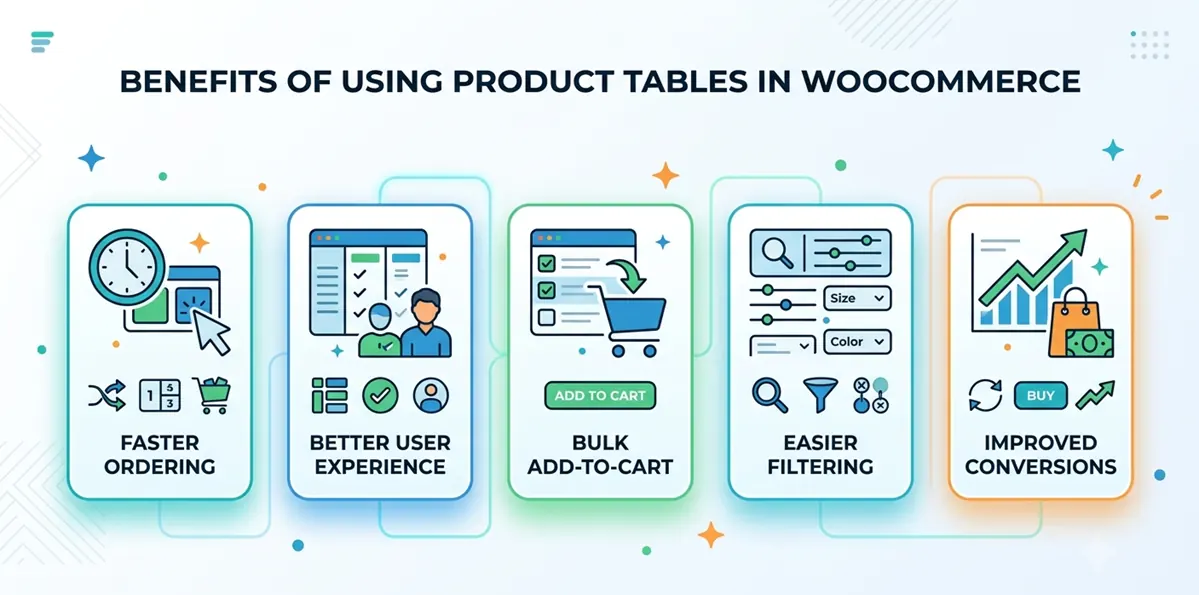
- Faster ordering: buyers can compare products, set quantities and add several lines without opening multiple pages.
- Better user experience: consistent columns reduce memory load and make differences easier to understand.
- Bulk add-to-cart: several selected products can be submitted in one action.
- Easier filtering: category, attribute, stock and price filters reduce large result sets quickly.
- Improved conversions: a shorter, clearer buying path removes avoidable friction.
These gains are not automatic. A table improves the experience only when it shows the right information, loads quickly and remains usable on mobile. When those conditions are met, it can increase conversion rates by reducing catalog friction and encourage multi-item purchases through a clearer ordering interface. The practical objective is not to fit every product field into one screen; it is to show the minimum information needed for a confident decision.
Different Types of WooCommerce Stores That Benefit From Product Tables
B2B & Wholesale WooCommerce Stores
B2B customers often arrive with a purchase list rather than a desire to browse. They want to search by SKU, review contract or wholesale prices, enter quantities and send the order. A table supports this behavior by keeping products and quantities in one place. It can also display minimum order quantities, pack sizes, stock information and account-specific data.
For a dedicated wholesale workflow, review how to create product tables for B2B stores and how a WooCommerce bulk order form can simplify repeat purchasing. Stores comparing implementation options can also use this overview of the best bulk order form plugins for WooCommerce to evaluate features such as variation support, live search and role-based visibility.
Restaurant & Food Ordering Stores
A restaurant menu is naturally tabular: item, description, dietary label, size, price and quantity. Customers usually want to add several items in one session, so forcing a page visit for every dish adds unnecessary delay. A table can group products by starters, mains, drinks and desserts, while quantity controls and a persistent cart keep the order visible.
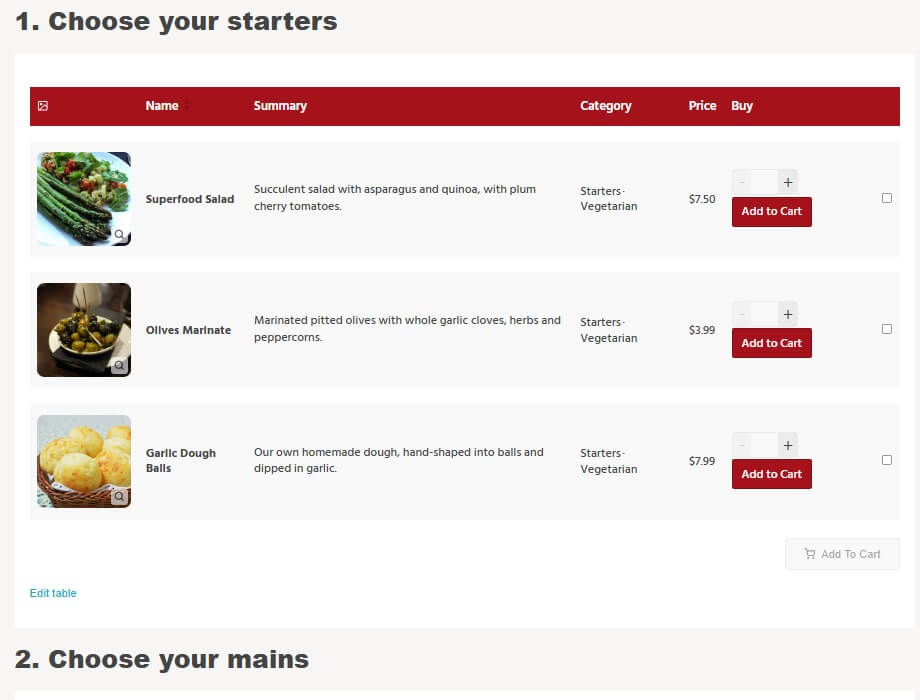
The table should still preserve appetizing imagery and clear allergen information. On small screens, descriptions can collapse while dish name, price and add controls remain visible. A practical WooCommerce restaurant food ordering system combines fast menu navigation with a checkout flow that does not interrupt the customer after every selection.
Fashion, Music & Specialty WooCommerce Stores
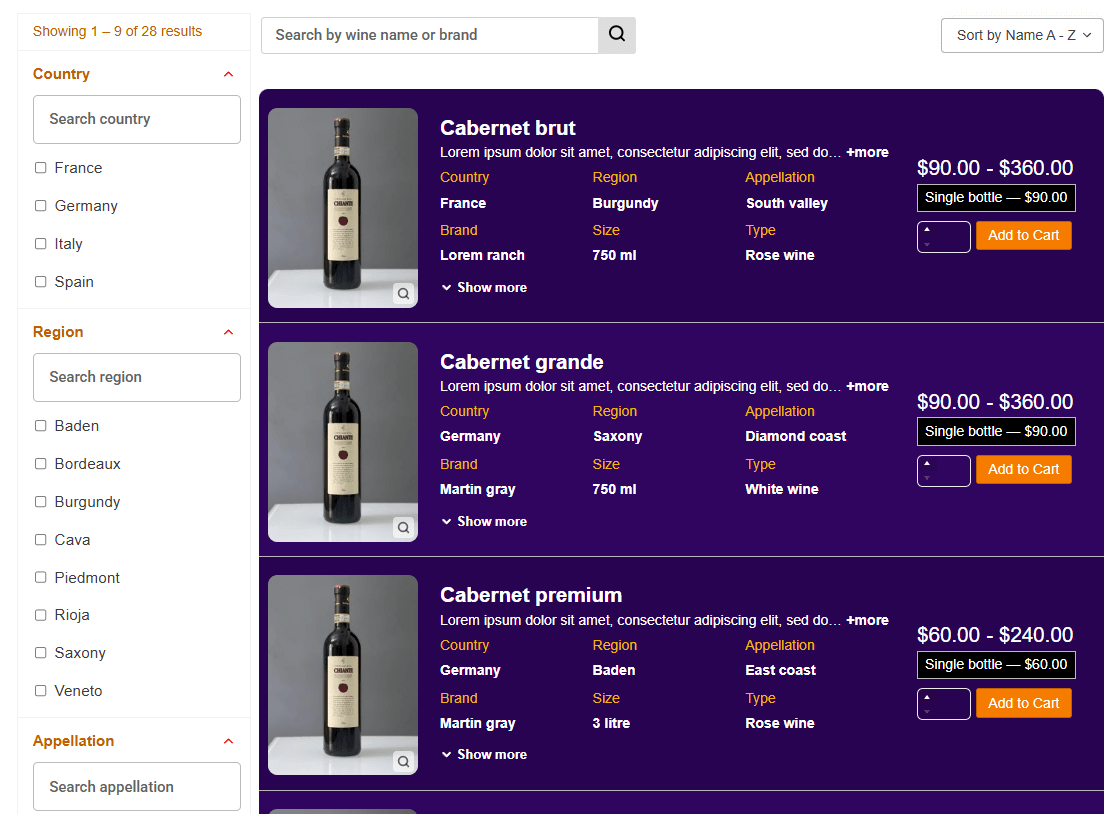
Specialty catalogs benefit when the table is adapted to the product. In an online WooCommerce clothing store, shoppers may need image, garment name, available colors, sizes and price. A WooCommerce music store can show track title, artist, album, genre, duration, preview and price. A WooCommerce wine shop might use region, grape, vintage, bottle size and tasting profile.
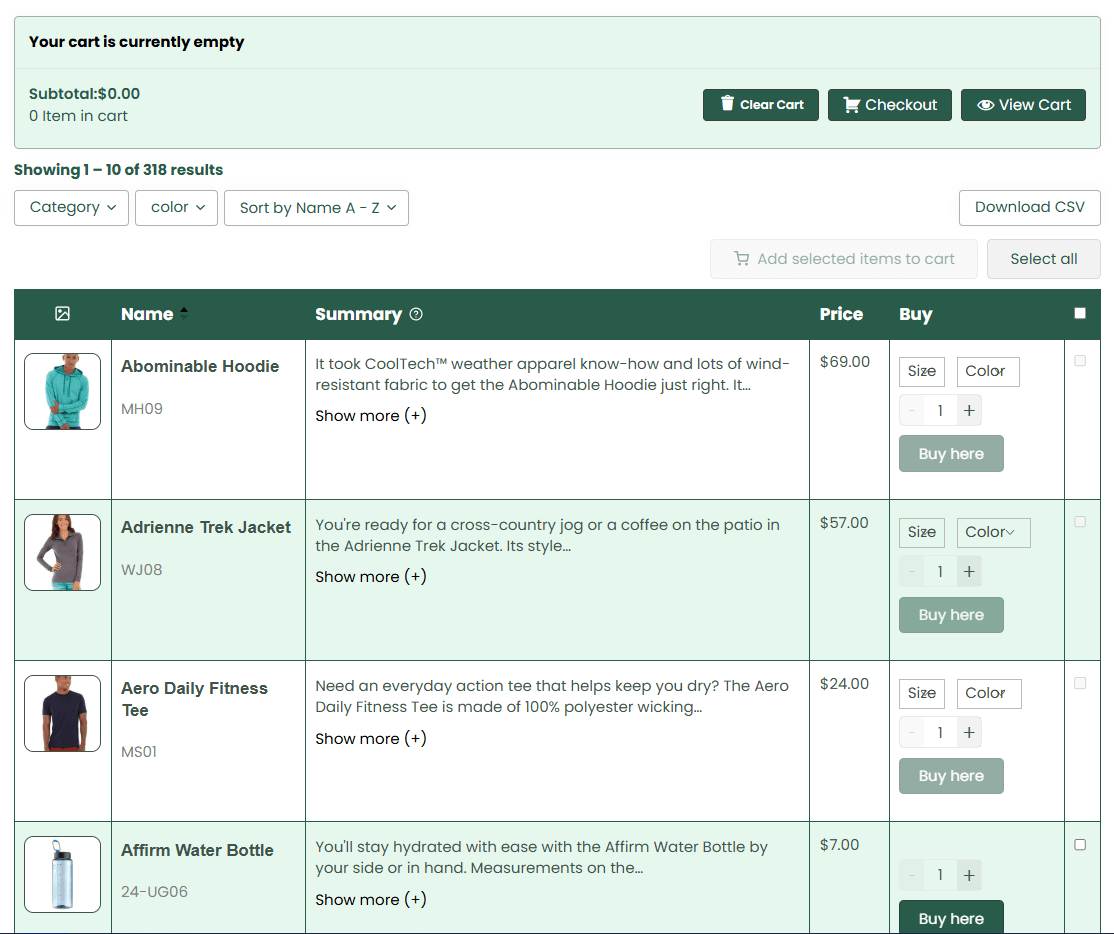
These stores remain visual, so the table should not remove photography or previews. Instead, it should combine compact media with structured buying information. A thumbnail, audio preview or tasting badge can support discovery while columns make comparison and multi-product ordering faster.
Technical & Industrial Product Catalogs
Technical buyers compare measurable data. A useful industrial table might include part number, material, voltage, dimensions, tolerance, compatibility, lead time and downloadable documentation. Search should accept exact SKUs as well as partial terms, and filters should reflect the taxonomy used by buyers in that industry.
For example, an electrical supplier can let users filter by voltage, current rating and enclosure type. A laboratory supplier might use capacity, material and sterility. The central design rule is to give every column a purchasing purpose. Decorative data increases table width and makes the decisive specifications harder to see.
Large WooCommerce Stores With Thousands of Products
In a very large store, the main challenge is not displaying every product at once. It is helping customers reduce the catalog to a manageable set. Server-side queries, pagination, AJAX search and indexed attributes become more important than visual effects. Tables should be separated by category or intent when a single universal list would be overwhelming.
A scalable WooCommerce product catalog may provide a global search for experienced buyers and category-specific tables for everyone else. Popular filters can be placed above the table, while secondary filters remain in a drawer. This approach preserves power without confronting every shopper with a complex control panel.
Core WooCommerce Product Table Features
Displaying WooCommerce Products in Table Layouts
A useful product table begins with a deliberate query. Decide whether it should include all published products, one category, selected IDs, products with a tag, items on sale or a custom set based on stock and metadata. Then choose columns in the order customers use them. Identification usually comes first, decision data comes next, and purchasing controls appear at the end.
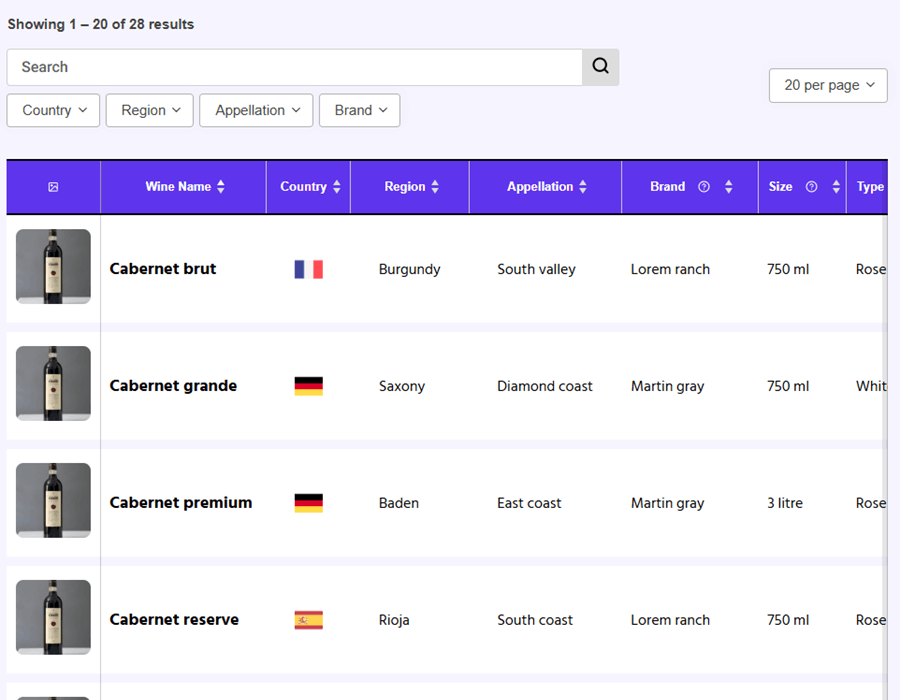
Store owners can follow a practical method to list WooCommerce products in a table and then enable sorting in a WooCommerce product table for fields such as name, price, popularity or date. Default sorting should match the dominant user goal. A spare-parts table may start by SKU; a wine table may start by category or price; a new-release catalog may start by date.
For example, a plugin such as TABLEiT – Product Table for WooCommerce allows store owners to choose which product fields appear as columns, rearrange their order and display product data in a searchable and sortable layout. This can be useful when customers need to compare prices, stock levels, SKUs, attributes and purchasing options from a single page.
Creating Fast Product Search & Filtering Systems
Search and filters are the navigation system of a product table. Search is best for known-item tasks, such as entering a product name or code. Filters are better for exploratory tasks, such as finding all black waterproof jackets under a specific price. The strongest interfaces support both and update the result set without making customers lose their position.
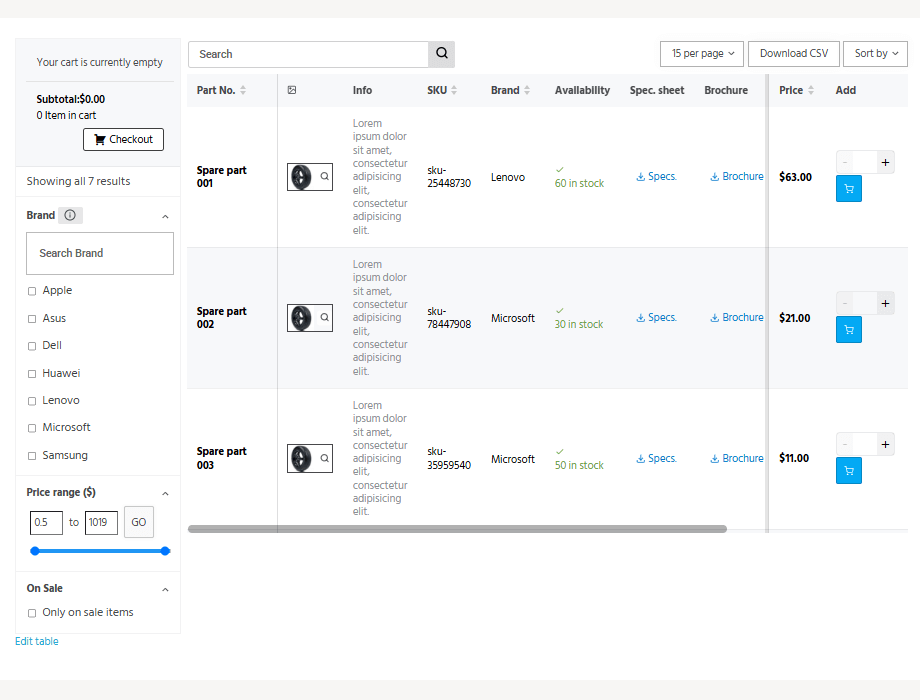
A searchable WooCommerce product table can use AJAX to refresh rows while the page remains in place. Price-sensitive catalogs can add a price range slider filter so users define a budget before comparing details. Filters should also expose active selections and provide a clear reset action.
Category & Tag Filters
Category filters should mirror the catalog hierarchy customers understand. Avoid showing internal administrative categories or dozens of empty choices. Tags work well for cross-category concepts such as “new,” “eco-friendly,” “clearance” or “compatible with Model X,” but only when tagging is maintained consistently.
Attribute-Based Filtering
Attributes are especially valuable for technical and variable products. Size, color, material, brand, capacity and compatibility can reduce a large catalog rapidly. Use human-readable labels, predictable units and multi-select behavior when customers may accept several options.
AJAX Search & Live Filtering
Live filtering should feel immediate without firing wasteful requests after every keystroke. A short debounce, visible loading state and server-side query limits improve reliability. The table should retain selected quantities when filters change, or clearly warn users before selections are removed.
Inline Product Information & Quick Ordering
Inline product information reduces the need to open a separate page. The table can show the short description, key attributes, stock, price and buying controls, while the product name or a quick-view link remains available for customers who need full details. A flexible WooCommerce product display plugin helps match the displayed information to the buying context.
Displaying SKUs, Stock & Attributes
SKUs should be searchable and visually distinct when buyers use them as primary identifiers. Stock can be shown as a simple status, an exact quantity or an expected lead time, depending on business rules. Attributes should use consistent units and concise values; long specifications are better placed in expandable content or a linked data sheet
Quick Quantity Selection
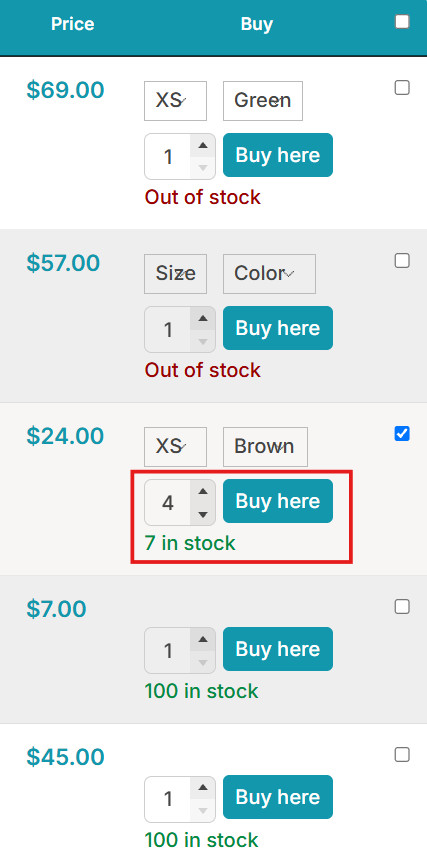
Quantity controls should be easy to edit by keyboard and touch. Enforce minimums, maximums and step values at the field level, then repeat validation in the cart. For case-based products, label the unit clearly so “2” cannot be mistaken for two individual items when it means two cartons.
Inline Add-to-Cart Workflows
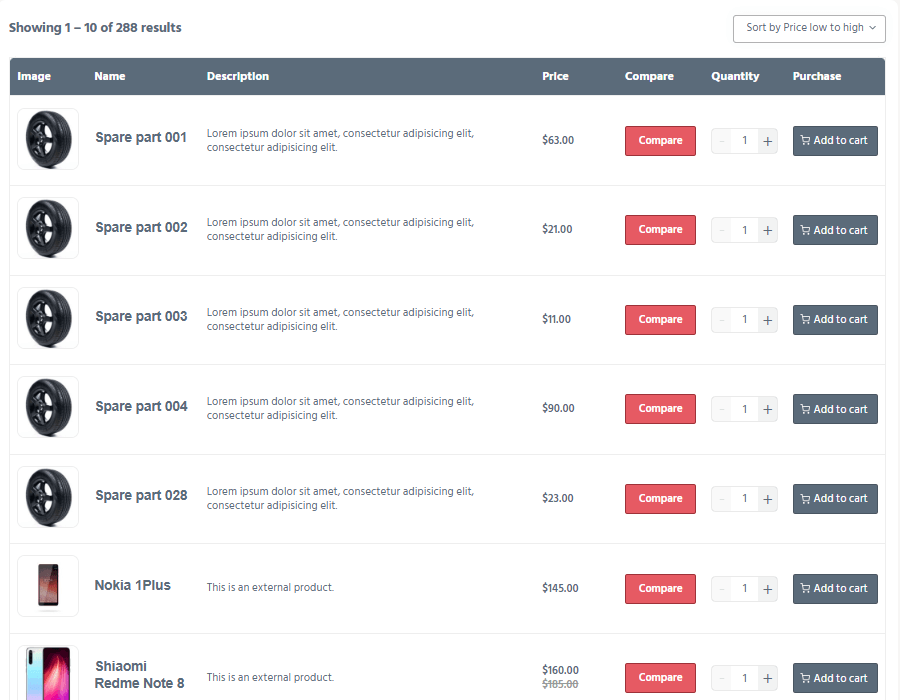
A row-level button is useful for simple purchases, while checkboxes and a shared add-selected button support multi-line orders. The interface should confirm what was added and keep the customer’s scroll position. This guide to adding multiple products to the cart explains the workflow in a product-table context.
Bulk Ordering & Multi-Product Add-to-Cart
Bulk ordering allows customers to prepare an order as a group of lines. They select products, set quantities and submit the set once. This is faster for wholesale restocking, school supply lists, restaurant menus, event merchandise and any catalog where buyers commonly need several related products.
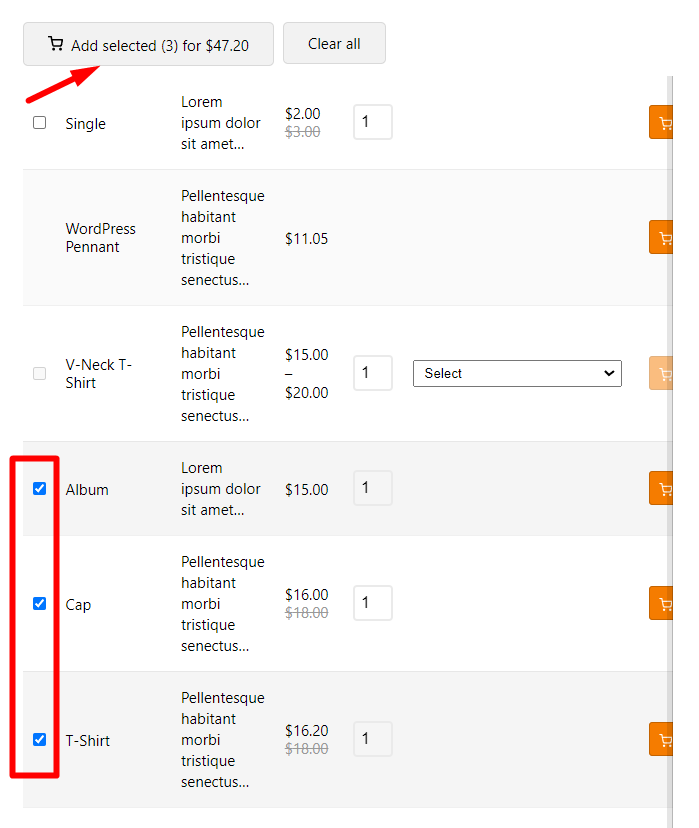
A reliable implementation validates every line, reports unavailable products clearly and preserves valid selections when one item fails. Use multi-product add-to-cart controls to reduce repetitive actions, apply techniques for boosting multi-item purchases, and consider a dedicated bulk order form when ordering speed is the primary commercial requirement.
Responsive Product Tables for Mobile Devices
A desktop table cannot simply be squeezed onto a phone. Important columns should remain visible, secondary data can move into expandable rows, and nonessential content may be hidden. Sticky product names or action columns can preserve context during horizontal scrolling. Buttons and quantity fields need comfortable touch targets.
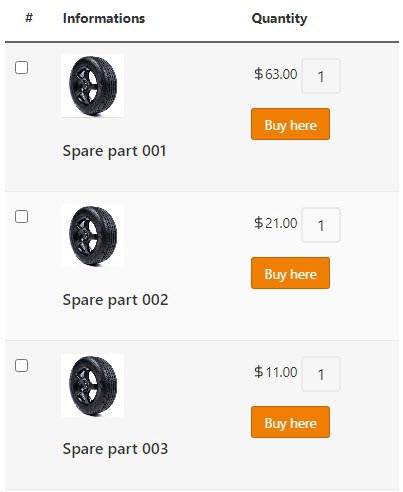
The best mobile pattern depends on the number of columns. A compact table works for four or five fields; a card-like expanded row works better for detailed catalogs. Review the techniques used to build a responsive WooCommerce product table and test with real product names, long prices, translated labels and variation controls rather than placeholder data.
WooCommerce Product Tables & User Experience Optimization
Improving Product Discovery in Large Catalogs
Product discovery improves when customers can move from a broad need to a short, comparable result set. A searchable product table supports known-item discovery, while category and attribute filters support exploration. In a large WooCommerce catalog, the table should also display the current result count and make the active criteria obvious.
Reducing Clicks During Product Browsing
Clicks are not inherently bad; unnecessary context changes are. Opening a product page is useful when the decision requires detailed photography, reviews or instructions. It is wasteful when the user only needs a price, SKU or stock value. Keep common comparison data and routine controls in the table, then reserve detail pages for deeper evaluation.
Creating Faster Checkout & Ordering Experiences
After customers build an order, the next action should be clear. A standard cart is appropriate when they need to review shipping and promotions. For simple, high-intent purchases, a product table with direct checkout can shorten the flow. A visible WooCommerce mini cart provides reassurance by showing the running order without taking the buyer away from the table.
Using Product Tables to Increase Conversion Rates
Conversion improvements come from clarity, speed and confidence. A table lets buyers compare alternatives, see availability and correct quantities before checkout. It may also increase average order value because complementary products remain visible during selection. The strongest evidence comes from store analytics: compare search use, add-to-cart rate, cart size, checkout completion and mobile behavior before and after implementation. This guide covers additional ways to increase conversion rates with product tables.
Displaying Variable Products Inside Product Tables
Variable products can be displayed as a parent row with dropdown selectors or as separate rows for each purchasable variation. Dropdowns keep the table compact, while separate rows make price, stock and SKU differences immediately comparable. Stores with a small number of intuitive options may prefer dropdowns; wholesale and technical catalogs often benefit from explicit variation rows.
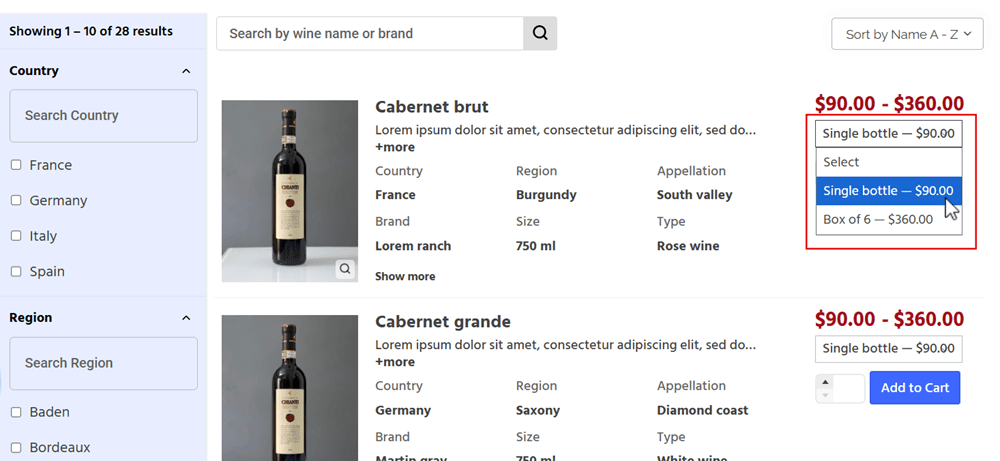
The practical tutorial on how to show WooCommerce product variations in separate table rows demonstrates this structure. The table query and column design should prevent duplicate or confusing parent rows, and unavailable variations should either be hidden or labeled clearly.
Variation Dropdowns & Attribute Selection
When variations appear in dropdowns, the interface must update dependent data after a valid combination is selected. Price, image, stock and SKU may change. Disable impossible combinations rather than waiting until add-to-cart validation. Attribute labels should be explicit, such as “Choose size,” instead of a generic “Select an option.”
Managing Variation Pricing & Stock Visibility
A price range on the parent product may be insufficient for a buyer comparing exact options. If variation prices differ materially, show the selected price immediately or use separate rows. Stock visibility should follow the same model: customers need to know whether the exact size, color or configuration is available, not merely whether the parent product is in stock.
Adding Multiple Variations to Cart Faster
A buyer may need three medium black shirts, two large blue shirts and one extra-large white shirt. A standard product page turns this into repeated visits and selections. A variation table can expose each option, provide an independent quantity field and add the selected set in one action. This guide describes several ways to add multiple variations to the WooCommerce cart.
Advanced Product Filtering & Search Workflows
AJAX Filtering Systems
AJAX filtering updates the table without a full page reload. It is useful when users test several combinations, but it must be implemented with accessible status messages, browser history support where possible and efficient queries.
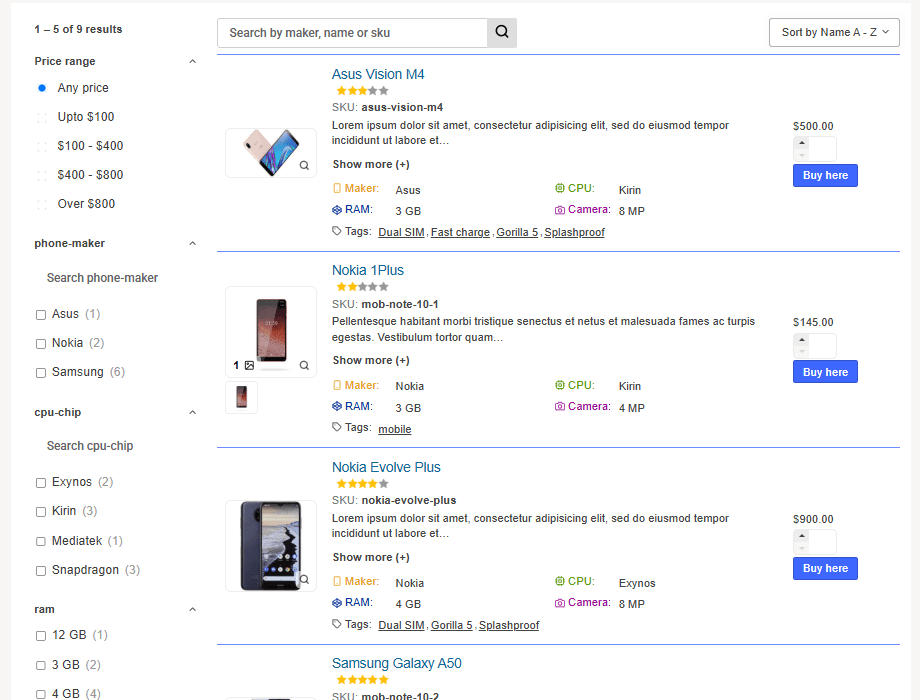
A practical searchable WooCommerce product table should remain usable even when the connection is slow or a query returns no results.
Real-Time Product Search
Real-time search is most valuable when it searches fields customers actually know: title, SKU, brand, model and selected custom fields.
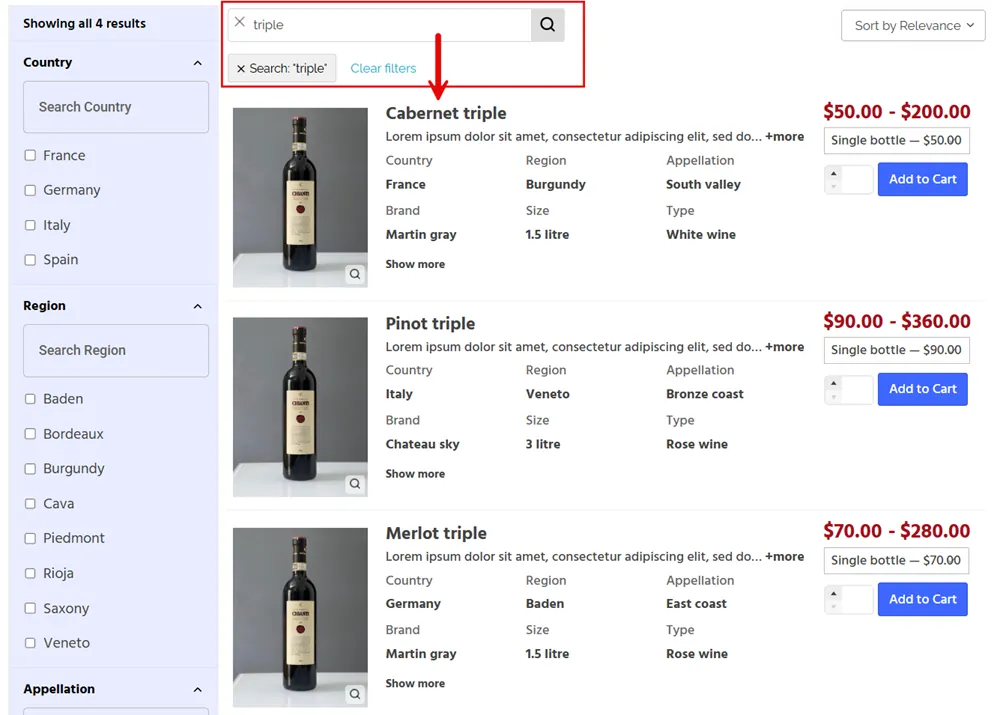
Highlighting matched terms can improve scanning. Use a minimum character threshold for broad catalogs and provide a submit option for users who prefer predictable keyboard interaction.
Filtering Products by Attributes & Taxonomies
Taxonomy filters should represent stable product groupings, while attributes should represent comparable properties. Normalize values before exposing them. “500 ml,” “0.5 L” and “500mL” should not become three separate filter choices. Consistent product data is a prerequisite for a trustworthy filtering experience.
Price Range Filtering for Large Product Catalogs
A WooCommerce price range slider is useful when price is a continuous decision factor. Also provide numeric values or accessible inputs so the control works for keyboard and assistive-technology users.
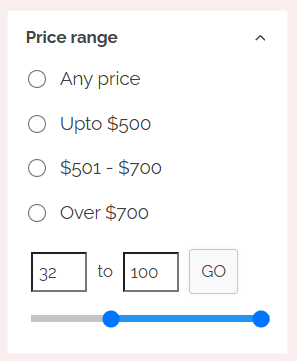
Decide whether the filter uses regular price, sale price or the minimum variation price and communicate that rule consistently.
Combining Multiple Product Filters Together
Combined filters should use clear AND/OR logic. A user selecting “red” and “blue” may expect products in either color, while selecting “red” and “waterproof” usually means both conditions.
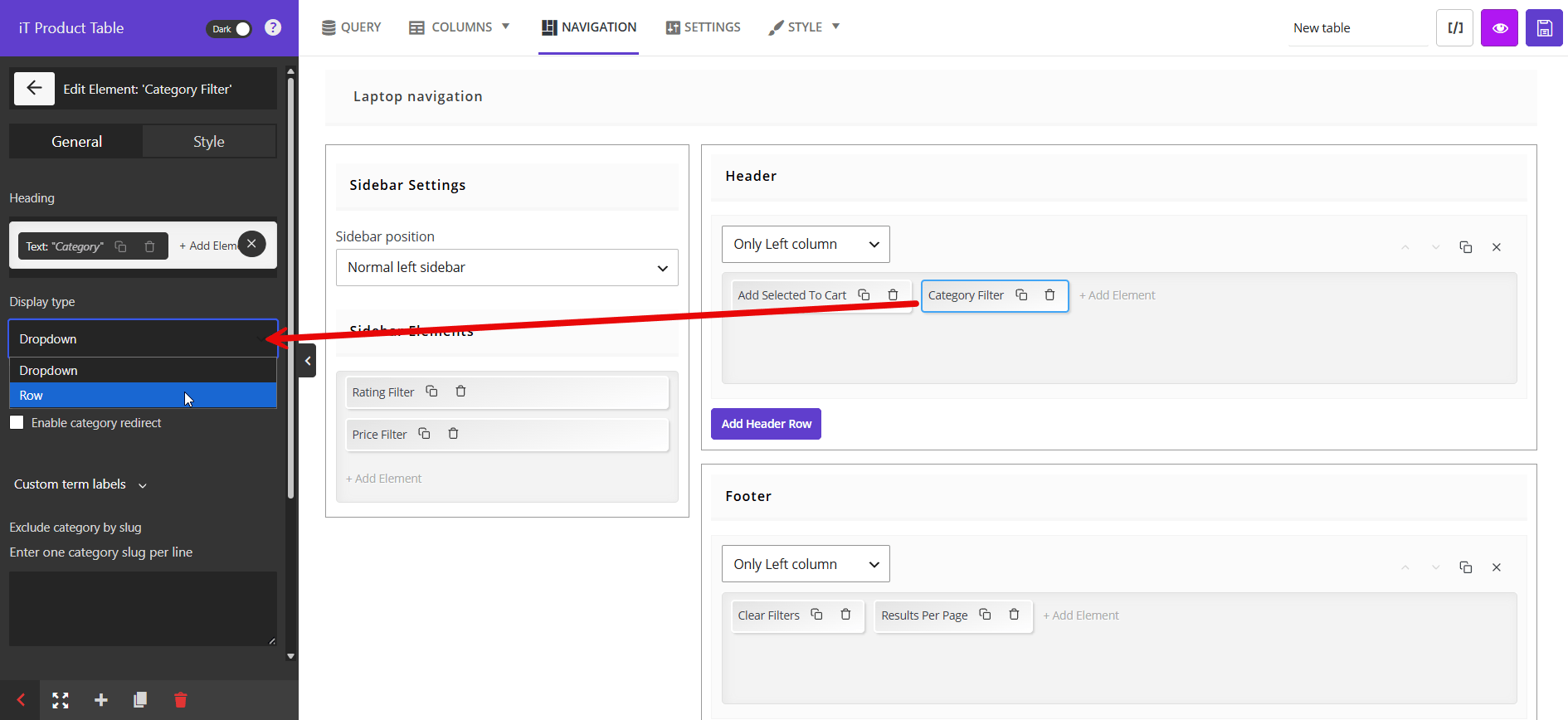
Show selected criteria as removable chips, update result counts promptly and provide a single reset control. Preserve the query in the URL when filtered views need to be shared or indexed.
Customizing WooCommerce Product Tables
Customizing Product Table Columns
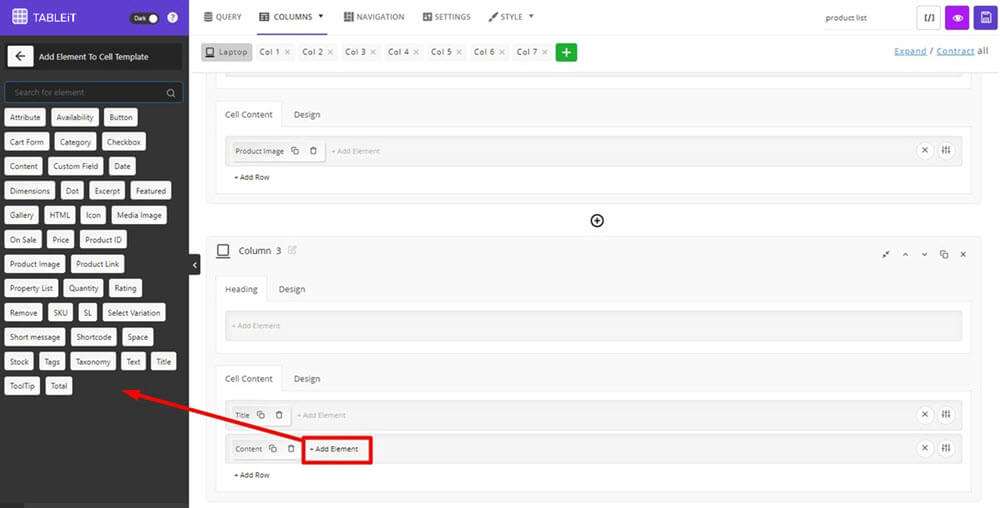
Choose columns from the customer’s decision sequence. A general retail table may use image, name, rating, price and action. A wholesale table may use SKU, name, case quantity, stock, account price and quantity. Column labels should be short and unambiguous, and units should appear in the heading when every value uses the same unit.
Displaying Custom Product Data & Custom Fields
Custom fields can expose technical specifications, delivery windows, supplier codes, certifications or downloadable files. Sanitize and format values before display. Dates, dimensions and decimals should follow one convention. When a custom field is missing, show a meaningful fallback or omit the column for that table rather than filling the page with empty cells.
Showing Product Images, Attributes & Badges
Images help recognition but should remain small enough to preserve scanning. Badges can highlight sale items, new products, low stock or special certifications. Limit badges to a few meaningful states; a row covered in labels becomes harder to compare. Attributes should be presented as text when comparison matters and as swatches when visual choice is central.
Customizing Table Styles & Layouts
Style should support hierarchy. Use adequate row spacing, strong column headings, visible focus states and restrained borders. Price emphasis can help, but product identity and controls must remain easy to locate.
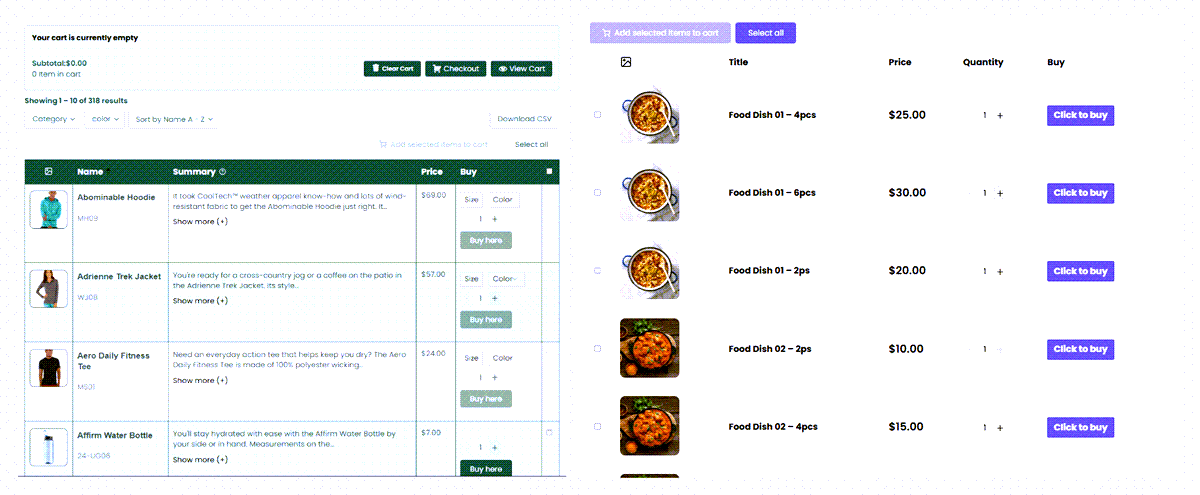
For a different use case, such as presenting plans or quantity tiers, see how to make a WooCommerce product pricing table without confusing a pricing comparison table with a transactional product list.
Creating Category-Specific Product Tables
Category-specific tables reduce complexity and allow different columns for different products. A laptop table can show processor and memory, while a monitor table shows resolution and refresh rate. Create a reusable base style, then adapt queries and columns to each category so the store remains consistent without forcing irrelevant data into every table.
Using Product Tables on Archive & Category Pages
Replacing archive grids with tables can make category navigation more efficient. The implementation should preserve headings, descriptions, canonical URLs, pagination and breadcrumbs. This guide to product tables for WooCommerce archive pages covers ways to integrate tables into existing catalog structures rather than creating isolated pages.
Improving WooCommerce Store Performance With Product Tables
Reducing Catalog Navigation Complexity
Performance is partly computational and partly perceived. Even a fast page feels slow when users must open ten products. By placing comparison data in one view, tables reduce navigation work. Keep the first screen useful with a focused query, sensible defaults and prominent search rather than presenting every possible control immediately.
Loading Large Product Catalogs More Efficiently
Do not render thousands of complete rows during the initial request. Use server-side pagination or progressive loading, request only the product fields required by visible columns and avoid expensive per-row queries. Image thumbnails should be appropriately sized and lazy-loaded. Database indexes and clean product metadata become increasingly important as the catalog grows.
Using AJAX Tables to Improve Performance
AJAX can reduce full-page reloads and return only the current rows, but it is not a substitute for efficient backend queries. Cache stable filter options, debounce searches and cancel outdated requests when the user types quickly. Display a lightweight loading state instead of blocking the entire page.
SEO Benefits of WooCommerce Product Tables

Improving Product Discoverability
A product table can expose product names, categories and concise descriptions on a useful landing page. Search engines can understand the page more easily when the table is rendered as accessible HTML and accompanied by introductory copy. However, the page should still link to canonical product pages where complete descriptions, images and structured data live.
Creating Better Internal Linking Structures
Product names should link to their detail pages, and contextual links can connect tables to buying guides, category hubs and support documents. Internal linking should reflect user journeys rather than keyword repetition. A category table can become a strong hub when it explains the category, exposes relevant products and points to deeper resources.
Improving Category Navigation & Crawlability
Use crawlable category and pagination links, stable URLs and descriptive headings. AJAX-only states may be invisible to crawlers unless equivalent URLs or server-rendered content exist. Preserve canonical signals when filtered combinations create many parameterized URLs, and avoid indexing low-value result pages automatically.
Reducing Thin Navigation Pages
A table should not replace useful editorial context. Add a clear introduction, buying criteria, category explanation and relevant FAQs around the product list. This turns a thin archive into a decision page. Keep the content specific to the category rather than repeating the same generic paragraph across hundreds of tables.
Enhancing User Engagement Metrics
Faster discovery may improve engagement signals such as product interactions, add-to-cart rate and completed searches. It may also reduce page views because customers need fewer pages, which is not inherently negative. Evaluate meaningful events—filter use, product expansion, quantity entry, cart additions and purchase completion—instead of treating raw page views as the primary success metric.
WooCommerce Product Tables & Conversion Optimization

Reducing Friction During Product Browsing
Every repeated action is a chance to lose a customer. Put routine decisions in the table, keep filter state stable and return clear feedback after cart actions. Do not interrupt bulk shoppers with a redirect after each addition. For complex products, provide quick details without forcing users to abandon their current result set.
Improving Bulk Ordering Conversions
Bulk buyers need confidence that the submitted set is correct. Show selected line count, subtotal when practical and validation messages next to the affected row. Make it easy to correct one quantity without rebuilding the order. Confirm minimum quantities and pack rules before checkout.
Increasing Average Order Value With Faster Ordering
When adding an additional relevant item requires only one quantity entry, customers are more likely to complete a multi-product order. Group accessories near primary products, keep complementary categories discoverable and use the methods described in boosting multi-item purchases. Recommendations should remain relevant; excessive upselling can undermine the efficiency that makes the table valuable.
Using Product Tables for Upselling & Cross-Selling
Upsells can appear as a clearly labeled alternative row or comparison group. Cross-sells may be a second compact table below the main order form. Show the reason for the recommendation—higher capacity, compatible cable, replacement filter—rather than relying on a generic badge. Never preselect paid extras without clear consent.
Creating Faster Buyer Decision Workflows
A decision workflow connects search, comparison, selection and checkout. Map the information needed at each stage and remove fields that do not contribute. The table should answer the buyer’s immediate questions: Is this the right item? Is it available? What does it cost? Can I order the required quantity now?
WooCommerce Product Table Integrations
Product Tables & Variation Plugins
Variation swatches can make color and style selection more visual, while the product table provides comparison and quantity entry. Confirm that selected attributes, dynamic price and stock states synchronize correctly. Avoid combining multiple plugins that each replace the variation form unless compatibility is documented.
Product Tables & Bulk Ordering Plugins
A table plugin may already provide multi-select and quantity controls. A separate bulk ordering plugin is useful when the store needs SKU paste, CSV order entry, saved lists or advanced account workflows. Define which plugin owns cart submission and validation to prevent duplicate requests.
Product Tables & Search Plugins
External search tools can improve relevance, typo tolerance and indexing of custom fields. The table should consume search results through a supported API or query integration rather than running a second unrelated search. Test whether search respects product visibility, language and customer-role restrictions.
Product Tables & Wholesale Plugins
Wholesale plugins may control prices, minimums, tax display and product access. The table must render the same values that WooCommerce validates in the cart. Clear caches after role or pricing changes, and test guest, retailer and wholesale accounts separately.
Product Tables & Direct Checkout Systems
Direct checkout is effective when the product set is simple and the buyer is ready to purchase. Combine it with a WooCommerce product table direct-checkout workflow only after confirming that required variation, address and payment data can be collected without confusion. For larger orders, a reviewable cart is often safer.
Common WooCommerce Product Table Mistakes
Overloading Tables With Too Many Columns
More data does not always create more confidence. Identify the fields that distinguish products and move secondary details into an expandable panel. A good test is whether a customer can explain the purpose of each visible column. If not, remove or relocate it.
Poor Mobile Product Table UX
Horizontal scrolling without context, tiny controls and hidden add buttons make mobile tables difficult to use. Prioritize product identity, price, quantity and action. Test landscape and portrait modes, long product names and browser zoom. Mobile behavior should be designed, not inherited from desktop CSS.
Slow AJAX Filtering Configurations
Slow live filters often result from broad unindexed metadata queries, too many simultaneous requests or rendering large row payloads. Debounce inputs, return only required data and profile database queries. A loading spinner does not solve a three-second query; it only makes the delay visible.
Bad Table Structures for Large Catalogs
A single table containing unrelated product types produces irrelevant columns and confusing filters. Split the catalog by buying intent or specification model. Use a global search and category navigation to connect the structure. Each table should have a coherent reason for grouping its products.
Ignoring Search & Filtering UX
A table with hundreds of rows but no effective search is merely a dense grid. Put the most useful controls where users can see them, label filters in customer language, preserve selections and provide useful empty states. Review search logs to find missing synonyms and common SKU patterns.
Choosing the Best WooCommerce Product Table Plugin
Essential Features to Look For
- Flexible product queries for categories, tags, IDs, stock states and custom fields.
- Configurable columns for WooCommerce fields, attributes, variations and custom data.
- Search, sorting, pagination and filters that work together.
- Quantity controls, variation selection and multi-product add-to-cart.
- Responsive layouts with control over hidden and expandable columns.
- Compatibility with caching, multilingual, wholesale and pricing plugins.
- Accessible keyboard behavior, labels and status feedback.
Scalability & Performance Considerations
Ask how the plugin handles 500, 5,000 and 50,000 products. Look for server-side processing, pagination, efficient queries and documented caching behavior. Test with the store’s real variation count and customer-specific pricing. A demo with twenty products does not prove large-catalog performance.
Customization & Filtering Capabilities
The plugin should support different column sets and filters for different tables, not force a universal template. Check whether it can search SKUs and custom fields, combine filters, display active selections and support custom queries. Developers should have hooks or APIs for business-specific logic.
Mobile & Responsive Features
Responsive settings should let administrators prioritize columns, expand row details and control breakpoints. Test quantity fields, dropdowns, bulk-selection controls and sticky elements on touch devices. Accessibility and mobile usability should be evaluated together because both depend on clear focus, labels and feedback.
Best WooCommerce Product Table Plugins
There is no single best plugin for every store. A restaurant may prioritize mobile ordering, a wholesaler may prioritize bulk quantities and role pricing, and an industrial catalog may prioritize specifications and exact search.
TABLEiT: A Flexible WooCommerce Product Table Solution
Store owners who need more control than the default WooCommerce shop layout can consider TABLEiT – Product Table for WooCommerce. The plugin is designed to create customizable product tables in which customers can search, filter, sort and order products without repeatedly opening individual product pages.
TABLEiT supports customizable columns, quantity selectors, bulk add-to-cart actions, variable products, custom fields and responsive table layouts. Store owners can display product information such as images, prices, SKUs, stock status, attributes and add-to-cart controls in the same structured interface.
This makes the plugin especially relevant for wholesale stores, restaurants, technical catalogs, fashion stores and other WooCommerce websites where customers often need to compare or purchase several items during the same session.
Its filtering options can also help stores with large catalogs. Customers can narrow products by category, tag, attribute, custom taxonomy or price range, while sorting tools make it easier to compare products by price, popularity or other available values.
For variation-heavy catalogs, TABLEiT can display variation selectors inside the table or place individual variations in separate rows. This reduces the number of product-page visits required when customers need to order several sizes, colors or configurations.
Use this review of the best WooCommerce product table plugins to create a shortlist, then test each option against representative products, integrations and order scenarios.
Conclusion
A WooCommerce product table is most valuable when it matches the way customers actually buy. It can transform a large catalog from a collection of isolated product pages into a searchable, comparable and order-ready system. For wholesale buyers, it shortens repeat orders. For restaurants, it creates a faster menu. For technical stores, it makes specifications and SKUs usable. For variation-heavy catalogs, it exposes choices that would otherwise remain hidden.
The implementation should begin with user tasks, not plugin settings. Define the product scope, decision data, filters and ordering actions first. Then select a plugin that can deliver those requirements at the store’s real scale. Keep the table focused, responsive and fast, and use analytics to refine it after launch. The result is not merely a different WooCommerce layout; it is a more efficient product discovery and purchasing workflow.
FAQ
What is a WooCommerce product table?
A WooCommerce product table is a structured product list that displays products or variations in rows and key information in columns. It can include search, filters, sorting, quantities, variation selectors and add-to-cart controls.
Why use product tables instead of default WooCommerce layouts?
Product tables are useful when customers need to compare many products, search by SKU, order multiple items or evaluate specifications. The default grid remains effective for small, visual catalogs, so many stores use both layouts for different tasks.
Can product tables improve WooCommerce conversions?
They can improve conversions by reducing navigation and ordering friction, but results depend on column design, search quality, mobile usability, speed and the relevance of the product grouping. Measure performance with store analytics rather than assuming an automatic uplift.
How do I display WooCommerce variations inside tables?
Variations can appear as dropdowns within a parent product row or as separate rows. Dropdowns save space, while separate rows make variation-specific SKU, price and stock easier to compare and order.
Are WooCommerce product tables mobile-friendly?
They can be mobile-friendly when the plugin supports responsive columns, expandable row details, touch-sized controls and clear priorities. A desktop table that only shrinks or scrolls is rarely sufficient.
Can I use AJAX filters inside WooCommerce product tables?
Yes. AJAX filters can update table results without a full page reload. They should use efficient server-side queries, visible loading and result states, accessible feedback and clear active-filter controls.
What is the best WooCommerce product table plugin?
The best choice depends on catalog size, variations, wholesale rules, search needs, mobile behavior and existing plugins. Test shortlisted plugins with realistic data and workflows before purchasing or deploying them.
Can product tables help wholesale WooCommerce stores?
Yes. They can show SKU, pack size, stock, wholesale price, quantity and minimum-order information in one view, allowing buyers to build multi-line orders much faster.
How do product tables improve product discovery?
They combine search, filters, sorting and comparable product data in one interface. Customers can narrow a large catalog and understand the remaining options without moving repeatedly between product pages.
Can I customize WooCommerce product table columns?
Most dedicated plugins allow column customization. Common choices include image, name, SKU, description, categories, attributes, custom fields, price, stock, quantity, variations and cart actions.